Key takeaways
- Four mice for butterfly clicking compared by weight, switch type and click behaviour, with debounce and drag-click claims kept to what sources state.
Butterfly clicking rewards a very specific mouse: light enough to vibrate under two alternating fingers, with wide, forgiving buttons and switches that register rapid presses cleanly. Most gaming mice are built for the opposite job, filtering out anything that looks like a double click. The four mice below are the realistic candidates from current Amazon listings, and they split honestly: two are known for software-adjustable debounce, one is a drag-click design, and one is a general high-CPS option with no special click claims at all.
Minecraft players chasing high CPS are the core audience, especially in PvP modes where click speed shapes fights. Every specification below comes from the Amazon listing for that model. Debounce and drag-click behaviour are not listing specifications, so where they appear they are attributed to the software and community sources that actually state them, and nothing is claimed for a mouse that no source supports.
Quick Picks
As an Amazon Associate we earn from qualifying purchases.
| Product | Best for | Key spec from title |
|---|---|---|
| Glorious Model O | Classic butterfly clicking with adjustable debounce | 67 g, Pixart 3360 sensor |
| Glorious Model O- | Smaller hands butterfly clicking | 58 g, 1,000 Hz polling |
| Bloody A70 II | Drag clicking on an optical switch design | Light Strike switch, under 0.2 ms response |
| Logitech G502 HERO | General high-CPS play without click tricks | HERO 25K sensor, 11 programmable buttons |
How to Choose
Debounce behaviour decides your ceiling
Debounce is the short delay a mouse applies after a click before it accepts another, and it is the setting that makes or breaks butterfly clicking. Third-party click-testing sources describe the Glorious Core software as offering a debounce slider across a wide range for the Model O family, although sources disagree on the lowest figure, quoting both 0 ms and 4 ms. The Bloody A70 II takes the opposite route: its optical Light Strike design is a zero-bounce approach with no adjustable debounce at all. Know which design you are buying before you pay.
Button width, shape and switch feel
Butterfly clicking parks two fingers on one button, so the left button needs width and a forgiving press across its whole surface. The ambidextrous honeycomb shells of the Model O and Model O- give a broad, flat button area, while the G502 HERO’s sculpted right-handed shape narrows the usable space. Switch type matters too: the Omron mechanical switches in the Glorious mice are the style most click-testing sources discuss for this technique, while optical switches register differently and reward a different touch, closer to drag clicking.
Weight and size for your hand
A lighter mouse moves less under rapid clicking and is easier to hold steady while your fingers work. The Model O- lists 58 g and a shorter shell for smaller hands, the Model O lists 67 g in a full-size body, and the Bloody A70 II lists 143 g, which is heavy for this technique but planted in the hand. The G502 HERO lists 121 g before its optional tuning weights. Match the shell to your hand first; a mouse that fits lets you click fast without gripping hard to control it.
Know the server rules before you optimise
High-CPS techniques sit in a grey area that varies by server. Some Minecraft servers cap registered CPS, some treat drag clicking and aggressive debounce settings as an unfair advantage, and rules change without much notice. A mouse that can register very fast clicks is legal to own and use in single-player and on servers that allow it, but your account standing is worth more than a few extra clicks. Check the rules of the servers you actually play on, and treat debounce adjustment as a setting to use where it is permitted.
The 4 Best Options
Glorious Model O
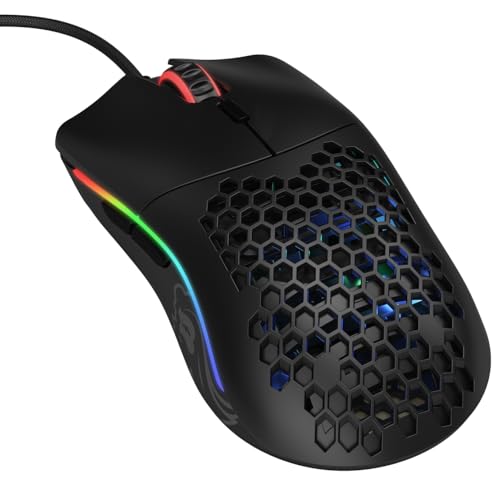
The Model O is the default butterfly-clicking recommendation for a reason: a 67 g honeycomb ambidextrous shell, a Pixart 3360 sensor up to 12,000 DPI, Omron switches and 6 buttons in a wired body that costs nothing in latency. On debounce, third-party click-testing sources describe Glorious Core offering an adjustable debounce range for this mouse, with sources disagreeing on the floor and quoting figures between 0 ms and 4 ms at the low end of a range extending to 16 ms, so treat any single number with caution.
Specs
- Sensor: Pixart 3360, up to 12,000 DPI
- Weight: 67 g
- Switches: Omron
- Connection: wired USB
- Buttons: 6
- Design: honeycomb shell, ambidextrous, RGB
- Dimensions: 5 x 2.6 x 0.1 in, as listed
Best for: butterfly clicking with software debounce adjustment on a full-size light shell.
Watch out for: debounce figures come from third-party sources rather than the listing and they disagree with each other; confirm the current Glorious Core software behaviour before relying on a specific setting.
ASIN: B07LDH3TWM
Glorious Model O-
The Model O- shrinks the same idea for smaller hands: 58 g, a Pixart 3360 sensor up to 12,000 DPI, Omron switches rated at 20M clicks in the listing’s reproduced features, 1,000 Hz polling and 6 buttons in a compact honeycomb ambidextrous shell. It runs the same Glorious Core software family as the Model O, and the debounce sources captured for this group are family-level rather than specific to this mouse, so expect similar adjustment without treating it as a listing promise. For younger players the shorter shell is easier to control while two fingers work the left button.
Specs
- Sensor: Pixart 3360, up to 12,000 DPI
- Weight: 58 g
- Polling: 1,000 Hz
- Switches: Omron, 20M clicks per the listing’s reproduced features
- Connection: wired USB
- Buttons: 6
- Dimensions: 4.72 x 2.48 x 0.1 in, as listed; the height figure appears corrupted in the listing data
Best for: smaller hands that want the Model O formula in a compact, lighter shell.
Watch out for: recent supply may come from resellers, and the listing’s own Q&A warns to check the seller; confirm the seller is Glorious and the mouse is in stock on the live page before ordering.
ASIN: B07VMM5LKH
Bloody A70 II

The A70 II is the drag-click entry rather than a debounce mouse. Its Light Strike infrared optical switch is listed with a response under 0.2 ms and over 20M clicks, and Bloody’s own material, as reported by third-party sources, explicitly lists drag click support for the A70. There is no adjustable debounce here: the design is zero-bounce, which is a different route to registering rapid inputs. It lists 8 buttons, a wired connection, a 125 to 1,000 Hz adjustable report rate and a heavy 143 g body.
Specs
- Sensor sensitivity: 4,000 DPI maximum, per the listing’s Features & Specs block
- Switch: Light Strike (LK) infrared micro-switch, under 0.2 ms response, over 20M clicks
- Polling: 125–1,000 Hz, 4-level adjustable
- Weight: 143 g
- Buttons: 8
- Connection: wired
- Dimensions: 3.03 x 4.8 x 1.63 in
Best for: drag clicking and players who prefer an optical switch design.
Watch out for: the listing contradicts itself on sensor and DPI, with three different figures appearing in different blocks; the figure above follows the Features & Specs block, so verify the live page, and remember there is no adjustable debounce on this mouse.
ASIN: B012AIJNSO
Logitech G502 HERO

The G502 HERO earns its place only as a general high-CPS candidate, and it should be bought with clear eyes: no source captured for this guide states a drag-click claim or adjustable debounce for it. What the listing does state is a HERO 25K sensor adjustable from 200 to 25,600 DPI, 11 programmable buttons, a 121 g body with five removable 3.6 g tuning weights, and a mechanical switch button tensioning system. Strong, well-built buttons and a proven sensor make it a fine everyday gaming mouse that can also click quickly in normal play.
Specs
- Sensor: HERO 25K, 200–25,600 DPI
- Buttons: 11 programmable
- Weight: 121 g, plus five removable 3.6 g tuning weights
- Dimensions: 5.2 x 2.95 x 1.57 in, as listed
- Connection: wired
- Switch: not named in the listing; mechanical switch button tensioning system
Best for: players who want one durable mouse for general gaming that also handles fast clicking in normal play.
Watch out for: do not buy it for drag clicking or debounce adjustment, because neither is claimed for this mouse; it is also the second-heaviest option here, which works against the butterfly technique.
ASIN: B07GBZ4Q68
Which One Fits Your Situation
You play Minecraft PvP and want classic butterfly clicking
Choose the Glorious Model O. It pairs the light shell and wide ambidextrous buttons the technique needs with the software debounce adjustment that click-testing sources describe for it. Check your server’s CPS rules first, then tune the setting to what is allowed rather than what is possible. That order matters for keeping your account in good standing.
Your hands are small or you are buying for a younger player
The Model O- is the fit. At 58 g with a shorter shell, it is easier to hold steady while two fingers work, and it keeps the same sensor family and Omron switches as the full-size mouse. Just buy it from the right seller, as the watch-out above explains.
You prefer drag clicking to butterfly clicking
Pick the Bloody A70 II. Its optical Light Strike switch is built around a zero-bounce design, and drag click support is stated in Bloody’s own material. Accept the trade-offs: a heavy body, no debounce adjustment, and a listing whose sensor figures need a careful read on the live page.
You want one mouse for everything, clicking tricks optional
The G502 HERO is the honest all-rounder here. It will not drag click and offers no debounce claims, but its sensor range, 11 programmable buttons and tuning weights make it a strong general gaming mouse. Buy it for everyday play, and treat any fast clicking as a bonus rather than the reason for purchase.
Common Mistakes
- Believing a debounce figure quoted as a single number, when sources for the Model O family disagree on the lowest setting.
- Buying the G502 HERO for drag clicking, a claim no source makes for that mouse.
- Ignoring server rules and losing an account over CPS settings that a specific server bans.
- Choosing a heavy mouse like the 143 g A70 II for butterfly clicking without realising how much the weight works against the technique.
- Copying specs between similar listings, such as the Bloody A70 II’s conflicting sensor blocks, instead of reading the exact listing for the model in the cart.
Frequently Asked Questions
What CPS can butterfly clicking reach on these mice?
It depends more on technique and settings than on the mouse model, and published figures vary widely between players. The mice here remove different limits: the Glorious pair through software debounce adjustment as described by click-testing sources, the A70 II through its zero-bounce optical design. Practise matters more than hardware, and server caps may limit what registers regardless of how fast you click.
Is butterfly clicking allowed on Minecraft servers?
Rules differ by server and change over time. Some servers cap CPS or ban techniques they class as unfair, including drag clicking and very low debounce settings, while others allow them freely. There is no universal answer, so read the current rules of each server you play on before changing settings, and never use software macros to automate clicking, which is treated far more harshly.
What is the difference between butterfly and drag clicking?
Butterfly clicking alternates two fingers on one button to double the click rate, and it leans on switch behaviour and debounce settings. Drag clicking drags a fingertip across the button so friction creates a burst of clicks, and it leans on surface texture and a switch design that registers the burst. The Glorious mice suit the first technique; the Bloody A70 II is the one here associated with the second.
Does a lighter mouse always click faster?
Not always, but it helps most players. A light shell like the 58 g Model O- is easier to keep stable while your fingers strike the button, so less effort goes into holding the mouse still. Technique, button width and switch feel matter just as much, which is why the heavy A70 II still has a following for drag clicking despite its 143 g weight.
FAQ
What CPS can butterfly clicking reach on these mice?
Is butterfly clicking allowed on Minecraft servers?
What is the difference between butterfly and drag clicking?
Does a lighter mouse always click faster?
More from Amazon
Programs that pair well with the guide above. Offers and eligibility are set by Amazon and may change.
Free shipping on eligible items, Prime Video and more. Eligible new members can start with a free trial.
Start a Prime free trialAd-free music streaming. Eligible new subscribers can start with a free trial.
Try Music Unlimited freeA Prime membership for ages 18-24 with a trial period. Eligibility is set by Amazon.
See Prime for Young AdultsAudiobooks and podcasts to listen to on the go. Eligible new members can start with a free trial.
Try Audible freeAs an Amazon Associate we earn from qualifying purchases.