Our Top Picks
 Logitech MX Vertical Wireless Mouse Ergonomic Design1 Pack4.7 x 3.11 x 3.09 inches0.5 poundsCheck on Amazon
Pros & cons
- 59-gram ultra-lightweight build aids fast, precise flicks
- 8000Hz polling rate reduces input latency
- Optical switches rated for 90 million clicks add longevity
- Wired-only design limits cable-free setups
- Glass-surface tracking still depends on sensor compatibility
 Razer Basilisk V3 Customizable RGB Wired Ergonomic GamingMouse2.96 x 5.12 x 1.67 inches0.2 poundsCheck on Amazon
 Logitech G502 X Plus Wireless RGB Gaming MouseWireless7.1 x 4.6 x 2.7 inches0.84 poundsCheck on Amazon

When your wrist starts complaining during long sessions, the mouse is usually the first thing worth changing, because shape decides how your hand rests for hours at a time. The five mice below take different routes to a more relaxed hold: one true vertical design, two sculpted right-handed ergonomic shells, a larger contoured wireless model and a lighter tri-mode option. None of them is a medical device, so treat this as a comfort comparison, not a treatment plan.
Comfort-first buyers who want the biggest change should look at the vertical option first, while players who still want gaming sensors and buttons can stay with the ergonomic gaming shells. Every figure here comes from the Amazon listing for that exact model: sensor range, weight, dimensions where the listing states them, and connection type, with productivity and gaming models labelled honestly.
Quick Picks
As an Amazon Associate we earn from qualifying purchases.
| Product | Best for | Key spec from title |
|---|---|---|
| Logitech MX Vertical | The most upright hand position | 57° vertical angle |
| Keychron M6 | Tri-mode flexibility in an ergonomic shape | PixArt 3395 sensor, 26,000 DPI |
| Razer DeathAdder V3 | Light ergonomic shell for fast games | 59 g, Focus Pro 30K sensor |
| Razer Basilisk V3 | Thumb support and extra controls | 11 programmable buttons |
| Logitech G502 X Plus | A larger hand that wants a palm grip | 13 programmable controls, 106 g |
How to Choose
Shape and hand angle come first
The biggest comfort change comes from the angle your hand sits at. A vertical mouse like the MX Vertical holds the hand at a listed 57° angle, close to a handshake position, while ergonomic gaming shells keep the hand flatter but sculpt the body so fingers rest instead of hovering. Neither approach suits everyone: vertical shapes take days to feel natural, and some players never like them for fast aiming. Start by deciding whether you want a radical shape change or a gentler one inside a familiar gaming outline.
Weight and how it changes your grip
Weight decides how much work your forearm does across a session. The DeathAdder V3 wired lists 59 g, the G502 X Plus lists 106 g, and that gap is obvious in use: light mice reward small, frequent movements, while heavier shells feel planted and can suit a relaxed palm grip. There is no correct number, only a match with your grip style. If your current mouse feels like it drags your hand around the pad, try lighter; if it feels twitchy and unstable, a heavier ergonomic shell may feel calmer.
Grip style and hand size
Palm grip spreads contact across the whole shell and usually suits larger ergonomic bodies like the Basilisk V3 and G502 X Plus, while fingertip and claw grips favour smaller, lighter shapes. Hand size matters just as much: a shell that is too small forces fingers to curl, and one that is too large stretches the thumb to reach side buttons. Compare the listed dimensions with your current mouse before ordering, and be honest about your grip, because the most comfortable mouse is the one your hand can rest on without thinking about it.
Buttons, wheel and connection for long days
Comfort is also about not fighting the controls. A thumb rest, a free-spinning or tilt wheel and well-placed side buttons reduce the small reaches that add up over a workday. The Basilisk V3 lists a HyperScroll tilt wheel and 11 programmable buttons, the G502 X Plus lists 13 controls, and the MX Vertical keeps things simple with 4 customizable buttons across up to 3 devices. Connection matters too: wireless models clear cable drag from the desk, while wired models never need charging during a long session.
The 5 Best Options
Logitech MX Vertical
This is a productivity mouse, not a gaming mouse, and it is included because its 57° vertical angle is the most direct shape change available if a flat mouse leaves your wrist uncomfortable. The listing covers a sensor up to 4,000 DPI, 4 customizable buttons, connection to up to 3 devices over a USB receiver or Bluetooth, and a rechargeable battery listed at up to 4 months per charge, with about 3 hours of use from a 1-minute quick charge. It suits work-first desks where gaming is occasional and comfort is the priority.
Specs
- Design: 57° vertical angle
- Sensor: up to 4,000 DPI
- Buttons: 4 customizable
- Connection: USB receiver and Bluetooth, up to 3 devices
- Battery: rechargeable, up to 4 months per charge as listed; about 3 hours from a 1-minute quick charge
Best for: desk workers who want the most upright hand position and only game lightly.
Watch out for: this is a productivity model, so the listing states no gaming polling figures, and the weight and dimension fields in the listing block are package figures rather than mouse figures; check the live page for the details that matter to you.
ASIN: B07FNJB8TT
Keychron M6
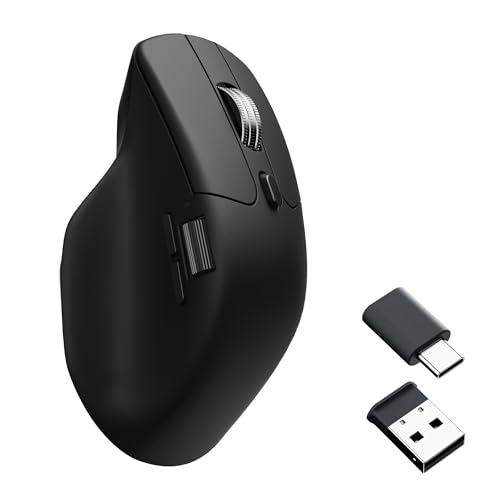
The M6 sits between office and gaming: the listing describes an ergonomic, lightweight mouse with a PixArt 3395 sensor up to 26,000 DPI, tri-mode connection over 2.4 GHz, Bluetooth 5.1 and a wired link, plus a programmable macro button, and it names Windows PC and Mac support. That makes it a reasonable middle step if a vertical mouse feels like too big a change but a flat esports shell no longer feels right for long days. Specs below are limited to what the listing title itself states.
Specs
- Sensor: PixArt 3395, up to 26,000 DPI
- Connection: tri-mode — 2.4 GHz, Bluetooth 5.1, wired
- Design: ergonomic, lightweight, as listed
- Buttons: programmable macro button, as listed
- Compatibility: Windows PC and Mac, as listed
Best for: players who want an ergonomic shape without giving up a gaming-grade sensor or tri-mode connection.
Watch out for: the M6 exists in several variants, including 1K, 4K, 8K and Silent versions under different ASINs with different specs; confirm the live listing matches this 1K version before ordering.
ASIN: B0D6B7M9CH
Razer DeathAdder V3
The wired DeathAdder V3 keeps the long-running right-handed ergonomic shape but trims it to a listed 59 g, so the hand rests on a familiar sculpted shell without pushing much weight around. Its Focus Pro 30K sensor reaches 30,000 DPI with 750 IPS tracking, the Optical Gen-3 switches are rated at 90M clicks, and true 8,000 Hz wired polling keeps it fully competitive for fast games. Six programmable buttons cover the essentials, and the Speedflex cable is designed to drag less than a standard rubber cable.
Specs
- Sensor: Razer Focus Pro 30K Optical, up to 30,000 DPI, 750 IPS
- Weight: 59 g
- Polling: true 8,000 Hz, wired
- Switches: Razer Optical Gen-3, 90M clicks
- Connection: wired, Speedflex cable
- Buttons: 6 programmable
- Dimensions: 5.01 x 2.65 x 1.69 in
Best for: right-handed players who want a light ergonomic shell that still performs in fast games.
Watch out for: the shape is right-handed only and the mouse is wired; if you need wireless freedom or a left-handed fit, look at the other options here.
ASIN: B0B6XTDJS1
Razer Basilisk V3
The Basilisk V3 is the thumb-focused option: a wired ergonomic body at a listed 101 g with a pronounced thumb rest, 11 programmable buttons and a HyperScroll tilt wheel that can free-spin through long pages and click back to tactile steps for weapon switching. The Focus+ 26K optical sensor reaches 26,000 DPI, Optical Gen-2 switches are rated up to 70M clicks, and Chroma RGB lighting is built in. The extra weight and width suit a settled palm grip rather than constant fingertip adjustments.
Specs
- Sensor: Razer Focus+ 26K Optical, up to 26,000 DPI
- Switches: Razer Optical Gen-2, up to 70M clicks
- Buttons: 11 programmable
- Weight: 101 g
- Dimensions: 5.12 x 2.96 in (length x width, as listed)
- Connection: USB wired
- Wheel: HyperScroll tilt wheel
Best for: palm-grip players who rest their thumb on the mouse and use plenty of side buttons.
Watch out for: at 101 g it is the heavier wired option here, and polling figures are not stated in the reproduced listing block, so check the live page if report rate matters to you.
ASIN: B09C13PZX7
Logitech G502 X Plus
The G502 X Plus is the larger, feature-heavy ergonomic choice: 106 g, 13 programmable controls, an infinite scroll toggle and LIGHTSYNC RGB, running over LIGHTSPEED wireless with USB-C charging. The HERO 25K sensor reaches 25,600 DPI and the LIGHTFORCE hybrid optical-mechanical switches pair optical actuation with a mechanical feel. Its tall, wide body gives a bigger hand somewhere to rest, and the control count suits MMO and productivity shortcuts as much as shooters. Battery wording on the listing varies, so the figure below follows the listing title.
Specs
- Sensor: HERO 25K, up to 25,600 DPI
- Switches: LIGHTFORCE hybrid optical-mechanical
- Buttons: 13 programmable controls
- Weight: 106 g
- Dimensions: 131.1 x 41.1 x 79.2 mm, as printed in the listing’s product information
- Connection: LIGHTSPEED wireless and USB-C wired
- Battery: under 130 hours per the listing title
Best for: larger hands that want a palm grip, many controls and wireless freedom.
Watch out for: battery figures conflict across the listing, with the title, features and product information stating different hours, and one features field understates the button count; read the live listing carefully before ordering.
ASIN: B092CB69Q4
Which One Fits Your Situation
Your wrist dislikes flat mice entirely
Start with the Logitech MX Vertical. The 57° angle is the only true change of hand position in this group, and its multi-device connection and long listed battery life suit a work desk. Accept the trade-off honestly: it is a productivity mouse, so fast competitive gaming is not what it is built for.
You game daily but want a gentler shape
Choose the Razer DeathAdder V3 if you play fast games, since its 59 g ergonomic shell keeps a familiar aim feel, or the Keychron M6 if you split time between work and play across several devices. Both keep gaming sensors while moving away from flat, low shells, and both keep your existing grip habits largely intact.
Your hand is large and rests fully on the mouse
The Logitech G502 X Plus and Razer Basilisk V3 are the two to compare. The G502 X Plus adds wireless and 13 controls in a 106 g body, while the wired Basilisk V3 answers with a thumb rest and tilt wheel at 101 g. Pick by connection and wheel preference rather than sensor, since both sensors are capable.
You are not sure a new mouse is the answer
Try the shape change that costs the least commitment first: a lighter ergonomic wired mouse like the DeathAdder V3 shows quickly whether weight was the problem. Also check your desk height, chair position and break habits, because a mouse works best as one part of a comfortable setup rather than the only change.
Common Mistakes
- Expecting any mouse to fix pain on its own, instead of treating shape, desk setup and breaks as one comfort picture.
- Buying a vertical mouse for competitive shooters without realising it is a productivity design that takes time to learn.
- Choosing the heaviest, widest shell for a small hand, which can make side buttons a stretch instead of a rest.
- Ignoring variant names on models like the Keychron M6, where different versions carry different sensors and polling under separate listings.
- Keeping a grip that hovers fingers above the buttons all day, when the point of an ergonomic shell is to let the hand rest.
Frequently Asked Questions
Is a vertical mouse better for long gaming sessions?
A vertical mouse changes the hand angle more than any gaming shell here, which many desk workers find more comfortable. The trade-off is aim familiarity: the MX Vertical is a productivity mouse with a 4,000 DPI sensor and no gaming polling figures in its listing. For mixed work-and-play days it can suit well; for competitive shooters, an ergonomic gaming shell is usually the better balance.
Which grip style is easiest on the wrist?
There is no single answer, because comfort depends on hand size and habit. A relaxed palm grip on a supportive shell, like the Basilisk V3 or G502 X Plus, spreads contact across the hand, while fingertip grips keep muscles engaged constantly. What matters most is that your hand can rest on the mouse without hovering or squeezing, whichever mouse you choose.
Does mouse weight really affect comfort?
For many players, yes. A 59 g mouse like the DeathAdder V3 asks for smaller, lighter movements, while a 106 g model like the G502 X Plus feels steadier and can suit a slower, planted style. Neither is automatically better. If your current mouse feels like hard work to move precisely, changing weight in either direction is a reasonable experiment.
When should I look beyond a new mouse?
If discomfort is persistent, worsening or affects your daily life, a product swap is not the right tool and you should get proper advice. This guide only compares shapes, weights and features for comfort. For everyday desk comfort, also review chair height, desk position, how often you take breaks and whether your wrist rests at a neutral angle while you work.
FAQ
Is a vertical mouse better for long gaming sessions?
Which grip style is easiest on the wrist?
Does mouse weight really affect comfort?
When should I look beyond a new mouse?
More from Amazon
Programs that pair well with the guide above. Offers and eligibility are set by Amazon and may change.
Free shipping on eligible items, Prime Video and more. Eligible new members can start with a free trial.
Start a Prime free trialAd-free music streaming. Eligible new subscribers can start with a free trial.
Try Music Unlimited freeA Prime membership for ages 18-24 with a trial period. Eligibility is set by Amazon.
See Prime for Young AdultsAudiobooks and podcasts to listen to on the go. Eligible new members can start with a free trial.
Try Audible freeAs an Amazon Associate we earn from qualifying purchases.