Key takeaways
- Compare webcams for adult creators on low-light quality, autofocus, privacy shutters, mounting and software control, with specs from Amazon listings.
Choosing a webcam for private streaming is really a decision about control: control over how you look in a dim room, control over what the lens sees between sessions, and control over framing without stepping away from the camera. Resolution alone settles none of that. A large sensor, a physical shutter, and software you can adjust mid-session matter more than a headline number.
This guide is for adult creators who stream from a bedroom or small studio, creators who record content in the evening under warm household lighting, and performers who share a home and need the camera visibly off when work ends. Every pick below was chosen from the product name and specifications on its Amazon listing, with low-light performance, autofocus, and listing-stated privacy features as the first filters.
Quick Picks
As an Amazon Associate we earn from qualifying purchases
| Product | Best for | Key spec from title |
|---|---|---|
| Razer Kiyo Pro Ultra | Dim rooms where image quality carries the stream | Ultra-large 1/1.2″ Sony STARVIS 2 Sensor |
| Logitech MX Brio | A fixed desk setup with a physical privacy control | Ultra HD 4K Webcam, 1080p 60 FPS |
| Insta360 Link 2 | Creators who move around the room on camera | PTZ 4K Webcam with 1/2″ Sensor, AI Tracking |
| OBSBOT Tiny 2 | Hands-free framing with voice and gesture control | 4K Voice Control PTZ, 1/1.5″ Sensor |
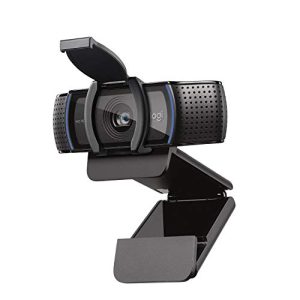
| Logitech C920s HD Pro | A simple, proven 1080p setup with a privacy shutter | 1080p Streaming Camera with Privacy Shutter |
How to Choose
Judge Low-Light Performance by Sensor and Lens, Not Resolution
Evening streaming rarely happens under bright studio lighting, so the sensor and lens decide how clean the picture stays. Listings that state a larger sensor size and a wide aperture, written as a low f-number, are telling you the camera gathers more light per frame. The Razer Kiyo Pro Ultra, for example, states a 1/1.2-inch sensor behind an F/1.7 lens, while smaller 1080p models state neither figure. When a listing names HDR as well, that describes how the camera balances bright and dark areas in the same frame, which helps when a lamp sits beside you rather than in front of you.
Separate Real Privacy Features From Software Promises
For a camera that lives in a private room, privacy has to be physical. Look for a listing that states a built-in shutter, a lens cover in the box, or a privacy position the camera moves into on its own. The Logitech C920s includes an attachable privacy shutter, the MX Brio has a built-in privacy shutter, and the Insta360 Link 2 tilts its lens downward after a period of inactivity. An indicator light is useful, but it only shows activity; it does not block the lens. Treat a physical cover as the baseline and anything software-only as a supplement, then unplug the camera when you want a complete disconnect.
Decide Whether You Need Tracking or a Fixed Frame
A fixed webcam suits a seated setup where you stay in one chair at a steady distance. A PTZ model, short for pan, tilt, and zoom, physically turns to follow you, which suits creators who stand, move between positions, or demonstrate something away from the desk. The OBSBOT Tiny 2 and Insta360 Link 2 both state AI tracking in their listings, and both add gesture or voice control so you can adjust framing without touching the keyboard. Tracking adds moving parts and setup time, so it earns its place only if your sessions actually involve movement; a seated stream gains nothing from a gimbal.
Check Mounting, Cable, and Software Control Together
Placement decides framing before any setting does. Check whether the listing describes a monitor clip, a tripod thread, or a magnetic mount, and whether the mount lets the camera tilt down for a desk-level angle, as the MX Brio does with its Show Mode. Cable type matters too: USB-C models are easier to route to a modern laptop, while USB-A models may need an adapter. Finally, look at what the companion software controls. Settings for zoom, exposure, and ISO are only useful if the named software runs on your operating system, so confirm that before relying on them.
The 5 Best Options
Razer Kiyo Pro Ultra

This is the pick for creators whose rooms are lit for mood rather than for cameras. Its listing leads with the largest sensor fitted to a webcam, paired with a wide-aperture lens, so the image holds together in dim conditions where smaller sensors turn grainy. Face-tracking autofocus and auto exposure keep your face sharp and evenly lit as you shift position, and HDR at 30 frames per second keeps bright and dark areas in the same frame under control. A built-in shutter and a separate lens cover handle privacy, and Razer Synapse provides the software controls for zoom and ISO.
Specs
- Sensor: 1/1.2″ Sony STARVIS 2, 2.9 μm pixel size
- Lens: Custom F/1.7 aperture
- Video: 4K at 30 FPS, 1080p at 60 FPS, HDR at 30 FPS
- Focus: Face tracking autofocus with auto exposure
- Privacy: Built-in shutter and lens cover included
- Microphone: Built-in
- Connection: USB Type A to USB Type C cable
- Software: Razer Synapse
- Model number: RZ19-04420100-R3U1
Best for: Creators streaming in low light who want the strongest image quality a webcam listing offers.
Watch out for: It is a large, heavy camera at 1.5 pounds, so check that your monitor or mount can hold it steady.
ASIN: B0CT6FFK4R
Logitech MX Brio

The MX Brio suits a creator who works from one fixed desk position and wants a tidy, deliberate setup. The listing states Ultra HD 4K capture with a smoother 1080p mode at 60 frames per second, which covers both recorded content and live sessions. Show Mode lets the camera tilt down to frame a desk surface, useful for showing products or notes without moving the mount. A built-in privacy shutter gives a physical off state between sessions, and the USB-C connection keeps cabling simple on a modern laptop or desktop. It is a fixed camera, so framing is set by where you place it rather than by tracking.
Specs
- Video: Ultra HD 4K, 1080p at 60 FPS
- Feature: Show Mode for tilting the view down to a desk
- Privacy: Built-in privacy shutter
- Connection: USB-C
- Colour: Graphite
- Model number: 960-001545
Best for: Creators at a fixed desk who want 4K headroom and a built-in physical privacy shutter.
Watch out for: There is no motorised tracking, so it cannot follow you if you move around the room.
ASIN: B0BFJ4CRKD
Insta360 Link 2

Choose the Link 2 if your sessions involve standing, turning, or moving between spots in the room. It sits on a two-axis gimbal, so the camera itself pans and tilts to keep you framed instead of cropping a static image. The listing states Phase Detection Auto Focus, which is the mechanism behind its focus speed, plus HDR and an AI noise-canceling microphone for rooms that are not acoustically treated. Privacy is handled by position rather than a cover: the lens tilts down automatically after ten seconds of inactivity, or you can tip it down yourself, giving a visible off state anyone in the room can read at a glance.
Specs
- Video: 4K at up to 30 FPS, 1080p at up to 60 FPS
- Sensor: 1/2 inch
- Mount: Two-axis gimbal with AI tracking
- Focus: Phase Detection Auto Focus (PDAF)
- Audio: AI noise-canceling microphone
- Control: Gesture control, Insta360 Link Controller software
- Privacy: Privacy Mode tilts the lens down after 10 seconds of inactivity
Best for: Creators who move while streaming and want the camera to follow without a second person operating it.
Watch out for: The listing states it is not compatible with ARM-based Windows systems or Windows Hello face recognition, so check your computer first.
ASIN: B0DDTH3HX8
OBSBOT Tiny 2

The Tiny 2 is the other tracking option, and its distinguishing feature is control without contact. The listing states voice control alongside gesture control, so you can start tracking, zoom, or reframe while your hands are occupied or away from the desk. Its 1/1.5-inch sensor is larger than the sensors in most fixed webcams, and the listing states HDR light correction, which is the combination that keeps evening sessions looking even. Autofocus and AI tracking handle framing once the session starts. Because it is a PTZ camera, it needs a stable mount and a moment of setup before each session rather than a simple clip-and-go routine.
Specs
- Video: 4K, up to 60 FPS
- Sensor: 1/1.5 inch CMOS
- Focus: Auto focus with AI tracking
- Control: Voice control and gesture control
- Light handling: HDR light correction
- Connection: USB 3.0
- Model: TINY 2
Best for: Creators who want hands-free framing control through voice or gestures during a session.
Watch out for: The base listing is the camera on its own; remote and tripod bundles are separate listings, so confirm what is in the box before ordering.
ASIN: B0C3B6ZR1V
Logitech C920s HD Pro

The C920s is the straightforward option for a creator who streams seated, at 1080p, and wants the privacy question settled with hardware. It includes an attachable privacy shutter, so the lens can be physically covered the moment a session ends. HD autofocus and automatic light correction handle the basics without software setup, and the 78-degree field of view frames one person at a desk without pulling in much of the room behind them. Dual microphones are built in, and the universal clip fits laptops and monitors, with a tripod thread for other mounts. It gives up 4K and tracking, and asks very little in return.
Specs
- Video: Full HD 1080p at 30 FPS, 720p at 30 FPS
- Focus: HD autofocus
- Light handling: Automatic light correction (RightLight 2)
- Field of view: 78 degrees
- Audio: Dual built-in microphones
- Privacy: Attachable privacy shutter included
- Connection: USB-A
- Mount: Universal clip, tripod thread
Best for: Creators who want a simple seated 1080p setup with a physical privacy cover and no tracking hardware.
Watch out for: The privacy shutter is a separate attachable cover rather than a built-in slider, so it can be misplaced if it is not kept on the camera.
ASIN: B07K95WFWM
Which One Fits Your Situation
You Stream in a Dim Room in the Evening
Pick the Razer Kiyo Pro Ultra. Its listing states the largest sensor here and an F/1.7 lens, which is the hardware combination that keeps a picture clean when the room is lit softly. HDR at 30 frames per second also helps when a warm lamp sits to one side. The MX Brio is the fallback if you prefer a smaller fixed camera and accept a smaller sensor.
You Share Your Home and Need the Camera Visibly Off
Start with the Logitech C920s or the MX Brio, because both give you a physical shutter or cover that anyone can see is closed. The Insta360 Link 2 also works here: its lens points at the desk in Privacy Mode, which reads as off from across the room. Whatever you choose, make closing or tilting the camera part of your end-of-session routine.
You Move Around During Sessions
Take one of the two gimbal cameras. The Insta360 Link 2 follows you with its two-axis gimbal and focuses with Phase Detection Auto Focus, while the OBSBOT Tiny 2 adds voice control, which helps when your hands are busy. Both state AI tracking in their listings. Fixed cameras such as the MX Brio and C920s will simply lose you once you leave the frame.
You Want the Simplest Possible Setup
Choose the Logitech C920s HD Pro. It clips on, connects over USB-A, focuses automatically, and needs no tracking setup or companion software to do its job. You give up 4K recording and any form of movement tracking, but for a seated private stream at 1080p it covers the essentials, including the privacy shutter that more expensive fixed cameras sometimes leave as an accessory.
Common Mistakes
- Buying on resolution alone and ignoring sensor size, then finding the picture turns grainy in the evening light you actually stream in.
- Relying on an indicator light or a software mute as your only privacy measure, instead of a shutter, cover, or privacy position that physically blocks the lens.
- Choosing a tracking gimbal camera for a seated stream, adding setup time and moving parts that the session never uses.
- Forgetting to check the cable and port type, so the camera arrives with USB-C while the streaming computer only offers the port you did not plan for.
- Leaving the companion software uninstalled and then discovering mid-session that zoom, exposure, or framing controls live there rather than on the camera.
Frequently Asked Questions
Do I need 4K for private streaming?
Not for the stream itself, since many platforms send outgoing video well below 4K. A 4K camera still helps when you record locally, crop into the frame, or want detail headroom for edited content. For a seated live session, clean 1080p from a camera with good low-light handling, such as the C920s or MX Brio at its 1080p mode, is a sensible target.
What is the most reliable privacy feature on a webcam?
A physical barrier. A built-in shutter, an attachable lens cover, or a gimbal that points the lens at the desk all block the camera in a way you can see and touch. Software settings and indicator lights only report or request a state. For a camera in a private room, pick a model whose listing states one of those physical options.
Can a tracking webcam follow me without software running?
The tracking itself is built into the gimbal cameras listed here, and both the Link 2 and the Tiny 2 state gesture control in their listings, with the Tiny 2 adding voice control. Companion software is still where deeper settings live, such as framing modes and sensitivity. Expect to install it once for setup, then rely on gestures or voice during the session itself.
Will these webcams work with my streaming platform?
Each listing names compatibility with common streaming and calling software, such as OBS and XSplit for the Kiyo Pro Ultra, and Twitch and Zoom among the platforms named for the Link 2. Compatibility still depends on your operating system and computer, and the Link 2 listing excludes ARM-based Windows systems. Check the listing for your exact setup before ordering.
FAQ
Do I need 4K for private streaming?
What is the most reliable privacy feature on a webcam?
Can a tracking webcam follow me without software running?
Will these webcams work with my streaming platform?
More from Amazon
Programs that pair well with the guide above. Offers and eligibility are set by Amazon and may change.
Free shipping on eligible items, Prime Video and more. Eligible new members can start with a free trial.
Start a Prime free trialAd-free music streaming. Eligible new subscribers can start with a free trial.
Try Music Unlimited freeA Prime membership for ages 18-24 with a trial period. Eligibility is set by Amazon.
See Prime for Young AdultsAudiobooks and podcasts to listen to on the go. Eligible new members can start with a free trial.
Try Audible freeAs an Amazon Associate we earn from qualifying purchases.