Key takeaways
- Three USB webcams with a real basis for Xbox use, explained honestly: the 1080p YUY2 or NV12 requirement for streaming, and which models meet it on paper.
Xbox webcam support is narrower than most buyers expect, and honesty matters more here than in any other webcam roundup. A console is not a PC: it will not accept every USB camera, install drivers, or run webcam software. According to Xbox Support, streaming from the console requires a 1080p webcam that outputs a YUY2 or NV12 format, and Microsoft notes that most Logitech and Microsoft LifeCam webcams use that format. Within those limits, a supported camera works for Skype calls and for broadcasting through apps such as Twitch.
This guide is for console players who want a facecam on their streams and families who use Skype on the big screen. Every pick below is a Logitech model whose Amazon listing or documented requirements connect it to Xbox use, and each section states plainly what the camera can and cannot do on a console, including the fact that Xbox caps webcam input at 1080p no matter what the sensor supports.
Quick Picks
As an Amazon Associate we earn from qualifying purchases.
| Product | Best for | Key spec from title |
|---|---|---|
| Logitech C922x Pro Stream Webcam | Streaming from the console with faster 720p motion | Full HD 1080p at 30fps or 720p at 60fps |
| Logitech C920s Pro HD Webcam | Skype calls and streaming with a privacy shutter | Full HD 1080p video calling with dual stereo mics |
| Logitech Brio 4K Webcam | One camera shared between Xbox and PC | 4K Ultra HD recording with Windows Hello support |
How to Choose
Understand the Format Requirement First
The gatekeeper for Xbox streaming is the video format, not the brand sticker. Xbox Support states that a streaming webcam needs to be 1080p and output YUY2 or NV12, and that most Logitech and Microsoft LifeCam models do. A camera that only offers compressed formats meant for PC software may work for Skype yet fail for broadcasting, or not register at all. This is why generic no-name webcams are a gamble on console even when their resolution looks right on the box. Sticking to models with documented Xbox connections, as this shortlist does, removes most of that risk before you spend anything.
Know What the Camera Is Actually For on Xbox
A webcam on Xbox has two jobs: video calls through Skype, and a facecam feed for broadcasts through streaming apps such as Twitch. It is not a general-purpose camera input for games, and it will not bring PC-style features like background replacement suites or companion apps to the console. Set expectations accordingly. If your streaming ambitions involve overlays, scenes and alerts, that production happens on a PC with a capture card, and the console webcam route is the simpler, lighter alternative. Buy for the job the console actually offers, and a modest camera suddenly looks well matched.
Respect the 1080p Ceiling
Xbox takes webcam input at up to 1080p, full stop. A 4K webcam like the Brio below still works, but the console uses a 1080p feed, so its extra resolution only pays off when the same camera is also used with a computer. Frame rate deserves similar realism: 1080p at 30 frames per second is the standard target for console streaming, while a 720p60 mode, offered by the C922x, can look smoother for a small facecam window. Spending more only makes sense if the camera leads a double life between console and PC.
Check the Microphone and Mounting Story
Your headset probably handles game audio and chat, but the webcam’s microphones matter for Skype calls from the sofa and for viewers when you stream without a headset. Stereo microphones, listed on both the C922x and C920s, give a fuller voice pickup across a room. Mounting is the other practical detail: most players clip the camera to the top of the TV or monitor, so a flexible clip and a standard tripod thread are worth more than exotic stands. Measure your screen bezel and viewing distance before assuming any camera will sit where you imagine it.
The 3 Best Options
Logitech C922x Pro Stream Webcam

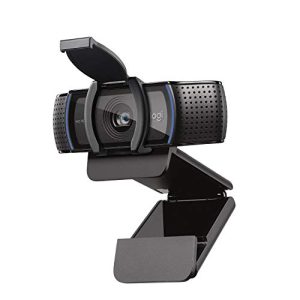
The C922x is the most natural fit for console streaming on this list. Its listing leads with Full HD 1080p at 30 frames per second and a 720p mode at 60 frames per second, which maps neatly onto how Xbox broadcasts actually work: a sharp main feed, or a smoother smaller facecam. Logitech’s own system requirements for the C922 family include Xbox One, and Logitech support answers have confirmed the camera working with the console’s Twitch app. Built-in stereo microphones cover call audio, and the camera arrives ready for the clip-on-TV placement most console setups use.
Specs
- Full HD 1080p video at 30 frames per second
- HD 720p video at 60 frames per second
- Built-in stereo microphones
- USB connection
- Model number 960-001176
Best for: Players who broadcast from the console and want the smoothest facecam option here.
Watch out for: Confirm the exact bundle variant on the listing, since the C922 family is sold in more than one package.
ASIN: B01LXCDPPK
Logitech C920s Pro HD Webcam

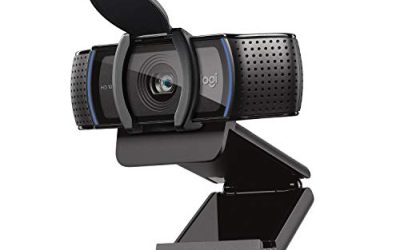
The C920s builds on the long-running C920 design and adds the feature living rooms appreciate most: a physical privacy shutter that closes over the lens when the camera is idle. Logitech’s listing for this model states compatibility that includes Xbox alongside PC and Mac, and the camera meets the console’s headline requirement with 1080p video at 30 frames per second. Dual stereo microphones handle Skype calls from the couch, RightLight 2 automatic light correction helps in dim rooms, and the 78-degree field of view fits one or two people without swallowing the whole room.
Specs
- Full HD 1080p video at 30 frames per second
- HD 720p video at 30 frames per second
- Dual built-in stereo microphones
- Privacy shutter included
- 78-degree field of view
- RightLight 2 automatic light correction
- Model number C920S-A
- USB connection
Best for: Households using Skype on Xbox who want a camera that can be visibly closed when not in use.
Watch out for: The listing’s Xbox compatibility covers console calling and streaming apps; it does not add PC-style software features on Xbox.
ASIN: B07K95WFWM
Logitech Brio 4K Webcam
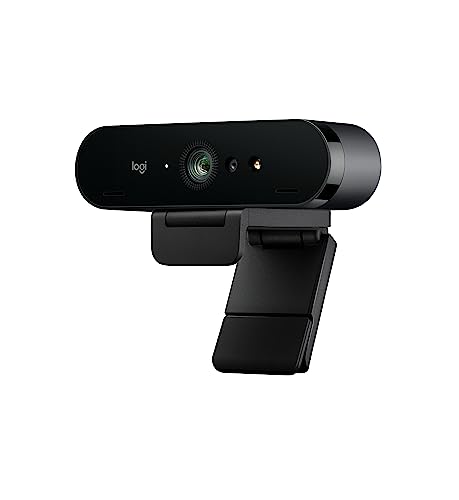
The Brio only makes sense here as a shared camera, and it is worth being direct about that. On Xbox it behaves as a 1080p webcam, because that is the console’s ceiling; its 4K sensor, 5x digital zoom and adjustable field of view earn their keep when the same camera is plugged into a PC for work calls or recording. The infrared sensor enables Windows Hello sign-in on a computer, and dual noise-cancelling microphones serve both homes. If one camera must cover a console corner and a desk, the Brio’s dual life justifies it; as an Xbox-only purchase, it is more camera than the console can use.
Specs
- 4K Ultra HD video recording
- 1080p output used by Xbox
- Infrared sensor for Windows Hello
- Dual noise-cancelling microphones
- 5x digital zoom
- Adjustable field of view
- Model number 960-001105
- USB connection
Best for: Players who split time between Xbox and a PC and want one higher-end camera for both.
Watch out for: Xbox caps the feed at 1080p, so the 4K capability only benefits you on a computer.
ASIN: B01N5UOYC4
Which One Fits Your Situation
You Broadcast Your Gameplay From the Console
Start with the Logitech C922x. It was packaged for streamers, its documented Xbox One connection covers the Twitch app route most console broadcasters use, and the 720p60 mode keeps a facecam looking fluid while the console handles the game. It is the pick with the least explaining to do, and it asks nothing extra of your existing setup.
The Camera Is Mostly for Family Skype Calls
Choose the Logitech C920s. The 1080p picture flatters nobody and offends nobody, the stereo microphones carry a room conversation, and the privacy shutter answers the reasonable discomfort of a permanently open lens in a living room. Its listing states Xbox compatibility outright, which keeps setup expectations simple for everyone in the household.
One Camera Has to Serve Console and Computer
Take the Logitech Brio. On the console it delivers the same 1080p feed as the others, and at a desk it becomes a 4K camera with Windows Hello and flexible framing. Buy it for the combined workload rather than for Xbox alone, and it stops looking excessive and starts looking efficient.
Common Mistakes
- Assuming any USB webcam works on Xbox because it works on a PC.
- Ignoring the YUY2 or NV12 format requirement that Xbox Support sets for streaming.
- Paying for a 4K camera expecting 4K broadcasts from a console that caps input at 1080p.
- Expecting PC companion software and effects to appear on Xbox.
- Mounting the camera far from the players, then blaming the microphones for quiet call audio.
Frequently Asked Questions
Which webcams does Xbox officially support for streaming?
Xbox Support describes the requirement rather than a long product list: a 1080p webcam with a YUY2 or NV12 format, noting that most Logitech and Microsoft LifeCam webcams qualify. That is why this guide sticks to Logitech models with documented Xbox connections instead of guessing at generic cameras.
Can I use a webcam for Skype on Xbox as well as streaming?
Yes. A supported webcam on Xbox works for Skype video calls and as a camera feed inside streaming apps such as Twitch. The same format expectations apply, and your picture is capped at 1080p in both cases, which is plenty for a call or a facecam window.
Will a 4K webcam give me a better Xbox stream?
No. The console accepts webcam input up to 1080p, so a 4K model sends a 1080p feed just like the others. A 4K webcam only shows its advantage on a PC. Buy one, like the Brio above, when the camera will genuinely split its time between console and computer.
Why is my PC webcam not recognized by my Xbox?
The likely reason is format or protocol support: the console expects a UVC camera offering YUY2 or NV12 at 1080p for streaming, and many PC-oriented cameras lean on proprietary drivers or compressed formats instead. There is no driver to install on Xbox, so a camera either meets the requirement or it does not.
FAQ
Which webcams does Xbox officially support for streaming?
Can I use a webcam for Skype on Xbox as well as streaming?
Will a 4K webcam give me a better Xbox stream?
Why is my PC webcam not recognized by my Xbox?
More from Amazon
Programs that pair well with the guide above. Offers and eligibility are set by Amazon and may change.
Free shipping on eligible items, Prime Video and more. Eligible new members can start with a free trial.
Start a Prime free trialAd-free music streaming. Eligible new subscribers can start with a free trial.
Try Music Unlimited freeA Prime membership for ages 18-24 with a trial period. Eligibility is set by Amazon.
See Prime for Young AdultsAudiobooks and podcasts to listen to on the go. Eligible new members can start with a free trial.
Try Audible freeAs an Amazon Associate we earn from qualifying purchases.