Our Top Picks


Discord turns a webcam into the face of your gaming identity. Friends watch you in voice channels, community servers, and Go Live sessions, so a grainy, lagging feed pulls attention away from the game and the conversation. Picking the right camera means weighing frame rate against resolution, low-light handling against field of view, and built-in audio against a separate microphone. A camera that looks fine in a bright office can fall apart in a dim gaming room at midnight.
This guide suits PC gamers who spend evenings in Discord voice channels, server moderators who host community video nights, and streamers who run Discord alongside their broadcast software. Each camera below was chosen from the name and specifications shown on its Amazon product page, with attention to the details that matter inside Discord: steady frame rates, usable built-in microphones, and autofocus that keeps up when you lean toward the screen or sit back in your chair.
Quick Picks
As an Amazon Associate we earn from qualifying purchases.
| Product | Best for | Key spec from title |
|---|---|---|
| Logitech C920S Pro HD Webcam | Everyday Discord calls on a shared PC | Full HD 1080p/30fps video with privacy shutter |
| Razer Kiyo Pro | Late-night calls in dim rooms | Full HD 1080p 60FPS with adaptive light sensor |
| Logitech Brio 4K Webcam | Hosting community video events | 4K Ultra HD with noise-cancelling mic |
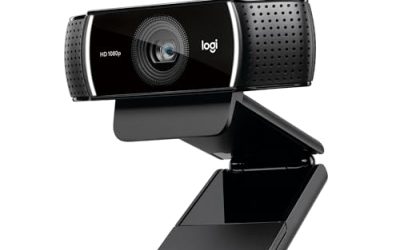
| Elgato Facecam | Go Live sessions with friends | 1080p60 True Full HD with Sony sensor |
How to Choose
Resolution and Frame Rate
Discord compresses video on its way to other callers, so the number on the box is only the beginning. A 1080p camera at 60 frames per second looks smoother than a 4K camera locked at 30, because motion stays fluid when you react to a play. That smoothness matters in Go Live sessions. A 4K sensor still earns its place: downscaling a sharp 4K image to 1080p keeps edges clean and lets you crop tighter without softness. Match the camera to your habit first. If you mostly sit still in voice channels, 1080p at 30 frames per second is plenty. If your facecam moves with your reactions, chase the higher frame rate.
Low-Light Performance
Most Discord calls happen after dark, in rooms lit by a single lamp or a monitor glow. In that light, small sensors produce noisy, muddy video no matter how high the resolution claims to be. Cameras with adaptive light sensors and HDR handling adjust exposure on the fly instead of leaving your face in shadow. A larger sensor gathers more light per pixel, which is why the Kiyo Pro and the Facecam hold up better in dim rooms than budget lenses. Check the listing for light correction features rather than trusting resolution alone. A desk lamp aimed at your face from behind the monitor often improves a mid-range camera more than jumping to a flagship model.
Field of View and Autofocus
Field of view decides how much of your room lands in the frame. A wide 90-degree view suits group calls from a couch, since two people fit without squeezing together. For solo calls, a 78-degree or narrower view keeps the focus on your face and hides the clutter at the edges of your desk. Several cameras in this guide let you switch between preset angles, which helps when you move from a solo call to a group hangout. Autofocus matters just as much. Fixed-focus lenses go soft when you lean in to read chat, while autofocus tracks you smoothly. If you fidget, gesture, or lean toward the screen, autofocus is worth prioritizing over a marginal bump in resolution.
Microphone and Privacy Controls
A webcam microphone decides whether friends hear you clearly or strain through echo and keyboard clatter. Dual microphones with noise cancelling handle a mechanical keyboard far better than a single mic, and they keep your voice forward when a fan hums nearby. For casual nightly calls, the built-in mic on a good webcam is genuinely enough. Streamers and server hosts who talk for hours may still prefer a dedicated USB microphone, but they can begin with the webcam mic and upgrade later. Privacy controls deserve the same attention. A physical shutter or lens cover lets you block the camera between calls without unplugging anything, which matters on a shared PC where someone else might open Discord.
The 4 Best Options
Logitech C920S Pro HD Webcam
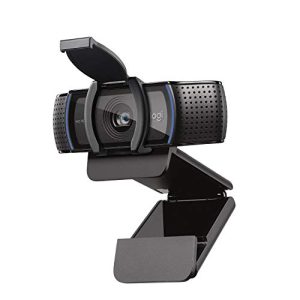
The C920S has spent years as the default webcam for PC gamers because it does the basics without fuss. It clips onto a monitor, connects over USB, and delivers a clean 1080p picture that holds up in Discord voice channels and video calls alike. Automatic light correction lifts a dim room just enough to keep your face readable, and the dual stereo microphones capture your voice clearly at desk distance. For a shared family PC or a first Discord camera, this is the sensible first pick that leaves nothing important out.
Specs
- Full HD 1080p/30fps video calling
- Clear stereo audio with dual microphones
- HD light correction for dim rooms
- Privacy shutter built into the housing
- Works with Skype, Zoom, FaceTime, Hangouts, PC, Mac, laptop, tablet, and Xbox
Best for: Everyday Discord calls on a shared PC where simple setup matters most.
Watch out for: The 30 frames per second cap can look slightly choppy during fast reactions, so check whether smooth motion matters to your calls before buying.
Razer Kiyo Pro

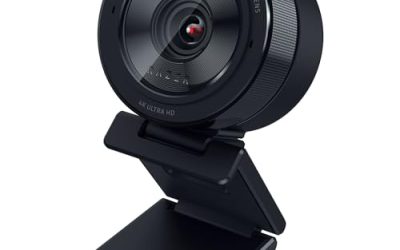
Dim rooms are where the Kiyo Pro earns its place in a Discord setup. Its adaptive light sensor and HDR handling brighten shadows without washing out your face, so late-night calls look far cleaner than a standard lens would manage. The uncompressed 1080p feed at 60 frames per second keeps motion smooth when you react to a clutch play, and the adjustable field of view lets you tighten the frame for solo calls or widen it for a friend beside you. Razer Synapse software adds fine control over exposure and focus for callers who like to tune their image.
Specs
- Full HD 1080p 60FPS uncompressed video
- Adaptive light sensor for dim rooms
- HDR enabled for high-contrast lighting
- Wide-angle lens with adjustable field of view
- Works with OBS, XSplit, Twitch, Zoom, and Teams
Best for: Late-night Discord calls in dim rooms where light correction matters most.
Watch out for: The camera leans on software for its best image controls, so confirm the companion app runs on your system before buying.
Logitech Brio 4K Webcam
Hosting a community night puts your camera under more scrutiny than a casual call, and the Brio 4K is built for that spotlight. Its 4K sensor captures fine detail at 30 frames per second, and dropping to 1080p unlocks a smoother 60 frames per second for animated conversation. RightLight 3 with HDR balances a bright window behind you against a darker room, while the 5x digital zoom lets you frame a tight headshot. Dual noise-cancelling microphones keep your voice clear over keyboard noise, and Windows Hello support adds face login for the host PC.
Specs
- 4K Ultra HD video at up to 30fps, 1080p at 60fps
- RightLight 3 with HDR for uneven lighting
- 5x digital zoom with autofocus
- Dual omnidirectional microphones with noise cancelling
- Adjustable field of view with 65, 78, and 90-degree presets
- Windows Hello facial recognition support
- Attachable privacy shutter included
Best for: Hosting community video events where a polished picture matters.
Watch out for: A 4K feed needs a strong USB connection and enough light to shine, so confirm your port and room lighting suit the camera before buying.
Elgato Facecam

Streamers who run Discord beside OBS tend to favor the Facecam because it behaves like a proper streaming camera. The Sony sensor and fixed 24mm lens produce a clean, detailed 1080p60 image with natural colors, while advanced light correction keeps indoor lighting even across long sessions. DSLR-style controls in the companion software let you set shutter speed, white balance, and ISO by hand instead of trusting automatic modes. The 84-degree field of view frames one person neatly, and the built-in privacy cover slides shut between calls without extra accessories.
Specs
- 1080p60 True Full HD video
- Sony sensor optimized for indoor use
- Advanced light correction for steady exposure
- DSLR-style manual controls for shutter, white balance, and ISO
- 84-degree field of view
- Built-in privacy cover
- Works with OBS, Zoom, Teams, and more, for PC and Mac
Best for: Go Live sessions with friends where a streaming-grade image matters.
Watch out for: The fixed lens has no autofocus, so set your seating distance once and keep it steady, or your face may drift soft during a call.
Which One Fits Your Situation
Late-Night Voice Channels in a Dark Room
Pick the Razer Kiyo Pro when your Discord hours begin after sunset. Its adaptive light sensor and HDR handling lift a dim room without blowing out your face, which is exactly the problem most webcams fail at midnight. The 60 frames per second feed keeps your reactions smooth, and the adjustable field of view tightens the frame so the camera concentrates on you rather than the dark corners of your room.
Streaming Games to Friends with Go Live
Pick the Elgato Facecam when Discord sits beside your streaming setup. Its 1080p60 image stays crisp and detailed through long sessions, and the manual controls let you lock in exposure instead of watching automatic modes hunt for light. The 84-degree view frames one gamer neatly, and the privacy cover closes the lens the moment your session ends.
Everyday Calls on a Shared Family PC
Pick the Logitech C920S Pro HD Webcam when several people share one computer. It plugs in over USB, needs no fiddling, and its privacy shutter gives everyone in the house a visible way to block the lens. The stereo microphones handle casual conversation well, and automatic light correction keeps the picture usable across different rooms and times of day.
Community Events Where You Host on Camera
Pick the Logitech Brio 4K Webcam when you run the show. The 4K sensor and 5x zoom let you frame a polished headshot, while RightLight 3 with HDR handles mixed lighting in a busy room. Dual noise-cancelling microphones keep your voice forward over background noise, and the adjustable field of view switches from a solo frame to a wider group shot.
Common Mistakes
- Assuming a higher resolution alone fixes a dark room, when light correction and sensor size matter more for Discord calls.
- Ignoring the built-in microphone, then wondering why friends hear keyboard clatter and fan noise over your voice.
- Mounting the camera below eye level, which films up your chin and makes long calls feel awkward for everyone watching.
- Leaving a wide field of view on for solo calls, so the frame shows a messy desk instead of your face.
- Forgetting to close the privacy shutter between calls on a shared PC, leaving the camera live when nobody is using it.
Frequently Asked Questions
Does Discord show my webcam at full 1080p quality?
Discord adjusts video quality based on the call type, your connection, and the settings of the server or group call. A 1080p camera still helps, because Discord receives a clean, detailed source image before compression. Feed it a sharp, well-lit picture and the result on the other end looks noticeably better than a soft source would.
Do I need a separate microphone if my webcam has one?
For casual Discord calls, a good webcam microphone is enough, especially dual microphones with noise cancelling. Friends will hear you clearly at desk distance. A separate USB microphone becomes worth it when you host long community events or stream, since it isolates your voice better and gives you control over gain and placement.
Can I use the same webcam for Discord and OBS at the same time?
Most webcams can only be claimed by one application at a time, so Discord and OBS may compete for the same camera. A common workaround is to run the camera through OBS first and send its virtual camera output into Discord. Check your streaming software for a virtual camera option before planning a dual-use setup.
What field of view works best for Discord calls?
A 78-degree view suits most solo calls, keeping your face centered while hiding desk clutter at the edges. Move to 90 degrees when a friend sits beside you or you join from a couch. Narrower angles flatter a single speaker, while wider angles keep group calls comfortable without anyone squeezing into frame.
A webcam for Discord earns its keep in dim rooms, long calls, and fast reactions rather than on a spec sheet alone. Match the camera to the way you actually use Discord, set your light and seating distance once, and the right pick from this list will keep your face clear every time you join a channel.
FAQ
Does Discord show my webcam at full 1080p quality?
Do I need a separate microphone if my webcam has one?
Can I use the same webcam for Discord and OBS at the same time?
What field of view works best for Discord calls?
More from Amazon
Programs that pair well with the guide above. Offers and eligibility are set by Amazon and may change.
Free shipping on eligible items, Prime Video and more. Eligible new members can start with a free trial.
Start a Prime free trialAd-free music streaming. Eligible new subscribers can start with a free trial.
Try Music Unlimited freeA Prime membership for ages 18-24 with a trial period. Eligibility is set by Amazon.
See Prime for Young AdultsAudiobooks and podcasts to listen to on the go. Eligible new members can start with a free trial.
Try Audible freeAs an Amazon Associate we earn from qualifying purchases.