Our Top Picks


Teaching through a screen puts your webcam at the center of every lesson. When students cannot see your face clearly or hear your voice without strain, attention drifts, questions go unasked, and a lesson that would work well in a classroom starts to feel distant. The real decision is not which camera has the longest spec sheet, but which one keeps you sharp, audible, and naturally framed for the full length of a class.
This guide is written for teachers, tutors, and trainers who run live lessons on Zoom, Microsoft Teams, or Google Meet, whether from a home desk, a classroom, or a shared office. Every camera below was picked from the name and specifications shown on its Amazon product page, with the focus on resolution, field of view, microphones, autofocus, and compatibility with the platforms teachers actually use.
Quick Picks
As an Amazon Associate we earn from qualifying purchases.
| Product | Best for | Key spec from title |
|---|---|---|
| Logitech Brio 101 | Daily live classes from a desk with simple plug-and-play setup | Full HD 1080p webcam with auto-light correction |
| Anker PowerConf C200 | Teaching from a busy household where background noise competes with your voice | 2K webcam with AI-noise canceling mics |
| Razer Kiyo Pro | Evening lessons in a dim room where lighting is hard to control | Full HD 1080p 60FPS with adaptive light sensor and HDR |
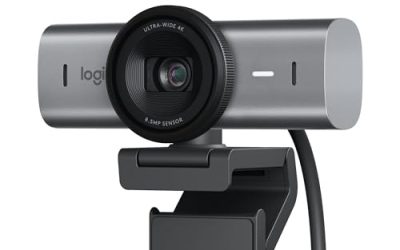
| Logitech MX Brio | Recording polished lessons and presenting to large groups | Ultra HD 4K webcam with 1080p 60 FPS and Show Mode |
| OBSBOT Tiny 2 Lite | Moving between a desk and a whiteboard during a lesson | 4K webcam with AI tracking PTZ and gesture control |
How to Choose
Resolution and frame rate that survive compression
Video platforms compress your feed before it reaches students, so a camera that starts soft ends up looking far worse on the other side. A 1080p camera is the sensible floor for teaching, because it keeps facial expressions and on-screen text readable after compression. A 60 fps mode helps when you gesture, demonstrate an object, or write on a board, since movement stays smooth instead of smearing. A 4K camera adds headroom for recorded lessons, where students watch the replay on a larger screen or you crop the frame later. Match the resolution to how your students watch: live-only classes do fine at 1080p, while recorded lessons reward the extra detail.
Microphones that carry your voice across the room
Students forgive a slightly soft picture far more readily than muffled or echoing audio. Built-in dual microphones with noise reduction handle a quiet room well, and AI noise-canceling mics go further by cutting keyboard clicks, fans, and household sounds. Think about where you sit: a mic array tuned for a desk works when you stay close, but it struggles if you step back toward a whiteboard. If your room echoes or several people share the space, plan on a separate headset for the longest sessions and let the webcam mic cover shorter classes. Check the listing for stereo mics and noise reduction before assuming the audio matches the video.
Field of view and framing for the way you teach
A narrow field of view suits a teacher who sits still at a desk, keeping the frame tight on the face and hiding the rest of the room. A wider angle fits demonstrations, shared desk work, or a second person beside you. Adjustable field of view is the most flexible option, since one camera can switch between a close head-and-shoulders shot and a wider view of your workspace. Teachers who walk to a whiteboard need something more: either a wide fixed angle that covers the whole board or a tracking camera that follows them. Decide how you move before you decide how wide the lens should be.
Low-light correction and autofocus for real rooms
Few teaching spaces have studio lighting. Evening classes, north-facing rooms, and a single desk lamp all push a camera to brighten the image without washing out your face. Auto-light correction and an adaptive light sensor adjust exposure as conditions change, which matters when clouds pass or a lesson runs past sunset. Autofocus earns its place the moment you hold up a worksheet, a model, or a textbook: the camera should shift focus to the object and back to your face without a long hunt. A privacy shutter rounds out the package, letting you block the lens between classes without unplugging anything.
The 5 Best Options
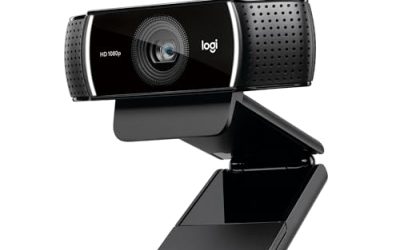
Logitech Brio 101
The Brio 101 is the straightforward choice for a teacher who wants to plug a camera in and start the lesson. Its 1080p picture with auto-light correction holds up in ordinary rooms, and the built-in microphone covers a quiet desk without extra gear. Because the listing names Zoom, Microsoft Teams, and Google Meet directly, there is little guesswork about whether it will work with the platform your school uses. The privacy shutter adds a small but genuine benefit between classes, and the USB-A connection suits the laptops and desktops most classrooms already have.
Specs
- Full HD 1080p video
- Auto-light correction
- Built-in mic
- Privacy shutter
- USB-A connection
- Compatible with Teams, Google Meet, and Zoom
Best for: Teachers running daily live classes from a desk who want a simple setup that works with the main teaching platforms.
Watch out for: Fixed focus means holding objects close to the lens will not sharpen the way an autofocus camera would.
Anker PowerConf C200

The PowerConf C200 is built for the reality of teaching from home, where a washing machine, a television, or children in the next room all compete with your voice. Its AI-noise canceling microphones and stereo mics focus on speech while pushing background sound down, which keeps long explanations intelligible. The 2K resolution gives students a clearer view than a basic 1080p camera, and the adjustable field of view lets you tighten the frame for a solo lesson or widen it when you demonstrate something on your desk. Low-light correction helps when your teaching corner sits away from the window.
Specs
- 2K webcam
- Low-light correction
- AI-noise canceling mics
- Adjustable field of view
- Built-in privacy cover
- Stereo mics
Best for: Tutors teaching from a busy household who need their voice to stay clear over everyday background noise.
Watch out for: The adjustable field of view is set through software, so check the settings before your first class rather than during it.
Razer Kiyo Pro

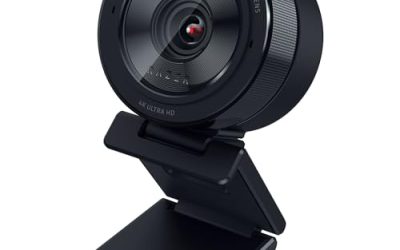
The Kiyo Pro earns its place in this list through low-light handling. Its adaptive light sensor and HDR adjust the image when a room is dim or unevenly lit, which is exactly what happens during evening lessons or in a classroom with a single strip light. Full HD at 60 frames per second keeps hand gestures and demonstrations smooth, and the wide-angle lens with adjustable field of view covers both a seated teacher and a broader desk setup. The listing names Zoom and Teams among its compatible platforms, so it slots into the same workflows schools already use.
Specs
- Full HD 1080p 60FPS
- Adaptive light sensor
- HDR enabled
- Wide angle lens with adjustable FOV
- Works with OBS, XSplit, Twitch, Zoom, and Teams
Best for: Teachers holding evening or dimly lit lessons who need the camera to correct exposure on its own.
Watch out for: Its advanced picture settings live in companion software, so the out-of-box image is the one you should judge it by.
Logitech MX Brio
The MX Brio is the premium option for teachers who record lessons as well as teach live. Its Ultra HD 4K sensor captures the fine detail that matters when students replay a lesson or watch on a large display, while the 1080p 60 fps mode keeps live movement fluid. Show Mode tilts the camera down to your desk, so you can present a worksheet, a diagram, or a practical demonstration without moving the camera or holding paper up to the lens. Dual noise-reducing microphones handle voice pickup at the desk, and the USB-C connection fits modern laptops.
Specs
- Ultra HD 4K webcam
- 1080p 60 FPS
- Show Mode
- Works with Microsoft Teams, Zoom, and Google Meet
- Dual noise reducing mics
- USB-C
Best for: Teachers recording reusable lessons and presenting desk demonstrations to large groups.
Watch out for: A 4K feed demands more from your computer and connection, so confirm your setup handles it before a live class.
OBSBOT Tiny 2 Lite

The Tiny 2 Lite is the only camera here that moves with you. Its AI tracking and two-axis gimbal follow you as you step from your desk to a whiteboard, keeping you framed instead of drifting out of shot. That makes it a natural fit for teachers who present standing up or demonstrate across a room. Gesture control lets you start tracking or adjust the zoom with a hand signal, which is handy when your hands are full of teaching materials. The 1/2-inch sensor and HDR support the 4K picture, and the noise-reducing microphones cover voice pickup while you move.
Specs
- 4K webcam
- AI tracking PTZ streaming camera
- 1/2″ sensor
- Gesture control
- 60 FPS
- HDR
- Noise reducing microphones
- Works with conferences and Zoom meetings
Best for: Teachers who move around the room, use a whiteboard, or demonstrate standing up during live lessons.
Watch out for: Tracking presets and background blur are configured in the OBSBOT Center app, so budget a few minutes to set it up before teaching.
Which One Fits Your Situation
Teaching from a dim room in the evening
Low light is hard to fix after the fact, so pick a camera that corrects it by itself. The Razer Kiyo Pro pairs an adaptive light sensor with HDR, which lifts a dim room without blowing out your face when a lamp sits nearby. Its 60 fps mode also keeps hand gestures readable during demonstrations. Choose it when your lessons regularly run after sunset or your teaching corner gets little daylight.
Moving between a desk and a whiteboard
A fixed camera forces a choice between desk and board, and students lose you the moment you step away. The OBSBOT Tiny 2 Lite follows you with AI tracking and a motorized gimbal, so the frame stays on you while you write, point, or pick up a prop. Gesture control adjusts the zoom without a walk back to the computer. Choose it when your lessons involve standing, moving, or presenting across a room.
Recording lessons to reuse all term
Recorded lessons get watched more than once, often on bigger screens, so detail matters. The Logitech MX Brio records in Ultra HD 4K and switches to 1080p at 60 fps for live sessions, covering both uses in one camera. Show Mode lets you present desk work directly, which suits worked examples and demonstrations. Choose it when your recordings form part of the course and need to hold up on replay.
Teaching from a busy household
When the house is noisy, the microphone decides whether students follow the lesson. The Anker PowerConf C200 uses AI-noise canceling microphones to suppress household sounds while keeping your voice forward, and its 2K picture stays clear on student screens. The adjustable field of view lets you frame just yourself when the room behind you is busy. Choose it when background noise is a daily reality rather than an occasional interruption.
Common Mistakes
- Buying a 720p camera and expecting it to look clear after the platform compresses the feed.
- Judging a webcam by resolution alone while ignoring whether its microphones handle your room.
- Choosing the widest field of view by default, then broadcasting the whole room behind you.
- Picking a fixed-focus camera when your lessons involve holding worksheets or objects up to the lens.
- Ordering a USB-C camera for a school laptop that only has USB-A ports, or the reverse, without checking first.
Frequently Asked Questions
Do I need a 4K webcam for online teaching?
Not for live classes alone. A good 1080p camera keeps your face clear after platform compression, and most students watch on laptops or tablets. A 4K camera is worth it when you record lessons for replay, crop the frame, or teach large groups on big displays, where the extra detail survives.
Is a webcam microphone good enough for teaching?
For a quiet room and classes under an hour, a camera with dual microphones and noise reduction is usually enough. In echoing rooms, noisy households, or very long sessions, a headset will sound clearer and tire your voice less. Use the webcam mic for everyday lessons and keep a headset ready for the harder rooms.
Will these webcams work with Zoom, Teams, and Google Meet?
Yes. The listings for the Brio 101, MX Brio, and Kiyo Pro name Zoom, Microsoft Teams, and Google Meet directly, and the Anker and OBSBOT listings describe conference and meeting use. All five connect over USB and appear as a standard camera, so the platform sees them without special drivers.
Can one webcam show both my face and a whiteboard?
A wide-angle lens covers a nearby whiteboard, but the writing may be hard to read. A tracking camera such as the OBSBOT Tiny 2 Lite follows you to the board and keeps you framed, while the MX Brio’s Show Mode presents desk work instead. For a full-size board across the room, a document camera or second camera works better.
FAQ
Do I need a 4K webcam for online teaching?
Is a webcam microphone good enough for teaching?
Will these webcams work with Zoom, Teams, and Google Meet?
Can one webcam show both my face and a whiteboard?
More from Amazon
Programs that pair well with the guide above. Offers and eligibility are set by Amazon and may change.
Free shipping on eligible items, Prime Video and more. Eligible new members can start with a free trial.
Start a Prime free trialAd-free music streaming. Eligible new subscribers can start with a free trial.
Try Music Unlimited freeA Prime membership for ages 18-24 with a trial period. Eligibility is set by Amazon.
See Prime for Young AdultsAudiobooks and podcasts to listen to on the go. Eligible new members can start with a free trial.
Try Audible freeAs an Amazon Associate we earn from qualifying purchases.