Key takeaways
- Latency: Look for a 2.4GHz USB-C dongle connection or a Bluetooth codec designed for low latency — anything above 40ms is noticeable in fast-paced shooters and fighting games.
- Microphone Quality: Prioritize earbuds with multi-mic arrays, ENC, or bone-conduction technology to ensure your teammates hear you clearly over keyboard and fan noise.
- Battery Life: Aim for at least 6 hours per charge with 25+ hours total via the case to cover extended gaming sessions without mid-match interruptions.
- Platform Compatibility: Verify support for your specific platforms — PC, PS5, Switch, or mobile — and check whether a single earbud can simultaneously connect to multiple devices.
- Fit and Comfort: Choose earbuds with multiple ear tip sizes and a secure in-ear design that stays locked in place during intense moments without causing fatigue over several hours.
What's inside
Finding a pair of wireless earbuds that actually works for competitive gaming has historically been a frustrating exercise. Most mainstream Bluetooth earbuds suffer from noticeable audio lag, making precise footstep tracking and reaction-based gameplay nearly impossible. When milliseconds decide whether you win or lose a round, that kind of latency simply isn’t acceptable. Compounding the problem, many earbuds lack the microphone clarity needed for team communication, pick up excessive background noise, or fall short on battery life during extended sessions. PC gamers in particular often juggle multiple platforms — PC, console, handheld — and need a versatile audio solution that performs across the board without sacrificing comfort or sound quality.
As an Amazon Associate we earn from qualifying purchases.


This guide cuts through the noise and highlights the best wireless earbuds for gaming in 2026, focusing on models that deliver low-latency 2.4GHz dongle connections, clear microphone technology, and meaningful battery life. We’ve prioritized earbuds with dedicated gaming modes, multi-platform compatibility, and audio tuning suited for competitive play. Whether you’re after a premium dual-mode setup for your ROG Ally and PS5, a budget-friendly pair with solid ANC, or a specialized in-ear monitor for wired backup use, these are the options worth your attention.
🛒 Best Price Today on Amazon
Prime members get fast, free shipping on everything above, plus member-only deals. New members get a 30-day free trial — cancel anytime.
Watch: Best Wireless Earbuds For Gaming — Video Review
How to Choose a Wireless Earbuds For Gaming (2026)
- Latency: Look for a 2.4GHz USB-C dongle connection or a Bluetooth codec designed for low latency — anything above 40ms is noticeable in fast-paced shooters and fighting games.
- Microphone Quality: Prioritize earbuds with multi-mic arrays, ENC, or bone-conduction technology to ensure your teammates hear you clearly over keyboard and fan noise.
- Battery Life: Aim for at least 6 hours per charge with 25+ hours total via the case to cover extended gaming sessions without mid-match interruptions.
- Platform Compatibility: Verify support for your specific platforms — PC, PS5, Switch, or mobile — and check whether a single earbud can simultaneously connect to multiple devices.
- Fit and Comfort: Choose earbuds with multiple ear tip sizes and a secure in-ear design that stays locked in place during intense moments without causing fatigue over several hours.
The Best Wireless Earbuds For Gaming (2026)s Reviewed
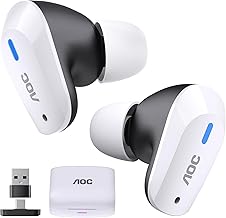
AOC ACT3512 Wireless Gaming Earbuds
With a 2.4GHz USB-C dongle and 20ms ultra-low latency, the AOC ACT3512 delivers lag-free audio that keeps pace with competitive play across PS5, PC, and Switch. The 32-hour battery life and four noise-cancelling microphones make it a well-rounded option for extended sessions and clear team comms.
ASUS ROG Cetra True Wireless SpeedNova
Asus covers all bases with dual-mode BT and 2.4GHz connectivity, bone-conduction AI mic technology, and Adaptive ANC in a premium package built for PC, PS5, and handhelds like the ROG Ally. With 46 hours of total battery life and Dirac Opteo sound enhancement, it stands as the most versatile option on this list.
SoundPEATS H3 Wireless Headphones
The SoundPEATS H3 brings audiophile-grade features to gaming with triple-driver LDAC aptX lossless audio and a serious 55dB hybrid ANC that blocks out mechanical keyboard clatter. Bluetooth 5.4, multipoint connection, and an IPX5 rating make it equally suited for gaming and everyday use.
GravaStar Sirius Plus True Wireless Earbuds
Bluetooth 5.3 and active noise cancellation give the GravaStar Sirius Plus a solid foundation, while the customization app lets you tune the sound profile to suit your preferred game genre. The 28-hour playtime and IPX4 rating make it a durable, adaptable option for both gaming and active lifestyles.
Piluyaa Wired Gaming IEM Earphones
While not wireless, the Piluyaa wired IEM with its 11mm dynamic driver earns a spot as a reliable zero-latency backup when battery life runs dry mid-session. Paired with the QKZ ENZO tuning, it delivers punchy bass and HiFi clarity that holds its own for video, music, and gaming.
Frequently Asked Questions
Are wireless earbuds good for competitive gaming?
Yes, provided they use a 2.4GHz USB-C dongle rather than relying solely on Bluetooth. Dongle-based connections typically achieve 20–30ms latency, which is imperceptible even in fast-paced competitive shooters.
Can I use gaming earbuds with both PC and console?
Most modern gaming earbuds support multi-platform connectivity via a USB-C dongle. Models like the ASUS ROG Cetra SpeedNova explicitly cover PC, PS5, PS4, Switch, and mobile, often switching between them seamlessly.
Do I need ANC for gaming?
Active noise cancellation isn’t strictly necessary, but it significantly improves immersion and focus by blocking ambient room noise, fan hum, and keyboard sounds. Look for hybrid ANC implementations for the best results.
How important is battery life for gaming earbuds?
Battery life matters more than with traditional headphones because earbuds are harder to use while charging. Aim for a case that provides at least 25 hours total, with 6 hours minimum per charge to avoid mid-session interruptions.
Final Thoughts
For most gamers, the ASUS ROG Cetra True Wireless SpeedNova is the clear top pick thanks to its dual-mode connectivity, bone-conduction mic, and 46-hour battery that covers nearly every platform imaginable. The AOC ACT3512 is an excellent value alternative with 20ms latency and solid noise-cancelling mics, while the SoundPEATS H3 stands out for players who want premium audio quality and best-in-class ANC without breaking the bank.