Our Top Picks
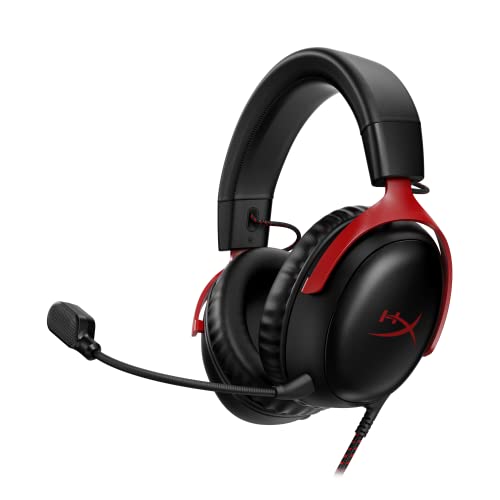 HyperX Cloud III Wired Gaming Headset for PCRegular3.41 x 6.1 x 7.48 inches0.7 poundsCheck on Amazon
 Razer BlackShark V2 X Gaming Headset: 7.1 Surround3.5 mm7.6 x 6.76 x 3.86 inches0.5 poundsCheck on Amazon

The HyperX Cloud II wired gaming headset is a comfortable, metal-framed headset with large 53 mm drivers, a detachable microphone, and a USB control box that adds virtual 7.1 surround on PC, Mac and PS4. It is still a sensible choice if you want a wired headset with a clear, balanced sound, but newer models now compete closely.
Quick Verdict
- Buy it if you want a durable wired headset, soft memory foam, and the option of a USB sound card with virtual surround.
- Skip it if you want true wireless freedom, a USB-C connection, or a modern software suite.
- Worth knowing: the 7.1 is virtual surround from the USB box, not seven physical drivers.
This review is research-based. We did not use the headset ourselves, so the notes below come from the maker manual, listings and independent reviews. Where a figure was not confirmed, we say so.
HyperX Cloud II Specs at a Glance
| Spec | HyperX Cloud II (wired) |
|---|---|
| Drivers | 53 mm dynamic, neodymium magnets |
| Impedance | 60 ohm (listed in published specs) |
| Sensitivity | 98 dB/mW (listed in published specs) |
| Frequency response | 15 Hz to 25 kHz (one catalog source) |
| Surround sound | Virtual 7.1 through the USB Advanced Audio Control Box |
| Connection | 3.5 mm analogue jack; USB sound card adapter in the box |
| Microphone | Detachable, flexible boom; noise cancellation when used with the USB box |
| Frame and padding | Aluminum frame, memory foam ear pads (per listing) |
| Platforms (per listing) | PC, PS4, PS4 Pro, Xbox One, Xbox One S; Mac via USB box |
The listing for the red model describes a 7.1 surround sound headset with memory foam ear pads and a durable aluminum frame, which matches the maker’s own manual. If a number matters for your setup, such as exact weight or cable length, check the maker manual, because we did not find a source we trust for those two.
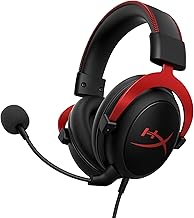
HyperX Cloud II Gaming Headset, 7.1 Surround Sound, Red
As an Amazon Associate we earn from qualifying purchases at no extra cost to you.

This is the red wired model discussed throughout the review. The listing highlights 7.1 surround sound, memory foam ear pads, a durable aluminum frame and multi-platform use with PC, PS4, PS4 Pro, Xbox One and Xbox One S. It is the version to look at if you want the classic Cloud II with the USB control box, and the colour code in its model name is KHX-HSCP-RD.
Design and Comfort
The Cloud II uses an aluminum frame with a padded headband and memory foam ear pads. That construction is the reason it still gets recommended years after release. Metal in the frame helps it survive being tossed in a bag or knocked off a desk, which plastic-heavy budget headsets often struggle with.
Comfort comes from the memory foam cups. They are closed-back, so they isolate outside noise reasonably well, but they also trap heat. For long sessions in a warm room, expect the ears to get warm. People who wear glasses sometimes find over-ear foam presses on the arms of the frames, so adjust the headband and try the fit.
What is in the box
- The headset with attached cable
- A detachable microphone
- A USB audio control box (the sound card adapter)
- Check the maker page for the exact accessories in your regional version, since carrying pouches and extra ear pads vary
Sound Quality and What 7.1 Really Means
The 53 mm drivers are larger than the 40 mm units on many budget headsets. Bigger drivers do not always mean better sound, but they give the headset good headroom for bass and a full mid range. Many independent reviewers describe the tuning as warm and easy to listen to rather than analytical.
7.1 HyperX Cloud 2: virtual, not physical
The 7.1 surround is virtual. When you plug the headset into the USB Advanced Audio Control Box and connect that to a PC, Mac or PS4, the box processes stereo audio to simulate seven speakers. It does not contain seven separate drivers. Cloud II has two drivers, one per ear, and the box uses software processing to place sounds around you.
Virtual surround helps most in games that use positional audio, such as shooters and some open-world titles. In stereo-mixed music and videos, it can sound hollow, so most people leave it off outside games. The box has a button to turn it on or off.
The USB control box
- It adds volume and microphone controls on the cable.
- It enables 7.1 on and off with one button.
- It adds noise cancellation, automatic gain control and echo cancellation to the mic (per published specs).
- Without the box, you can still plug the headset into a 3.5 mm jack for plain stereo, but you lose the 7.1 and the mic processing.
Microphone Performance
The detachable boom microphone is one of the headset’s selling points. When the USB box is used, the mic gets noise cancellation and echo reduction. That makes it clearer than many budget boom mics for team chat. It is not a studio microphone, so streamers who care about voice quality usually add a standalone mic later.
Because it detaches, you can remove it when you want to use the Cloud II as ordinary headphones, which is handy for music or video. Keep the mic arm away from your mouth by a few finger widths to avoid breath popping.
How It Performs by Use
FPS and competitive games
For shooters, directional cues matter more than raw bass. The 7.1 mode can widen the soundstage, and the large drivers give footsteps and gunfire body. Some competitive players prefer plain stereo because virtual surround can blur precise positioning, so try both settings.
Single-player and open-world games
The warm tuning and comfortable cups suit long single-player sessions. Cinematic soundtracks and ambient effects come across with weight, and the closed-back design keeps room noise out.
Music and movies
It works as a general listening headset. The tuning leans warm, and the 7.1 mode is best left off for stereo music. Using the detachable mic option, you can wear it like normal headphones.
Console play
The 3.5 mm connection works with a controller jack. The listing names PS4, PS4 Pro, Xbox One and Xbox One S. For newer consoles, check the maker compatibility page, as newer listings carry updated platform lists. The 7.1 box feature is aimed at PC, Mac and PS4.
HyperX Cloud II Pro, Kingston and Other Versions Explained
People search for several names for this headset. Here is what we could confirm.
- HyperX Cloud II Pro: we could not confirm a separate maker model with that name. Retailer listings that use “Pro” generally refer to the standard Cloud II with the USB audio box, so check the box contents and the model number before buying.
- Kingston HyperX Cloud II: HyperX began as Kingston’s gaming brand, and the original manual for this headset is hosted on Kingston’s support site. The older Kingston-branded packaging and the HyperX-branded packaging describe the same headset family.
- HyperX Cloud II Wireless: this is a different product. It keeps the 53 mm drivers but connects through a 2.4 GHz USB dongle, not a control box.
- Colours: the headset is sold in several colours with the same specs. Listing codes such as KHX-HSCP-RD (red) and KHX-HSCP-GM (gunmetal) refer to colour.
Who Should Buy the HyperX Cloud II
- Players who want a wired headset that does not need charging.
- Buyers who want a metal frame that can take rough handling.
- PC and Mac users who want a USB box for volume, mic controls and virtual surround.
- Anyone who wants a detachable mic and a headset that doubles as headphones.
Who Should Skip It
- Players who want wireless operation, since this wired model needs a cable.
- Anyone who needs USB-C or Bluetooth connectivity on the headset itself.
- Those who want a modern software suite with equaliser presets inside an app.
- Buyers who want a lighter headset for very long sessions; heavier metal-frame designs can tire the neck.
Alternatives to Consider
HyperX Cloud III Wired Gaming Headset

The Cloud III is the direct successor in the lineup. The listing describes a wired headset with USB-C, USB-A and 3.5 mm connectivity, memory foam, a durable frame and a 10 mm microphone. If you want a modern connection set and a newer design from the same brand, this is the natural step up.
- Connection: USB-C, USB-A and 3.5 mm (per listing)
- Platforms: PC, PS5, PS4, Xbox Series X|S (per listing)
- Mic: 10 mm, per listing
Best for: Buyers who like the Cloud II style but want USB-C and a newer platform list.
Skip if: you want the exact tuning of the older headset.
Pros
- Modern connection options
- Same brand and comfort approach
- Broader console support
Cons
- Different tuning to the Cloud II
- Surround features differ; check the maker page
Razer BlackShark V2 X Gaming Headset

The BlackShark V2 X is a lighter alternative aimed at esports. The listing mentions 7.1 surround sound, 50 mm drivers and a memory foam cushion for PC, PS4, PS5 and Switch. It trades the metal frame for a lighter build.
- Drivers: 50 mm (per listing)
- Surround: 7.1 (per listing)
- Platforms: PC, PS4, PS5, Switch (per listing)
Best for: Players who want a lightweight esports-style wired headset.
Skip if: you want a metal frame.
Pros
- Lighter feel
- Lower cost tier
- Broad platform support
Cons
- Plastic frame
- Mic is fixed or less versatile; check the listing
Corsair HS65 Surround Wired Gaming Headset
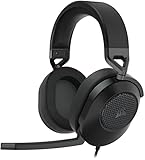
The Corsair HS65 Surround is a wired headset with a 3.5 mm connection that lists Dolby 7.1 surround sound and a clear microphone. It is a good comparison for buyers who like the Cloud II format but want a different brand and software.
- Connection: 3.5 mm wired (per listing)
- Surround: Dolby 7.1 (per listing)
- Platforms: PC, PS5, Xbox, Switch (per listing)
Best for: Buyers who want a wired headset with Dolby surround support.
Skip if: you want the HyperX ear-cup style.
Pros
- Wide platform support
- Dolby 7.1 listed
- Clear mic in listing
Cons
- Surround needs the right setup on PC
- Different tuning
SteelSeries Arctis Nova 1 Multi-System Gaming Headset

The Arctis Nova 1 is a clean, comfort-focused wired headset. The listing describes Hi-Fi drivers, 360 degree spatial audio and a comfort-focused design. It suits buyers who want a modern look and spatial audio in place of a USB box.
- Drivers: Hi-Fi (per listing)
- Audio: 360 degree spatial audio (per listing)
- Platforms: multi-system (per listing)
Best for: Players who want a modern, simple multi-system wired headset.
Skip if: you want a detachable boom with a USB control box.
Pros
- Multi-system compatibility
- Spatial audio
- Comfort focus
Cons
- Different feature mix to Cloud II
- Spatial audio details are in the maker app
Setting Up the HyperX Cloud II
- Attach the detachable microphone to the left ear cup until it seats firmly.
- For PC or Mac, plug the headset cable into the USB Advanced Audio Control Box and plug the box into a USB port.
- Open your sound settings and set the headset as both the playback and recording device.
- Press the 7.1 button on the box if you want virtual surround in a game, and leave it off for music and video.
- On console, skip the box and use the 3.5 mm jack on the controller. Check the maker page for the adapter your console generation needs.
Cloud II vs Cloud II Wireless
The wired and wireless models share the same 53 mm drivers, but they are built for different desks. This table keeps the differences clear.
| Feature | Cloud II (wired) | Cloud II Wireless |
|---|---|---|
| Connection | 3.5 mm cable, USB control box in the package | 2.4 GHz USB dongle |
| Drivers | 53 mm | 53 mm |
| Charging | Not needed | Needed; battery life is listed by the maker |
| Surround | Virtual 7.1 through the USB box | Check the maker page for the surround method |
| Best for | Desk play that does not need charging | Players who want to move around |
If you are choosing between them, the question is simply whether the cable bothers you. A wired headset never runs out of power, and you can plug it into a controller or laptop and go. The wireless version is the answer if you move around a room or hate cable drag.
Getting the Best Sound and Fit
- Adjust the headband first. A headset that sits too low on the ears loses bass and feels heavier.
- Give the foam time. Memory foam softens as it warms and moulds. A first impression of firmness often improves after a few sessions.
- Use the mic mute. Mute when you are not talking to cut keyboard noise.
- Try both surround settings. Switch 7.1 on and off in the same game to see which positioning you prefer.
- Use the EQ in your game or OS. If the bass is too warm for you, a small cut in the low end sharpens footsteps.
- Replace worn pads. Ear pads wear first. Third-party and official replacements exist, so check the fit and the material before ordering.
Common Problems and Quick Fixes
No sound or the wrong device
Open your sound settings and make sure the headset or USB audio device is selected for playback. Switching between the 3.5 mm jack and the USB box can change the device name.
Mic not working on PC
Desktop PCs with separate headphone and mic jacks need a splitter when you use the 3.5 mm plug directly. The USB box avoids this. Also check the mic mute switch and the input level in the system settings.
7.1 button does nothing
Virtual 7.1 only works through the USB box on supported systems. If you are on a plain 3.5 mm connection, the button does not exist, so connect through the box.
Crackling or cut-outs
Check the cable for kinks near the plug and try another USB port. A loose 3.5 mm plug is a frequent cause of crackle.
Durability and Long-Term Ownership
The aluminum frame is the main reason people keep these headsets for years. The parts that wear out first are the ear pads and the cable. Because the microphone and ear pads are replaceable, you can extend its life at low cost. If the headset sits on a stand when not in use, the headband padding lasts longer.
For the Cloud II, the main long-term trade-off is that it is wired and uses older connection standards. If you plan to switch to a USB-C-only setup, a newer headset may be a better long-term choice.
7.1 HyperX Cloud 2 vs Stereo: Which Mode to Use
Many buyers search for the 7.1 HyperX Cloud 2 expecting a big change in sound. The reality is more modest. Virtual surround widens the sense of space in games that carry positional audio data, but it is processing, not extra hardware. A simple rule works well for most players.
- Turn 7.1 on for single-player adventures and cinematic games where atmosphere matters.
- Try both in competitive shooters and keep whichever helps you locate footsteps.
- Turn it off for music, podcasts and calls, where stereo sounds more natural.
Cloud II Compared with Its Siblings
HyperX sells several wired headsets, and the differences are easy to mix up. The Cloud II is the older metal-frame model with a USB control box. The Cloud III is the newer wired model with USB-C, USB-A and 3.5 mm connectivity according to its listing. The Cloud Alpha uses dual chamber drivers and a detachable cable. If you are unsure which to choose, list the connections you need first, then pick the model that offers them without adapters.
HyperX Cloud II Verdict
The HyperX Cloud II earns its reputation through comfort, durable build and a practical USB box. It does not pretend to be wireless, and its 7.1 is virtual. If those trade-offs suit you, it remains a dependable wired headset. If you want modern connectivity, compare it with the Cloud III before you decide.
Frequently Asked Questions
Is the HyperX Cloud II still worth buying?
Yes, if you want a durable wired headset with comfortable memory foam and a USB box for virtual 7.1. If you want USB-C or wireless, look at newer models.
Is the HyperX Cloud II true 7.1?
No. The 7.1 is virtual surround processed by the USB Advanced Audio Control Box. The headset has two drivers, one per ear, not seven.
What is the HyperX Cloud II Pro?
We could not confirm a separate maker model with that name. Listings that use it usually refer to the standard Cloud II, so check the model number and box contents.
Is the Kingston HyperX Cloud II the same headset?
HyperX began as Kingston’s gaming brand, and the manual for this headset is on Kingston’s support site. Both names describe the same headset family.
Does the HyperX Cloud II work on Xbox and PlayStation?
The listing names PS4, PS4 Pro, Xbox One and Xbox One S through the 3.5 mm jack. Check the maker page for newer consoles.
Can I use the Cloud II without the USB box?
Yes, through a 3.5 mm jack for plain stereo. You will lose the 7.1 button and the extra mic processing.
Sources
- HyperX Cloud II user manual hosted by Kingston support
- HyperX Cloud II retailer listing for model KHX-HSCP-RD
- Tom’s Hardware review of the HyperX Cloud II Wireless (for the wireless comparison)
- Published spec catalog entries for the HyperX Cloud II
Last updated: November 2026
FAQ
Is the HyperX Cloud II still worth buying?
Is the HyperX Cloud II true 7.1?
What is the HyperX Cloud II Pro?
Is the Kingston HyperX Cloud II the same headset?
Does the HyperX Cloud II work on Xbox and PlayStation?
Can I use the Cloud II without the USB box?
More from Amazon
Programs that pair well with the guide above. Offers and eligibility are set by Amazon and may change.
Free shipping on eligible items, Prime Video and more. Eligible new members can start with a free trial.
Start a Prime free trialAd-free music streaming. Eligible new subscribers can start with a free trial.
Try Music Unlimited freeA Prime membership for ages 18-24 with a trial period. Eligibility is set by Amazon.
See Prime for Young AdultsAudiobooks and podcasts to listen to on the go. Eligible new members can start with a free trial.
Try Audible freeAs an Amazon Associate we earn from qualifying purchases.