Key takeaways
- Strengths: accurate PMW3366 sensor, wired or wireless use, ambidextrous shape, Omron switches rated for 20 million clicks.
- Weaknesses: 107 g is heavy by current standards, battery life is modest, the shape sits low in the palm for some hands, and the warranty is only two years.
- Best for: Players who want a classic shape and a flexible wired-or-wireless mouse.
The Logitech G900 Chaos Spectrum is an ambidextrous wired and wireless gaming mouse with a PMW3366 sensor, a 107 g body and a battery claimed at 24 hours with lighting on. It still holds up on sensor accuracy and wireless speed, but its weight, micro-USB-era design and battery life are dated. Buy it for the shape, or choose the G903 or a lighter mouse instead.
This review of the logitech g900 chaos spectrum covers the specs, how it plays, who should still buy it and which current mice make better alternatives. The figures come from the store listing, the maker and long-standing editorial reviews. Where sources differ, the text says so, and nothing here relies on stock or price claims, since this is an older model.
Verdict First
Buy the G900 if you want an ambidextrous mouse with a proven sensor, you do not mind 107 g, and you find it at a fair tier in new condition. Skip it if you want an ultralight mouse, a long battery life or USB-C charging. The successor G903 and the newer Logitech and Razer mice solve those complaints.
- Strengths: accurate PMW3366 sensor, wired or wireless use, ambidextrous shape, Omron switches rated for 20 million clicks.
- Weaknesses: 107 g is heavy by current standards, battery life is modest, the shape sits low in the palm for some hands, and the warranty is only two years.
- Best for: Players who want a classic shape and a flexible wired-or-wireless mouse.
Logitech G900 Chaos Spectrum Specs
| Spec | Detail |
|---|---|
| Connection | Wired and wireless (2.4 GHz) |
| Sensor | PixArt PMW3366 |
| DPI range | 200 to 12,000 |
| Report rate | 1 ms (1,000 Hz), wired and wireless |
| Weight | 107 g (mouse only) |
| Size | About 130 mm long, 67 mm wide, 40 mm tall |
| Battery | 720 mAh; about 24 hours claimed with lighting on, 32 hours lighting off |
| Charge time | About 2 hours; works wired while charging |
| Switches | Omron, rated for 20 million clicks |
| Shape | Ambidextrous |
| Warranty | 2 years |
The Mouse
As an Amazon Associate we earn from qualifying purchases at no extra cost to you.

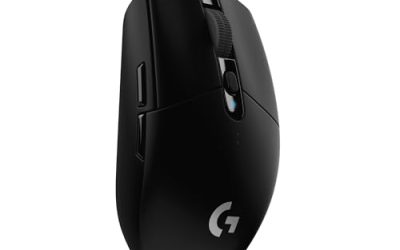
The store listing calls it the Logitech G900 Chaos Spectrum Professional Grade Wired/Wireless Gaming Mouse, Ambidextrous Mouse. It was built to show that a wireless mouse could match a wired one, and reviewers at the time agreed that it did. It remains a recognizable design with a symmetrical body, and it is easy to confuse with the G903, which is the improved follow-up.
- Connection: Wired or wireless
- Sensor: PMW3366, up to 12,000 DPI
- Weight: 107 g
- Shape: Ambidextrous
Best for: Players who want a flexible, symmetrical mouse and a proven sensor.
Skip if: You want an ultralight mouse or a battery that lasts for weeks.
Pros: Accurate sensor; wired or wireless; ambidextrous; strong switches; wireless speed matches wired in reviews. Cons: 107 g is heavy by today’s standards; battery life is short; sits low in the palm for some hands; older design.
How It Plays
Sensor and tracking
The PMW3366 was one of the most respected sensors of its generation and is still accurate for competitive play. The 12,000 DPI ceiling is lower than the 25K and higher numbers on newer mice, but those numbers rarely matter: most players use 400 to 1,600 DPI.
Wireless latency
GamersNexus found that wireless mice can respond as quickly as wired ones, if not faster, and the G900 was an early proof of that. The 1 ms report rate applies on both wired and wireless connections, which means you do not give up speed by cutting the cable.
Weight and handling
At 107 g, the G900 is lighter than the Logitech G502 at 121 g, but heavier than the ultralight mice that dominate esports today. Players who like a planted feel will enjoy it. Players used to 60 g mice will find it slow to flick.
Battery life
The maker claims about 24 hours of continuous use with default lighting and 32 hours with the lights off, from a 720 mAh battery that charges in about two hours. Some reviewers found the claims held up; one reported roughly 16 hours of work and 10 to 12 hours of gaming with lighting on. Color-cycling lighting can cut about 30 percent of battery life. In practice, plan to charge it every few days, or run it wired.
Comfort
Reviewers noted the mouse sits low in the palm and is not as comfortable as an ergonomic shape for long sessions. Palm-grip players with larger hands may want a taller mouse. Claw and fingertip grips fit it better.
Why the G900 Mattered
When it launched, many players believed wireless mice added lag and were only suitable for office work. The G900 set out to change that with a 1 ms report rate over wireless and a sensor that matched the best wired mice. Reviewers measured wireless response and found it as fast as wired, which helped move esports players toward wireless mice.
That history is why it still shows up in searches. Many players remember it as the mouse that proved wireless could work, and it has a loyal following among ambidextrous and left-handed players who had few options at the time.
Design, Buttons and Lighting
The body is symmetrical, with a low profile and a smooth shell. The store listing calls it ambidextrous. For the exact number of buttons and how the side buttons work, check the maker page for your unit, because layout details differ by version and we did not verify them for this review.
The name Chaos Spectrum refers to the RGB lighting. Lighting uses battery, and reviewers found that color-cycling effects cut about 30 percent of run time. If you want the longest wireless use, turn the lights down or off. The maker’s 32 hour figure is for lights off.
The Omron switches are rated for 20 million clicks. That is the maker rating, not a measured lifespan, but it points to durable switches. The two-year warranty was short for a premium mouse when it launched, according to TechSpot, so check the current warranty terms where you buy.
Setting It Up
- Charge the mouse fully before first use, which takes about two hours.
- Plug in the receiver and keep it close to the mouse, preferably on a short extension on the desk rather than the back of a PC case.
- Install Logitech’s software from the maker page to set DPI levels, buttons and lighting.
- Pick a DPI between 400 and 1,600 to start, then adjust to your sensitivity.
- Run the mouse wired when the battery is low, since it works while charging.
Performance by Game Type
Tactical shooters
The accurate sensor and fast report rate suit tactical shooters, but 107 g is heavier than the mice most pros use now. If you play at a high rank and rely on quick flicks, a lighter mouse will help more than the G900’s wireless speed.
Battle royale and open-world action
The planted feel is an advantage for tracking and for smooth camera control. Wireless freedom helps on a wide desk setup.
Strategy, MOBA and general desktop use
The G900 works as a general mouse as well. The battery is the main limit, and running it wired solves that.
Left-handed play
The ambidextrous body is the strongest reason to buy it. Left-handed players often have few shapes to choose from, and the G900 and the G903 are both options.
Grip and Hand Size
At roughly 130 mm long and 67 mm wide, the G900 suits small to large hands in claw and fingertip grips. Palm-grip users with large hands may find it low. Reviewers described it as sitting low in the palm, which supports that view. If you are unsure, compare the length with a mouse you already use.
Care, Battery and Longevity
- Battery: Lithium-polymer cells wear with age. A used G900 may hold far less charge than a new one.
- Switches: Double-click problems can appear on older mice. Test a new unit within the return window.
- Feet: Replace worn feet to keep glide consistent.
- Receiver: Keep the receiver and cable. A lost receiver is harder to replace than it looks, and third-party receivers sold for the G900 may not be a safe match, so check the maker.
- Storage: Charge to a partial level before putting the mouse away for months.
How Heavy Is 107 g?
| Weight class | Typical range | Where the G900 sits |
|---|---|---|
| Ultralight | Under about 60 g | Well above |
| Light | 60 to 80 g | Above |
| Standard | 80 to 100 g | Slightly above |
| Heavy | Over 100 g | Inside this class |
For many players, 107 g feels fine for general use and slow for fast flicking. If you are curious about going lighter, step down one weight class at a time and give each mouse about a week.
Mousepad and Desk Setup
A heavier mouse like the G900 glides well on most cloth pads, and the feet are large enough to work on hard pads too. A wireless mouse benefits from a clear line between the receiver and the mouse, so avoid placing the receiver behind a metal case or a monitor stand. A short extension cable on the desk usually solves interference and range problems.
If you use the mouse wired, a mouse bungee keeps the cable from dragging. Many players prefer the wireless mode for exactly that reason, and use the cable only when the battery is low.
What to Check Before You Buy
Is it new?
Because the G900 is an older model, listings may include used or renewed units. A used mouse can have a tired battery and worn switches. For a wireless mouse with a built-in battery, condition matters more than usual.
Is the title exact?
Some listings include the words G900, Chaos Spectrum, or both, and some are for accessories such as receivers. Make sure the title names the mouse itself and not just a part.
What does the return window allow?
Because comfort is personal, a mouse you cannot return is a risk. Look for a window long enough to use it for several days of real play.
Do you need wireless?
If you never use the wireless mode, a wired mouse of the same shape would be lighter and cheaper. The G900’s main value is the choice of both modes.
G900 Compared With Newer Wireless Mice
Newer wireless mice improved on the G900 in three ways: lower weight, longer battery life and faster charging over USB-C. Many current flagships weigh half as much, run for weeks on a charge and offer very high polling rates. The G900 matches them on sensor accuracy and wireless response in everyday play, which is why it still gets recommended for the shape.
If you value shape above everything else, the G900 or the G903 are the choices. If you value speed, battery and weight, pick a current mouse and accept a different shape. If you are not sure, start by measuring your hand and checking which grip you use, then pick the mouse whose length and height match.
Common Names for This Mouse
You may see the mouse listed as the Logitech G900, G900 Chaos Spectrum, Chaos Spectrum wireless gaming mouse or Logitech G900 wireless. All of them refer to the same mouse. The G903 is a separate, newer model, and a G900 USB receiver is an accessory, not the mouse.
Who Should Buy It
- Left-handed or ambidextrous players who want a wireless mouse with a symmetrical body.
- Players who want to use a mouse wired when needed and wireless when they want freedom.
- Owners of an older G900 who need a replacement of the same shape.
Who Should Skip It
- Players who want an ultralight mouse for fast flicks.
- Anyone who wants battery life measured in weeks.
- Buyers who want USB-C charging and a current warranty period.
- Anyone looking at a used or heavily worn unit; the switches and battery age with time.
Current Alternatives to the G900
Logitech G903 Lightspeed: The Direct Successor
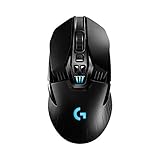
The G903 keeps the ambidextrous shape and adds a longer battery life and Powerplay wireless charging compatibility. The listing names a 140 plus hour rechargeable battery, Lightsync RGB, a 107 g body with a 10 g optional weight, and an ambidextrous design.
- Battery: 140+ hours listed
- Weight: 107 g plus a 10 g optional weight
- Charging: Powerplay compatible
Best for: Players who like the G900 shape and want better battery life.
Skip if: You want a lighter mouse.
Pros: Much longer listed battery life; same ambidextrous shape; Powerplay compatibility. Cons: Same 107 g weight; premium tier; older design.
Other options
- Logitech G305 Lightspeed: Listed with a Hero 12K sensor, six programmable buttons and 250 hours of battery life. A light, low tier wireless mouse for players who do not need the G900 shape.
- Logitech G703 Lightspeed: Listed with a Hero 25K sensor, Powerplay compatibility and 95 g with a 10 g optional weight. A right-handed wireless option.
- Logitech G502 Lightspeed: Listed with adjustable weights, 11 programmable buttons and Powerplay compatibility. Choose it for buttons rather than shape.
- Logitech G Pro X Superlight 2: A current premium esports mouse with LIGHTFORCE hybrid switches and a HERO 2 sensor. Check the maker for weight.
G900 vs G903 at a Glance
| Feature | G900 Chaos Spectrum | G903 Lightspeed |
|---|---|---|
| Weight | 107 g | 107 g plus 10 g optional |
| Battery (maker claim) | 24 hours, 32 with lights off | 140+ hours listed |
| Wireless charging | No | Powerplay compatible |
| Shape | Ambidextrous | Ambidextrous |
| Best for | Classic shape, wired or wireless | Same shape with better battery |
Buying Checklist for an Older Mouse
- Confirm the exact model. G900 and G903 look similar. Match the title and the maker’s naming.
- Check the condition. Skip used and renewed units if you want a fresh battery and switches.
- Check what is in the box. A wireless mouse needs its receiver and cable. Separate receivers sold by third parties may not be a safe substitute.
- Watch the tier. If an older mouse is priced like a current flagship, a current model is the better buy.
- Look at returns. Shape fit is personal.
How We Evaluated This Mouse
This is a research-based review. We did not use the mouse ourselves. We compared the store listing with the maker’s figures and editorial reviews from sites such as TechPowerUp, TechSpot, Neowin and GamersNexus, and marked any figure that sources disagreed on.
Frequently Asked Questions
What is the Logitech G900 Chaos Spectrum?
It is an ambidextrous wired and wireless gaming mouse from Logitech with a PMW3366 sensor, a 107 g body and an up to 12,000 DPI range.
How much does the G900 weigh?
The mouse alone weighs 107 grams, about 14 grams lighter than the G502 at 121 grams.
How long does the G900 battery last?
Logitech claims about 24 hours with default lighting and 32 hours with lights off. Reviewers reported somewhat shorter real-world use with lighting on.
Can I use the G900 wired?
Yes. It works as a wired mouse while charging, and the report rate is 1 ms on both wired and wireless.
Is the G900 good for left-handed players?
Yes. The body is ambidextrous, which is its main advantage over many right-handed shapes.
Is the G900 still worth buying?
Only if you want the shape and find a new unit at a fair tier. For most players, a G903 or a lighter current mouse is a better choice.
Does the G900 have a USB-C port?
The listing does not mention USB-C. Check the maker page for the port type on your unit before ordering a cable.
Is the G900 better than the G502?
It depends on what you want. The G900 is ambidextrous and wireless; the G502 has more buttons and adjustable weights. Choose by shape and buttons, not by sensor.
Can I replace the G900 battery?
Check the maker page. Battery replacement is not something to rely on for an older mouse, so factor battery age into the purchase.
Does the G900 work on Mac?
Check the maker page for current software and operating system support. The mouse itself works as a standard pointing device, but customization may need Logitech software.
What replaced the G900?
The G903 Lightspeed is the direct successor with the same ambidextrous shape and a longer listed battery life.
Is the G900 good for FPS games?
Yes for accuracy and wireless speed. Its 107 g weight is heavier than most esports mice, so fast flick players may prefer a lighter model.
Final Recommendation
The G900 Chaos Spectrum was ahead of its time and still plays well. Its weight and battery life show their age, so the best buy today is usually the G903 for the same shape, or a lighter modern mouse if you want faster flicks.
Sources
- TechPowerUp, Logitech G900 Chaos Spectrum review
- TechSpot, Logitech G900 Chaos Spectrum review
- Neowin, Logitech G900 Chaos Spectrum review
- GamersNexus, G900 review and analysis
- Store listings for each named mouse
Last updated: November 2026
FAQ
Is it new?
Is the title exact?
What does the return window allow?
Do you need wireless?
What is the Logitech G900 Chaos Spectrum?
How much does the G900 weigh?
How long does the G900 battery last?
Can I use the G900 wired?
More from Amazon
Programs that pair well with the guide above. Offers and eligibility are set by Amazon and may change.
Free shipping on eligible items, Prime Video and more. Eligible new members can start with a free trial.
Start a Prime free trialAd-free music streaming. Eligible new subscribers can start with a free trial.
Try Music Unlimited freeA Prime membership for ages 18-24 with a trial period. Eligibility is set by Amazon.
See Prime for Young AdultsAudiobooks and podcasts to listen to on the go. Eligible new members can start with a free trial.
Try Audible freeAs an Amazon Associate we earn from qualifying purchases.