Our Top Picks

A good capture card sits between a console and a computer, taking the video signal from the console and sending it to streaming or recording software. The right one depends on the resolution and refresh rate of the display, the capture resolution the stream needs, and whether the setup uses a single PC or a dedicated streaming PC. For most streamers, the Elgato 4K X is the strongest overall pick, thanks to its HDMI 2.1 connection and capture up to 4K at 144 frames per second. The AVerMedia Live Gamer Ultra 2.1 is a close second for high-refresh play, the Elgato HD60 X and HD60 S+ cover 1080p and 4K60 streaming at more accessible tiers, and the Razer Ripsaw HD is a straightforward budget option for 1080p60 capture.
As an Amazon Associate, we earn from qualifying purchases.
Table of Contents
- At a Glance
- Elgato 4K X
- AVerMedia Live Gamer Ultra 2.1 GC553G2
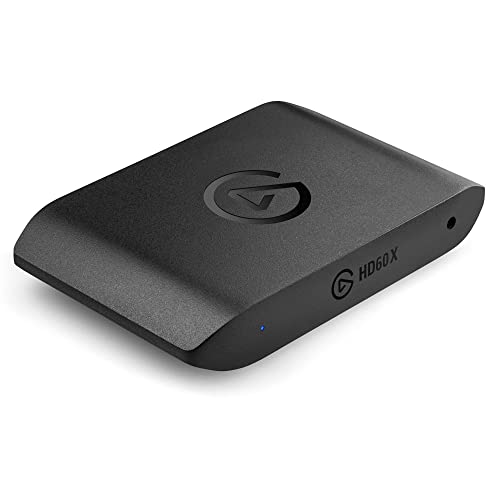
- Elgato HD60 X
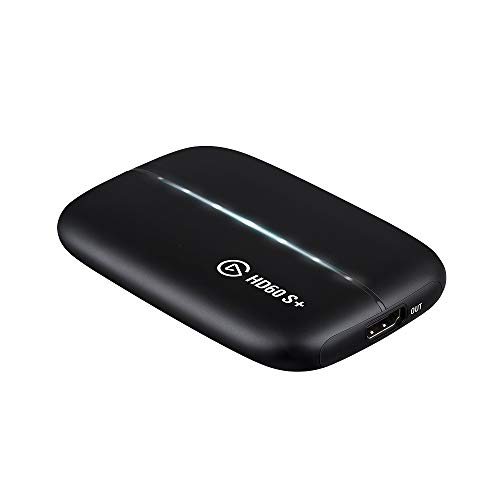
- Elgato HD60 S+
- Razer Ripsaw HD
- How to Choose a Gaming Capture Card
- Frequently Asked Questions
- Conclusion
- Product and ASIN Reference
At a Glance
- Elgato 4K X — Premium pick for 4K144 capture with HDMI 2.1 and VRR support.
- AVerMedia Live Gamer Ultra 2.1 GC553G2 — Premium pick for 4K144 passthrough and 4K60 capture on Windows.
- Elgato HD60 X — Mid-range pick for 1080p60 HDR10 capture with 4K60 passthrough.
- Elgato HD60 S+ — Mid-range pick for 4K60 HDR10 capture and recording.
- Razer Ripsaw HD — Budget pick for simple 1080p60 capture with 4K60 passthrough.
Elgato 4K X
The Elgato 4K X is the flagship USB capture card in the Elgato lineup, and it is built for players who stream or record at the highest resolutions their consoles and displays can produce. It uses an HDMI 2.1 input and output, which is what allows it to pass through a 4K signal at 144 frames per second while capturing at the same resolution. That combination matters for competitive play, because the game on the monitor stays smooth while the recording keeps the full detail of the source.
Capture reaches up to 4K at 144 frames per second, or 1080p at 240 frames per second, which covers both high-resolution recording and slow-motion-friendly high-frame-rate footage. Variable refresh rate and HDR10 are supported, so a display with VRR keeps its tear-free output while the card records. The USB connection is USB 3.2 Gen 2, which provides the bandwidth the card needs for uncompressed-style high-resolution capture over a single cable.
Setup follows the usual external capture card pattern. The console connects to the HDMI input, the HDMI output runs to the display, and the USB-C cable connects the card to the computer. It works with PS5 and PS5 Pro, Xbox Series X and S, Nintendo Switch 2, PC, Mac, and iPad, and it works with OBS and other common streaming software.
The card is a premium-tier option, aimed at streamers who already own a 4K display with a high refresh rate and want the capture hardware to match it.
Specs
- Capture: up to 4K144 or 1080p240
- Passthrough: 4K144 with VRR and HDR10 support
- Interface: HDMI 2.1 input and output, USB 3.2 Gen 2
- Model number: 10GBH9901
- Compatibility: PS5 and PS5 Pro, Xbox Series X and S, Nintendo Switch 2, PC, Mac, iPad
- Software support: OBS and other common streaming software
AVerMedia Live Gamer Ultra 2.1 GC553G2
The AVerMedia Live Gamer Ultra 2.1, model GC553G2, is the other HDMI 2.1 capture card in this roundup, and it targets the same high-refresh audience as the Elgato 4K X. Its headline figures are a 4K144 passthrough and 4K60 capture, with capture up to 4K144 on Windows when used with AVerMedia Streaming Center. On macOS, capture reaches up to 4K60, with HDR capture available on Windows.
Passthrough is generous. It supports 4K144 with HDR and VRR, 1440p240 with HDR and VRR, and 1080p360 with HDR and VRR, along with ultrawide resolutions such as 3440 by 1440 and 2560 by 1080. That range makes it a good match for players who run an ultrawide or high-refresh monitor and want the display signal untouched while the stream records at 4K60.
The card connects over USB 3.2 Gen 2 Type-C at 10 gigabits per second, and it carries two HDMI 2.1 ports, one for input and one for output. It also includes a 3.5 millimeter headset audio jack and a 3.5 millimeter gamepad audio jack, which help with routing party chat and game audio into the stream. A customizable RGB light bar runs along the body of the card, which fits a setup where the capture hardware sits on the desk in view of the camera.
Video format support covers YUY2, NV12, RGB24, and P010 for HDR. It works as a standard USB video class device, and AVerMedia provides Streaming Center on Windows, an OBS plugin, and a firmware update tool through Assist Central Pro. The box includes the capture card, an HDMI 2.1 cable, a USB 3.2 Gen 2 Type-C cable, a 4-pole 3.5 millimeter audio cable, and a quick start guide.
Specs
- Capture: up to 4K144 on Windows, up to 4K60 on macOS
- Passthrough: 4K144 HDR and VRR, 1440p240 HDR and VRR, 1080p360 HDR and VRR
- Interface: HDMI 2.1 input and output, USB 3.2 Gen 2 Type-C
- Audio: 3.5 millimeter headset jack and 3.5 millimeter gamepad jack
- Formats: YUY2, NV12, RGB24, P010 for HDR
- Weight: 115 grams
- In the box: HDMI 2.1 cable, USB 3.2 Gen 2 Type-C cable, 3.5 millimeter audio cable, quick start guide
- Model number: GC553G2
Elgato HD60 X
The Elgato HD60 X is the mid-range workhorse of the Elgato range, and it is the card most streamers will recognize first. It captures in 1080p60 with HDR10, or in 4K30, and it passes through a 4K60 HDR10 signal with variable refresh rate. That combination covers the two most common streaming setups: a 1080p60 stream from a 4K console, and a 4K recording from a console that outputs at 30 frames per second.
Latency is kept low, which matters when the player watches the game through the capture preview rather than through a separate display path. The card connects over USB-C and works with PS5 and PS5 Pro, PS4 and PS4 Pro, Xbox Series X and S, Xbox One X and S, Nintendo Switch 2, PC, and Mac. It works in OBS and other common streaming and recording software, so it fits into an existing setup without a change of tools.
The HD60 X is a good fit for streamers who play on a current-generation console at 4K but stream at 1080p, which is still the most common streaming resolution. The HDR10 capture keeps bright highlights and deep shadows in the recording, and the VRR passthrough keeps the display smooth for the player. One point to check before buying is availability: a listing check in mid-November 2026 showed the card as unavailable on Amazon at that time, so stock should be confirmed before planning a build around it.
Specs
- Capture: 1080p60 HDR10 or 4K30
- Passthrough: 4K60 HDR10 with VRR
- Interface: HDMI input and output, USB-C
- Latency: ultra-low latency design
- Model number: 10GBE9901
- Compatibility: PS5 and PS5 Pro, PS4 and PS4 Pro, Xbox Series X and S, Xbox One X and S, Nintendo Switch 2, PC, Mac
- Software support: OBS and other common streaming software
Elgato HD60 S+
The Elgato HD60 S+ sits just below the HD60 X in the Elgato range, and it is the card to pick when 4K60 capture matters more than the highest passthrough refresh rates. It captures in 1080p60 with HDR10, or in 4K60 with HDR10, and it passes through a 4K60 HDR10 signal. That makes it a strong choice for recording 4K gameplay at full frame rate while streaming at 1080p60.
Like the HD60 X, it is an external USB card with ultra-low latency, so the game feed reaches the computer quickly enough for live commentary and reaction-based streaming. It works with PS5, PS4 and PS4 Pro, Xbox Series X and S, Xbox One X and S, PC, and Mac, and it works in OBS, Twitch, and YouTube workflows. The card is compact and draws its power over USB, so it needs no separate power adapter on the desk.
Specs
- Capture: 1080p60 HDR10 or 4K60 HDR10
- Passthrough: 4K60 HDR10
- Interface: HDMI input and output, USB
- Latency: ultra-low latency design
- Model number: 10GAR9901
- UPC: 840006609292
- Compatibility: PS5, PS4 and PS4 Pro, Xbox Series X and S, Xbox One X and S, PC, Mac
- Software support: OBS, Twitch, YouTube, and other common streaming software
Razer Ripsaw HD
The Razer Ripsaw HD is the budget pick in this roundup, and it keeps the feature list short on purpose. It captures in 1080p60 and passes through a 4K60 signal, which is enough for a streamer whose audience watches at 1080p and whose console plays at 4K. It uses HDMI 2.0 for input and output and connects to the computer over USB-C.
Audio handling is the card’s most useful extra. It includes a 3.5 millimeter audio input for mixing, with mic monitoring, so a streamer can bring microphone audio into the capture path and hear the mix while playing. It works with OBS Studio, Streamlabs OBS, and XSplit, and it uses Razer Synapse 3 for drivers and firmware. The card measures 4.14 by 3.35 by 0.63 inches, so it fits easily on a crowded desk or in a travel bag for a portable streaming kit.
There are two limits to know before buying. First, HDR support is not listed for this card, so console HDR output should be turned off before capture, or the recorded image can look washed out. Second, 4K capture is not supported; the 4K60 figure applies to passthrough only, and recording stays at 1080p60.
Specs
- Capture: 1080p60
- Passthrough: 4K60 or 1080p60
- Interface: HDMI 2.0 input and output, USB-C
- Audio: 3.5 millimeter audio mixing input with mic monitoring
- Latency: under 60 milliseconds on passthrough
- Dimensions: 4.14 by 3.35 by 0.63 inches
- Model number: RZ20-02850100-R3U1
- Software support: OBS Studio, Streamlabs OBS, XSplit, Razer Synapse 3 for drivers and firmware
- HDR support: not listed
How to Choose a Gaming Capture Card
Start with the display. If the monitor or television runs at 4K and 120 frames per second or higher, the capture card needs an HDMI 2.1 passthrough to match it, which points to the Elgato 4K X or the AVerMedia Live Gamer Ultra 2.1. If the display runs at 4K60, any card in this roundup passes the signal through without a problem.
Next, decide the capture resolution. Streaming at 1080p60 is the most common choice, and every card here handles it. Recording at 4K60 needs the Elgato 4K X, the AVerMedia GC553G2, or the Elgato HD60 S+. Recording at 4K144 is only possible with the two HDMI 2.1 cards, and only on Windows for the AVerMedia card.
Consider the computer as well. A dedicated streaming PC with a free USB 3.2 port gets the most from the premium cards, while a laptop with a single USB-C port works well with any of the external cards here.
Check HDR and VRR support against the console settings. The Elgato cards and the AVerMedia card support HDR10 capture or passthrough, while the Razer Ripsaw HD does not list HDR support, so HDR should be turned off on the console when using it. VRR passthrough is listed for the Elgato 4K X, the AVerMedia GC553G2, and the Elgato HD60 X.
Frequently Asked Questions
Do I need a capture card to stream PC games?
No. PC games can be captured directly by streaming software on the same computer, using the graphics card’s built-in encoding. A capture card is mainly needed when the game runs on a separate device, such as a console, a handheld, or a second PC, and the video signal has to reach the streaming computer.
What is the difference between passthrough and capture resolution?
Passthrough is the signal the card sends to the display, so the player sees the game at full quality. Capture resolution is the signal the card sends to the computer for streaming or recording. A card can pass through 4K60 to the display while capturing at 1080p60, which is how most console streamers run a 4K game with a 1080p stream.
Can a capture card record gameplay without streaming?
Yes. Streaming software such as OBS can record to a local file without going live, and some capture cards also work with recording software that saves footage directly. The recording resolution and frame rate depend on the card’s capture limits and on the storage speed of the computer.
Does a capture card add delay to the game?
A capture card adds a small amount of delay to the signal that reaches the computer, but the passthrough signal to the display is designed to stay close to real time. Playing from the display connected to the card’s HDMI output, rather than from the capture preview on the computer, keeps the game responsive.
Conclusion
The best gaming capture card is the one that matches the display and the stream. The Elgato 4K X leads the roundup for high-refresh 4K streaming and recording, and the AVerMedia Live Gamer Ultra 2.1 is a strong alternative for the same HDMI 2.1 setups. The Elgato HD60 X and HD60 S+ cover the middle ground well, with the HD60 X favoring VRR passthrough and the HD60 S+ favoring 4K60 capture. The Razer Ripsaw HD rounds out the list as a budget pick for straightforward 1080p60 streaming.
FAQ
Do I need a capture card to stream PC games?
What is the difference between passthrough and capture resolution?
Can a capture card record gameplay without streaming?
Does a capture card add delay to the game?
More from Amazon
Programs that pair well with the guide above. Offers and eligibility are set by Amazon and may change.
Free shipping on eligible items, Prime Video and more. Eligible new members can start with a free trial.
Start a Prime free trialAd-free music streaming. Eligible new subscribers can start with a free trial.
Try Music Unlimited freeA Prime membership for ages 18-24 with a trial period. Eligibility is set by Amazon.
See Prime for Young AdultsAudiobooks and podcasts to listen to on the go. Eligible new members can start with a free trial.
Try Audible freeAs an Amazon Associate we earn from qualifying purchases.