Our Short List of 3

- Best for: A frequently rewritten bulk drive in a desktop, or a like-for-like Seagate replacement.
- Capacity: 1 TB
- Form factor: 3.5 inch
- Interface: SATA 6 Gb/s
- Rotational speed: 7200 RPM

- Best for: Upgrading a laptop or older desktop that only has SATA connections.
- Capacity: 1 TB
- Form factor: 2.5 inch
- Interface: SATA III (Serial ATA-600)
- Sequential read: up to 560 MB/s
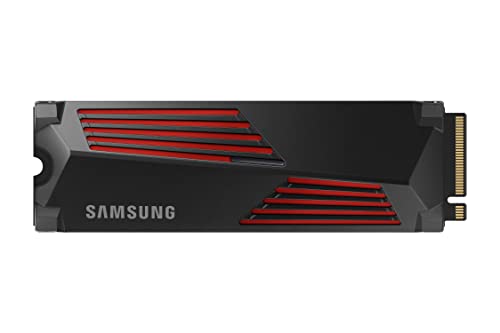
- Best for: Buyers who want the fastest rated 1TB NVMe drive here for a gaming PC or PS5.
- Capacity: 1 TB
- Form factor: M.2 2280
- Interface: PCIe 4.0, NVMe
- Sequential read: up to 7,450 MB/s
All 3 Picks at a Glance
| Product | Specs | Action |
|---|---|---|
| Seagate BarraCuda 1TB Internal Hard Drive HDD |
| Check price on Amazon |
| Crucial MX500 1TB 3D NAND SATA 2.5 Inch Internal SSD |
| Check price on Amazon |
| Samsung 990 PRO Heatsink SSD 1TB |
| Check price on Amazon |
Our Top Picks
A 1TB internal drive is the size most PC owners land on when a build needs a boot drive, a game library drive, or a cheap second bay filled — but 1TB on the box says nothing about how the drive connects or how fast it moves data. At this capacity you will find spinning SATA hard drives, 2.5-inch SATA SSDs and M.2 NVMe drives sharing the same shelf space, and picking the wrong family means either a drive that does not fit your board or speed you paid for and never see.
This guide groups the five picks by connection type so the split stays honest: two mechanical SATA drives for inexpensive bulk storage, one 2.5-inch SATA SSD for older desktops and laptops, and two PCIe Gen4 NVMe drives for gaming builds. Every pick is a 1TB internal drive sold on Amazon, and each one was chosen from its listing’s stated interface, form factor and rated speeds rather than brand reputation alone.
Quick Picks
As an Amazon Associate we earn from qualifying purchases
| Product | Best for | Key spec from title |
|---|---|---|
| Western Digital 1TB WD Blue PC Internal Hard Drive HDD | Everyday desktop storage | 7200 RPM, SATA 6 Gb/s, 3.5 inch |
| Seagate BarraCuda 1TB Internal Hard Drive HDD | A second bulk drive in a desktop | 7200 RPM, 64 MB cache, 3.5 inch |
| Crucial MX500 1TB 3D NAND SATA 2.5 Inch Internal SSD | Reviving an older PC or laptop | SATA 2.5 inch, up to 560 MB/s |
| WD_BLACK SN850X 1TB NVMe SSD with Heatsink | Gaming builds with a Gen4 slot | Gen4 NVMe, up to 7,300 MB/s, heatsink |
| Samsung 990 PRO Heatsink SSD 1TB | The fastest single drive on this list | Gen4 NVMe, up to 7,450 MB/s, heatsink |
How to Choose
Start With the Connector Your PC Actually Has
Internal drives split into two connector families, and the wrong one simply will not plug in. SATA drives use the same data and power cables that PCs have carried for years, so any desktop with a spare bay and any older laptop can take one. NVMe drives skip cables entirely and slot into an M.2 socket on the motherboard, which most boards from recent years include but older systems lack. Check your board’s manual or spec sheet for an M.2 slot before ordering an NVMe drive, and confirm whether that slot supports PCIe Gen4 speeds or only Gen3.
Match the Form Factor to the Bay or Slot
A 1TB label hides three different physical shapes. The two mechanical picks here are 3.5-inch drives that need a full-size desktop bay, so they are desktop-only parts. The Crucial MX500 uses the 2.5-inch shape that fits laptop bays, small-form-factor cases and desktop bays with a simple bracket. Both NVMe picks are M.2 2280 sticks, 22 mm wide and 80 mm long, which is the size nearly every desktop M.2 slot and the PS5 expansion bay accept. Measure the space you actually have, especially in compact cases where a 3.5-inch cage may already be full.
Decide How Much Speed Your Workload Uses
Rated speeds climb steeply across the three families in this guide. The mechanical drives move data at hard-drive pace, which is fine for photo libraries, backups and game installs you load occasionally. The MX500 reads at up to 560 MB/s, close to the SATA ceiling, and that jump is what makes an old PC feel responsive again. The two NVMe drives read at up to 7,300 MB/s and 7,450 MB/s, which shortens game load times and large file transfers, but only when the slot runs at Gen4; in a Gen3 slot they fall back to roughly half their rated speed.
Check the Details That Bite Later
Small print decides whether an install takes ten minutes or turns into a second order. Bare SATA drives ship without cables, so confirm you have a spare SATA data cable and a free power connector. The ST1000DM010 BarraCuda uses CMR recording, which handles repeated rewrites more predictably than SMR designs if the drive will be written to often. Both NVMe picks include a heatsink, which adds height — check clearance under a graphics card or inside a console bay. Finally, a fresh drive arrives unformatted, so budget time to initialize it in your operating system before it appears as usable space.
The 5 Best Options
Western Digital 1TB WD Blue PC Internal Hard Drive HDD
The WD Blue WD10EZEX is the default answer when a desktop simply needs another terabyte of honest spinning storage. It spins at 7200 RPM with a 64 MB cache on a SATA 6 Gb/s connection, a combination that suits documents, media folders and a secondary game library better than it suits a modern boot drive. Buyers adding space to an office PC, a family computer or a home server that stays on all day will find its spec sheet matches that workload exactly. It is a bare internal drive, so expect to supply your own cables and mounting screws.
Specs
- Capacity: 1 TB
- Form factor: 3.5 inch
- Interface: SATA 6 Gb/s
- Rotational speed: 7200 RPM
- Cache: 64 MB
- Model number: WD10EZEX
- Item weight: 440 grams
Best for: Desktop owners who need a full extra terabyte for files and media at hard-drive pace.
Watch out for: It is a desktop-only 3.5-inch drive — it will not fit a laptop bay, and it is a poor choice as a modern Windows boot drive.
ASIN: B0088PUEPK
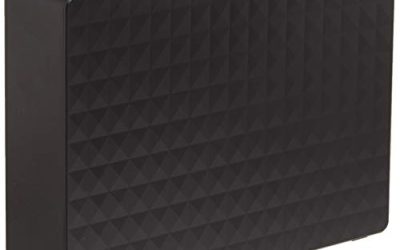
Seagate BarraCuda 1TB Internal Hard Drive HDD
- Best for: A frequently rewritten bulk drive in a desktop, or a like-for-like Seagate replacement.
- Capacity: 1 TB
- Form factor: 3.5 inch
- Interface: SATA 6 Gb/s
- Rotational speed: 7200 RPM
A frequently rewritten bulk drive in a desktop, or a like-for-like Seagate replacement.
This is an older model sold through marketplace sellers on Amazon — confirm the listing shows a new drive and the exact ST1000DM010 model before ordering.
The BarraCuda ST1000DM010 gives desktop builders a second mechanical option with the same headline specs as the WD Blue — 1TB, 7200 RPM, 64 MB of cache and SATA 6 Gb/s — in Seagate’s long-running desktop line. This model uses CMR recording rather than SMR, which makes it the better fit when the drive will be rewritten often, such as a working download folder, a DVR-style recording target or a frequently updated backup. It suits builders who already run Seagate drives and want a matching spare, or anyone whose preferred retailer pricing favors this listing on the day they order.
Crucial MX500 1TB 3D NAND SATA 2.5 Inch Internal SSD
- Best for: Upgrading a laptop or older desktop that only has SATA connections.
- Capacity: 1 TB
- Form factor: 2.5 inch
- Interface: SATA III (Serial ATA-600)
- Sequential read: up to 560 MB/s
Upgrading a laptop or older desktop that only has SATA connections.
A desktop with a 3.5-inch bay needs a 2.5-inch mounting bracket, and SATA caps this drive well below NVMe speeds no matter how fast the SSD itself is.
The MX500 is the pick that makes an aging machine feel new again, because it drops into the same 2.5-inch SATA bay as the hard drive it replaces. Its listing rates sequential reads at up to 560 MB/s and writes at up to 510 MB/s, close to the practical SATA limit, so Windows boots, application launches and file copies all move at the fastest pace a SATA connection allows. Laptop owners with a spinning drive, desktop users with an older SATA-only board, and anyone cloning a system onto solid state without changing connectors will get the most from it.
WD_BLACK SN850X 1TB NVMe SSD with Heatsink
The SN850X is built for gaming PCs, and this listing is the heatsink version, which matters for sustained loads under a hot graphics card and for console expansion bays that require one. Western Digital rates it at up to 7,300 MB/s reads and up to 6,300 MB/s writes over a PCIe Gen4 x4 connection, and the drive supports Game Mode 2.0 through the WD_BLACK Dashboard on Windows. Builders assembling a Gen4 gaming rig, or players who want one fast drive for the operating system and the current game library together, are the audience this model was designed for.
Specs
- Capacity: 1000 GB
- Form factor: M.2 2280
- Interface: PCIe Gen4 x4, NVMe
- Sequential read: up to 7,300 MB/s
- Sequential write: up to 6,300 MB/s
- Heatsink: included
- Model number: WDS100T2XHE
Best for: Gaming desktops with a Gen4 M.2 slot, and PS5 owners who need a heatsink fitted from the factory.
Watch out for: The heatsink adds height, so check clearance in tight laptop bays — this version is aimed at desktops and consoles, and a Gen3 slot will cap its speed.
ASIN: B0B7CPSN2K
Samsung 990 PRO Heatsink SSD 1TB
- Best for: Buyers who want the fastest rated 1TB NVMe drive here for a gaming PC or PS5.
- Capacity: 1 TB
- Form factor: M.2 2280
- Interface: PCIe 4.0, NVMe
- Sequential read: up to 7,450 MB/s
Buyers who want the fastest rated 1TB NVMe drive here for a gaming PC or PS5.
Several similar 990 PRO listings exist with and without the heatsink — verify the model number MZ-V9P1T0CW on the listing so you get the heatsink version you intended.
The 990 PRO carries the highest rated read speed in this guide at up to 7,450 MB/s, and this heatsink model (MZ-V9P1T0CW) is the version Samsung positions for PlayStation 5 expansion as well as high-end PCs. It runs on a PCIe 4.0 NVMe connection in the standard M.2 2280 size, so it drops into the same slots as the SN850X while edging it on headline read speed. Creators who move large video files, gamers chasing the shortest load screens, and builders who simply want the fastest 1TB stick on this page should start here and compare the day’s listings.
Which One Fits Your Situation
You Are Filling a Spare Bay With Bulk Storage
Choose between the WD Blue WD10EZEX and the Seagate BarraCuda ST1000DM010. Both are 3.5-inch, 7200 RPM SATA drives with 64 MB caches, so the deciding factors are rewrite habits and the day’s listing. Pick the BarraCuda if the drive will be rewritten constantly, thanks to its CMR recording, and the WD Blue for a general-purpose media and documents bay.
You Are Reviving an Older Desktop or Laptop
The Crucial MX500 is the only pick here that fits a 2.5-inch laptop bay, and its SATA connection matches the boards in older machines exactly. Replacing a spinning drive with the MX500 is the single change that makes an old system start faster and feel responsive again, with no new cables or adapters beyond a possible desktop mounting bracket.
You Are Building a Gaming PC Around a Gen4 Slot
Take the WD_BLACK SN850X with heatsink. Its 7,300 MB/s rated read speed, factory-fitted heatsink and Game Mode 2.0 support are aimed squarely at gaming rigs, and the heatsink keeps speeds steadier during long installs and play sessions in a warm case. Confirm your motherboard’s M.2 slot runs at Gen4 before paying for Gen4 speed.
You Want the Fastest Drive for Games and Creation Work
The Samsung 990 PRO heatsink model tops this list on rated reads at up to 7,450 MB/s, which suits large game installs and heavy file work alike. It also fits the PS5 expansion bay with its heatsink already fitted. If its listing is unavailable on the day you shop, the SN850X above is the natural substitute at nearly the same speed.
Common Mistakes
- Ordering an M.2 NVMe drive for a motherboard that has no M.2 slot, or only a SATA-only M.2 slot that rejects NVMe drives.
- Buying a 3.5-inch desktop hard drive for a laptop, when only 2.5-inch drives and M.2 sticks fit inside a laptop case.
- Installing Windows on a mechanical drive in a new build when a SATA or NVMe SSD in this guide would make the whole system feel faster.
- Forgetting that bare internal drives usually ship without SATA cables, mounting screws or a 2.5-inch to 3.5-inch bracket.
- Expecting a full 1TB of usable space after formatting, when the file system and the manufacturer’s decimal capacity always leave less.
Frequently Asked Questions
Is 1TB enough for a gaming PC in 2026?
For many players, yes. A 1TB NVMe drive like the SN850X or 990 PRO holds the operating system plus a rotating library of large games, and you can add a cheap mechanical drive later for the back catalogue. Players who keep many huge titles installed at once are the ones who outgrow 1TB first.
Can I put a 3.5-inch internal hard drive in a laptop?
No. Laptops accept 2.5-inch drives or M.2 sticks, and a 3.5-inch drive is physically too large and needs more power than a laptop bay provides. From this guide, the Crucial MX500 is the laptop-friendly pick, while the WD Blue and BarraCuda are desktop parts for a full-size bay with SATA power from the supply.
What is the difference between SATA and NVMe at 1TB?
The capacity is identical; the connection is not. SATA tops out near the MX500’s 560 MB/s reads, while the Gen4 NVMe picks here are rated above 7,300 MB/s. In daily use that shows up as faster game loads and file transfers, but only NVMe-ready boards with an M.2 slot can use the faster drives.
Do I need a heatsink on a 1TB NVMe drive?
For short bursts, most NVMe drives manage without one, but sustained writes in a warm case can throttle speed. Both NVMe picks in this guide include a heatsink, which also makes them ready for the PS5 expansion bay, where a heatsink is required. In a desktop, check that the added height clears your graphics card.
FAQ
Is 1TB enough for a gaming PC in 2026?
Can I put a 3.5-inch internal hard drive in a laptop?
What is the difference between SATA and NVMe at 1TB?
Do I need a heatsink on a 1TB NVMe drive?
More from Amazon
Programs that pair well with the guide above. Offers and eligibility are set by Amazon and may change.
Free shipping on eligible items, Prime Video and more. Eligible new members can start with a free trial.
Start a Prime free trialAd-free music streaming. Eligible new subscribers can start with a free trial.
Try Music Unlimited freeA Prime membership for ages 18-24 with a trial period. Eligibility is set by Amazon.
See Prime for Young AdultsAudiobooks and podcasts to listen to on the go. Eligible new members can start with a free trial.
Try Audible freeAs an Amazon Associate we earn from qualifying purchases.