Key takeaways
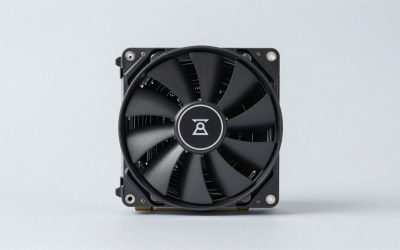
- Dual-tower layout with 6 heat pipes and two 120mm PWM fans
- Fan speed up to about 1550 RPM on this version
- Supports AM4 and AM5, so it carries over to a later platform change
The best CPU cooler for the Ryzen 5 5600X3D is a dual-tower or strong single-tower 120mm air cooler rated for at least 150W, with the Thermalright Peerless Assassin 120 SE as the value pick and the Noctua NH-D15 as the quiet premium pick. The 5600X3D is a 105W chip with no cooler in the box, so you have to buy one.
Quick answer: choose a cooler whose rated capacity sits well above the chip’s roughly 142W peak package power. Budget builds are fine on a four-heat-pipe tower, quiet builds want a dual tower or a 240mm AIO, and tiny cases need a height check before anything else.
Why the Ryzen 5 5600X3D needs more cooler than you might expect
The Ryzen 5 5600X3D is a 6-core, 12-thread Zen 3 processor for the AM4 socket with 3.3 GHz base and 4.4 GHz boost clocks, 96MB of L3 cache and a 105W TDP. It was released in July 2023 as a Micro Center exclusive in the US, and the boxed listing says the heatsink is not included. It has no integrated graphics and officially supports DDR4-3200.
That 105W rating matches the Ryzen 7 5800X3D and is far above the 65W rating of the regular Ryzen 5 5600X. Several reviews of the 5600X3D call this out. It is the reason a cooler that was perfectly fine for a 5600X can feel marginal here. If you searched for “5600x3d” or “ryzen 7 5600x3d”, note that the chip is the Ryzen 5 5600X3D with six cores; the eight-core X3D chip from the same family is the Ryzen 7 5800X3D.
A worked cooler-headroom calculation
On AM4, the socket power limit (PPT) is typically about 1.35 times the TDP. For a 105W chip that works out to roughly 142W, and one public spec database lists the same 142W maximum boost power for the 5600X3D. A cooler rated at exactly the TDP leaves almost no margin, so use the cooler’s own rating to see how hard it would be working at that peak.
| Cooler rated capacity | Load at 142W | What it means |
|---|---|---|
| 150W | about 95% | Works, but fans run near their ceiling during long loads |
| 190W to 200W | about 71% to 75% | Comfortable for gaming with a normal fan curve |
| 250W to 260W | about 55% to 57% | A genuinely quiet fan curve is realistic |
These ratings are manufacturer claims from the product listings, not independent measurements, so treat the table as a comparison tool rather than a promise of a particular temperature. Games rarely pull the full 142W on a six-core chip, which is why even a 200W cooler leaves a lot of room in everyday play. All-core productivity loads such as video encoding are where the peak figure matters.
5600X3D versus 5600X and 5800X3D for cooling
| Chip | Cores / threads | Base / boost | L3 cache | TDP | Cooler in box |
|---|---|---|---|---|---|
| Ryzen 5 5600X | 6 / 12 | 3.7 / 4.6 GHz | 32MB | 65W | Wraith Stealth on the listed retail version |
| Ryzen 5 5600X3D | 6 / 12 | 3.3 / 4.4 GHz | 96MB | 105W | No |
| Ryzen 7 5800X3D | 8 / 16 | not listed here | 96MB | 105W | No |
The 5600X3D trades about 400 MHz of base clock and 200 MHz of boost for the extra cache. That is why it can beat the 5600X in many games while the power limit goes up instead of down. For cooling, the practical lesson is simple: shop for a 5800X3D-class cooler, not a 5600X-class cooler.
Quick comparison of the best coolers for the 5600X3D
| Cooler | Type | Key spec | Best for | Budget tier |
|---|---|---|---|---|
| Thermalright Peerless Assassin 120 SE | Dual-tower air | 6 heat pipes, dual 120mm PWM fans | Best overall value | Low |
| Thermalright Assassin X120 Refined SE | Single-tower air | 4 heat pipes, 120mm PWM fan | Cheapest solid option | Lowest |
| ID-COOLING SE-214-XT V2 | Single-tower air | 200W rating, full memory clearance | RAM clearance worries | Lowest |
| Arctic Freezer 36 | Single-tower air | Two 120mm fans, push-pull | Quiet on a budget | Low |
| be quiet! Pure Rock Pro 3 | Dual-tower air | 250W rating, two silent 120mm fans | Low-noise builds | Mid |
| Noctua NH-D15 | Dual-tower air | 168mm height, 6 heat pipes | Premium quiet cooling | High |
| Cooler Master Elite Liquid 240 | 240mm AIO | AM4 and AM5 support, ARGB | Clear RAM and VRM area | Mid |
The 7 best CPU coolers for the Ryzen 5 5600X3D
1. Thermalright Peerless Assassin 120 SE – best overall value
- Dual-tower layout with 6 heat pipes and two 120mm PWM fans
- Fan speed up to about 1550 RPM on this version
- Supports AM4 and AM5, so it carries over to a later platform change
This is the cooler most builders land on for an AM4 X3D chip, and the reason is straightforward: it brings a dual-tower layout and two fans for the cost of a mid-range single tower. For a 105W part that peaks near 142W, that extra fin area is exactly what keeps the fans from ramping up in long sessions.
Best for: almost every 5600X3D build that wants strong cooling without a premium price. Skip if: your case is narrow or your RAM has tall heat spreaders that collide with the front fan.
Pros: dual-tower performance class, two fans included, widely used on AM4. Cons: large footprint, plain looks, mounting takes a few minutes longer than a small cooler.
2. Thermalright Assassin X120 Refined SE – cheapest solid choice
- Single tower with 4 heat pipes and one TL-C12C PWM fan
- Compact enough for most mid-tower cases
- Sold in plain and ARGB versions
If the 5600X3D already took most of your budget, this tower is the sensible way to cool it without a stock-cooler gamble. It has the least headroom on this list, so plan on a slightly higher fan curve and make sure your case has decent airflow.
Best for: tight budgets where the processor is the biggest purchase. Skip if: you want near-silent operation under long loads, since a single fan works harder at 142W peak.
Pros: very low cost, light, simple install. Cons: least headroom on this list, fan becomes audible in warm rooms.
3. ID-COOLING SE-214-XT V2 – best for RAM clearance on a budget
- Four direct-contact heat pipes with a 120mm fan
- Rated at 200W by the maker
- Marketed with full memory clearance, helpful with tall DDR4 kits
AM4 builds often use older DDR4 kits with tall heat spreaders, and a front fan that sits over the first RAM slot can be a real problem. This cooler is built to avoid that. The 200W rating on the listing also gives it a better paper margin than most cheap towers.
Best for: builders with wide-spreader DDR4 who want a cheap, simple tower. Skip if: you prefer a brand with a long track record in very quiet cooling.
Pros: low cost, strong paper rating, memory-friendly shape. Cons: single fan, less well known than Thermalright or Noctua.
4. Arctic Freezer 36 – best quiet single tower
- Single tower with two pressure-optimised 120mm fans in push-pull
- Fluid dynamic bearing fans
- An A-RGB version exists for lit cases
The push-pull setup lets each fan turn more slowly than the single fan on cheaper towers, and that is how a single-tower cooler stays reasonable for a 105W chip. It is a good middle path when a dual tower is too wide for your case.
Best for: quiet, no-fuss builds where a dual tower will not fit. Skip if: you have very tall RAM and do not want to move the front fan.
Pros: two fans included, fits mid-size cases, easy AM4 mounting. Cons: the front fan can interfere with tall RAM.
5. be quiet! Pure Rock Pro 3 – best low-noise dual tower
- Compact double-tower design rated at 250W
- Two silent 120mm PWM fans
- Black and silver versions exist
With a 250W rating the 142W peak lands near 57% of capacity, which is the zone where a quiet fan curve is realistic. It is the pick for people who build a PC to sit on a desk and not hear it.
Best for: quiet PCs where the large capacity margin keeps the fan percentage low. Skip if: you only need basic cooling and want to spend less.
Pros: large margin, quiet-focused design. Cons: costs more than the Thermalright options for similar real-world results.
6. Noctua NH-D15 – best premium air cooler
- 168mm tall dual-tower cooler with 6 heat pipes
- Low-noise fans and a well-regarded mounting kit
- Black chromax edition available for a darker build
This is the cooler that outlasts the CPU, the board and often the case. For a six-core 105W chip it is more cooler than strictly required, and that is the point: it runs slow and quiet at loads that make smaller towers spin up.
Best for: builders who want a cooler they can move to their next platform. Skip if: your case supports under about 168mm of cooler height, or your RAM sits close to the first fan.
Pros: excellent noise-to-cooling balance, long service life. Cons: expensive for a 105W chip, heavy and large.
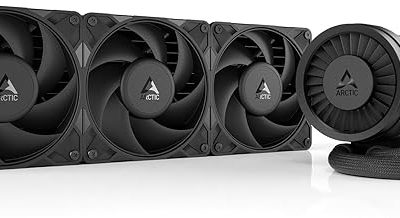
7. Cooler Master Elite Liquid 240 – best 240mm AIO
- 240mm radiator with dual 120mm ARGB fans
- Supports AMD AM4 and AM5 as well as recent Intel sockets
- Clears the area around the RAM and VRM
An AIO makes sense mainly when a tower will not fit or you want the board visible. For a six-core chip it does not cool dramatically better than a good dual tower, so the reasons to pick it are fit and looks rather than a big temperature gap.
Best for: cases with limited cooler height, or builds that show off the board. Skip if: you want the fewest failure points; air is simpler.
Pros: no tower to bump into RAM, works with front-mounted radiators. Cons: pump noise, more parts that can fail.
Air versus liquid for a 5600X3D: what actually changes
The Ryzen 5 5600X3D has six cores, so the heat it makes is concentrated in a small area. Cooler performance on a chip like this depends mostly on how quickly the base and heat pipes pull heat off a small spot, and only secondarily on total radiator or fin area. That is why a well-built 120mm dual tower can sit close to a 240mm AIO in real use, while costing less and having no pump to fail.
| Factor | Dual-tower air | Single-tower air | 240mm AIO |
|---|---|---|---|
| Cooling margin at a 142W peak | High | Moderate | High |
| Noise at gaming load | Low | Low to moderate | Low plus pump hum |
| RAM and board clearance | Needs a check | Usually easier | Clear |
| Failure points | Fans only | Fans only | Pump, tubes, fans |
| Cost for the same cooling | Low | Lowest | Higher |
The ratings in this table are qualitative, drawn from the specifications in the product listings and common reviewer experience, not from our own numbers.
Compatibility checklist before you click buy
- Socket: confirm the listing mentions AM4. All seven picks above do.
- Cooler height: compare the cooler’s height with your case’s stated maximum, in millimetres. The NH-D15 is 168mm, so it is the one most likely to be too tall.
- RAM clearance: tall DDR4 heat spreaders can clash with the first fan of a dual tower. Slide the fan up its fin stack to clear the memory.
- Top PCIe slot: some large towers sit close to the first graphics card slot on small boards. Check the board layout.
- VRM heatsink: make sure the tower does not hang over a tall heatsink on the board’s power section.
- Case panels: side-panel clearance matters as much as height. A dual tower with a thick fan can touch a tempered-glass panel.
What temperature range is normal for the 5600X3D?
We did not record temperature numbers for this guide and will not invent them. What reviewers consistently note is that the 3D V-Cache chips run warmer than non-3D chips at similar power because the stacked cache layer adds resistance between the cores and the cooler. In practice that means the temperature reading looks higher than you might expect from a 6-core chip, even with a good cooler.
A few rules keep expectations realistic:
- A temperature that rises sharply in the first seconds of a load and then flattens is normal for Ryzen.
- Short boost spikes matter less than the average temperature during a long session.
- If the CPU is pegged at its limit and the fan is at full speed, the cooler is undersized, the paste is poorly spread, or the case has no airflow.
- Remount before replacing parts. A poorly seated cooler is the most common cause of a high temperature report.
Thermal paste and mounting pressure
Most of the coolers above ship with a tube of paste. Put a pea-sized dot in the centre of the heat spreader, then lower the cooler straight down. Do not twist it. Tighten each screw a few turns at a time in a diagonal pattern so the pressure is even. If the cooler has a protective plastic film on the base, remove it before mounting. This one step is the most frequent installation mistake and it leads to very high temperatures.
When you move the cooler to a different CPU later, clean the old paste with isopropyl alcohol and a lint-free cloth, then reapply a fresh dot of paste.
Budget planning: where to spend and where to save
The Ryzen 5 5600X3D is a budget-friendly gaming chip, so the cooler should stay in proportion. A sensible split is to spend the lowest tier on a basic tower if the chip and graphics card are your priority, and to step up to a dual tower or the Pure Rock Pro 3 only if noise bothers you. Premium coolers like the NH-D15 make sense when you plan to keep the cooler for several builds. If you expect to move to AM5 within a couple of years, pick a cooler whose AM5 bracket you can obtain.
- Save: on RGB and screens. They add cost without adding cooling.
- Spend: on fans and a larger fin area if the PC lives on a desk next to you.
- Do not skip: the case fans. A weak intake makes any cooler perform worse.
How we chose these coolers
This guide is research-based. We did not use these coolers ourselves. We compared manufacturer specifications from the product listings (heat pipe count, fan size, rated capacity, stated socket support and height), read what editorial reviews of the 5600X3D say about its power and cooling needs, and kept only products that list AM4 support and are sold new.
- Rated capacity of at least about 150W, to cover the roughly 142W peak
- Explicit AM4 support in the listing
- No more than two products from one brand
- A spread of budget air, premium air and one AIO so each case size is covered
Buying guide: how to choose a cooler for a 5600X3D
Match the cooler to your situation
| Your situation | Choose |
|---|---|
| Mid-tower, standard RAM, budget first | Peerless Assassin 120 SE or Assassin X120 Refined SE |
| Tall RAM heat spreaders | SE-214-XT V2, or raise the front fan on a dual tower |
| Quiet PC on a desk | Pure Rock Pro 3 or Noctua NH-D15 |
| Case allows less than about 150mm of cooler | Arctic Freezer 36 (check height) or a 240mm AIO |
| Small form factor build | Check the cooler height first; low-profile coolers struggle with a 142W peak |
Thresholds worth using
- Rated capacity: 150W is the practical minimum, 200W or more is comfortable.
- Heat pipes: 4 is workable, 6 or more suits the 105W 3D chips better.
- Fans: two fans let each run slower, which is the main quiet advantage.
- Height: check your case’s stated CPU cooler clearance in millimetres before buying.
Case airflow matters as much as the cooler
A strong cooler still struggles in a case with a solid front panel and no exhaust fan. Aim for at least one intake fan at the front and one exhaust fan at the back or top. A tower cooler’s fans should push air front to back, in line with the case airflow, so the heat leaves through the rear exhaust.
Installing on AM4
AM4 boards ship with a plastic backplate. Most coolers reuse it and bring their own brackets, so read the product page for the AM4 hardware and the order of steps. Use a pea-sized amount of thermal paste if the cooler does not come with it pre-applied, and tighten the mounting screws in a cross pattern a little at a time. Plug the fan into the CPU_FAN header, not a case fan header, so the board can read the fan speed.
A sensible fan curve
In BIOS or your board’s software, set the fan to stay low until the CPU reaches about 60 degrees Celsius, then ramp gradually. Games on the 5600X3D tend to produce short spikes, and a very aggressive curve makes the fan surge up and down. A gentle slope sounds better and usually keeps temperatures similar.
Coolers to avoid with this chip
- The small Wraith Stealth cooler: built for 65W chips such as the Ryzen 5 5600, not a 105W part.
- Low-profile coolers: fine for 65W parts in small cases, but undersized for 142W peak.
- Old coolers with unknown condition: dried-out paste, bent pins and weak fans cost more than a new budget tower.
- Cheap 120mm AIOs: a small radiator is usually no better than a good tower and adds pump noise.
Frequently asked questions
Does the Ryzen 5 5600X3D come with a cooler?
No. The boxed Micro Center listing states that the heatsink is not included, so you must buy a cooler separately.
Is the stock Wraith cooler enough for the 5600X3D?
The 5600X3D does not ship with one, and the Wraith Stealth bundled with chips like the 5600 is designed for 65W parts. Treat it as unsuitable for a 105W chip.
Is a 240mm AIO better than air for the 5600X3D?
Not by a large margin. A good dual-tower air cooler handles a six-core 105W chip about as well with fewer parts that can fail, so an AIO is mainly about case fit and looks.
Does the 5600X3D run hot?
It can run warmer than a 65W chip because the power limit is higher and the stacked cache layer adds a barrier to heat transfer. A decent dual tower typically keeps it in a comfortable range during games.
Will a cooler for the Ryzen 5 5600X work on the 5600X3D?
Yes, the AM4 socket is the same, but check the capacity rating. A cooler made for 65W may run loud, so aim for 150W or more.
Can I reuse the cooler if I upgrade to AM5 later?
Many modern coolers list both AM4 and AM5 support, including the Thermalright, Noctua, Arctic and Cooler Master options above. Confirm the AM5 bracket is in the box or available separately.
Where can I buy the Ryzen 5 5600X3D?
It was a US-only Micro Center release. If it is not available to you, look at the Ryzen 7 5800X3D or the Ryzen 5 5600 for AM4 and pair them with the same coolers.
Sources
- Tom’s Hardware, AMD Ryzen 5 5600X3D review
- TechRadar, AMD Ryzen 5 5600X3D review
- KitGuru, AMD Ryzen 5 5600X3D review
- Micro Center, Ryzen 5 5600X3D product page
- Manufacturer product listings for each cooler named above
Last updated: October 2026