
Key takeaways
- Finding a gaming mouse under 15 dollars means accepting a hard rule up front: at this level you are choosing between features, not getting all of them.
Finding a gaming mouse under 15 dollars means accepting a hard rule up front: at this level you are choosing between features, not getting all of them. A wired mouse spends its small budget on the sensor and the shell, while a wireless one spends it on the battery and radio. That is why a plain wired mouse often feels better than a wireless one at the same cost, and why this list leans toward wired models with one or two wireless options for comparison.
This guide is for students, first-time PC gamers, and anyone who wants a spare gaming mouse for a second desk or a travel bag in 2026. The eight options below are compared from their listing titles only: DPI range, number of buttons, weight, connection, and shell design. The goal is to help you choose which trade-off fits you, and to flag the places where a low-cost mouse is most likely to let you down.
Quick Picks
Our top picks
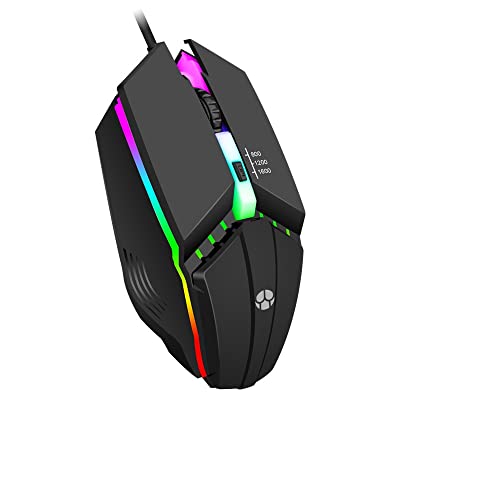
 BENGOO Gaming Mouse Wired with RGB Backlit
- 【Speed DPI Switch】 Bengoo customizable RGB gaming mice,…
- 【Flexible Buttons】 Equipped with six buttons: Left button,…
- 【Lighting Colors】 Muti-colors lights greatly match your style,…
 Typehaven G57 Wireless Gaming Mouse
- 【Tri-Mode Connectivity】Switch easily between 2.4G wireless, Bluetooth, and…
- 【Adjustable DPI Settings】Fine-tune your aim with six DPI…
- 【Cross-Platform Compatibility】This wireless computer mouse works with Windows…



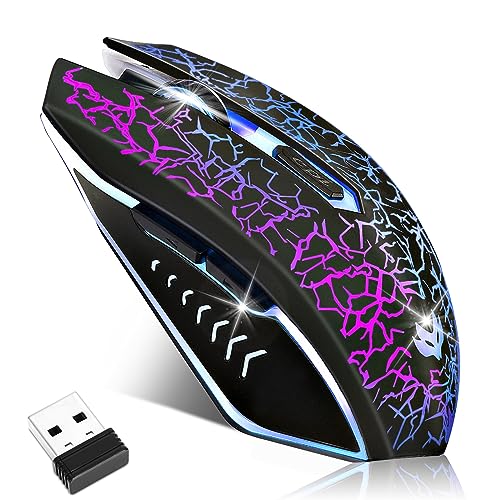 LuLabboard Wireless Gaming Mouse
- ⚡️【𝐖𝐢𝐫𝐞𝐥𝐞𝐬𝐬 𝐟𝐫𝐞𝐞𝐝𝐨𝗺 & 𝐒𝐭𝐚𝐛𝗹𝐞 𝗖𝐨𝗻𝗻𝗲𝐜𝐭𝐢𝐨𝐧】The wireless mouse connects…
- ⚡️【3 𝐃𝐏𝗜 𝐀𝐝j𝐮𝐬𝐭𝐚𝐛𝗹𝐞 & 𝐄𝐱𝐭𝐞𝐧𝗱𝐞𝗱 𝐁𝐚𝐭𝐭𝐞𝐫𝐲 𝐋𝐢𝗳𝐞】This rechargeable…
- ⚡️【𝐒𝐢𝐥𝐞𝐧𝐭 𝗖𝐥𝐢𝐜𝐤𝐬 & 𝗖𝐨𝐦𝐟𝐨𝐫𝐭𝐚𝐛𝗹𝐞 𝐆𝐫𝐢𝐩】PC gaming mice make…

As an Amazon Associate we earn from qualifying purchases at no extra cost to you.
| Product | Best for | Key spec |
|---|---|---|
| BENGOO Wired RGB | Basic starter mouse | Up to 3600 DPI, 6 programmable buttons |
| Guiheng Wired | Very basic use | 800 to 1600 DPI, 4 programmable buttons |
| Typehaven G57 Wireless | Cable-free flexibility | 8000 DPI, 80g, 2.4G/Bluetooth/USB-C |
| Wired PC Gaming Mouse, 7 Buttons | Extra programmable buttons | 7 programmable buttons, adjustable DPI |
| WolfLawS KM-1 Wireless | Lightweight wireless look | Honeycomb shell, 2.4G, 6 buttons, rechargeable |
| SOLAKAKA SM900 | High-DPI wired | 12800 DPI, side buttons, white |
| LuLabboard Wireless | Quiet clicks | 6 silent click buttons, rechargeable, 7-color LED |
| Redragon M617 | Light wired mouse | 41g honeycomb shell, 10000 DPI, paracord |
How to Choose
Wired first, wireless only with care
Under 15 dollars, wired mice avoid battery and radio quirks. Wireless models bring convenience but often use basic receivers and cheaper batteries, so expect more delay and occasional dropouts, particularly when the receiver sits behind a PC case or too far from the mouse. If you play fast shooters, lean wired. If you want a clean desk or a travel mouse, a rechargeable wireless model is a fair trade as long as you accept that.
DPI is not a quality score
Most players use 800 to 1600 DPI, with some going up to 3200. A listing of 10000 or 12800 DPI means high maximum, not better aim. What matters more is a consistent sensor with no jitter, and you cannot judge that from a title. Choose a mouse that lets you step through DPI levels with a button. Many first-time buyers find that dropping the DPI is the quickest way to make a mouse feel more accurate.
Weight, shell, and grip
Mice under 60g suit fast, flicking play; 80g is a common wireless weight. Honeycomb shells cut weight but let in dust and can feel sharp. Rubber side grips, where listed, help a light mouse stay put in a sweaty hand, which matters more than a few grams. Check the title for the weight, and match the shape to your hand: ergonomic shapes suit palm grips, while smaller shapes suit claw grips. A comfortable grip matters more than any lighting feature. If you are unsure of your grip, measure your hand from wrist to fingertip and compare it with the mouse length, since too small a shell cramps larger hands within an hour.
Where budget mice cut corners
Expect plastic switches built for fewer clicks, rubbery cables, and basic software or none at all. Programmable buttons need software on Windows, and some listings do not name any. Ignore flashy lighting claims. Lighting drains a wireless battery faster and does nothing for accuracy, so turn it down or off. If a mouse lists very many buttons, ask whether you will use them, since extra buttons add weight and accidental clicks.
A short checklist before you order: confirm the cable length is enough to reach your USB port, check that the mouse works with your operating system, and make sure there is a return window. At this budget, a poor unit slips through now and then, and being able to swap it is worth more than any spec.
The 8 Best Options
BENGOO Wired RGB
An ergonomic wired optical gaming mouse with RGB backlighting, four adjustable DPI levels up to 3600, and six programmable buttons. It is a straightforward starter mouse for a desktop PC, offering enough DPI steps and buttons for most games without pretending to be a premium model.
- Strength: four DPI levels up to 3600 cover most play styles.
- Strength: six programmable buttons give some shortcut options.
- Trade-off: the title lists no weight or sensor model, so precision is unknown.
Skip it if you want a very light mouse or wireless use. For a student desk or a laptop bag spare, the plain design and familiar button layout are easy to live with.
Guiheng Wired
A wired optical USB mouse with 800 to 1600 DPI, RGB lighting, an ergonomic shape, and four programmable buttons, aimed at laptops and desktops. The narrow DPI range keeps it easy to control, which suits beginners.
- Strength: 800 to 1600 DPI is the range most players use.
- Strength: an ergonomic shape suits long sessions.
- Trade-off: four programmable buttons limit shortcuts for MMOs and strategy games.
Skip it if you want high DPI or many programmable buttons. It is best seen as a calm, controllable mouse for browsing, homework, and relaxed gaming.
Typehaven G57 Wireless
A wireless gaming mouse with 8000 DPI, an 80g body, rechargeable battery, and 2.4G, Bluetooth, and USB-C connectivity, with five programmable buttons. It is one of the few options here that offers three connection modes, which suits a laptop and desktop shared desk.
- Strength: 2.4G, Bluetooth, and USB-C give flexible connections.
- Strength: a rechargeable battery removes the need for spare cells.
- Trade-off: an 80g weight is heavier than the honeycomb options here.
Skip it if you want a light mouse for fast flicks or the lowest possible delay. It makes more sense for casual and cross-device use than for ranked play.
Wired PC Gaming Mouse, 7 Buttons
A wired gaming mouse with a high-precision sensor, RGB backlighting, adjustable DPI, seven programmable buttons, and an ergonomic shape, for office and gaming on Windows, Mac, and Linux. The seven buttons and cross-platform note make it a flexible option for mixed use.
- Strength: seven programmable buttons suit MMOs and productivity shortcuts.
- Strength: compatibility with Windows, Mac, and Linux is listed.
- Trade-off: the title gives no brand, DPI figure, or weight.
Skip it if you want a known brand name behind the sensor. Treat it as a flexible workhorse, and check the return policy in case the shape does not fit your hand.
WolfLawS KM-1 Wireless
A wireless RGB gaming mouse with a honeycomb shell, a 2.4G USB receiver, six buttons, three adjustable DPI levels, and a rechargeable battery. The honeycomb look is meant to cut weight, and the wireless design keeps the desk tidy.
- Strength: a honeycomb shell aims to keep the mouse light.
- Strength: a rechargeable battery and 2.4G receiver keep things simple.
- Trade-off: no weight figure is given, and wireless input can add delay.
Skip it if you play competitive shooters or want a sealed shell. It works best for relaxed play and desk use where the lighter look and cable-free setup are the main appeal.
SOLAKAKA SM900
A wired RGB gaming mouse in white, with adjustable DPI up to 12800 and side buttons, for laptop and PC use. The white finish suits a light-themed desk, and the high DPI ceiling is headroom more than a benefit.
- Strength: a wired connection avoids charging and delay.
- Strength: side buttons add quick shortcuts.
- Trade-off: 12800 DPI is largely a marketing figure for real play.
Skip it if you need a heavily programmable mouse or a very light one. It is a simple wired pick that behaves predictably, which is often what a spare mouse should do.
LuLabboard Wireless
A rechargeable wireless gaming mouse with 7-color LED lighting, an ergonomic shape, and six silent click buttons, with three adjustable DPI settings. The silent clicks suit a shared room or late-night sessions where noise matters.
- Strength: silent click buttons reduce noise for shared spaces.
- Strength: rechargeable and wireless for a tidy desk.
- Trade-off: silent switches can feel softer, and wireless adds some delay.
Skip it if you want crisp, audible clicks or a wired connection. Its main appeal is the quiet clicks, so choose it when noise around you is the problem.
Redragon M617
An ultralight wired mouse with a honeycomb shell at 41g, 10000 DPI, six programmable buttons, a drag-free paracord cable, and Type-C connectivity. It is the lightest option on the list, aimed at players who flick and swipe a lot.
- Strength: a 41g body is very light for the category.
- Strength: a paracord cable reduces drag during motion.
- Trade-off: honeycomb shells let in dust and some people find the surface rough.
Skip it if you have large hands or want a heavier, planted feel. Because the shell is perforated, keep it clean and avoid eating at the desk.
Which One Fits Your Situation
You play fast shooters
The Redragon M617 offers the lightest wired build here, with a flexible cable that does not tug at your hand during swipes.
You want a quiet mouse for a shared room
The LuLabboard Wireless lists silent click buttons, which suits late-night play and shared rooms.
You share a mouse between a laptop and a desktop
The Typehaven G57 Wireless supports 2.4G, Bluetooth, and USB-C, so you can switch devices without swapping receivers.
You play MMOs or strategy games
The Wired PC Gaming Mouse with seven buttons gives the most programmable inputs, which helps when you want shortcuts on thumb and side buttons.
Common Mistakes
- Chasing high DPI claims instead of a comfortable shape.
- Choosing wireless for fast shooters without considering delay.
- Buying a honeycomb mouse and not planning for dust.
- Ignoring weight and ending up with a mouse that feels heavy.
- Expecting software for remapping when the listing names none.
Related guides
- Gaming Headsets For Competitive Fps Directional Audio
- Threadripper Vs Xeon Vs Core I9 For Workstations
- Compact Mini Itx Gaming Pcs For Small Desks
Frequently Asked Questions
Can a mouse under 15 dollars be good for gaming?
Yes, for casual and mid-level play. A wired model with a decent sensor and a comfortable shape will serve most players. Spend a little time setting the DPI and a pad surface you like, and the difference between this and a pricier mouse shrinks.
Is wireless worth it at this price?
Only if you value a tidy desk. Expect basic receivers and some delay compared with wired mice, and a mouse that sleeps to save battery can feel laggy when you wake it.
What DPI should I use?
Most players settle between 800 and 1600. Higher numbers can feel jumpy, so keep the maximum as headroom.
Do I need software for a cheap gaming mouse?
Only for remapping buttons or changing lighting. Many basic mice work without it, and plug-and-play operation is a plus for a spare or travel mouse.









