Our Short List of 3

- Best for: living rooms where the lights stay on during evening viewing.
- Best for: gaming and bright rooms where high brightness and low input latency both matter.

- Best for: portable viewing in dark rooms, bedrooms, and small spaces where a compact laser projector fits the setup.
All 4 Picks at a Glance
| Product | Specs | Action |
|---|---|---|
| Epson Home Cinema 1080 — ASIN B08GL2DSKZ |
| Check price on Amazon |
| ViewSonic PX701HD — ASIN B07QG6FRB7 |
| Check price on Amazon |
| Epson EpiqVision Mini EF12 — ASIN B08GL4QSFH |
| Check price on Amazon |
 XGIMI MoGo 2 Pro (New) — ASIN B0FK4S3H29 |
| Check price on Amazon |
Key takeaways
- Find the best HDMI projectors for movies and gaming, compared on resolution, brightness, HDMI inputs, throw distance, and built-in sound for your room.
The best HDMI projectors connect to a laptop, console, or streaming stick through a standard HDMI cable and turn a blank wall into a screen that can reach 100 inches or more. The Epson Home Cinema 1080 leads this guide because it pairs 3,400 lumens of brightness with dual HDMI inputs and a 1080p 3LCD image, while the ViewSonic PX701HD follows close behind with 3,500 ANSI lumens and the same dual-HDMI flexibility.
Our top pick: Epson Home Cinema 1080. Runner-up: ViewSonic PX701HD. This guide compares published specifications only: every brightness figure, resolution, HDMI count, and lamp-life number below comes from the product listing or the manufacturer specification sheet, so you can compare the four models on the same terms.
At a Glance
| Product | Best for | Key specification |
|---|---|---|
| Epson Home Cinema 1080 | Bright living rooms | 1080p 3LCD, 3,400 lumens, dual HDMI |
| ViewSonic PX701HD | Gaming and bright rooms | 1080p DLP, 3,500 ANSI lumens, dual HDMI |
| Epson EpiqVision Mini EF12 | Portable laser viewing | 1080p laser, 1,000 lumens, HDMI input |
| XGIMI MoGo 2 Pro (New) | Portable smart streaming | 1080p, 400 ISO lumens, 1 HDMI 2.0 port |
How to Choose
1. Count the HDMI inputs
A projector with a single HDMI input works fine if you connect one source, such as a streaming stick or a console, and leave it plugged in. Dual HDMI inputs matter when you switch between two sources, for example a laptop for work and a console for games, because you can leave both cables connected and change inputs from the remote. Two of the four picks in this guide carry dual HDMI inputs, while the two portable picks carry one HDMI input each.
2. Match resolution to the screen size
All four picks in this guide have a native 1080p resolution, which keeps text sharp and faces detailed on screens up to about 120 inches. A native 720p image looks acceptable on a small screen in a dark room, but the softness becomes visible as the image grows, so 1080p is the sensible floor for a projector you plan to use for movies and games.
3. Read brightness in the right unit
Brightness figures come in lumens, ANSI lumens, and ISO lumens, and those units do not line up exactly. Epson quotes 3,400 lumens for the Home Cinema 1080, ViewSonic quotes 3,500 ANSI lumens for the PX701HD, and XGIMI quotes 400 ISO lumens for the MoGo 2 Pro. For a living room with lamps on, a figure in the 3,000 range holds up far better than a figure in the 400 range, while a portable model with 400 ISO lumens is built for dark rooms and evening use.
4. Check the throw distance before you buy
Throw distance is the gap between the lens and the wall for a given image size. A standard-throw projector needs roughly 8 to 12 feet to fill a 100-inch screen, while the portable picks in this guide can fill the same screen from a similar distance because they use a fixed 1.2 to 1 throw ratio. Measure your room first, then check the throw ratio in the specification sheet to confirm the projector fits the space you have.
5. Weigh lamp life against laser life
Lamp projectors such as the Home Cinema 1080 and the PX701HD list lamp life in the 10,000 to 20,000 hour range in economy modes, which covers years of evening viewing. Laser projectors such as the EpiqVision Mini EF12 use a laser light source with a much longer rated life and no lamp to replace, which suits a projector that moves between rooms or travels with you.
6. Consider built-in sound
A built-in speaker keeps the setup simple: one HDMI cable, one power cable, and the projector plays sound on its own. The Home Cinema 1080 and the MoGo 2 Pro both carry built-in speakers, and the MoGo 2 Pro adds dual 8-watt speakers tuned for dialogue. For a dedicated home theater, an external soundbar or a set of speakers connected through the projector audio output or through HDMI ARC gives a fuller soundstage.
7. Look at input lag for gaming
Input lag is the delay between a controller input and the image on screen. The ViewSonic PX701HD lists a 16-millisecond input latency, which suits fast games where timing matters. The BenQ and Epson home theater models in this guide list low-lag modes as well, but the PX701HD is the pick that states its latency figure most directly in the listing.
8. Confirm the HDMI version
HDMI 2.0 carries 4K signals at 60 frames per second and supports ARC for audio return to a soundbar. The XGIMI MoGo 2 Pro lists one HDMI 2.0 port with ARC, and the dual-HDMI picks in this guide list HDMI 1.4 inputs that carry 1080p signals without issue. If you plan to connect a 4K console or a 4K streaming device, check that the port version matches the signal you intend to send.
Our Picks
Epson Home Cinema 1080 — ASIN B08GL2DSKZ
- Best for: living rooms where the lights stay on during evening viewing.
living rooms where the lights stay on during evening viewing.
The Epson Home Cinema 1080 is a 3-chip 3LCD projector with a native 1920 by 1080 resolution, 3,400 lumens of color and white brightness, and a 16,000 to 1 contrast ratio. It carries dual HDMI inputs, a built-in speaker, and auto picture skew correction, and the listing states a 1080p image for streaming, gaming, and media room use. The 3LCD design puts color brightness and white brightness at the same figure, which keeps bright scenes vivid instead of washed out.
Consideration: the 1080p resolution caps detail below 4K, so a viewer who wants a native 4K image should look at a 4K-capable model instead.
ViewSonic PX701HD — ASIN B07QG6FRB7
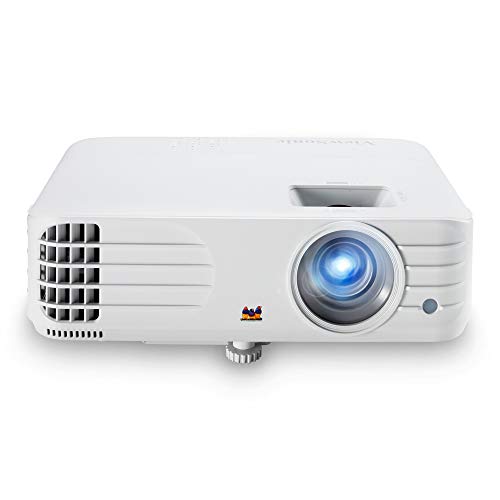
- Best for: gaming and bright rooms where high brightness and low input latency both matter.
gaming and bright rooms where high brightness and low input latency both matter.
The ViewSonic PX701HD is a 1080p DLP projector with 3,500 ANSI lumens, SuperColor technology, vertical lens shift, and dual HDMI inputs. The listing states a screen size up to 300 inches, a 12,000 to 1 contrast ratio, and a 16-millisecond input latency for gaming, with a lamp life up to 20,000 hours in SuperEco mode. A powered USB port on the unit lets a streaming dongle draw power from the projector itself.
Consideration: the DLP design uses a single-chip color wheel, so viewers sensitive to rainbow artifacts may prefer the 3LCD image of the Epson picks.
Epson EpiqVision Mini EF12 — ASIN B08GL4QSFH
- Best for: portable viewing in dark rooms, bedrooms, and small spaces where a compact laser projector fits the setup.
portable viewing in dark rooms, bedrooms, and small spaces where a compact laser projector fits the setup.
The Epson EpiqVision Mini EF12 is a portable laser projector with a native 1920 by 1080 resolution, 1,000 lumens of color and white brightness, and Android TV built in. The listing states a 3LCD laser light source, HDR support, Bluetooth connectivity, and sound by Yamaha, with an HDMI input for a console, laptop, or streaming device. The laser source removes the lamp replacement cycle entirely, and the compact body moves easily between rooms.
Consideration: at 1,000 lumens, the image needs a dark room to hold contrast, so it suits evening viewing rather than daytime use with the curtains open.
XGIMI MoGo 2 Pro (New) — ASIN B0FK4S3H29
- Best for: portable smart streaming in bedrooms, dorm rooms, and outdoor evening sessions.
portable smart streaming in bedrooms, dorm rooms, and outdoor evening sessions.
The XGIMI MoGo 2 Pro (New) is a portable 1080p projector with 400 ISO lumens, a multi-angle stand, and Google TV built in. The listing states one HDMI 2.0 port with ARC, autofocus, automatic keystone correction, and dual 8-watt speakers, with a 4K input supported and a screen size up to 200 inches. The unit weighs about 2.4 pounds and can run from a 65-watt USB-C power bank, which makes it the most portable pick in this guide.
Consideration: the 400 ISO lumen brightness is the lowest in this guide, so the image needs darkness to look its best, and the single HDMI port means swapping cables when you change sources.
Which One Is Right for You?
Choose the Epson Home Cinema 1080 if your projector lives in a living room and you want the brightest 1080p image with dual HDMI inputs for two sources. Choose the ViewSonic PX701HD if gaming is the main use, because the 16-millisecond input latency and 3,500 ANSI lumens suit fast games in rooms that are not fully dark. Choose the Epson EpiqVision Mini EF12 if you want a laser projector that moves between rooms without a lamp to replace. Choose the XGIMI MoGo 2 Pro (New) if portability matters most and you want a smart projector with built-in streaming, autofocus, and a stand that aims the image from any angle.
Frequently Asked Questions
Do all four projectors in this guide have an HDMI input?
Yes. The Epson Home Cinema 1080 and the ViewSonic PX701HD each carry dual HDMI inputs, while the Epson EpiqVision Mini EF12 and the XGIMI MoGo 2 Pro each carry one HDMI input. Any laptop, console, or streaming stick with an HDMI output connects directly.
What is the difference between lumens, ANSI lumens, and ISO lumens?
Lumens is a general brightness figure, ANSI lumens follows a standardized measurement method, and ISO lumens follows an international standard. The numbers do not convert directly between units, so compare models quoted in the same unit first, then use the room lighting and screen size to judge whether the brightness fits.
Can a 1080p projector show a 4K signal?
A 1080p projector accepts a 4K input on many models, including the XGIMI MoGo 2 Pro, and downscales the signal to its native 1080p resolution. The image stays sharp at 1080p, but it does not gain the extra detail of a native 4K projector.
How far from the wall should the projector sit?
A standard-throw projector needs roughly 8 to 12 feet to fill a 100-inch screen, depending on its throw ratio. The portable picks in this guide use a fixed throw ratio near 1.2 to 1, so a 100-inch image needs about 8.7 feet from the lens to the wall. Check the specification sheet for the exact distance at your target screen size.
Is a built-in speaker enough for movies?
A built-in speaker is enough for casual viewing in a small room, and the dual 8-watt speakers in the XGIMI MoGo 2 Pro handle dialogue clearly. For a larger room or a dedicated home theater, connect a soundbar or external speakers through the projector audio output or through HDMI ARC for fuller sound.
Bottom Line
The Epson Home Cinema 1080 is the strongest all-around pick in this guide, with 3,400 lumens, dual HDMI inputs, and a bright 3LCD image that holds up with the lights on. The ViewSonic PX701HD is the gaming pick, with 3,500 ANSI lumens and a 16-millisecond input latency. The Epson EpiqVision Mini EF12 and the XGIMI MoGo 2 Pro (New) cover portable viewing, with the EF12 using a laser light source and the MoGo 2 Pro carrying built-in smart streaming and a multi-angle stand. Match the pick to the room, the light, and the number of HDMI sources you plan to connect.
Disclosure: As an Amazon Associate, this site earns from qualifying purchases.
FAQ
Which One Is Right for You?
Do all four projectors in this guide have an HDMI input?
What is the difference between lumens, ANSI lumens, and ISO lumens?
Can a 1080p projector show a 4K signal?
How far from the wall should the projector sit?
Is a built-in speaker enough for movies?
More from Amazon
Programs that pair well with the guide above. Offers and eligibility are set by Amazon and may change.
Free shipping on eligible items, Prime Video and more. Eligible new members can start with a free trial.
Start a Prime free trialAd-free music streaming. Eligible new subscribers can start with a free trial.
Try Music Unlimited freeA Prime membership for ages 18-24 with a trial period. Eligibility is set by Amazon.
See Prime for Young AdultsAudiobooks and podcasts to listen to on the go. Eligible new members can start with a free trial.
Try Audible freeAs an Amazon Associate we earn from qualifying purchases.