Key takeaways
- Best i7 gaming desktops compared: two Core i7-14700F builds lead ten prebuilts, with notes on older i7 generations, GPU pairing and seller caveats.
The best i7 gaming desktops in this group are the two Core i7-14700F builds: the Skytech King 95 with an RTX 5070 and the CyberPowerPC Gamer Xtreme with an RTX 5060 Ti. They pair a recent i7 with a current graphics card, which none of the other eight listings can claim. Those eight run from a plausible 1080p machine down to listings where the “i7” is a chip from several generations back or, in one case, a Xeon. The badge alone says little; generation, graphics card, memory and seller decide whether an i7 desktop is worth the money. Below, the ten listings are sorted by how far their parts reach, with plain notes wherever a title leaves a gap.
All ten listings at a glance
Our top picks




As an Amazon Associate we earn from qualifying purchases at no extra cost to you.
| Model | Key point from title | Price tier | Best for |
|---|---|---|---|
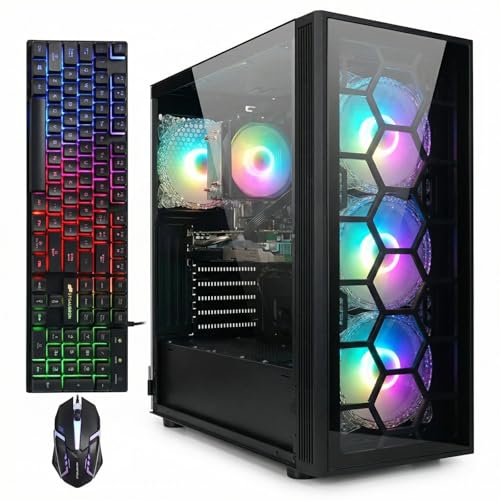
| Skytech King 95 | i7-14700F, RTX 5070, 32GB, 850W Gold | Premium | Long-term main PC |
| CyberPowerPC Gamer Xtreme | i7-14700F, RTX 5060 Ti 8GB, DDR5 | Premium | DDR5 platform buyers |
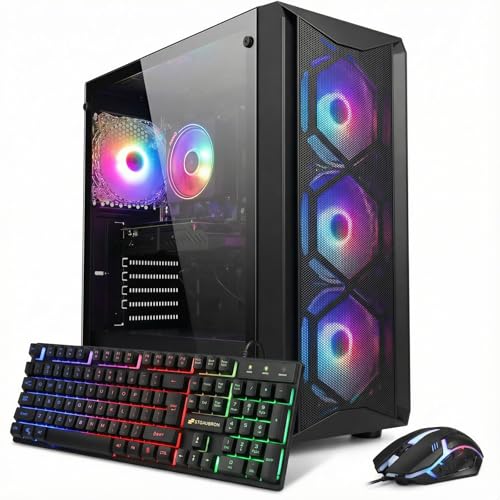
| STGAubron RTX 3070 | Core i7, RTX 3070 8G, 32G | Mid-range | Strongest older-platform GPU |
| STGAubron RTX 3060 | Core i7, RTX 3060 12G, 32G | Mid-range | Video-memory-heavy games |
| OKAMUS | i7-7700, RTX 3050 8GB | Mid-range | Named-CPU transparency |
| STGAubron 8th Gen | Core i7 8th Gen, RTX 3050 6G | Mid-range | Stated CPU generation |
| STGAubron GTX 1070 | Core i7, GTX 1070 8G, 16G | Budget | Older titles, tight budgets |
| STGAubron RX 580 | Core i7, RX 580 8G, 1T SSD | Budget | Esports and 1080p basics |
| GPVHOSO | i7 4th Gen, GTX 1050 Ti 4GB | Budget (price not shown) | Family and light gaming |
| STGAubron “i7 Xeon E5” | Xeon E5, RX 560 4G | Budget | Light use only |
Current-generation i7 builds
Skytech King 95 with i7-14700F and RTX 5070
The title lists an i7-14700F, RTX 5070, 32GB of RAM, a 1TB Gen4 NVMe drive, DDR4 3200 memory, an 850W Gold ATX 3 power supply, a 360 ARGB liquid cooler and Wi-Fi 5. It is the only listing where every major part is current or close to it. The memory is DDR4 rather than DDR5, so the upgrade path is shorter than the CyberPower option, and Wi-Fi 5 is a generation behind. An RTX 5070-class card is usually aimed at 1440p, our assumption rather than a title claim.
Pros
- Recent i7 with a recent card
- 32GB and a generous PSU leave room to grow
- Liquid cooler suits sustained loads
Cons
- DDR4 limits later memory upgrades
- Wi-Fi 5
- Highest price tier here
Who it’s for: buyers who want one i7 prebuilt that should not need part swaps for years.
CyberPowerPC Gamer Xtreme (GXiVR8040A19) with i7-14700F and RTX 5060 Ti
Same processor as the Skytech, but the title shows an RTX 5060 Ti 8GB, 16GB of DDR5 and a 1TB PCIe 4.0 SSD, with “WiFi Ready” wording. DDR5 gives a newer memory base; our DDR5 gaming desktop picks explain why that matters. The 8GB of video memory is the caveat, since newer games at high texture settings can fill it. “WiFi Ready” may not mean an adapter is included, so check the listing. If you are also weighing iBuyPower, see iBuyPower vs CyberPowerPC.
Pros
- I7-14700F with DDR5
- Model code lets you verify the exact configuration
Cons
- 8GB graphics memory
- 16GB RAM is the minimum, not a cushion
- Unclear Wi-Fi hardware
Who it’s for: buyers who prefer a DDR5 base and will accept lower texture settings.
Older-platform i7 builds, mid-range
STGAubron Core i7 with RTX 3070 8G and 32G RAM
The title offers a Core i7 “up to 3.9GHz”, RTX 3070 8G, 32G RAM, a 1T SSD, Wi-Fi 6 and Windows 11 Home. This pairs the strongest graphics card in the older group with the most memory. The CPU generation is not stated, and a clock figure is not a model name, so ask the seller. A fast card beside an older processor may leave performance unused in busier games. The title also names no PSU wattage, which matters for a card in this class.
Pros
- Strongest GPU of the older group
- 32G RAM
- Wi-Fi 6
Cons
- CPU generation and PSU unstated
- Seller support unknown
Who it’s for: bargain hunters who will verify the CPU and power supply before paying.
STGAubron Core i7 with RTX 3060 12G and 32G RAM
Here the title shows an RTX 3060 with 12G of video memory, 32G of RAM and a 1TB SSD. The RTX 3070 above is generally the faster card, but 12G against 8G is a real trade for texture-heavy games and creative work. As with its siblings, the i7 generation is missing, and “up to 3.9G” only describes a clock ceiling. Price tier is mid-range, so a low figure for these parts is a prompt to check whether components are new or refurbished.
Pros
- 12G of video memory
- 32G RAM and 1TB storage
Cons
- CPU generation and PSU not named
- Older cards lack newest features
Who it’s for: players who want memory headroom more than peak speed.
OKAMUS Prebuilt with i7-7700 and RTX 3050 8GB
OKAMUS names the exact processor: an i7-7700 “up to 4.2GHz”, with an RTX 3050, 16GB RAM, 512GB SSD, ARGB cooling with a temperature display, Wi-Fi 6 and Bluetooth 5.3. Naming the chip is helpful, but the i7-7700 is a 7th-generation part, and Windows 11’s official CPU list generally starts later, so check how the listing handles licensing and support. The title says “DDR6” for the card’s memory, which looks like imprecise wording for GDDR6; confirm it.
Pros
- Exact CPU named
- Modern wireless
- Temperature display
Cons
- Older CPU may restrain a newer card
- 512GB fills quickly
- Sloppy memory wording
Who it’s for: shoppers who value knowing the CPU model up front.
STGAubron Core i7 8th Gen with RTX 3050 6G
This one states its generation, which most STGAubron titles do not: Core i7 8th Gen, up to 4.1GHz, RTX 3050 6G, 16G DDR4 and a 512G SSD. Eighth generation is generally where Intel chips begin to meet Windows 11’s official requirements, a point worth confirming. The 6G video memory is smaller than the 8GB OKAMUS card, and the price tier sits near the RTX 3070 listing, so compare value before choosing.
Pros
- Generation disclosed
- DDR4 stated
- Wi-Fi 6 and Bluetooth 5.2
Cons
- 6G video memory
- 512G storage
- Priced close to faster options
Who it’s for: buyers who want a stated generation for 1080p play.
Older-platform i7 builds, budget and runner-ups
STGAubron Core i7 with GTX 1070 8G
The title shows a GTX 1070 8G, 16G RAM and a 512G SSD. The GTX 1070 is an older card that generally lacks the newest upscaling and ray tracing features, so it suits older and esports titles better than recent releases. Wi-Fi 6 and Bluetooth 5.0 are listed, but no CPU generation or PSU. As a budget pick it works only if the price stays well below the RTX 3050 listings.
Pros
- 8GB card
- Low price tier
- Wi-Fi 6
Cons
- Older GPU generation
- CPU unstated
- Small drive
Who it’s for: tight budgets and older libraries.
STGAubron Core I7 with RX 580 8G and 1T SSD
An RX 580 8G, 16G RAM and a 1T SSD. The 1T drive is the most generous storage among the budget cards. “4K HDMI” in the title describes the output port, not a promise of 4K gaming; an RX 580-class card is generally a 1080p proposition. Runner-up status comes from the graphics age and the unnamed CPU, not from any defect we can see.
Pros
- 1T storage
- 8GB card
- Budget tier
Cons
- Older GPU
- Unnamed i7 generation
- Limited for new releases
Who it’s for: esports players and students.
GPVHOSO Core i7 4th Gen with GTX 1050 Ti 4GB
The title says i7 4th Gen, GTX 1050 Ti 4GB, 16GB RAM, 512GB SSD and Windows 11 Home, and describes itself as entry level for gaming, family work and daily use. A 4th-generation chip is roughly a decade old, and Windows 11 on such a CPU is worth questioning. No price is shown in our data, so check the listing. Treat it as a family computer that can play light games.
Pros
- Honest entry-level positioning
- 16GB and an SSD
Cons
- Oldest CPU here
- 4GB graphics memory
- Windows 11 support to verify
Who it’s for: shared home use and undemanding games.
STGAubron “i7 Xeon E5” with RX 560 4G (runner-up, off-type)
The title says “intel i7 Xeon E5”, but Xeon E5 is a workstation and server family, not a Core i7, so this is not an i7 desktop in the usual sense. The listing shows E5 “up to 3.0GHz”, RX 560 4G, 16G RAM and a 512G SSD. The RX 560 4G is the weakest graphics card in this set. We include it because it appears among i7-labeled results; for gaming, treat it as the lowest choice here.
Pros
- Lowest price tier
- Wi-Fi, Bluetooth 5.0 and display outputs listed
Cons
- Not a Core i7
- Weakest GPU
- Labeling is contradictory
Who it’s for: light office and media use with occasional casual games.
How we picked these
We sorted the ten listings by what their titles promise: named CPU, graphics card, memory, storage, power supply and cooling. Our basis is published specifications, manufacturer documentation and buyer reviews. Nobody on the team used or measured these units. Titles are seller-written, so performance remarks are general expectations, not results, and any figure beyond a title is a labeled estimate. Price tiers are relative within this set. Where a title omits the CPU generation, PSU or warranty, we say so rather than guess.
What to look for in an i7 gaming desktop
Which i7 is actually inside
“i7” spans many generations. The 14700F is recent; the 7700 and 4th-generation parts are old; “up to 3.9GHz” names no model at all. Ask for the exact model, and check Windows 11 support, which generally begins around 8th generation. An “F” suffix generally means no integrated graphics, which is fine when a discrete card ships in the box.
Graphics pairing and memory
Match the card to the processor. A strong card beside an old quad-core can leave performance unused, and an 8GB card can run short at high texture settings. Treat 16GB of RAM as the floor and 32GB as the target for streaming or editing. DDR5 gives a longer runway than DDR4, but only if the board is DDR5 to begin with.
Storage, power and case
A 512GB drive holds only a handful of big modern games after Windows, so 1TB is the practical minimum. Only the Skytech title names a PSU, and the others leave you to ask. Cases with a PSU shroud hide cabling and tidy airflow, as covered in our PSU shroud desktop guide.
Cooling and noise
Only the Skytech lists a liquid cooler by size; the others mention ARGB fans, which says nothing about heat handling. A hot i7 and a strong card in a small case can throttle, so check the cooler type and read buyer comments about fan noise before you commit.
Upgrade path and seller caveats
The upgradeable desktop list shows which platforms keep options open. Older platforms often cap at the memory type and CPU range their motherboard supports, so a cheap upgrade today may be a dead end later. Ask which motherboard and memory standard the system uses, and whether a bigger GPU would fit the case and power supply. On lower-priced listings, parts may be renewed or refurbished, and support can be thin.
Pre-purchase checklist for older-platform listings
- Exact CPU model and generation, in writing
- New, renewed or refurbished parts
- PSU brand and wattage
- Windows 11 license and activation method
- Return window and warranty length
- Free M.2 and RAM slots
Mistakes buyers make
- Trusting the “i7” badge without a model number; two listings here show how little the badge proves, since one gives no generation and another is a Xeon.
- Assuming 16GB and a 512GB drive is enough forever; both fill faster than expected.
- Paying for a large GPU while ignoring a decade-old CPU that may hold it back in busier games.
- Reading “4K” on a port label as a gaming capability; it describes output, not frame rates.
- Ignoring video memory: 6G and 4G cards are the first to feel dated as texture sizes grow.
- Skipping support and return questions on low-priced systems, where a missing warranty costs the most.
- Buying the biggest SSD claim but not checking whether Windows is activated and drivers are current.
Verdict
Choose the Skytech King 95 if the budget stretches: it is the most complete i7 build here. Pick the CyberPowerPC Gamer Xtreme for a DDR5 platform and a model code you can verify. On a tighter budget, the STGAubron RTX 3060 and RTX 3070 listings offer the most graphics, provided the seller confirms the CPU and power supply first. Treat the GTX 1050 Ti and Xeon listings as light-use machines, not gaming picks. Whatever you choose, get the CPU model confirmed first.
Related guides
- Gaming Headsets For Competitive Fps Directional Audio
- Compact Mini Itx Gaming Pcs For Small Desks
- Threadripper Vs Xeon Vs Core I9 For Workstations
Frequently asked questions
Is an i7 still worth buying for gaming?
Yes, when the model is recent and the graphics card matches it. A current i7 handles gaming with room left for streaming or background apps. An old i7 can still run light games, but a newer midrange chip may beat it, so the generation matters more than the name. Read the full model number before you compare prices.
How much RAM and storage do I need?
Treat 16GB of RAM and 512GB of storage as the floor, 32GB and 1TB as comfortable. Modern games are large, so a 512GB drive fills fast. Most listings here meet the floor; only a few reach the comfortable tier, so budget for a second drive if you collect large games.
Does an older i7 hold back a new graphics card?
It can. Games that lean on the processor may leave a fast card waiting, especially with older, lower-core-count chips. Balanced pairings, like the two 14700F builds, are safer than a strong card on an unnamed CPU. The effect varies by game and resolution, so treat this as a general caution, not a measured result.
Are these desktops upgradeable?
Often, but verify. Ask about free RAM and M.2 slots, the PSU wattage and the motherboard size. Proprietary parts can block swaps, and a DDR4 platform will not take DDR5 memory later. Check the listing and photos for slot counts, since a title rarely lists them, and message the seller if they are missing.
What should I check on low-priced listings?
Confirm whether parts are new, renewed or refurbished, read the return window, and ask for the CPU model and Windows license details. A price that looks low for the named parts deserves a direct question before you order, and the answer should be in writing. Also look at how the seller describes returns and who handles warranty claims.