Our Short List of 3

- Best for: Most family homes that want a capable Wi-Fi 6 router without a flagship model.
- Dual-band Wi-Fi 6 with AX3000 wireless capacity
- 2402 Mbps on 5 GHz and 574 Mbps on 2.4 GHz
- USB 3.0 port for shared storage
- EasyMesh compatible

- Best for: Smaller homes and renters who want a straightforward Wi-Fi 6 upgrade.
- Dual-band Wi-Fi 6 with AX1800 wireless capacity
- 1201 Mbps on 5 GHz and 574 Mbps on 2.4 GHz
- Gigabit wired ports
- OFDMA and MU-MIMO

- Best for: Larger homes with heavy evening streaming and several active users.
- Dual-band Wi-Fi 6 with AX5400 wireless capacity
- 4804 Mbps on 5 GHz and 574 Mbps on 2.4 GHz
- 1.5 GHz triple-core processor
- Six external antennas
All 5 Picks at a Glance
| Product | Specs | Action |
|---|---|---|
| 1. TP-Link Archer AX55 |
| Check price on Amazon |
| 2. TP-Link Archer AX21 |
| Check price on Amazon |
| 3. TP-Link Archer AX73 |
| Check price on Amazon |
 4. NETGEAR Nighthawk RAX30 |
| Check price on Amazon |
 5. TP-Link Archer BE230 |
| Check price on Amazon |
Our Top Picks
A mid-range router has to do two jobs at once: carry a busy evening of video, gaming, and video calls without choking, and still leave room for the next few years of new phones, laptops, and smart home gear. The real decision is not the headline wireless number alone. Coverage, wired ports, mesh support, and the way a router handles many devices at once matter just as much, and a model that looks strong on paper can feel thin in a home with thick walls or a crowded 5 GHz band.
This guide is for households that want a solid upgrade without moving to a flagship model, for renters who need simple setup in a smaller space, and for families juggling work, school, and play on one network. The five routers below were chosen from their names and listed specs on Amazon pages, covering Wi-Fi 6 AX1800 through Wi-Fi 7 BE3600, with a mix of dual-band designs, mesh options, and multi-gig wired ports.
Quick Picks
As an Amazon Associate we earn from qualifying purchases
| Product | Best for | Key spec from title |
|---|---|---|
| TP-Link Archer AX55 | Balanced Wi-Fi 6 for most homes | Dual-band AX3000 Wi-Fi 6 with USB 3.0 |
| TP-Link Archer AX21 | Smaller homes and simple setup | Dual-band AX1800 Wi-Fi 6 with Alexa support |
| TP-Link Archer AX73 | Larger homes and heavy streaming | Dual-band AX5400 Wi-Fi 6 with six antennas |
| NETGEAR Nighthawk RAX30 | Families who want built-in security | Dual-band AX2400 Wi-Fi 6 with NETGEAR Armor |
| TP-Link Archer BE230 | A move to Wi-Fi 7 | Dual-band BE3600 Wi-Fi 7 with two 2.5 Gbps ports |
How to Choose
Match the wireless class to your household
Wireless class is a shorthand for how much combined wireless capacity a router advertises across its bands, and it should line up with the number of people and devices under your roof. An AX1800 router suits a smaller household with a modest device count, while AX3000 gives a family more headroom when several screens run at once. AX5400 fits homes where 4K video, online gaming, and large downloads overlap in the evening. Wi-Fi 7 adds Multi-Link Operation, which can use more than one band for a single connection on compatible devices. Pick the class that matches your busiest hour, not a quiet afternoon, and leave a little spare capacity for guests and new gear.
Check wired ports before you buy
Wireless gets the attention, yet wired ports often decide how calm a home network feels. A desktop PC, a console, and a TV box all run better on a cable, freeing wireless airtime for phones and laptops that have no other option. Look for at least four Gigabit LAN ports if you plan to wire more than one room, and note whether the WAN port runs at Gigabit or multi-gig speed. Two 2.5 Gbps ports, one for the modem and one for a wired device, give a home with a multi-gig internet plan a clear path forward. Count the devices you would wire today, add one spare, and let that number guide the port layout.
Look at coverage and mesh support
One router can cover a flat or a small house with ease, while a long home, a second floor, or thick masonry walls may need help at the far end. Mesh support lets you add a matching node later instead of replacing the whole router, which keeps the network on one name and one password as it grows. Check the coverage figure on the Amazon page and treat it as a guide for open space, not a promise through several walls. Place the router high, near the center of the home, and away from metal shelves and thick furniture. If dead zones remain after a careful placement, a mesh node is a better fix than a louder antenna claim.
Weigh security and parental controls
A home router is the front door for every connected device, from a laptop to a doorbell camera, so its built-in protection deserves a close look. Some models include network security and parental controls at no extra charge, while others keep the basic layer free and put deeper features behind an add-on. Parental controls can pause internet access for a device, block categories of sites, and set bedtime schedules for younger family members. VPN client and server support matters if you work from home or want a secure link back to your own network while away. Choose the model whose built-in tools match the way your household actually uses the internet.
The 5 Best Options
1. TP-Link Archer AX55
- Best for: Most family homes that want a capable Wi-Fi 6 router without a flagship model.
- Dual-band Wi-Fi 6 with AX3000 wireless capacity
- 2402 Mbps on 5 GHz and 574 Mbps on 2.4 GHz
- USB 3.0 port for shared storage
- EasyMesh compatible
Most family homes that want a capable Wi-Fi 6 router without a flagship model.
Gigabit wired ports only, so a multi-gig internet plan will not reach full wired speed through this router.
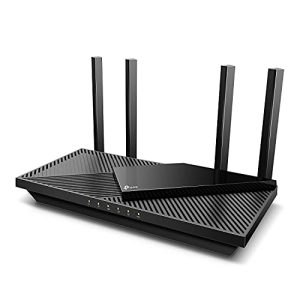
The Archer AX55 sits in the middle of this group, and that balance is its main appeal. It carries AX3000 wireless capacity across two bands, so a family can run video calls, homework, and evening video at the same time without one activity crowding out the rest. Four external antennas help the signal reach around a home, and the USB 3.0 port lets you share a drive with the household. EasyMesh support means a matching node can extend coverage later, while HomeShield adds a layer of network protection and parental controls.
2. TP-Link Archer AX21
- Best for: Smaller homes and renters who want a straightforward Wi-Fi 6 upgrade.
- Dual-band Wi-Fi 6 with AX1800 wireless capacity
- 1201 Mbps on 5 GHz and 574 Mbps on 2.4 GHz
- Gigabit wired ports
- OFDMA and MU-MIMO
Smaller homes and renters who want a straightforward Wi-Fi 6 upgrade.
AX1800 capacity can feel tight in a large home with many simultaneous video streams.
The Archer AX21 is the simplest pick in this set, aimed at smaller homes where ease of use matters more than raw capacity. Its AX1800 wireless class covers everyday browsing, video, and calls, while OFDMA helps the router share airtime among phones, tablets, and smart home gear. Setup runs through the Tether app, and Alexa support lets you manage the network with voice commands. Parental controls are built in, so a household can set limits for younger users without adding another box or service.
3. TP-Link Archer AX73
- Best for: Larger homes with heavy evening streaming and several active users.
- Dual-band Wi-Fi 6 with AX5400 wireless capacity
- 4804 Mbps on 5 GHz and 574 Mbps on 2.4 GHz
- 1.5 GHz triple-core processor
- Six external antennas
Larger homes with heavy evening streaming and several active users.
Its size and six antennas need more shelf space than the compact models in this guide.
The Archer AX73 is the high-capacity Wi-Fi 6 pick here, with six antennas and a 1.5 GHz triple-core processor behind its AX5400 wireless class. That combination suits a larger home where several people stream, game, and download at once, and the higher 5 GHz figure gives compatible devices more room on the cleaner band. OneMesh support allows a matching extender to join the same network, and the USB 3.0 port handles shared storage for the household. HomeShield covers basic network protection and parental controls.
4. NETGEAR Nighthawk RAX30
- Best for: Families who want strong built-in security and parental controls in a Wi-Fi 6 router.
- Dual-band Wi-Fi 6 with AX2400 wireless capacity
- 1800 Mbps on 5 GHz and 574 Mbps on 2.4 GHz
- Coverage up to 2,000 sq. ft. and 20 devices
- 1.5 GHz triple-core processor
Families who want strong built-in security and parental controls in a Wi-Fi 6 router.
The device limit is listed at 20, so a home with a very large smart home collection may need a higher-capacity model.
The Nighthawk RAX30 brings NETGEAR Armor security and Smart Parental Controls to a mid-range Wi-Fi 6 router, which makes it a natural fit for families with children and many connected gadgets. Its AX2400 wireless class splits across two bands, with the 5 GHz band carrying the heavier work, and coverage is listed for homes up to 2,000 sq. ft. with up to 20 devices. A 1.5 GHz triple-core processor keeps the router responsive when the network is busy, and four Gigabit LAN ports cover wired consoles, PCs, and TV boxes.
5. TP-Link Archer BE230
- Best for: Households with a multi-gig internet plan or newer Wi-Fi 7 phones and laptops.
- Dual-band Wi-Fi 7 with BE3600 wireless capacity
- 2882 Mbps on 5 GHz and 688 Mbps on 2.4 GHz
- Two 2.5 Gbps ports and three 1 Gbps ports
- 2.0 GHz quad-core processor
Households with a multi-gig internet plan or newer Wi-Fi 7 phones and laptops.
Wi-Fi 7 benefits appear only on compatible devices, so older gear will run at its own Wi-Fi 6 or Wi-Fi 5 limits.
The Archer BE230 is the forward-looking pick, moving from Wi-Fi 6 to Wi-Fi 7 while staying in mid-range territory. Its BE3600 wireless class combines a 2882 Mbps 5 GHz band with a 688 Mbps 2.4 GHz band, and Multi-Link Operation can use both bands together on compatible devices. Two 2.5 Gbps ports, one WAN and one LAN, give wired gear a faster path than Gigabit alone, while three more Gigabit ports cover the rest of the desk. A 2.0 GHz quad-core processor, USB 3.0, VPN support, and EasyMesh round out a router built for the next few years.
Which One Fits Your Situation
A small apartment with a handful of devices
A compact space with a modest device count does not need the highest wireless class on the shelf. The Archer AX21 covers everyday video, calls, and browsing with room to spare, and its simple app setup suits a renter who may move within a year. Place it near the center of the apartment, wire the TV box if a port is close, and keep the 5 GHz band for the devices in the same room.
A family home with evening streaming and gaming
When several people use the network at once, capacity and device handling matter more than any single feature. The Archer AX55 or the Nighthawk RAX30 both handle a busy evening well, with the RAX30 adding stronger parental controls for younger users. Wire the console and the main TV if you can, and let the router spread the remaining devices across its two bands.
A home office with wired gear and video calls
A desk with a PC, a work laptop dock, and a video call schedule needs stable wired links and a clean 5 GHz band for calls. The Archer BE230 fits here, with its 2.5 Gbps ports for the PC and the modem link, plus Wi-Fi 7 for newer laptops. Keep the router close to the desk, use cables for the fixed gear, and reserve wireless for phones and tablets that move around the home.
A larger home with weak corners and many gadgets
Long hallways, a second floor, and a growing set of smart home gear call for capacity plus a path to wider coverage. The Archer AX73 covers this ground with six antennas and AX5400 capacity, and its mesh support lets you add a node for a far bedroom or a garden room later. Put the router high and central, then add the node only where the signal still drops.
Common Mistakes
- Placing the router on the floor or inside a closed cabinet, which blocks the signal before it reaches the next room.
- Buying on wireless class alone and ignoring wired ports, coverage, and mesh support.
- Hiding the router behind a TV or a metal shelf, then blaming the internet plan for weak corners.
- Leaving every device on one band instead of spreading heavy use across 2.4 GHz and 5 GHz.
- Skipping a firmware update after setup, which can leave useful fixes and security patches unapplied.
Frequently Asked Questions
Do I need Wi-Fi 7 for a mid-range router?
No, Wi-Fi 7 is a bonus rather than a must-have for most homes today. Wi-Fi 6 routers in this guide already handle video, gaming, and calls for a busy household. Wi-Fi 7 makes sense if you own newer phones and laptops that support it, or if your internet plan runs above Gigabit speed and you want the wired and wireless headroom to match.
Is AX1800 enough for a family home?
AX1800 can serve a smaller family home with a modest device count, especially when the heavy users sit near the router. It may feel tight when several people stream 4K video at once or when a large smart home collection joins the network. In that case, step up to AX3000 or AX5400 for extra capacity and a calmer evening network.
How many wired ports should a home router have?
Four LAN ports suit most homes, covering a PC, a console, a TV box, and one spare for a dock or a network drive. Count the fixed devices you own today, then add one more for growth. If you plan to wire a desk and a living room, a model with multi-gig ports, like the Archer BE230, gives the wired link more room.
Can I add mesh coverage later?
Yes, if your router supports a mesh system such as EasyMesh or OneMesh. A matching node joins the same network name and extends coverage to a far room or a second floor without a second password. Check that the node uses the same mesh system as your router, place it halfway between the router and the weak spot, and keep it out in the open.
FAQ
Do I need Wi-Fi 7 for a mid-range router?
Is AX1800 enough for a family home?
How many wired ports should a home router have?
Can I add mesh coverage later?
More from Amazon
Programs that pair well with the guide above. Offers and eligibility are set by Amazon and may change.
Free shipping on eligible items, Prime Video and more. Eligible new members can start with a free trial.
Start a Prime free trialAd-free music streaming. Eligible new subscribers can start with a free trial.
Try Music Unlimited freeA Prime membership for ages 18-24 with a trial period. Eligibility is set by Amazon.
See Prime for Young AdultsAudiobooks and podcasts to listen to on the go. Eligible new members can start with a free trial.
Try Audible freeAs an Amazon Associate we earn from qualifying purchases.