Key takeaways
- A worn cable should not retire a good headset. Compare five replacement cables for HyperX, Astro and SteelSeries headsets, with fit notes and lengths.
A detachable cable is the part of a gaming headset that takes the most abuse. It gets rolled over by chair wheels, yanked when you stand up, kinked at the plug, and chewed on by desk edges until one channel cuts out or the mic drops mid-match. The good news is that on headsets with a removable cord, none of that damage has to retire the whole unit. A matching replacement cable brings back full audio and voice chat for a fraction of what a new headset runs, and swapping one takes about ten seconds.
The catch is compatibility. Gaming headsets do not all use the same plug layout. Some take a plain 3.5mm plug at both ends, some use a five-pole plug at the earcup, and SteelSeries Arctis models use their own connector shape that a generic aux cord cannot fit. The five cables below cover the three ecosystems PC and console players ask about most: HyperX Cloud, Astro A10 and A40, and SteelSeries Arctis. Each one is a model-specific lead with the plug layout and inline controls its headset expects.
Disclosure: As an Amazon Associate, we earn from qualifying purchases made through links in this article, at no extra cost to you.
Quick Picks
| Product | Best for | ASIN |
|---|---|---|
| Cozy69 Replacement Cable for HyperX Cloud Alpha and Mix | HyperX owners who want the full inline control set | B08K914LTZ |
| weishan A40 Cord for Astro A10 and A40 TR | Astro owners who want a volume wheel on the cable | B0B2P2H4XW |
| MJKOR Replacement Cable for Astro A40 TR | MixAmp Pro TR users who need working inline mute | B08VS5MKXV |
| ienza Audio Cable for Astro A10 and A40 | A plain spare cable with no controls to fail | B07DLKF46K |
| LZYDD Adapter Cable for SteelSeries Arctis | Arctis owners who need the proprietary earcup plug | B07X5TB18Z |
How to Choose a Replacement Headset Cable
Match the headset model first. A replacement cable is built around one family’s plug layout. Astro A40 cables use a five-pole plug at the headset end, HyperX Cloud cables use a four-pole 3.5mm plug at both ends, and Arctis headsets before the Nova line use a proprietary connector that only Arctis-fit cables carry. A cable that plugs in but has the wrong pole layout may give you sound with no mic, or mic with no sound.
Count the poles if you use voice chat. A four-pole (TRRS) plug carries stereo audio plus the microphone on one connector, which is what controllers and combo jacks expect. A three-pole (TRS) plug carries audio only. If your replacement is three-pole, game audio will work and your mic will not, which is why every cable in this roundup keeps the mic line intact.
Decide which inline controls you actually use. The stock cables on these headsets put mute and volume within thumb reach, and replacements split into three camps: full controls (mute plus volume), mute only, and no controls at all. If you mute from your controller or keyboard, a plain cable is one less part to break. If you reach for the cable wheel out of habit, buy the version that keeps it.
Check the length against your setup. Most of these cables land between 6 feet and 2 meters. That is plenty for a controller in your lap or a front-panel PC jack. For a rear-panel jack on a tower under the desk, measure the run before ordering, because a cable that only just reaches will pull at both plugs every time you lean back.
Mind the jacket material. Braided nylon jackets resist the fraying that kills rubber-jacket cables at the plug, and they slide over desk edges instead of gripping them. Plain jackets are lighter and coil more neatly in a bag. Either way, the plug housing matters as much as the jacket: a slim housing fits recessed controller jacks and phone cases that chunky plugs cannot.
The 5 Best Replacement Cables for Gaming Headsets
Cozy69 Replacement Cable for HyperX Cloud Alpha and Mix

Specs
- Fits HyperX Cloud, Cloud Alpha and Cloud Mix headsets
- Length: 2 meters (approx.)
- 3.5mm plugs at both ends
- Inline mute switch and volume control
- Copper wire conductor
- Color: black
The Cloud Alpha and Cloud Mix ship with a detachable cable that carries the mute switch and volume wheel, and this Cozy69 lead mirrors that layout rather than trimming it down. Both plugs are 3.5mm, the run is about 2 meters, and the inline pod keeps the two controls HyperX owners reach for during a match. Because the Cloud family uses a standard four-pole layout at the earcup, the swap is a straight pull-and-plug with no adapters involved.
This is the pick for a Cloud owner whose cable has developed the classic fault: sound in one ear, or a mic that crackles when the cable moves near the plug. One honest flag from the listing page: at the time of checking, the listing showed no featured offers, so confirm availability on the page before counting on it as your only spare.
Best for: HyperX Cloud, Cloud Alpha and Cloud Mix owners who want the full inline control set restored.
weishan A40 Cord for Astro A10 and A40 TR

Specs
- Fits Astro A10, A40 and A40 TR gaming headsets
- Length: 6 feet
- Braided nylon jacket
- Inline volume control wheel
- 3.5mm TRRS plugs, male-to-male
- Model number: A40-35MM-CABLE-VOL-BK
Astro’s own A40 inline cable puts a volume wheel on the cord, and this weishan cord follows the same pattern for the A10, A40 and A40 TR. The five-pole end seats in the earcup, the four-pole end goes to your controller, MixAmp or PC, and the braided nylon jacket shrugs off the desk-edge wear that splits the stock rubber cable. At 6 feet it matches the working length of the original lead, so your routing does not change.
Pick this one if the wheel is the control you use. Volume on the cable means one less trip into a system menu mid-game, and the braid gives the replacement a longer working life than the cord it replaces. Note that the wheel handles volume only; muting still happens at the MixAmp, the controller, or your chat app.
Best for: Astro A10 and A40 owners who adjust volume from the cable and want a braided upgrade over the stock cord.
MJKOR Replacement Cable for Astro A40 TR

Specs
- Fits Astro A40 TR (also works with A10 and A40)
- Length: 2 meters
- Nylon braided jacket
- Inline mute button, no volume control
- Five-pole plug at the headset end, four-pole plug at the device end
- Inline mute works with the MixAmp Pro TR
The A40 TR has a quirk that trips up generic replacements: its inline mute talks to the MixAmp Pro TR, and not every five-pole cable keeps that function alive. This MJKOR cable is built around it. Hold the button to mute, and the MixAmp registers it the way it does with the factory cord. The trade is deliberate: there is no volume wheel, because on a MixAmp setup the dial on the amp already owns that job.
At 2 meters in a nylon braid, it covers the amp-on-desk layout most A40 TR owners run, with a little slack to spare. If your current cable’s fault is a dead mute button rather than dead audio, this is the replacement that restores the exact function you lost instead of working around it.
Best for: A40 TR owners running a MixAmp Pro TR who need the inline mute to work exactly like the original.
ienza Audio Cable for Astro A10 and A40
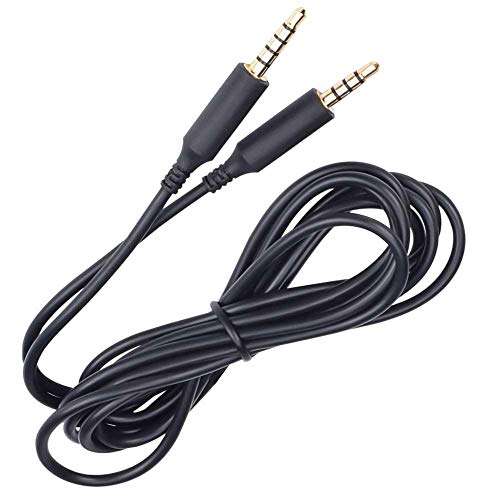
Specs
- Fits Astro A10 and A40 gaming headsets
- Length: 6 feet
- No inline mute or volume controls
- Tangle-free cable design
- 3.5mm plugs, male-to-male
- Model: SYA40AUDIO
Sometimes the right replacement is the simplest one. This ienza lead carries audio and mic between an A10 or A40 and a PS4 or Xbox One controller, a phone, a tablet, or a PC combo jack, and it leaves every control off the cable. There is no wheel to drift and no mute pod to crack, which also makes it the easiest of these cables to coil into a controller drawer or a travel bag as a backup.
It suits players who mute and mix from the controller guide or the MixAmp and just need a dependable pipe for sound and voice. It also suits a second setup: keep one at the couch and one at the desk so the headset can move without unplugging anything. Just know before ordering that the plain layout is the whole point here; if you reach for cable controls, take the weishan or MJKOR above instead.
Best for: Astro owners who want a plain, tangle-free spare cable and handle mute and volume elsewhere.
LZYDD Adapter Cable for SteelSeries Arctis

Specs
- Fits SteelSeries Arctis 3, 5, 7, 9X and Pro headsets
- Proprietary Arctis earcup connector to standard 3.5mm
- Works with PC, PS4, Xbox One and smartphones
- Color: grey
- Item weight: 0.01 kg
- Sold by the LZYDD Store
SteelSeries did not use a plain 3.5mm socket on the Arctis 3, 5, 7, 9X and Pro. The earcup takes a proprietary plug, so a standard aux cord physically cannot seat, and a lost stock cable can sideline an otherwise healthy headset. This LZYDD cable carries the Arctis-fit connector on one end and a standard 3.5mm plug on the other, which puts the headset back on controllers, phones and PC jacks without the ChatMix dial in the chain.
That last point shapes who should buy it. Run through this cable and you get game audio and mic, but the ChatMix balance dial stays in its box, so chat-versus-game mixing moves to your software settings. For a spare, a travel cable, or a second-room setup, that is a fair trade for getting the headset working again. At the time of checking the listing showed no featured offers, so confirm availability on the page.
Best for: Arctis 3, 5, 7, 9X and Pro owners who lost the stock cable and need the proprietary plug to use the headset wired again.
FAQ
Will any 3.5mm cable work with my gaming headset?
Only if your headset takes a standard 3.5mm plug at the earcup and the cable has the right pole count. HyperX Cloud models do. Astro A40 headsets need a five-pole plug at the headset end, and SteelSeries Arctis models before the Nova line need their proprietary connector, so a generic aux cord will not seat or will drop the mic.
Why does my replacement cable give me sound but no microphone?
The usual cause is a three-pole (TRS) cable where a four-pole (TRRS) cable is needed. The fourth contact carries the microphone. Check that both the cable and any adapter in the chain are four-pole, and that the cable is fully seated at the earcup, since a half-seated plug often keeps audio while cutting the mic line.
Does the inline mute on an Astro replacement work with the MixAmp Pro TR?
It depends on the cable. The A40 TR sends its mute signal over the five-pole plug, and only cables wired for it keep the function. The MJKOR cable in this roundup is built for that pairing. Plain A40 cables will pass audio and mic through a MixAmp but may not trigger its mute state.
How do I make a replacement cable last longer than the original?
Route it with slack at both ends so the plugs are never under tension, keep chair wheels off the run, and unplug by gripping the housing rather than pulling the cord. When you store the headset, coil the cable loosely instead of wrapping it tight around the headband, which is where most kinks and broken conductors begin.
Conclusion
A failed cable is the cheapest fault a good headset can have, as long as the replacement matches the plug layout your model expects. HyperX Cloud owners should take the Cozy69 lead for its full inline controls, Astro players split between the weishan wheel cable, the MJKOR mute cable for MixAmp Pro TR setups, and the plain ienza spare, and Arctis owners need the LZYDD cable’s proprietary plug to get wired up at all. Match the model, keep the mic pole intact, and your headset is back in the game.
FAQ
Will any 3.5mm cable work with my gaming headset?
Why does my replacement cable give me sound but no microphone?
Does the inline mute on an Astro replacement work with the MixAmp Pro TR?
How do I make a replacement cable last longer than the original?
More from Amazon
Programs that pair well with the guide above. Offers and eligibility are set by Amazon and may change.
Free shipping on eligible items, Prime Video and more. Eligible new members can start with a free trial.
Start a Prime free trialAd-free music streaming. Eligible new subscribers can start with a free trial.
Try Music Unlimited freeA Prime membership for ages 18-24 with a trial period. Eligibility is set by Amazon.
See Prime for Young AdultsAudiobooks and podcasts to listen to on the go. Eligible new members can start with a free trial.
Try Audible freeAs an Amazon Associate we earn from qualifying purchases.