Our Top Picks

Buying a VR headset mainly for private video viewing is a different decision from buying one for games. Gaming roundups rank headsets on controller tracking and game libraries, but for video the deciding factors are per-eye resolution, whether the headset plays files on its own without a PC or console, how much local storage it carries, and whether its account system keeps your viewing separate from anyone else who picks the headset up. Get those four things right and the headset disappears into the experience; get them wrong and you end up tethered, transcoding, or sharing more than you intended.

This guide narrows the field to two standalone headsets chosen from their Amazon listing specifications. The Meta Quest 3 512GB suits viewers who store large local libraries and want straightforward profile and PIN controls, while the HTC Vive Focus Vision suits viewers who put the sharpest possible panel first. Both play video without a PC, and both keep accounts separate.
Quick Picks
As an Amazon Associate we earn from qualifying purchases.
| Product | Best for | Key spec |
|---|---|---|
| Meta Quest 3 512GB | Large local libraries and shared-household privacy | 512GB storage |
| HTC Vive Focus Vision | Sharpest image for filmed content | 2448 x 2448 per eye |
How to Choose
Per-Eye Resolution and Refresh Rate
Video exposes a panel’s limits faster than games do, because the image fills your view and stays still long enough for softness to show. Per-eye resolution is the figure that matters: the Quest 3 lists 2064 x 2208 per eye through pancake lenses, while the Focus Vision lists 2448 x 2448 per eye with a field of view up to 120 degrees. Refresh rate matters less for filmed content than for games, since most video is shot at low frame rates, but a 90Hz or 120Hz ceiling still helps interface motion and high-frame-rate files play smoothly. Lens design matters here too: pancake lenses hold clarity toward the edges of the frame better than older lens designs.
Standalone Playback Without a PC or Console
A headset bought for private viewing should work the moment you put it on, with no computer to boot and no console to borrow. Both headsets here are standalone designs that store and play files on the device itself, and neither needs external base stations: the Quest 3 uses inside-out tracking, and the Focus Vision also runs untethered. Tethered headsets can look excellent, but they tie viewing to one room and one machine. If you expect to watch in different rooms, or away from home, standalone playback is the feature that decides whether the headset actually gets used.
Local Storage for Video Files
Streaming is convenient until a connection drops or a service removes a title, so local storage is worth taking seriously for a viewing headset. High-resolution video files are large, and a library grows quickly once you start keeping favourites on the device. The Quest 3’s 512GB is the largest local storage in this guide and removes most capacity planning from the purchase. Where a listing leaves storage unclear, confirm the configuration on the product page before ordering, because capacity cannot be judged from the model name alone and variants differ. Capacity also decides how often you end up deleting older files just to make room for new ones.
Profiles and Lock Controls for Privacy
Privacy on a shared headset is an account feature, not a hardware one. Look for separate user profiles so each person’s apps, files and history stay under their own sign-in, and for a headset-level unlock pattern or PIN so the device itself asks for a code before it opens. The Quest platform supports separate profiles and a headset unlock pattern, which keeps casual access out without hiding the headset away. Before buying any headset for private viewing, confirm in the listing and platform description that profiles and a lock are supported, not merely an app store account.
The 2 Best Options
Meta Quest 3 512GB
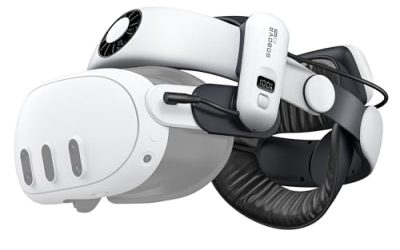
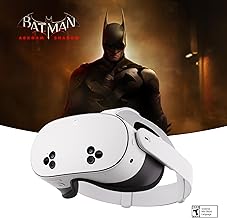
The Quest 3 is the straightforward recommendation for private viewing because it removes the most friction. It plays video entirely on its own hardware, so there is no PC to start and no console to share, and its 512GB of storage is the largest in this guide for keeping files on the device. The 2064 x 2208 per-eye pancake-lens display stays sharp across the frame, and the platform’s separate profiles plus a headset unlock pattern keep your library under your own sign-in. At about 515 grams it is also the lighter long-session option here, which matters over a full-length film.
Specs
- Display: 2064 x 2208 per eye, pancake lenses
- Processor: Snapdragon XR2 Gen 2; 8GB RAM
- Storage: 512GB
- Refresh rate: up to 120Hz
- Tracking: inside-out, no base stations; Touch Plus controllers included
- Mixed reality: full-color passthrough
- Weight: about 515 grams
- Model number: 899-00585-01
Best for: Viewers who keep a large local video library and want simple profile and PIN privacy on a shared headset.
Watch out for: This ASIN is the standalone headset on its own; bundle listings that add a Link Cable or an Elite Strap use different codes, so check the listing title describes the headset alone before ordering.
ASIN: B0CD1JTBSC
HTC Vive Focus Vision
The Focus Vision makes one argument and makes it well: resolution. At 2448 x 2448 per eye it carries the sharpest panel in this guide, and for filmed content that extra clarity is visible in fine detail and text. It is a standalone headset with eye tracking and automatic IPD adjustment, so setup stays simple, and its hot-swappable battery suits longer viewing sessions without waiting on a charge. The trade-offs are a 90Hz refresh ceiling and a heavier reliance on optional extras for PC streaming, but as a self-contained video viewer it is the connoisseur’s pick.
Specs
- Display: 2448 x 2448 per eye; field of view up to 120 degrees
- Refresh rate: 90Hz
- RAM: 12GB
- Eye tracking with auto-IPD adjustment; hand tracking
- Hot-swappable battery
- Standalone and PC VR; DisplayPort streaming requires the optional VIVE Wired Streaming Kit, sold separately
- Model number: 2QD4100
Best for: Viewers who put the sharpest possible image first and watch mainly filmed content.
Watch out for: Availability signals for this ASIN conflict: a price tracker’s current entry is dated March 2026, while a November 2026 catalogue check sighted the headset on sale. Confirm a live featured offer for this exact ASIN on the product page before ordering, and remember the wired streaming kit is a separate purchase.
ASIN: B0DDRLX7V4
Which One Fits Your Situation
You Keep a Large Library on the Device
Choose the Meta Quest 3 512GB. Its 512GB of local storage is the largest capacity in this guide, so a substantial collection of high-resolution files can live on the headset itself instead of on a network drive or a streaming subscription. Standalone playback means the library is available in any room, and files stay put even when a streaming service rotates its catalogue. Playback also starts instantly, with no buffering or downloads first.
The Headset Is Shared With Other People
Choose the Meta Quest 3 512GB. Separate user profiles keep each person’s apps, files and viewing history under their own sign-in, and the headset unlock pattern means the device asks for a code before it opens. That combination is what makes a shared headset workable for private viewing: nobody needs to hand over an unlocked device, and nobody else’s recommendations or history get mixed into yours.
Image Sharpness Matters More Than Anything
Choose the HTC Vive Focus Vision. Its 2448 x 2448 per-eye resolution is the highest in this guide, and filmed content rewards that clarity in faces, fine detail and on-screen text. Eye tracking with automatic IPD adjustment keeps the image aligned without manual dialling, and the hot-swappable battery lets a long session continue with a quick swap instead of a charging break.
You Also Want to Stream From a PC Sometimes
Choose the HTC Vive Focus Vision, with one condition. It works as a standalone viewer out of the box, and it can also stream from a PC, but DisplayPort streaming requires the optional VIVE Wired Streaming Kit, which is sold separately and is not in the box. Budget for that kit if wired PC playback is part of your plan; if it is not, the Quest 3 covers standalone viewing with nothing extra to buy.
Common Mistakes
- Buying a tethered headset that needs a console or gaming PC before it can play anything, when the goal was viewing anywhere.
- Comparing total resolution figures instead of per-eye resolution, which is the number that decides how sharp video actually looks.
- Underestimating file sizes: high-resolution video fills a small drive quickly, so storage should be settled before purchase, not after the first few downloads have already filled the drive.
- Ordering a bundle listing and assuming it is the same product as the standalone headset listing; bundles carry different ASINs.
- Skipping the profile and lock setup, leaving viewing history and files visible under one shared account.
Frequently Asked Questions
Do these headsets need a PC to play video?
No. Both the Quest 3 and the Focus Vision are standalone headsets that store and play video files on the device itself, with no computer or console required. The Focus Vision can optionally stream from a PC as well, but that is an extra mode rather than a requirement, and its wired DisplayPort mode needs a separately sold kit.
How much storage does a local video library need?
More than most buyers expect. High-resolution video files are large, and a modest collection kept permanently on the device can run to hundreds of gigabytes. The Quest 3’s 512GB gives the most headroom of the two headsets here. If you plan to stream everything instead, storage matters less, but then your library depends on your connection and on services keeping titles available and their apps supported.
Can other people see what I watch on a shared headset?
Not if you set the account controls up first. Separate user profiles keep each person’s apps, files and history under their own sign-in, and a headset unlock pattern or PIN stops the device opening straight into your account. The Quest platform supports both features. Set them up during initial configuration rather than afterwards, so nothing accumulates under a shared profile in the meantime.
Does the Vive Focus Vision include everything needed for PC streaming?
No. The headset works standalone out of the box, but DisplayPort streaming from a PC requires the VIVE Wired Streaming Kit, which HTC sells separately and does not include with the headset. Check the listing contents carefully before ordering if wired PC playback matters to you, and confirm whether any cable or adapter you already own is actually the kit the listing describes.
FAQ
Do these headsets need a PC to play video?
How much storage does a local video library need?
Can other people see what I watch on a shared headset?
Does the Vive Focus Vision include everything needed for PC streaming?
More from Amazon
Programs that pair well with the guide above. Offers and eligibility are set by Amazon and may change.
Free shipping on eligible items, Prime Video and more. Eligible new members can start with a free trial.
Start a Prime free trialAd-free music streaming. Eligible new subscribers can start with a free trial.
Try Music Unlimited freeA Prime membership for ages 18-24 with a trial period. Eligibility is set by Amazon.
See Prime for Young AdultsAudiobooks and podcasts to listen to on the go. Eligible new members can start with a free trial.
Try Audible freeAs an Amazon Associate we earn from qualifying purchases.