Our Short List of 3
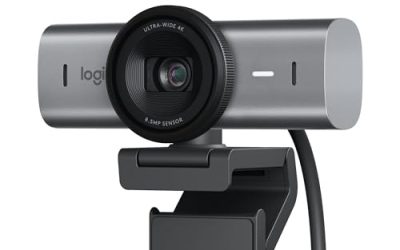
- Maximum video: 4K Ultra HD at 30 fps, 1080p at 60 fps, 720p at 90 fps
- Face sign-in: Windows Hello, optical and infrared sensors
- Field of view: 65, 78 or 90 degrees, adjustable
- Focus and exposure: Autofocus, RightLight 3 with HDR

- Maximum video: 4K UHD at 30 fps, Full HD at 60 fps
- Sensor: Sony STARVIS CMOS, 8.3 megapixels
- Face sign-in: Windows Hello compatible, Dell ExpressSign-in presence detection
- Field of view: 65, 78 or 90 degrees, adjustable

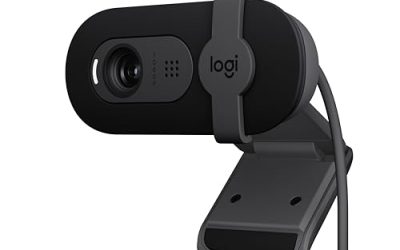
- Maximum video: 1080p Full HD at 30 fps, MJPEG and YUY2
- Face sign-in: Windows Hello 4.x support, dedicated infrared sensor and IR mode
- Field of view: 95 degrees
- Zoom and movement: 4x digital zoom, 360 degree rotation with pan and tilt
All 5 Picks at a Glance
| Product | Specs | Action |
|---|---|---|
| 1. Logitech Brio 4K — Best 4K Windows Hello Webcam |
| Check price on Amazon |
| 2. Dell UltraSharp Webcam WB7022 — Best Premium Option With Presence Detection |
| Check price on Amazon |
| 3. Lenovo 510 FHD Webcam — Best Straightforward 1080p Pick |
| Check price on Amazon |
 4. NexiGo HelloCam — Best for Automatic Privacy |
| Check price on Amazon |
 5. NexiGo HelloCam Pro — Best 1080p Pick for Smoother Motion |
| Check price on Amazon |
Key takeaways
- Find the best webcams with Windows Hello facial recognition, with IR sensors for secure face sign-in, plus 4K and 1080p options for calls, streaming and work.
As an Amazon Associate we earn from qualifying purchases.
Typing a password every time you sit down at a desktop PC gets old quickly. A webcam with Windows Hello facial recognition solves that at the hardware level. Instead of relying on the ordinary color image used for video calls, these cameras add an infrared sensor and emitters. Windows uses that infrared view to confirm it is really you, then signs you in without a password or PIN entry.
That extra hardware is why so few webcams qualify. A sharp 4K webcam can still be unable to do face sign-in if it has no infrared sensor. Every pick here lists Windows Hello support explicitly in its product listing, and pairs that hardware with a usable everyday camera for meetings, streaming and recording.
Disclosure: This article contains affiliate links. If you buy through a link on this page, we may earn a commission at no additional cost to you.
Quick Picks
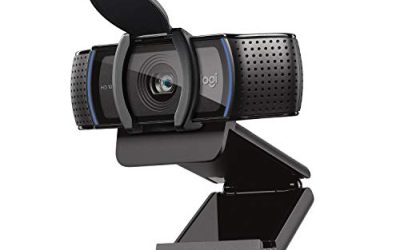
- Best 4K option overall: Logitech Brio 4K — 4K video, adjustable field of view, autofocus, HDR light correction and optical plus infrared sensors for Windows Hello.
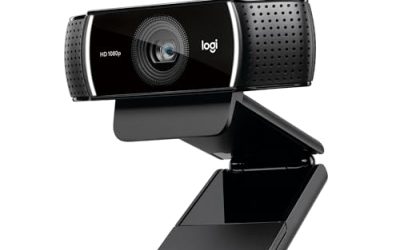
- Best for premium Dell setups: Dell UltraSharp Webcam WB7022 — 4K video from a large Sony STARVIS sensor, AI auto-framing, Windows Hello and presence detection that can wake and lock your PC.
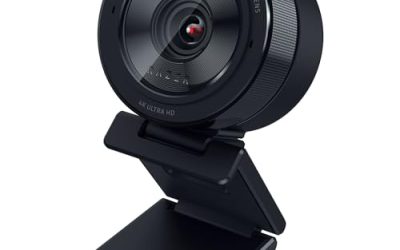
- Best straightforward 1080p pick: Lenovo 510 FHD Webcam — 1080p video, a wide 95-degree lens, dual microphones, a sliding privacy shutter and Windows Hello 4.1 facial recognition.
- Best for privacy by design: NexiGo HelloCam — 1080p video, Windows Hello sign-in and an automatic electronic shutter that closes the lens when the camera is not in use.
- Best 1080p pick for smoother video: NexiGo HelloCam Pro — 1080p at 60 frames per second, autofocus, Windows Hello and the same automatic electronic shutter approach as the standard HelloCam.
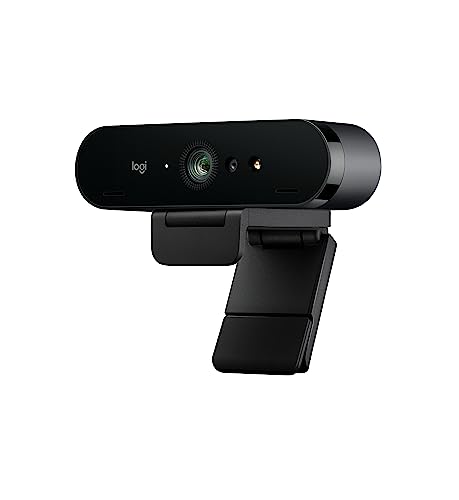
1. Logitech Brio 4K — Best 4K Windows Hello Webcam
- Maximum video: 4K Ultra HD at 30 fps, 1080p at 60 fps, 720p at 90 fps
- Face sign-in: Windows Hello, optical and infrared sensors
- Field of view: 65, 78 or 90 degrees, adjustable
- Focus and exposure: Autofocus, RightLight 3 with HDR
The Logitech Brio 4K is the longest-established name in this category, and remains the easiest recommendation for someone who wants one camera for face sign-in, meetings and streaming. Logitech lists Windows Hello integration directly in the product details, powered by both optical and infrared sensors.
For video, the Brio records up to 4K Ultra HD at 30 frames per second, 1080p at 30 or 60 frames per second, and 720p at up to 90 frames per second. You can switch between 65, 78 and 90 degree fields of view, from tight head-and-shoulders framing to a wider room view. Autofocus and RightLight 3 with HDR help in mixed or backlit lighting.
Audio comes from dual omnidirectional microphones with noise canceling, and a USB 3.0 connection is needed for full 4K output. It works across Windows, Mac and ChromeOS for video, although Windows Hello face sign-in itself is a Windows feature.
Key specifications:
Pros:
Cons:
View the Logitech Brio 4K on Amazon
2. Dell UltraSharp Webcam WB7022 — Best Premium Option With Presence Detection
- Maximum video: 4K UHD at 30 fps, Full HD at 60 fps
- Sensor: Sony STARVIS CMOS, 8.3 megapixels
- Face sign-in: Windows Hello compatible, Dell ExpressSign-in presence detection
- Field of view: 65, 78 or 90 degrees, adjustable
The Dell UltraSharp Webcam WB7022 takes the same basic idea and adds presence detection. Dell lists it as Windows Hello compatible, and its ExpressSign-in feature uses a proximity sensor to detect when you approach, wake the system and sign you in. When you walk away, it can lock the system again — a meaningful security benefit for a shared office or work desk.
Video comes from a large Sony STARVIS CMOS sensor with 8.3 megapixels, capturing 4K at 30 frames per second and Full HD at 60 frames per second. AI auto-framing keeps you centered, the field of view adjusts between 65, 78 and 90 degrees, and you get autofocus, HDR and 5x digital zoom. Settings are managed through Dell Peripheral Manager on Windows.
One limitation to plan around is audio: the WB7022 focuses on the image and does not replace a headset or separate microphone for calls. A magnetic lens cap covers the lens for privacy.
Key specifications:
Pros:
Cons:
View the Dell UltraSharp Webcam WB7022 on Amazon
3. Lenovo 510 FHD Webcam — Best Straightforward 1080p Pick
- Maximum video: 1080p Full HD at 30 fps, MJPEG and YUY2
- Face sign-in: Windows Hello 4.x support, dedicated infrared sensor and IR mode
- Field of view: 95 degrees
- Zoom and movement: 4x digital zoom, 360 degree rotation with pan and tilt
The Lenovo 510 FHD Webcam is built around a simple promise: clear 1080p video and easy face sign-in. Lenovo states that it has Windows Hello built in, and its specification sheet lists Windows Hello 4.x support with a dedicated infrared mode alongside the normal color video mode.
The color camera captures 1920 x 1080 video at 30 frames per second through a 95 degree lens with 4x digital zoom. The head rotates 360 degrees with pan and tilt, so positioning is flexible on a monitor, laptop or tripod. Dual microphones capture audio from up to two meters away, according to Lenovo.
Privacy is handled with a sliding shutter, and the connection is a 1.8 meter USB Type-C to Type-A cable. It is fixed-focus, which keeps setup simple but gives less control than autofocus models.
Key specifications:
Pros:
Cons:
View the Lenovo 510 FHD Webcam on Amazon
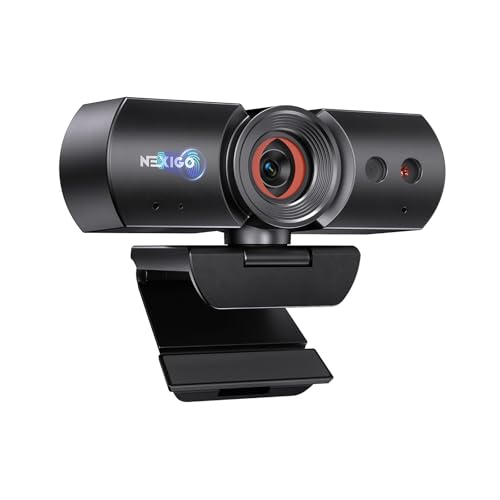
4. NexiGo HelloCam — Best for Automatic Privacy
- Maximum video: 1080p HD
- Face sign-in: Windows Hello, as stated in the product listing
- Privacy: Automatic electronic shutter, True Privacy design
- Model: N930W HelloCam
The NexiGo HelloCam approaches privacy differently from a sliding cover you have to remember to close. Its listing describes a True Privacy design with an automatic electronic shutter that closes over the lens when the camera is not in use, and opens when you join a call or sign in. Combined with Windows Hello support stated directly in the listing, that makes it a strong fit for anyone uneasy about a lens that is always exposed.
For video, the HelloCam is a 1080p HD USB webcam with a built-in microphone and facial enhancement features for calls, lessons and streaming. Setup is plug and play: mount it, plug it in, and enroll your face in the Windows sign-in settings.
NexiGo sells several similar-looking webcams, and only the HelloCam line is listed with Windows Hello. Confirm the listing title includes Windows Hello, since a standard NexiGo camera without infrared hardware cannot add face sign-in later.
Key specifications:
Pros:
Cons:
View the NexiGo HelloCam on Amazon
5. NexiGo HelloCam Pro — Best 1080p Pick for Smoother Motion
- Maximum video: 1080p at 60 fps
- Face sign-in: Windows Hello, as stated in the product listing
- Focus: Autofocus
- Privacy: Automatic electronic shutter, True Privacy design
The NexiGo HelloCam Pro keeps the core formula — Windows Hello and an automatic electronic shutter — and upgrades the video side. Its listing specifies 1080p at 60 frames per second with autofocus, for smoother motion than a 30 frame per second camera when you move or gesture. For streamers, teachers and presenters, that is the main reason to choose the Pro.
Autofocus keeps your face sharp as you lean in or sit back. The built-in microphone, facial enhancement features and plug-and-play USB connection carry over, as does the shutter that closes automatically when the camera is idle.
As with the standard model, check the listing before ordering. The Pro is designated N930W Pro, and Windows Hello should appear in the title of the exact listing you choose.
Key specifications:
Pros:
Cons:
View the NexiGo HelloCam Pro on Amazon
How to Choose a Webcam for Windows Hello Face Sign-In
Start with the infrared sensor, not the resolution. Windows Hello Face requires a camera system built for biometric sign-in, normally including near-infrared sensing. A product listing should say Windows Hello explicitly. Marketing phrases such as face tracking, face enhancement or AI framing describe video features and do not mean the camera can sign you in.
Check your Windows version and sign-in settings. You need Windows 10 or Windows 11 with Windows Hello Face available under sign-in options. On newer Windows 11 systems, Enhanced Sign-in Security can affect which external cameras are accepted, so confirm your system settings and keep Windows and camera firmware up to date before assuming a camera is faulty.
Match the video spec to your real use. If the camera is mainly for signing in and occasional calls, 1080p at 30 frames per second is enough. If you present, teach or stream, 1080p at 60 frames per second or a 4K model with adjustable field of view gives you more flexibility and a cleaner image when you crop or zoom.
Think about field of view and focus. A 95 degree lens captures a wide room view but can look distant. Adjustable fields of view, such as 65, 78 and 90 degrees, let you tighten the framing. Autofocus suits people who move around, while fixed focus is simpler and works well at a consistent desk distance.
Do not overlook audio and privacy. Some premium cameras, including the Dell WB7022 in this guide, focus on video and leave audio to a headset or separate microphone. For privacy, look for a physical shutter, a lens cap or an automatic electronic shutter, and use it whenever the camera is not needed.
Verify the exact model at checkout. Brands often sell near-identical cameras with and without infrared hardware. The model name and the words Windows Hello should both appear in the listing for the exact item in your cart. That single check prevents the most common buying mistake in this category.
Frequently Asked Questions
Can any webcam work with Windows Hello facial recognition?
No. Windows Hello Face needs a compatible biometric camera, normally with an infrared sensor and infrared emitters. An ordinary webcam, even a very sharp 4K model, cannot be upgraded in software to add face sign-in if the infrared hardware is missing.
Is face sign-in with a webcam secure?
Windows Hello is designed as a biometric sign-in system, and the infrared hardware helps the system distinguish a real person from a flat photo or a screen image. It replaces typing a password at the desk, but you should still keep a PIN or password as a backup sign-in method and use a privacy shutter or lens cap when the camera is idle.
Do these webcams work on Mac or ChromeOS?
Several models in this guide can work as regular video cameras on other systems, and the Logitech Brio lists Windows, Mac and ChromeOS support for video. Windows Hello itself is a Windows feature, however, so face sign-in only applies on a compatible Windows PC.
Why does Windows not offer the face sign-in option after I plug the camera in?
First, confirm the exact model supports Windows Hello and that the camera is connected directly to the PC. Then check the sign-in options in Windows Settings, install any camera software or firmware the maker provides, and make sure Windows is fully updated. On newer Windows 11 systems, Enhanced Sign-in Security settings can also affect external camera support.
What is the difference between face tracking and facial recognition sign-in?
Face tracking and auto-framing keep you centered in the video picture as you move. Facial recognition sign-in is a separate function that uses the infrared sensor to identify you and unlock the PC. A camera can offer the first without offering the second, which is why the Windows Hello listing detail matters so much.
Conclusion
For most people, the right choice comes down to how much webcam you need beyond signing in. The Logitech Brio 4K is the most complete all-rounder, pairing proven Windows Hello hardware with flexible 4K video. The Dell UltraSharp WB7022 suits premium Windows and Dell setups that can use its presence detection and automatic locking. The Lenovo 510 FHD keeps things simple with 1080p video, a wide lens and a built-in shutter, while the NexiGo HelloCam and HelloCam Pro make automatic lens privacy the centerpiece, with the Pro adding smoother 60 frame per second video and autofocus. Whichever model you choose, confirm Windows Hello in the exact listing before you buy, enroll your face in a well-lit room, and keep a backup PIN set up. After that, signing in becomes as simple as sitting down and looking at your screen.
FAQ
Can any webcam work with Windows Hello facial recognition?
Is face sign-in with a webcam secure?
Do these webcams work on Mac or ChromeOS?
Why does Windows not offer the face sign-in option after I plug the camera in?
What is the difference between face tracking and facial recognition sign-in?
More from Amazon
Programs that pair well with the guide above. Offers and eligibility are set by Amazon and may change.
Free shipping on eligible items, Prime Video and more. Eligible new members can start with a free trial.
Start a Prime free trialAd-free music streaming. Eligible new subscribers can start with a free trial.
Try Music Unlimited freeA Prime membership for ages 18-24 with a trial period. Eligibility is set by Amazon.
See Prime for Young AdultsAudiobooks and podcasts to listen to on the go. Eligible new members can start with a free trial.
Try Audible freeAs an Amazon Associate we earn from qualifying purchases.