Key takeaways
- A white wireless gaming mouse is a narrow search with two sets of requirements. The first is performance: a sensor that tracks cleanly.
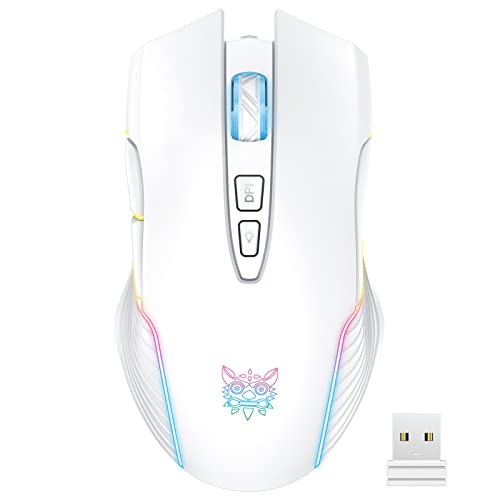
A white wireless gaming mouse is a narrow search with two sets of requirements. The first is performance: a sensor that tracks cleanly, a connection that does not lag, and a battery that outlasts a tournament weekend. The second is looks, because a white mouse usually sits on a white or light desk setup where a black rubber block would stand out. The challenge is that white finishes are only offered on some models and sometimes only on specific variants, so reading the listing carefully saves a return.
This guide is for players building a light-themed desk who still want real gaming features: low-latency wireless, programmable buttons and onboard profiles. It compares eight white models ranging from the lightweight 60 gram class to feature-heavy 13-button designs, and it sorts them by grip, weight, battery and connection type. In 2026, 2.4GHz wireless with a USB dongle is the default for competitive play, with Bluetooth as a convenient backup for laptops and tablets.
Quick Picks
Our top picks
 Logitech G305 Lightspeed Wireless Gaming Mouse
- Next-gen 12,000 DPI HERO optical sensor delivers unrivaled…
- Advanced LIGHTSPEED wireless gaming mouse for super-fast 1…
- Ultra-long battery life gives you up to 250…
 SOLAKAKA SM600 Wireless Wireless Gaming Mouse with
- 3 Mode Connection.SM600 wireless gaming mouse adopts tri-mode…
- Customized &Macro Proqram.SM600 gaming mouse with 7 programmable…
- Adjustable DPI & Rechargeable Battery.SM600 wireless mouse can…


 Razer Orochi V2 Wireless Gaming Mouse
- Up to 950 hours of battery life on…
- Dual wireless connectivity gives you efficient Bluetooth for…
- Razer 5G Advanced 18K DPI Optical Sensor delivers…


As an Amazon Associate we earn from qualifying purchases at no extra cost to you.
| Product | Best for | Key spec from the title |
|---|---|---|
| Logitech G305 Lightspeed | Reliable lightweight all-rounder | 12,000 DPI, 6 buttons, 250h battery |
| SOLAKAKA SM600 | Honeycomb shell on a budget | BT5.0, Type-C wired, 2.4G wireless |
| Redragon wireless mouse | Budget macro buttons | 8000 DPI, fire button, 70 hours, rechargeable |
| Logitech G502 X Plus | Feature-rich, RGB lighting | 13 buttons, optical switches, LIGHTSYNC RGB, under 130 hr battery |
| Razer Orochi V2 | Ultralight, long battery | 60g, 950 hr battery, HyperSpeed and Bluetooth |
| Razer Basilisk V3 Pro | Productivity and gaming mix | Optical switches Gen-3, HyperScroll Tilt Wheel, 11 buttons |
| PHNIXGAM wireless mouse | Casual use on a tight budget | Up to 3600 DPI, 7 non-programmable buttons |
| Logitech G502 X Lightspeed | Big-hand claw and palm grips | Optical switches, 13 buttons, under 140 hr battery |
How to Choose
Weight and shell shape
Weight shapes how a mouse feels in fast flicks. A mouse near 60 grams suits quick, twitchy aim, while feature-rich designs with many buttons are heavier and steadier. A honeycomb shell lowers weight but exposes the internals to dust. Match the shape to your grip: claw and fingertip players usually like smaller, lighter mice, while palm grippers prefer a larger body with a thumb rest. White shells show dirt more readily, so wipe them down every few weeks.
Wireless type and battery life
A 2.4GHz dongle connection typically gives the lowest latency, which is why most competitive players choose it over Bluetooth. Bluetooth is handy for laptops and tablets and saves a USB port. Battery claims vary widely: 70 hours is a comfortable week for casual players, while claims of 250 or even 950 hours mean charging only a few times a year. Rechargeable USB-C mice can be used wired in a pinch, which helps when the battery runs out mid-session.
Sensor, DPI and buttons
DPI is mostly a marketing number. A 12,000 DPI sensor and an 18,000 DPI sensor are both far beyond what most players use, which is usually 400 to 1600 DPI. What matters more is clean tracking, onboard memory so settings travel between PCs and a button layout you can reach. Six programmable buttons are plenty for most games, while MMO and productivity players may want 11 or 13. Optical switches avoid the double-click failures common to mechanical switches.
Ignore the gimmicks and check the finish
RGB lighting is a nice touch on a white shell but adds nothing to aim and can shorten battery life. Ignore inflated claims about response times without a stated polling rate or connection type. Budget mice often skip onboard memory, use slower wireless and have buttons that cannot be reprogrammed. Always confirm the listing says white in the title, since many models share a name across several colors.
The 8 Best Options
Logitech G305 Lightspeed
A dependable, lightweight option for anyone who wants proven wireless without fuss. The title lists 12,000 DPI, a lightweight build, six programmable buttons, a 250-hour battery and onboard memory, in white. It is an easy recommendation for beginners, students and office-plus-gaming desks, and its battery life means you rarely think about charging. The simple shape also works for both small and medium hands, so it is a safe pick when you cannot try the mouse before buying.
- A 250-hour battery rating reduces charging worries.
- Onboard memory keeps your settings across computers.
- Trade-off: six buttons and a simple shape offer fewer shortcuts than larger mice.
Skip it if you need many programmable buttons or a rechargeable battery.
SOLAKAKA SM600
A budget honeycomb-shell mouse that supports three connection modes. The title lists Bluetooth 5.0, Type-C wired and 2.4G wireless, two side buttons and programmable macros in white. It appeals to buyers who want flexibility between a gaming PC, a laptop and a tablet without carrying several mice. The honeycomb design also gives it a distinctive look on a white desk, which suits players who treat the mouse as part of the aesthetic as much as a tool.
- Three connection modes cover desktop, laptop and wired use.
- Honeycomb shell suggests a lighter body.
- Trade-off: the title gives no battery or DPI figures to compare.
Skip it if you want a recognizable brand or documented performance numbers.
Redragon wireless mouse
A budget wireless mouse with gaming extras. The listing mentions RGB backlighting, 8000 DPI, a fire button, macro editing, 70 hours of battery, rechargeable design and Windows and Mac support, in white. It suits casual players who want macro buttons on a small budget and do not mind that the design is more about convenience than precision. Rechargeable operation also saves a steady stream of spare batteries.
- Macro editing and a fire button add game-specific shortcuts.
- 70-hour rechargeable battery is a practical figure.
- Trade-off: the title does not describe the sensor or switch type.
Skip it if you need competitive-level proven wireless performance.
Logitech G502 X Plus
A premium, full-featured white mouse for players who want everything. The title lists optical switches, LIGHTSYNC RGB, 13 buttons, infinite scroll, a battery under 130 hours, USB-C and a reference to the POWERPLAY charging system. It targets shooters, MMOs and builders of RGB-heavy desks, and its thumb buttons and scroll wheel suit anyone who likes binding actions to the side of the mouse.
- 13 buttons give extensive customization.
- Optical switches avoid typical double-click issues.
- Trade-off: it is heavier and larger than ultralight mice.
Skip it if you want an ultralight mouse for twitch aim.
Razer Orochi V2
A compact, ultralight option for travel and fast aim. The title lists 60g weight, a 950-hour battery, HyperSpeed and Bluetooth wireless modes, an 18K DPI sensor and 60 million click switches, in white. It fits claw and fingertip grips and small hands, and the long battery rating makes it a natural travel companion for laptop users who rarely want to plug anything in.
- 60g weight supports quick, low-fatigue movement.
- 950-hour battery claim means very infrequent charging.
- Trade-off: its small size can feel cramped for large hands.
Skip it if you have large hands or want many buttons.
Razer Basilisk V3 Pro
A versatile wireless mouse that mixes gaming and productivity. The title cites 2.4GHz wireless, optical switches Gen-3, a HyperScroll Tilt Wheel, Chroma RGB and 11 programmable buttons, in white. It suits players who also work on the same desk and want smooth scrolling control. It is the choice for people who edit spreadsheets, timelines or documents between matches and want the mouse to help with both.
- HyperScroll Tilt Wheel adds flexible scrolling.
- 11 programmable buttons cover games and workflows.
- Trade-off: the title does not list a weight, and the feature set suggests a larger body.
Skip it if you want a minimal, lightweight shape.
PHNIXGAM wireless mouse
An entry-level white wireless mouse with rechargeable RGB. The title mentions an ergonomic design, up to 3600 DPI and seven non-programmable buttons. It targets casual players, students and office users who want a white look more than advanced features. Because the buttons are fixed rather than programmable, it works best as a general-purpose mouse that happens to light up.
- Rechargeable design avoids replacing batteries.
- Ergonomic shape suits relaxed palm grips.
- Trade-off: buttons are non-programmable, which limits gaming use.
Skip it if you play competitive games or need custom button mapping.
Logitech G502 X Lightspeed
A feature-rich wireless mouse without the RGB of the Plus. The title lists optical switches, 13 buttons, a battery under 140 hours, USB-C and an infinite scroll toggle, in white. It suits players who want the G502 shape and long battery life, and it is a sensible choice for palm and claw grippers with larger hands who want plenty of programmable buttons without extra lighting.
- Under 140 hours of battery is the longest among the 13-button models here.
- Infinite scroll toggle helps long lists and fast scrolling.
- Trade-off: the larger shape is not ideal for small hands.
Skip it if you want an ultralight pick.
Which One Fits Your Situation
You play fast shooters and want light weight
The Razer Orochi V2 at 60g and the Logitech G305, which the listing calls lightweight, are the lightest picks here. Both pair well with a low-friction pad and a modest DPI setting.
You want maximum buttons
The Logitech G502 X Plus or G502 X Lightspeed offer 13 buttons. Choose the Plus if you want RGB lighting and the Lightspeed if you would rather keep the desk less flashy. The Razer Basilisk V3 Pro sits just below with 11 programmable controls.
You switch between devices
The SOLAKAKA SM600 and the Razer Orochi V2 offer Bluetooth along with 2.4G wireless. That lets you pair one mouse with a gaming PC through the dongle and a laptop or tablet through Bluetooth, switching as you move around.
You are on a tight budget
The Redragon wireless and PHNIXGAM mice keep the look without premium pricing. The Redragon adds programmable macros, while the PHNIXGAM is the simpler pick for everyday use and casual games.
Common Mistakes
- Buying a mouse that looks white in photos but is only black in the variant you ordered.
- Chasing DPI figures instead of grip, weight and tracking.
- Ignoring battery type and being stuck mid-session.
- Choosing a heavy feature mouse for fast aim.
- Forgetting the dongle and leaving it at home.
Related guides
- Gaming Headsets For Competitive Fps Directional Audio
- Threadripper Vs Xeon Vs Core I9 For Workstations
- Compact Mini Itx Gaming Pcs For Small Desks
Frequently Asked Questions
Is wireless good enough for competitive play?
Yes, modern 2.4GHz wireless matches wired latency in many models. Bluetooth is better for casual use, laptops and travel, where a tiny extra delay is easy to ignore. For ranked games, use the dongle and keep it plugged into a port close to the mouse.
How much DPI do I need?
Most players use 400 to 1600 DPI. Higher numbers are rarely needed, and they can make the cursor harder to control. Treat the headline figure as a spec, not a quality score.
Do white mice get dirty quickly?
Yes, oils and dust show on white shells, but a damp cloth removes most marks. Avoid harsh cleaners that can yellow the plastic, and wash your hands before long sessions to keep the shell clean.
Can I use these mice wired?
Many can via USB-C, though confirm the listing mentions wired use. Using a cable while the battery charges is handy when you forget to top up before a long session.