Key takeaways
- Peak speeds: Trident Z5 kits reach higher rated frequencies (6400MT/s and beyond) more readily, while Vengeance focuses on rock-solid mainstream speeds.
- Physical height: Vengeance runs a lower profile that clears large tower coolers; Trident Z5’s taller heatspreader can conflict with bulky air cooling.
- Overclocking headroom: Trident Z5 uses tightly binned dies that reward manual tuning; Vengeance is tuned for stability over squeezing every last MHz.
- Aesthetics: Trident Z5’s tri-fin design and vivid RGB target enthusiast showcase builds; Vengeance offers a cleaner, more understated look.
- Price: Vengeance almost always costs less at the same capacity and speed tier, making it the value pick.
- Platform profiles: Both support AMD EXPO and Intel XMP 3.0, but always match the kit’s profile to your CPU brand for one-click stability.
When you’re speccing DDR5 for a 2026 gaming build, two names rise to the top: Corsair’s Vengeance and G.Skill’s Trident Z5. Both deliver the fast speeds and tight timings that modern Ryzen and Intel platforms crave, but they take different approaches to design, tuning headroom, and price, and picking wrong can cost you either money or a few percent of real performance.
This comparison breaks down how Corsair Vengeance and G.Skill Trident Z5 stack up on speed, compatibility, aesthetics, and value, so you can match the right kit to your CPU and motherboard. Below you’ll find the specific Trident Z5 kits worth considering, followed by a head-to-head that cuts through the marketing.
Our top picks
 G.SKILL Trident Z5 RGB Series DDR5 RAM
- * Requires overclocking/BIOS adjustments
- G.SKILL Trident Z5 RGB Series DDR5 U-DIMM Memory…
- Non-ECC, DDR5 U-DIMM, 288-pin, for Desktop PC &…
 G.SKILL Trident Z5 Neo RGB Series DDR5
- * Requires overclocking/BIOS adjustments
- G.SKILL Trident Z5 Neo RGB Series DDR5 U-DIMM…
- Non-ECC, DDR5 U-DIMM, 288-pin, for Desktop PC &…
| Product | Key specs | |
|---|---|---|
| G.SKILL Trident Z5 RGB Series DDR5 RAM | * Requires overclocking/BIOS adjustments G.SKILL Trident Z5 RGB Series DDR5 U-DIMM Memory… Non-ECC, DDR5 U-DIMM, 288-pin, for Desktop PC &… | Check price |
| G.SKILL Trident Z5 Neo RGB Series DDR5 | * Requires overclocking/BIOS adjustments G.SKILL Trident Z5 Neo RGB Series DDR5 U-DIMM… Non-ECC, DDR5 U-DIMM, 288-pin, for Desktop PC &… | Check price |
 G.SKILL Trident Z5 Neo RGB Series DDR5 G.SKILL Trident Z5 Neo RGB Series DDR5 | Check price | |
| G.SKILL Trident Z5 RGB Series DDR5 RAM | Check price | |
 G.SKILL Trident Z5 RGB Series DDR5 RAM G.SKILL Trident Z5 RGB Series DDR5 RAM | * Requires overclocking/BIOS adjustments G.SKILL Trident Z5 RGB Series DDR5 U-DIMM Memory… Non-ECC, DDR5 U-DIMM, 288-pin, for Desktop PC &… | Check price |
 G.SKILL Trident Z5 RGB Series DDR5 RAM G.SKILL Trident Z5 RGB Series DDR5 RAM | * Requires overclocking/BIOS adjustments G.SKILL Trident Z5 RGB Series DDR5 U-DIMM Memory… Non-ECC, DDR5 U-DIMM, 288-pin, for Desktop PC &… | Check price |
| G.SKILL Trident Z5 Neo RGB Series DDR5 | * Requires overclocking/BIOS adjustments G.SKILL Trident Z5 Neo RGB Series DDR5 U-DIMM… Non-ECC, DDR5 U-DIMM, 288-pin, for Desktop PC &… | Check price |
 G.SKILL Trident Z5 Neo RGB Series DDR5 G.SKILL Trident Z5 Neo RGB Series DDR5 | * Requires overclocking/BIOS adjustments G.SKILL Trident Z5 Neo RGB Series DDR5 U-DIMM… Non-ECC, DDR5 U-DIMM, 288-pin, for Desktop PC &… | Check price |
As an Amazon Associate we earn from qualifying purchases at no extra cost to you.
⚡ Save on Your Next PC — Amazon Prime
Prime members get fast free shipping on the systems above, plus early access to Prime Day & Black Friday PC deals. New members get a 30-day free trial.
Watch: Corsair Vengeance vs G.Skill Trident Z5 — Video Review
Quick Verdict
For most gamers, Corsair Vengeance is the smart default: it’s typically cheaper, boots reliably with EXPO and XMP profiles, and its lower profile clears big air coolers. Choose G.Skill Trident Z5 when you want the highest binned speeds, the best overclocking headroom, and premium RGB for a showcase build. Trident Z5 wins on peak performance and looks; Vengeance wins on value and no-fuss compatibility.
Key Differences
- Peak speeds: Trident Z5 kits reach higher rated frequencies (6400MT/s and beyond) more readily, while Vengeance focuses on rock-solid mainstream speeds.
- Physical height: Vengeance runs a lower profile that clears large tower coolers; Trident Z5’s taller heatspreader can conflict with bulky air cooling.
- Overclocking headroom: Trident Z5 uses tightly binned dies that reward manual tuning; Vengeance is tuned for stability over squeezing every last MHz.
- Aesthetics: Trident Z5’s tri-fin design and vivid RGB target enthusiast showcase builds; Vengeance offers a cleaner, more understated look.
- Price: Vengeance almost always costs less at the same capacity and speed tier, making it the value pick.
- Platform profiles: Both support AMD EXPO and Intel XMP 3.0, but always match the kit’s profile to your CPU brand for one-click stability.
Corsair Vengeance
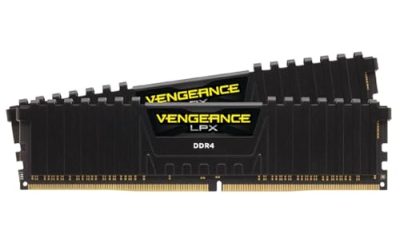
Corsair’s Vengeance DDR5 line is the pragmatic choice for gamers who want fast, reliable memory without paying a premium. It boots cleanly on the widest range of motherboards, its lower-profile heatspreaders sidestep cooler-clearance headaches, and Corsair’s iCUE software makes lighting and monitoring simple if you opt for an RGB variant.
Where Vengeance shines is the value-to-stability ratio. You give up a little peak overclocking potential versus the highest-binned Trident kits, but in real gaming the frame-rate difference is marginal, and you pocket the savings. For a 32GB (2x16GB) build at 6000MT/s CL30, it’s hard to argue against.
G.Skill Trident Z5
G.Skill’s Trident Z5 is the enthusiast’s memory. The kits above span 32GB and 64GB configurations at 6000MT/s to 6400MT/s, with Neo variants tuned specifically for AMD EXPO and standard Z5 kits carrying Intel XMP 3.0. The tightly binned SK Hynix dies give it the best headroom for manual overclocking and low-latency tuning.
It’s also the better-looking kit, the sculpted tri-fin heatspreader and bright RGB make it a centerpiece in a windowed case. You pay for that binning and design: a Trident Z5 kit often costs noticeably more than comparable Vengeance, and its height can crowd large air coolers. For water-cooled showcase rigs chasing peak numbers, it’s worth it.
Which Should You Buy?
- Buy Vengeance if: you want the best value, run a big air cooler, and prioritize plug-and-play stability over squeezing peak MHz.
- Buy Trident Z5 if: you’re chasing the highest speeds, plan to overclock manually, or want premium RGB for a showcase build.
- For AMD Ryzen: either works, but grab the EXPO-optimized variant (Trident Z5 Neo) for one-click stability.
- For Intel: both carry XMP 3.0; pick on price and cooler clearance.
- On a budget: Vengeance at 6000MT/s CL30 is the sweet spot that most gamers should default to.
Frequently Asked Questions
Does memory speed actually matter for gaming?
Yes, especially on Ryzen, where fast DDR5 with tight timings feeds the Infinity Fabric and lifts 1% lows. The jump from 4800 to 6000MT/s is meaningful; gains above 6400 shrink for most titles.
Should I run 32GB or 64GB in 2026?
32GB (2x16GB) remains the gaming sweet spot. Step to 64GB only if you stream, edit video, or run heavy multitasking alongside games.
Will Trident Z5’s height block my CPU cooler?
It can with large tower air coolers. Check your cooler’s RAM clearance spec, or choose lower-profile Vengeance if you’re tight on space.
EXPO or XMP, which do I enable?
Match your CPU: EXPO for AMD Ryzen, XMP for Intel. Many kits carry both profiles; enabling the wrong one can cause boot instability.
Final Verdict
Both kits are excellent, and neither will bottleneck a modern gaming build. Corsair Vengeance is the value-and-stability champion most gamers should buy, clearing coolers and boot profiles without drama at a lower price. G.Skill Trident Z5 is the enthusiast’s pick, worth the premium if you want peak speeds, real overclocking headroom, and standout RGB. Decide whether you’re optimizing for dollars or for the last few percent, and the choice makes itself.