Our Top Picks

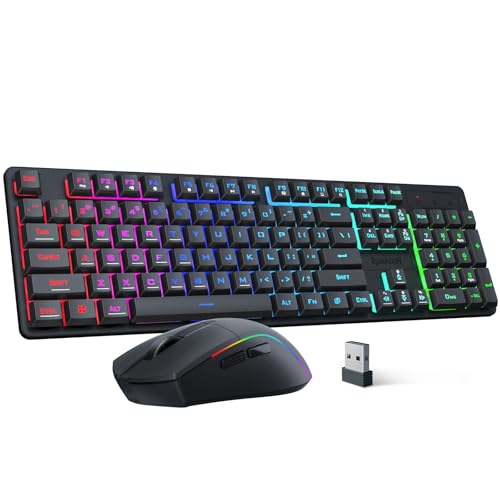
A wireless keyboard and mouse combo lives or dies on one detail: how the two devices connect. Separate dongles eat USB ports, Bluetooth-only sets can feel slow in fast games, and a shared receiver only helps if it stays reliable at your desk distance. The five sets below all cut the cables, but they split into full-size boards, compact 60% and 75% layouts, and mice that range from 4,800 to 12,800 DPI, so the right pick depends on your desk and your games.
Full-size buyers who type as much as they play should start with the Redragon S101M-KS, while players short on space get two RedThunder options in 60% and 75% sizes. Every set here was chosen from its Amazon listing: connection modes, keyboard layout and switch type, mouse DPI and battery details are taken from what the listing itself states, including where a keyboard is membrane rather than mechanical.
Quick Picks
As an Amazon Associate we earn from qualifying purchases.
| Product | Best for | Key spec from title |
|---|---|---|
| Redragon S101M-KS | Full-size desks and family PCs | Tri-mode connection, one shared 2-in-1 receiver |
| Redragon S107KS | Players who want a light mouse | Mouse up to 10,000 DPI, 65 g |
| Redragon S155-PRO | Small desks and quiet rooms | 75% membrane keyboard, mouse 12,800 DPI |
| RedThunder K62 | Compact 60% setups | 2,500 mAh rechargeable battery |
| RedThunder K84 | 75% layout fans | Honeycomb mouse, 3,200 DPI as listed |
How to Choose
Connection modes and the shared receiver
Tri-mode sets move between a wired USB-C link, Bluetooth and a 2.4 GHz receiver, which matters if you swap between a gaming PC and a laptop during the day. A single shared receiver, like the 2-in-1 unit in the S101M-KS, leaves your other ports free and keeps both devices on one low-latency link. Bluetooth is handy for a second machine but is the mode most players notice in fast shooters. Before buying, count how many devices you actually switch between, then pick the connection mix that covers them without daily re-pairing.
Keyboard layout and switch type
Layout decides how much desk the board takes and which keys you give up. Full-size sets keep the number pad for spreadsheets and MMO keybinds, 75% boards drop the pad but keep arrows and a function row, and 60% sets like the K62 remove both to free mouse space. Switch type matters just as much: several sets here use membrane keys or a mechanical-feel design rather than true mechanical switches. Membrane boards are quieter and lighter, while mechanical-feel keys add tactility without mechanical hardware underneath.
Mouse DPI, weight and shape
Combo mice vary more than their DPI headlines suggest. The S107KS mouse reaches 10,000 DPI and weighs 65 g, the S155-PRO mouse lists 12,800 DPI, and the K84 honeycomb mouse lists 3,200 DPI, which still covers most sens settings used in shooters and strategy games. Weight shapes how a mouse feels over a long session: a 65 g shell suits quick flicks, while a heavier honeycomb body can feel steadier for slower aiming. Check whether DPI is adjustable in steps and whether software is offered, since that decides how finely you can tune sensitivity.
Battery design and charging
Rechargeable sets remove the AA battery routine but add charging habits to your week. The K62 lists a 2,500 mAh battery, the S107KS keyboard lists 4,000 mAh, and the K84 splits its capacity between keyboard and mouse, so runtimes are not directly comparable across sets. Look for USB-C charging, because a cable you already own can top up either device. Also check what happens when the battery runs flat mid-game: tri-mode sets can fall back to a wired link, while 2.4 GHz-only sets simply stop until they charge.
The 5 Best Options
Redragon S101M-KS
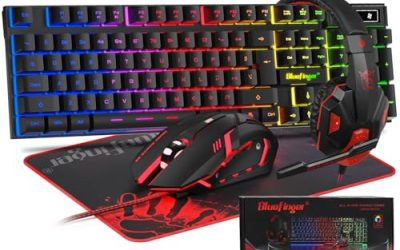
This is the full-size option in the group, pairing a complete keyboard with number pad and 10 independent multimedia keys with a 4,800 DPI mouse. Its tri-mode connection covers USB-C wired, Bluetooth and 2.4 GHz, and one shared 2-in-1 receiver runs both devices, which suits a desk that hosts a work laptop and a gaming PC on the same day. The keyboard is RGB backlit and the set is rechargeable, so it works as a single purchase for a shared family or study desk.
Specs
- Contents: full-size wireless keyboard and gaming mouse in one box
- Connection: tri-mode — USB-C wired, Bluetooth, 2.4 GHz
- Receiver: one shared 2-in-1 2.4 GHz receiver controls both devices
- Keyboard: RGB backlit, 10 independent multimedia keys
- Mouse: 4,800 DPI
- Power: rechargeable
Best for: full-size desks where one receiver should run both devices.
Watch out for: the shared receiver is a single point of failure, so keep it somewhere safe; losing it means falling back to Bluetooth or a cable.
ASIN: B0DXTV9BGJ
Redragon S107KS
The S107KS leads with its mouse: up to 10,000 DPI with software support and a 65 g ultra-lightweight shell, the lightest mouse figure in this roundup. The keyboard brings RGB backlighting and 25-key anti-ghosting, which covers the key clusters most games press at once, and the listed keyboard battery is 4,000 mAh. Three connection modes — wired, 2.4 GHz and Bluetooth — make it easy to move between a desktop and a laptop without re-pairing everything each time.
Specs
- Contents: wireless keyboard and mouse combo
- Connection: 3 modes — wired, 2.4 GHz, Bluetooth
- Keyboard: RGB backlit, 25-key anti-ghosting
- Keyboard battery: 4,000 mAh, as stated in Redragon’s product post
- Mouse: up to 10,000 DPI, with software
- Mouse weight: 65 g
Best for: players who want the lightest combo mouse here and software-tuned DPI.
Watch out for: anti-ghosting is rated at 25 keys rather than full rollover, so check the listing if your games rely on unusual key combinations.
ASIN: B0FDVZ5X38
Redragon S155-PRO
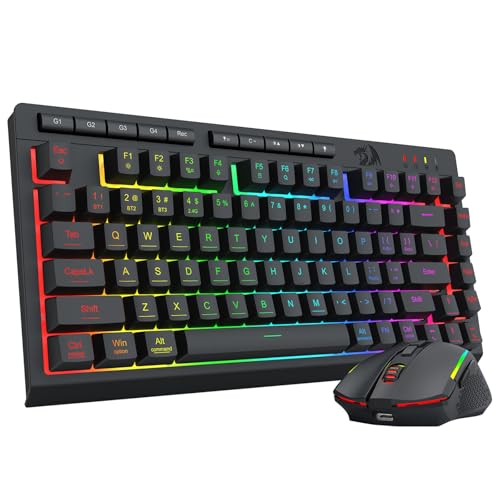
The S155-PRO is the quiet, compact pick: a 75% portable keyboard that the listing describes as a macro membrane design, paired with a 12,800 DPI mouse with software. Bluetooth, 2.4 GHz and USB-C wired modes cover most setups, the set is rechargeable, and the listing names Windows and Mac support. Because the keyboard is membrane, key presses stay soft and quiet, which suits shared rooms, late sessions and anyone who prefers a low-profile typing feel over mechanical tactility.
Specs
- Contents: 75% keyboard and mouse combo
- Keyboard type: membrane, quiet, with macro support, as listed
- Connection: Bluetooth, 2.4 GHz, USB-C wired
- Keyboard: RGB backlit, rechargeable
- Mouse: 12,800 DPI, with software
- Compatibility: Windows and Mac, as listed
Best for: small desks and quiet rooms that still want a high-DPI mouse.
Watch out for: the keyboard is membrane as listed, not mechanical; if you want mechanical switches, choose a different set and confirm stock on the live listing before ordering.
ASIN: B0FDG55BPG
RedThunder K62

The K62 is the smallest set here, built around a 60% keyboard and a lightweight honeycomb optical mouse that share one 2.4 GHz receiver, stored in the bottom of the mouse so it travels with the set. The keyboard is described as mechanical feel, which means a membrane-class board with added tactility rather than true mechanical switches. A 2,500 mAh rechargeable battery powers the combo, and the compact footprint leaves maximum room for wide mouse movements on a crowded desk.
Specs
- Contents: 60% wireless keyboard and wireless honeycomb optical mouse
- Keyboard type: mechanical feel, not true mechanical switches
- Connection: 2.4 GHz, one USB receiver stored in the bottom of the mouse
- Battery: 2,500 mAh rechargeable
- Keyboard: RGB backlit, ultra-compact layout
Best for: tight desks and travel setups that need the smallest footprint.
Watch out for: a 60% layout has no separate arrow keys or function row, and the mechanical-feel keys are not mechanical switches; check the layout diagram on the listing before ordering.
ASIN: B0CHRBQBLP
RedThunder K84

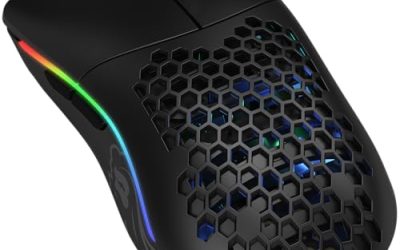
The K84 keeps a 75% TKL layout with 84 keys, so arrows and a function row survive while the number pad goes. Its lightweight honeycomb optical mouse is listed at 3,200 DPI on the US listing, and both devices share a single 2.4 GHz USB receiver. Rainbow backlighting, USB-C recharging and separate battery capacities for keyboard and mouse round out a set aimed at players who want a compact board without dropping to a 60% layout.
Specs
- Contents: 75% TKL keyboard with 84 keys and lightweight honeycomb optical mouse
- Connection: 2.4 GHz via a single USB receiver
- Keyboard: rainbow backlit, rechargeable via USB-C
- Mouse: 3,200 DPI, as listed on the US listing
- Battery: 1,850 mAh keyboard and 500 mAh mouse, per brand promo material
Best for: players who want a 75% board with arrows and a shared receiver.
Watch out for: one importer variant of this combo states a higher mouse DPI figure; the US listing states 3,200 DPI, so confirm the figure on the live product page before ordering.
ASIN: B0C2HCCTF2
Which One Fits Your Situation
A full-size desk with one free USB port
Choose the Redragon S101M-KS. Its shared 2-in-1 receiver runs the full-size keyboard and the mouse from a single port, the number pad stays available for work, and tri-mode connection lets a second machine join over Bluetooth. It is the only set here that treats typing and gaming as equal priorities.
A small desk or a laptop-first setup
Pick the RedThunder K62 if space is the hard limit, since the 60% board leaves the most mouse room and the receiver stores inside the mouse for travel. If you still need arrow keys daily, step up to the 75% RedThunder K84 instead and keep the same single-receiver convenience.
A quiet room shared with other people
The Redragon S155-PRO fits best here. Its membrane keyboard is listed as quiet, the 75% layout keeps the desk tidy, and the 12,800 DPI mouse means gaming performance does not drop with the noise level. Tri-mode connection also lets it double as a living-room keyboard over Bluetooth.
Typing-heavy days with gaming at night
Start with the Redragon S107KS. The full keyboard layout and 4,000 mAh listed battery suit long typing days, while the 65 g mouse and 10,000 DPI ceiling with software tuning cover evening sessions. Its three connection modes make the work-to-play switch a single toggle rather than a re-pairing job.
Common Mistakes
- Assuming every combo keyboard is mechanical, when several sets here are membrane or mechanical-feel designs as their listings state.
- Counting DPI as a quality score and ignoring mouse weight, which changes how a mouse feels more than a DPI figure you will never use.
- Forgetting that a shared receiver is one small part; losing it can disable the wireless link for both devices at once.
- Buying a 60% keyboard for a game or job that needs a number pad, arrow keys or a function row every day.
- Leaving rechargeable sets uncharged before a long session instead of using the wired fallback mode where the set offers one.
Frequently Asked Questions
Can one receiver really run both the keyboard and the mouse?
Yes, on the sets here that list a shared receiver. The S101M-KS uses one 2-in-1 2.4 GHz receiver for both devices, and the RedThunder sets also run both devices from a single USB receiver. That frees ports, but it also means the receiver matters: keep it plugged in or stored in the mouse where the design allows.
Is a membrane combo keyboard good enough for gaming?
For most players, yes. Membrane and mechanical-feel boards in these sets still offer RGB backlighting, anti-ghosting on key clusters and macro features on some models. What you give up is the distinct mechanical switch feel and per-switch customisation. If you already know you prefer mechanical switches, skip membrane sets like the S155-PRO and look at mechanical boards instead.
What mouse DPI do I actually need in a combo?
Far less than the headline numbers suggest. Most players settle between roughly 800 and 3,200 DPI for shooters and general use, so even the K84 mouse at its listed 3,200 DPI covers typical settings. Higher ceilings like 10,000 or 12,800 DPI mainly help very high-sensitivity players. Adjustable steps and software matter more than the maximum figure.
Do wireless combos work with consoles and Mac?
Support varies by set and is stated per listing. The S155-PRO lists Windows and Mac support, while the RedThunder and Redragon sets are aimed at PC use over 2.4 GHz or Bluetooth. Console support depends on the console and the game, so check the listing’s compatibility notes and your console’s peripheral rules before relying on a combo for console play.
FAQ
Can one receiver really run both the keyboard and the mouse?
Is a membrane combo keyboard good enough for gaming?
What mouse DPI do I actually need in a combo?
Do wireless combos work with consoles and Mac?
More from Amazon
Programs that pair well with the guide above. Offers and eligibility are set by Amazon and may change.
Free shipping on eligible items, Prime Video and more. Eligible new members can start with a free trial.
Start a Prime free trialAd-free music streaming. Eligible new subscribers can start with a free trial.
Try Music Unlimited freeA Prime membership for ages 18-24 with a trial period. Eligibility is set by Amazon.
See Prime for Young AdultsAudiobooks and podcasts to listen to on the go. Eligible new members can start with a free trial.
Try Audible freeAs an Amazon Associate we earn from qualifying purchases.