Our Top Picks


Disclosure: As an Amazon Associate, we earn from qualifying purchases.
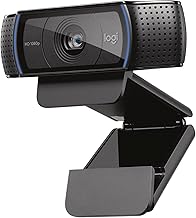
Our top pick: NexiGo N940P. Runner-up: Logitech MX Brio.
A webcam for a smart TV has a different job from a webcam for a laptop. On a desk, the camera sits an arm’s length from your face and a modest lens and microphone are enough. In a living room, the camera sits on top of a large screen, several feet from the sofa, and it has to frame a whole seating area, pick up voices across the room, and send a picture that still looks clear on a big display. Field of view, microphone reach, resolution and mounting on a thin TV bezel matter far more here than at a desk.
There is also an honest limit that decides whether any of these cameras will work for you at all: smart TV support for USB cameras is platform-specific. A USB webcam only works on a TV if that TV model supports USB cameras, and only inside apps that are allowed to use one. Some TVs accept a UVC camera for a specific video-calling app, some accept one only in a browser or conferencing app, and some do not support an external camera at all. None of the cameras here can add camera support to a TV that does not have it. Before you buy, check your exact TV model, confirm that it supports a USB camera, and confirm that the video-call app you plan to use can access it. The How to Choose section walks through those checks in order.
The five cameras below were chosen for living-room use: wide or adjustable framing, microphones built for distance, and mounts that sit on top of a TV. Two are pan-and-tilt models that follow you, and three are fixed cameras. All figures are as stated on the Amazon listing for each model.
Quick Picks
- NexiGo N940P — Best overall for TV calls: 2K resolution, a remote-controlled zoom for framing the sofa, and dual stereo microphones.
- Logitech MX Brio — Best picture quality: 4K resolution from a fixed camera with a strong sensor for large screens.
- Insta360 Link 2 — Best for moving around: a two-axis gimbal with AI tracking that follows the speaker, plus gesture control from the sofa.
- OBSBOT Tiny 2 — Best tracking alternative: AI tracking with voice and gesture control and the largest sensor in this guide.
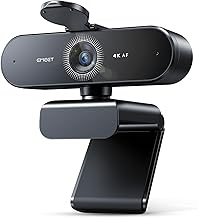
- EMEET SmartCam C960 4K — Best simple 4K pick: autofocus, dual microphones and a straightforward fixed mount.
NexiGo N940P

OUR TOP PICK
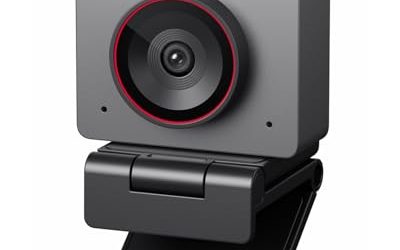
The NexiGo N940P is the top pick for a smart TV because its feature set lines up with the living-room problem better than any other camera here. As stated on the Amazon listing, it records at 2K QHD, 2560×1440 at 30 frames per second, and can also run at 1080p at 60 frames per second. On a large TV screen, that step up from basic 1080p keeps faces looking clean when the picture is shown big, and a 1080p mode covers apps that prefer smoother motion.
The feature that suits a TV setup most is the zoom. The N940P has a 3x zoom controlled by an included remote, as stated on the listing. A fixed wide lens on top of a TV usually frames the whole room and leaves the people on the sofa small in the picture. With the remote, you can tighten the frame from the sofa itself, without walking to the TV before every call. That is the adjustment living-room callers actually need, and it is why this camera leads the guide.
Sound is the other half of a TV call, and the N940P uses dual stereo microphones, as stated on the listing, which suits voices from a sofa several feet away better than the single small microphone on a basic webcam. Its 5MP Sony sensor helps it hold a usable picture in the mixed, often dim lighting of a living room in the evening. The same compatibility rule applies as for every camera here: confirm USB camera support on your TV and app before ordering.
Specs
– Model: NexiGo N940P (Black)
– Resolution: 2K QHD 2560×1440 at 30 fps; 1080p at 60 fps, as stated on the listing
– Sensor: 5MP Sony sensor, as stated on the listing
– Zoom: 3x zoom with remote control, as stated on the listing
– Microphones: dual stereo microphones, as stated on the listing
Pros
– Remote-controlled 3x zoom lets you reframe from the sofa
– 2K resolution holds up on a large TV screen
– Dual stereo microphones for voices across the room
Cons
– The remote is one more small item to keep track of in the living room
– Zoom and framing controls depend on the camera being recognised correctly by the TV or app
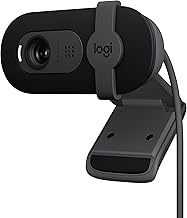
Logitech MX Brio
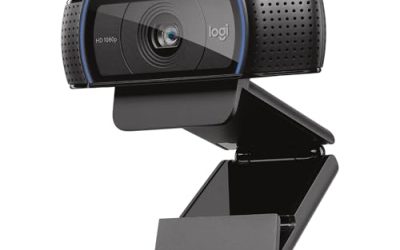
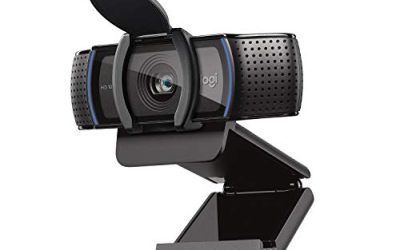
The Logitech MX Brio is the runner-up, and the pick for a caller who wants the strongest fixed-camera picture and does not need a remote zoom or a tracking mount. As stated on the Amazon listing, it records at 4K at 30 frames per second and at 1080p at 60 frames per second. On a big screen, 4K capture gives the calling app more detail to work with, and leaves more room to crop the frame while keeping the picture clear.
This is the graphite consumer edition of the MX Brio, as stated on the listing. Its mount is fixed, so framing is set once by placement and tilt on top of the TV. That suits a fixed seating arrangement — a sofa that does not move and calls where everyone sits in roughly the same place — and a fixed camera is simpler to live with than a tracking one, because there is nothing to follow the wrong person and nothing to configure beyond placement.
The trade-off against the NexiGo is control: the MX Brio has no remote zoom, so if the frame feels too wide, the fix is moving the camera or the seating rather than pressing a button. Its strength is the underlying image. As with every camera here, it needs your TV model to support USB cameras and your app to accept one, so run those checks first.
Specs
– Model: Logitech MX Brio (Graphite)
– Resolution: 4K at 30 fps; 1080p at 60 fps, as stated on the listing
– Format: fixed USB webcam, as stated on the listing
Pros
– 4K capture for the clearest fixed-camera picture in this guide
– Simple fixed setup with nothing to track or configure after placement
– 1080p at 60 fps mode for smoother motion
Cons
– No remote zoom, so reframing means moving the camera
– Fixed framing suits a fixed seating layout better than a busy room
Insta360 Link 2

The Insta360 Link 2 takes a different approach to the living-room problem: instead of widening the frame to cover everyone, it moves. As stated on the Amazon listing, the Link 2 is a PTZ camera — pan, tilt and zoom — built on a two-axis gimbal, with AI tracking that follows the person speaking or presenting. That means the camera can keep a single caller centred while they stand or move around, rather than pinning everyone to the sofa.
The camera records in 4K and uses a 1/2-inch sensor, as stated on the listing, with HDR support. The larger sensor class and HDR help where light is uneven — a bright window on one side and a shaded sofa on the other is the normal living-room case, and it is where small webcam sensors struggle most. For sound, the Link 2 has an AI noise-cancelling microphone, as stated on the listing, aimed at keeping voices clear in a room that also contains a television or children in the background.
Specs
– Model: CINSABNB
– Resolution: 4K, as stated on the listing
– Sensor: 1/2-inch, as stated on the listing
– Mount: two-axis gimbal PTZ with AI tracking, as stated on the listing
– Imaging: HDR, as stated on the listing
– Microphone: AI noise-cancelling microphone, as stated on the listing
– Control: gesture control, as stated on the listing
Pros
– Gimbal tracking follows a moving speaker around the room
– Gesture control works from the sofa, with no desk controls needed
– 1/2-inch sensor with HDR for uneven living-room light
Cons
– Tracking features depend on the TV or app accepting the camera feed as expected
– More moving parts and settings than a fixed camera
OBSBOT Tiny 2

The OBSBOT Tiny 2 is the second tracking camera in this guide, and it has the largest sensor here. As stated on the Amazon listing, it uses a 1/1.5-inch CMOS sensor and records at 4K at 30 frames per second or 1080p at 60 frames per second, with HDR. A larger sensor gathers more light, which is the single most useful trait for evening calls in a dim room.
Like the Link 2, the Tiny 2 is a PTZ camera with AI tracking, as stated on the listing, and it adds both voice control and gesture control. Voice control is a genuinely living-room-friendly feature: you can direct the camera while holding a child or a drink, without opening an app. The tracking keeps a moving presenter or an active grandchild in frame, and the gimbal covers a much wider area than any fixed lens here.
Specs
– Model: OBSBOT Tiny 2
– Resolution: 4K at 30 fps; 1080p at 60 fps, as stated on the listing
– Sensor: 1/1.5-inch CMOS, as stated on the listing
– Mount: PTZ with AI tracking, as stated on the listing
– Imaging: HDR, as stated on the listing
– Control: voice control and gesture control, as stated on the listing
Pros
– Largest sensor in this guide, at 1/1.5-inch, for low-light rooms
– Voice and gesture control from anywhere in the room
– AI tracking on a gimbal covers a wide area from the TV top
Cons
– The most feature-dense camera here, so setup takes longer
– Smart features rely on the TV or app handling the feed correctly
EMEET SmartCam C960 4K
The EMEET SmartCam C960 4K is the straightforward pick: a fixed 4K camera with autofocus and dual microphones, for a household that wants a clear picture without tracking gimbals or remote zooms. As stated on the Amazon listing, it records in 4K UHD and uses PDAF autofocus, which keeps faces sharp as people shift on the sofa — a small thing at a desk, but a real one across a room, where a fixed-focus camera can soften anyone who leans forward or back.
Its field of view is 73 degrees, as stated on the listing. That is narrower than wide conference-room lenses, and on a TV that is often a good thing: a moderate field of view fills more of the frame with the people on the sofa and less with the walls and ceiling. If your seating is close to the TV, 73 degrees is a sensible frame. If the sofa is far back and seats several people side by side, check your seating width against that figure first, because a narrower view is the one real limit of this model.
For sound, the C960 4K has dual omni-directional microphones, as stated on the listing, which pick up voices from across the seating area rather than only from directly in front of the camera. It is the simplest camera here to mount and leave in place, and it follows the same rule as the rest of the guide: confirm that your TV model supports a USB camera and that your calling app can use it before you buy.
Specs
– Model: E3117
– Resolution: 4K UHD, as stated on the listing
– Autofocus: PDAF autofocus, as stated on the listing
– Field of view: 73 degrees, as stated on the listing
– Microphones: dual omni-directional microphones, as stated on the listing
Pros
– PDAF autofocus keeps faces sharp as people move on the sofa
– Dual omni microphones pick up the whole seating area
– Simple fixed design that mounts and stays put
Cons
– 73-degree field of view may be too narrow for a wide sofa far from the TV
– No zoom or tracking to correct framing after placement
How to Choose
Begin with compatibility, because it rules cameras in or out before picture quality matters. Find your TV’s exact model and check three things in its manual or the maker’s support pages: whether the TV supports a USB camera at all, which video-calling apps on that TV are allowed to use one, and whether the TV needs the camera in a specific USB port. A TV with no USB camera support cannot use any camera in this guide. If your TV fails that check, the workable routes are a calling app on a connected streaming device or laptop feeding the TV, or the calling features built into the TV itself — not a different webcam.
Next, decide between fixed and tracking. A fixed camera — the NexiGo N940P, the Logitech MX Brio or the EMEET C960 4K — covers one frame and suits calls where everyone sits in the same place. A tracking camera — the Insta360 Link 2 or the OBSBOT Tiny 2 — follows one moving person and suits calls where someone stands, presents, or moves around with children. Tracking is not better by default; in a multi-person family call, a fixed frame is usually the calmer choice.
Then match framing to your room. A moderate field of view such as the EMEET’s 73 degrees fills the frame with a nearby sofa; a wider or adjustable frame suits distant, wide seating. The NexiGo’s remote-controlled 3x zoom is the flexible middle ground, because it lets you tighten or widen the shot from the sofa after mounting. Resolution interacts with framing: a 4K camera leaves more detail in the frame when the app crops or the picture is shown on a large screen, while the NexiGo’s 2K pairs a mid-level resolution with the zoom instead. Sound matters just as much: every camera here has microphones built for more than desk distance, but voices travel further in a living room, so seat callers facing the TV and favour strong microphone designs if your room is large or noisy.
Finally, think about mounting and cables. A TV-top mount must grip a thin bezel without blocking the screen, and the tracking cameras need clearance to pan and tilt without meeting a wall or shelf edge. The USB cable has to reach the TV’s port with slack to spare, and the camera should sit at seated eye level as closely as the TV allows.
FAQs
Will any of these webcams work with my smart TV?
Only if your TV supports one. USB camera support is decided by the TV model and its platform, not by the webcam: the TV must support USB cameras, and the video-call app you use must be allowed to access the camera. Check your exact TV model in its manual or the maker’s support pages, and check the app’s requirements, before buying any camera in this guide.
Is 4K worth it for TV video calls, or is 2K or 1080p enough?
It depends on how the picture is used. The calling app and your connection decide the resolution actually sent, and many calls run below the camera’s maximum. A 4K camera still helps because it gives the app more detail to crop from and holds up better on a large screen. The NexiGo N940P at 2K is a sensible middle point, and its remote zoom does more for framing than the step from 2K to 4K alone would.
Should I choose a tracking camera or a fixed camera for the living room?
Choose tracking if one person moves during calls — presenting, demonstrating something, or keeping up with children — because the Link 2 and Tiny 2 follow that person automatically and can be directed by gesture or voice from the sofa. Choose a fixed camera if everyone stays seated: it is simpler, frames the whole group evenly, and the NexiGo’s remote zoom still lets you adjust the shot from the sofa.
Conclusion
For most living rooms, the NexiGo N940P is the top pick: 2K resolution, dual stereo microphones and a remote-controlled zoom that solves the framing problem unique to a sofa-and-TV setup. The Logitech MX Brio is the runner-up for callers who want the strongest fixed 4K picture and a set-and-forget mount. The Link 2 and Tiny 2 serve movers rather than sitters, and the EMEET C960 4K is the simple autofocus option for a compact seating area. Whichever you choose, make the compatibility check first: confirm your TV model supports a USB camera and that your calling app can use it, because that check decides whether any of these will work in your home.
FAQ
Will any of these webcams work with my smart TV?
Is 4K worth it for TV video calls, or is 2K or 1080p enough?
Should I choose a tracking camera or a fixed camera for the living room?
More from Amazon
Programs that pair well with the guide above. Offers and eligibility are set by Amazon and may change.
Free shipping on eligible items, Prime Video and more. Eligible new members can start with a free trial.
Start a Prime free trialAd-free music streaming. Eligible new subscribers can start with a free trial.
Try Music Unlimited freeA Prime membership for ages 18-24 with a trial period. Eligibility is set by Amazon.
See Prime for Young AdultsAudiobooks and podcasts to listen to on the go. Eligible new members can start with a free trial.
Try Audible freeAs an Amazon Associate we earn from qualifying purchases.