Key takeaways
- Looking for your first gaming monitor? Compare four beginner-friendly 24-inch displays with fast refresh rates, IPS and VA panels, and FreeSync play.
A good first gaming monitor is a 24-inch Full HD display with a 144Hz or faster refresh rate, a 1ms response time, and adaptive sync that matches your graphics card. That combination keeps motion smooth in fast games, keeps text readable for school and work, and works with almost any modern PC without demanding a powerful graphics card. The four monitors in this guide all meet that bar, and each one suits a slightly different kind of beginner.
This guide is written for first-time buyers setting up a first gaming desk, students moving from a laptop screen to a dedicated display, and casual players who want smoother play without learning a glossary of display terms. Every monitor below was chosen from its Amazon listing title and listed specifications, focusing on screen size, panel type, refresh rate, response time, and the ports you will actually use.
Quick Picks
As an Amazon Associate we earn from qualifying purchases
| Product | Best for | Key spec from title |
|---|---|---|
| ASUS TUF Gaming VG249Q1A | First-time buyers who want an IPS screen with speakers | 23.8-inch Full HD IPS, 165Hz, 1ms |
| Acer Nitro KG241Y Sbiip | Small desks and deep contrast in dark games | 23.8-inch Full HD VA, 165Hz, 1ms (VRB) |
| LG UltraGear 24GN600-B | Colour-rich play and a near borderless look | 24-inch Full HD IPS, 144Hz, 1ms (GtG) |
| Samsung Odyssey G3 G30D | The fastest refresh rate of the four | 24-inch FHD, 180Hz, 1ms |
How to Choose
Start with size and resolution
A 24-inch Full HD screen is the sweet spot for a first gaming monitor, because the picture stays sharp at a normal desk distance and the 1920 x 1080 resolution is easy for entry-level graphics cards to drive. Going much larger at the same resolution makes individual pixels easier to spot, while jumping to a higher resolution raises the demands on your graphics card and can leave games running slower than you expect. Measure your desk before you order, and leave room on each side for speakers, a notebook, or a second screen later. A 24-inch display also fits neatly beside a laptop, which matters if your setup shares a desk with study or work.
Understand refresh rate and response time
Refresh rate tells you how many times per second the screen draws a new image, and a 144Hz or 165Hz panel redraws far more often than a standard 60Hz office screen, so fast movement looks smoother and aiming feels more connected to your mouse. Response time measures how quickly a pixel changes colour, and a 1ms figure means less smearing behind moving objects in racing and shooter games. Check both numbers together rather than chasing one alone, because a high refresh rate with a slow response still leaves trails. All four monitors in this guide pair a fast refresh rate with a 1ms response time.
Pick a panel type that fits your games
Panel type shapes how the picture looks from different angles and how dark scenes are rendered. IPS panels keep colours steady when you shift in your chair or when a friend watches from the side, which suits shared rooms and games with bright, colourful worlds. VA panels deliver deeper blacks and stronger contrast, which makes night scenes and horror games look richer, though colours can shift a little at wide angles. Neither type is wrong for a beginner. If you play mostly bright competitive games and share your screen often, lean toward IPS, and if you play story-driven games in a dim room, a VA panel may suit you better.
Check ports, stand, and adaptive sync
Before you buy, look at the back of the monitor and the back of your computer to confirm they share a connection. DisplayPort and HDMI are the two ports you will see most often, and having both gives you room to connect a PC and a console without swapping cables. A height-adjustable stand helps you set the screen at eye level, which matters during long sessions, while VESA mounting lets you attach an arm later. Adaptive sync, listed as FreeSync Premium on these monitors, matches the screen refresh to your graphics card output so the picture tears less during sudden frame changes.
The 4 Best Options
ASUS TUF Gaming VG249Q1A

The ASUS TUF Gaming VG249Q1A is the most complete starter package in this guide, pairing an IPS panel with built-in speakers, so you can start playing the moment it arrives without adding anything else to your desk. Its 165Hz refresh rate handles fast shooters and racing games with ease, while the Extreme Low Motion Blur setting and Shadow Boost help moving targets stay readable in darker scenes. The stand is simple and the frame is sturdy, which suits a first setup that may be moved between rooms or shared with family.
Specs
- 23.8-inch Full HD (1920 x 1080) IPS display
- 165Hz refresh rate (overclocked, supports 144Hz)
- 1ms response time
- Extreme Low Motion Blur and Shadow Boost
- AMD FreeSync Premium
- Built-in speaker
- DisplayPort and HDMI, VESA mountable
Best for: First-time buyers who want an IPS screen with speakers included.
Watch out for: The 165Hz mode is an overclocked setting, so confirm your graphics card and cable support it before expecting the top speed.
Acer Nitro KG241Y Sbiip
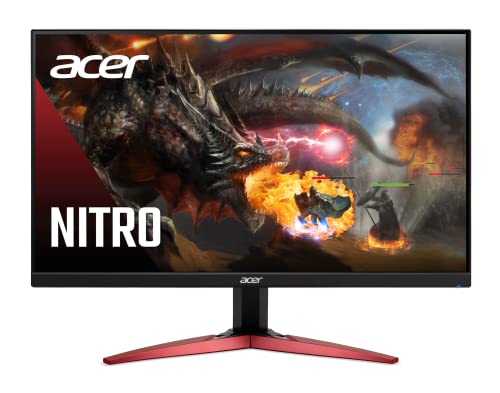
The Acer Nitro KG241Y Sbiip stands out for beginners who play in dim rooms or love games with moody lighting, because its VA panel produces deeper blacks than the IPS screens in this guide. Its slim ZeroFrame design keeps the bezels thin, which makes the screen feel larger than its 23.8-inch size and looks tidy on a small desk. With a 165Hz refresh rate, a 1ms VRB response time, and FreeSync Premium, it covers the same smooth-play basics as the ASUS, while its two HDMI ports make it easy to keep a PC and a console connected at the same time.
Specs
- 23.8-inch Full HD (1920 x 1080) VA display
- 165Hz refresh rate
- 1ms (VRB) response time
- AMD FreeSync Premium
- ZeroFrame design
- 1 x DisplayPort 1.2 and 2 x HDMI 2.0
Best for: Small desks and players who want deep contrast in dark games.
Watch out for: VA panels can show a little colour shift at wide viewing angles, so sit directly in front of the screen for the truest picture.
LG UltraGear 24GN600-B

The LG UltraGear 24GN600-B is the calmest pick in this guide, built around an IPS panel with HDR10 support and a three-side virtually borderless design that keeps your focus on the game rather than the frame. Its 144Hz refresh rate and 1ms GtG response time are a clear step up from a standard office screen, and the difference is easy to feel the first time you move a mouse across the desktop or turn quickly in a game. FreeSync Premium keeps the picture steady when frame rates vary, which is common on entry-level graphics cards that cannot hold a fixed frame rate in every scene.
Specs
- 24-inch Full HD (1920 x 1080) IPS display
- 144Hz refresh rate
- 1ms (GtG) response time
- AMD FreeSync Premium
- HDR10 support
- 3-side virtually borderless display
Best for: Colour-rich play and a clean, near borderless look on the desk.
Watch out for: At 144Hz it is a step below the 165Hz and 180Hz monitors here, so competitive players chasing the fastest motion may prefer one of those.
Samsung Odyssey G3 G30D

The Samsung Odyssey G3 G30D is the fastest screen in this guide, with a 180Hz refresh rate that gives competitive beginners a little extra smoothness over the 144Hz and 165Hz options. Its adjustable stand lets you change the height to match your chair, which is a useful touch when a desk is shared with other people of different heights. Gaming extras such as Black Equalizer, which brightens dark corners, and Virtual Aim Point, which adds a crosshair overlay, are aimed squarely at first-time shooter players. Eye Saver Mode and Flicker-Free support round out a screen built for long sessions.
Specs
- 24-inch FHD display
- 180Hz refresh rate
- 1ms response time
- AMD FreeSync
- Adjustable stand
- Black Equalizer and Virtual Aim Point
- Eye Saver Mode and Flicker-Free
Best for: Competitive beginners who want the fastest refresh rate in this guide.
Watch out for: The gaming overlays take a little time to learn, so spend a few minutes in the on-screen menu before your first match.
Which One Fits Your Situation
You are building your very first gaming desk
Pick the ASUS TUF Gaming VG249Q1A. The built-in speaker means one less thing to buy, the IPS panel looks good from any seat in the room, and the 165Hz refresh rate covers every genre a new player is likely to try. Its straightforward setup suits someone who wants to unbox, connect one cable, and start playing without studying a manual first.
Your desk is small or shared with study
Pick the Acer Nitro KG241Y Sbiip. Its thin ZeroFrame bezels keep the footprint tidy, and the two HDMI ports let a PC and a console share the screen without cable swapping. The VA panel also suits evening play in a dim bedroom, where its deeper blacks make story games and films look richer than they would on a brighter panel.
You care most about colour and a clean look
Pick the LG UltraGear 24GN600-B. The IPS panel and HDR10 support bring out colour in bright, detailed worlds, and the three-side virtually borderless frame gives the desk a modern, uncluttered feel. Its 144Hz refresh rate is still a big step up from a standard screen, and FreeSync Premium keeps motion steady when your graphics card cannot hold a fixed frame rate.
You play fast shooters and want every edge
Pick the Samsung Odyssey G3 G30D. Its 180Hz refresh rate is the fastest in this guide, the adjustable stand helps you lock in a comfortable eye-level view, and Black Equalizer plus Virtual Aim Point are built for spotting opponents in dark corners. If your main games are competitive shooters, this is the screen that matches that pace best.
Common Mistakes
- Buying a 27-inch screen at Full HD and sitting close enough to see individual pixels instead of choosing a 24-inch panel.
- Paying attention only to refresh rate and forgetting to check response time, so fast motion still smears.
- Ordering a monitor without checking whether your computer has a matching DisplayPort or HDMI output.
- Setting the monitor on a desk at the wrong height and getting neck strain during long sessions.
- Leaving adaptive sync switched off in the monitor menu, then wondering why the picture tears during sudden frame changes.
Frequently Asked Questions
What size monitor is best for a beginner?
A 24-inch Full HD monitor is the best starting point for most beginners. It keeps text and game details sharp at a normal desk distance, fits on a small desk, and is easy for entry-level graphics cards to drive smoothly. Larger screens at the same resolution can look softer up close, while higher resolutions demand more from your graphics card.
Is 144Hz enough for a first gaming monitor?
Yes, 144Hz is plenty for a first gaming monitor and feels dramatically smoother than a standard 60Hz screen. The monitors in this guide run at 144Hz, 165Hz, or 180Hz, and all of them deliver that smooth feel. Moving above 144Hz adds a small gain, but the jump from 60Hz to 144Hz is the one you will notice most.
Do I need a powerful graphics card for these monitors?
No, these monitors are chosen because a modest graphics card can drive them well at Full HD resolution. A 24-inch 1920 x 1080 screen asks far less of your graphics card than a larger or higher-resolution display, so most modern entry-level cards can reach high frame rates in popular games. Check your card’s outputs match the monitor’s ports before you buy.
What does FreeSync do on a gaming monitor?
FreeSync matches the monitor refresh rate to the frame rate your graphics card produces, so the two stay in step instead of drifting apart. That reduces tearing, where the picture appears split during fast movement, and makes uneven frame rates feel smoother. All four monitors in this guide support FreeSync, and you switch it on in the monitor menu and your graphics settings.
FAQ
What size monitor is best for a beginner?
Is 144Hz enough for a first gaming monitor?
Do I need a powerful graphics card for these monitors?
What does FreeSync do on a gaming monitor?
More from Amazon
Programs that pair well with the guide above. Offers and eligibility are set by Amazon and may change.
Free shipping on eligible items, Prime Video and more. Eligible new members can start with a free trial.
Start a Prime free trialAd-free music streaming. Eligible new subscribers can start with a free trial.
Try Music Unlimited freeA Prime membership for ages 18-24 with a trial period. Eligibility is set by Amazon.
See Prime for Young AdultsAudiobooks and podcasts to listen to on the go. Eligible new members can start with a free trial.
Try Audible freeAs an Amazon Associate we earn from qualifying purchases.