Our Short List of 3
All 5 Picks at a Glance
| Product | Specs | Action |
|---|---|---|
 HUANUO Triple Monitor Mount HNTS3B | Check price on Amazon | |
 VIVO Triple Monitor Desk Mount STAND-V003T | Check price on Amazon | |
 ErGear Triple Monitor Mount | Check price on Amazon | |
 ECHOGEAR Triple Monitor Desk Stand | Check price on Amazon | |
 Ergotech Triple LCD Monitor Desk Mount Stand 100-D16-B03-TW | Check price on Amazon |
Our Top Picks
The best monitor stands for 3 monitors turn three separate screens into one working surface, with the centre screen straight ahead and the side screens angled in toward you. A triple stand clears your desk of three separate bases, lines the screens up at the same height, and lets you adjust tilt, swivel, and rotation until the whole array feels like a single wide display. Done well, it changes how you work and play: code on one screen, a game or video on the second, and chat or reference material on the third, all without turning your head more than a few degrees.
Choosing a triple stand is different from choosing a single or dual mount, because the loads and the geometry are bigger. Three screens means three times the weight on one base or clamp, a much wider total span, and far more leverage on the desk edge. A stand that would hold one ultrawide happily can sag, wobble, or creep under three monitors. This guide compares five stands built specifically for three screens, covering gas-spring arms, clamp mounts, freestanding poles, and telescoping designs, so you can match the mount to your monitors and your desk.
Below you will find how to judge a triple monitor stand before you buy, five stands that hold three screens well, a side-by-side comparison, and answers to the questions buyers ask most. Every pick links to its Amazon listing so you can confirm the exact model, the current availability, and the full specification sheet before you buy.
How to Choose
1. Screen size and weight capacity per arm
Every triple stand lists a screen size range and a weight limit per arm, and both numbers are hard limits, not suggestions. Check the size and weight of each of your three monitors, including the heaviest one, and make sure the stand covers them with room to spare. A stand rated for 17 to 32 inch screens will not hold a 34 inch ultrawide safely, and a stand rated for 17.6 lbs per arm will sag under a 20 lb monitor. When in doubt, pick the stand with the higher capacity, because a stand working near its limit is a stand that drifts out of alignment over time.
2. VESA compatibility
Monitors attach to stands through VESA mounting holes on the back of the screen, most commonly in 75 by 75 millimetre or 100 by 100 millimetre patterns. Check the VESA pattern on all three of your monitors before you buy, because a stand that only fits one pattern will leave an incompatible screen unusable. Most triple stands include both patterns, but some budget models include only one. Also check whether your monitors need an adapter for a recessed or curved back, which is common on curved gaming screens.
3. Mounting style: clamp, grommet, or freestanding
Triple stands attach to your desk in three ways. A C-clamp grips the desk edge and is the easiest to install and move, but it needs a desk edge thick enough to grip and clear of drawers or modesty panels. A grommet mount bolts through a hole in the desk and is the most secure option, but it needs a suitable hole or a willingness to drill one. A freestanding base sits on the desk surface and needs no clamp at all, but it takes up desk space and relies on its own weight for stability. Pick the style your desk actually supports, not the one that looks best in a photo.
4. Adjustment range: tilt, swivel, rotation, and height
A good triple stand lets you adjust each screen independently: tilt forward and back to kill glare, swivel to angle the side screens inward, rotate between landscape and portrait, and raise or lower each screen to line up the bezels. Gas-spring arms make these adjustments smooth and hold their position without drifting, while friction arms need manual tightening and can creep over weeks. Independent height adjustment for the centre screen is particularly valuable, because it lets you align three monitors of slightly different sizes into one clean line.
5. Desk space and total span
Three monitors side by side span a wide distance, and the stand needs a desk deep enough and wide enough to hold them. Measure your desk width against the total width of your three screens plus their bezels, and check the stand’s maximum span. A desk that is too shallow will leave the screens hanging over the front edge or pushed too close to your face, and a desk that is too narrow will leave the side screens overhanging the edges. Also check the stand’s footprint: a wide freestanding base eats desk space that a clamp mount leaves free.
6. Build quality and materials
Three monitors put serious stress on a stand, so materials matter. Steel and aluminium alloy arms hold their shape under load, while thin stamped metal and plastic joints flex and sag. Look for a heavy base or a strong clamp, thick arms, and solid VESA plates. Cable management channels are a useful bonus, because three monitors mean three power cables and three video cables, and a stand that routes them neatly keeps the desk usable.
7. Curved and ultrawide screens
Curved monitors and ultrawides change the geometry of a triple setup. A curved side screen angled inward can work beautifully, but its weight distribution and depth differ from a flat screen, and some stands struggle to hold a curved panel at a steep angle. Ultrawides are wider and heavier than standard screens, so they need a stand rated for their size and weight, and they often work best as the centre screen with two standard screens on the sides. If your setup includes a curved or ultrawide panel, confirm the stand explicitly supports it before ordering.
Top Picks
HUANUO Triple Monitor Mount HNTS3B
View the HUANUO Triple Monitor Mount HNTS3B on Amazon
The HUANUO HNTS3B is a gas-spring triple monitor mount for screens from 17 to 32 inches, and it is the most flexible pick in this guide. Each arm holds up to 17.6 lbs, mounts to VESA 75 by 75 and 100 by 100 patterns, and attaches to the desk with either a C-clamp or a grommet mount. The gas-spring arms make positioning smooth: tilt runs from plus 35 to minus 35 degrees, swivel reaches plus or minus 90 degrees, rotation is a full 360 degrees, and the centre screen adjusts in height independently so you can line up three screens into one clean row. The arms are built from aluminium alloy, which keeps them rigid under load without adding unnecessary bulk.
The HNTS3B suits gamers and multitaskers who rearrange their screens often, because the gas springs let you reposition a monitor with one hand and hold it exactly where you leave it. It handles three 32 inch screens, which is the largest size in this guide, and the clamp and grommet options cover most desks. The main caveat is the weight limit: at 17.6 lbs per arm, heavy monitors need checking against the specification before you buy, and the arms need a desk with enough depth for clearance when the side screens swing inward. Integrated cable management keeps the nine cables of a triple setup tidy. For a full-motion triple setup, this is the strongest all-round pick here.
VIVO Triple Monitor Desk Mount STAND-V003T
View the VIVO Triple Monitor Desk Mount STAND-V003T on Amazon
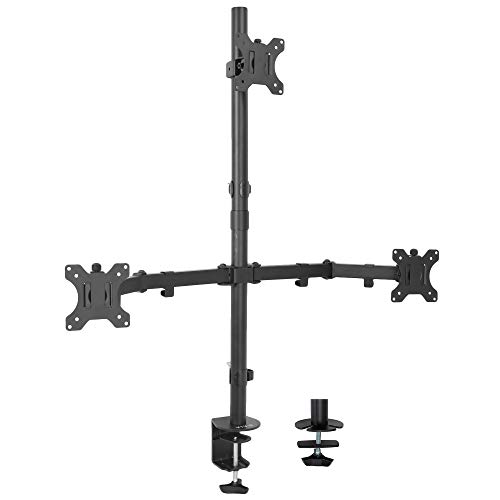
The VIVO STAND-V003T is the classic pyramid-style triple mount: a single central pole with three articulated arms, clamped to the desk edge, holding screens from 13 to 30 inches. Its arms tilt from minus 15 to plus 15 degrees, swivel a full 360 degrees, rotate a full 360 degrees, and lift up to 11.5 inches, with VESA 75 by 75 and 100 by 100 mounting. The pyramid layout puts the centre screen forward and the side screens angled back, which suits a curved wrap-around arrangement for gaming and trading desks.
The STAND-V003T suits buyers who want a proven, straightforward triple mount at a sensible size, especially for three standard monitors in the 24 to 27 inch range. Its long production history means the design is well understood, spare parts and assembly guidance are easy to find, and the clamp installation takes minutes. The caveats need stating plainly: the listed weight capacity differs between sources, with the current assembly manual rating each arm at 17.6 lbs while some retailer listings show a higher figure, so confirm the capacity against your monitors on the listing before ordering. It is also a friction-arm design rather than gas spring, so adjustments need manual tightening and can drift if the joints are not set firmly. For three standard screens on a solid desk, it remains a dependable choice.
ErGear Triple Monitor Mount
View the ErGear Triple Monitor Mount on Amazon
The ErGear triple monitor mount is a heavy-duty three-arm stand for screens from 13 to 27 inches, with each arm holding up to 17.6 lbs and VESA mounting up to 100 by 100 millimetres. Its arms tilt, swivel, and rotate, and the base includes built-in USB ports, which is a thoughtful touch for a desk that already hosts three monitors and their cables. The mount attaches with a clamp or grommet, and the arms are built to hold their position once tightened.
The ErGear suits office and home-office setups where three 24 or 27 inch monitors serve productivity work: spreadsheets, code, design tools, and communication apps spread across three screens. The USB ports in the base give you a convenient charging and peripheral point without adding a hub to the desk, and the 13 to 27 inch range covers the most common office monitor sizes. The main caveat is the size ceiling: 27 inch screens are the largest it supports, so owners of 32 inch monitors should look at the HUANUO instead. It is also a friction-arm design, so expect to tighten the joints firmly during setup and check them after the first week. For a three-screen productivity desk, it is a solid, well-equipped pick.
ECHOGEAR Triple Monitor Desk Stand
View the ECHOGEAR Triple Monitor Desk Stand on Amazon
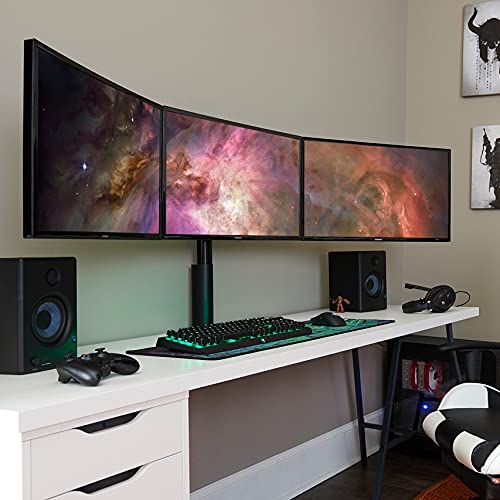
The ECHOGEAR triple monitor desk stand is built for screens up to 27 inches, and its headline feature is a lock-down clamp designed to eliminate screen wobble. Three monitors on a single pole can vibrate when you type or bump the desk, and the ECHOGEAR clamp tightens down hard to stop that movement. Each screen adjusts in tilt, orientation, and swivel without tools, so you can reposition a monitor by hand and have it stay put, and the stand supports both horizontal and vertical arrangements.
The ECHOGEAR suits anyone whose desk takes a beating: heavy typists, gamers with forceful mouse work, and anyone who has watched a monitor wobble every time they lean on the desk. The tool-free adjustment is genuinely convenient for shared desks and hot-desking, where the screen arrangement changes between users. The caveats are the 27 inch size ceiling and the simpler feature set: there is no gas spring, no USB hub, and no telescoping wing, so it does the core job well without extras. If wobble is your main complaint with a current setup, this is the pick that addresses it most directly.
Ergotech Triple LCD Monitor Desk Mount Stand 100-D16-B03-TW
View the Ergotech Triple LCD Monitor Desk Mount Stand on Amazon
The Ergotech 100-D16-B03-TW is the heavy-duty option in this guide, with telescopic wings that extend to fit three screens up to 27 inches and a weight capacity of 25 lbs per pivot, the highest here. The telescoping wings are its defining feature: they slide outward to match the width of your monitors, so the arms sit exactly behind each screen rather than forcing a one-size-fits-all span. The mount is fully adjustable, and it comes with a lifetime warranty, which signals how much confidence the maker has in the build.
The Ergotech suits buyers with heavy monitors, such as older panels with thick bezels and built-in power supplies, and anyone who wants the strongest mount in this guide. The 25 lb per pivot capacity covers monitors that would overload the other stands here, and the telescopic wings make alignment precise. The main caveat is its age and design: this is a long-running professional mount with a utilitarian look, and its installation takes more care than a simple clamp pole. It is also the most expensive style of mount here in terms of build, not features. For heavy screens and a permanent desk setup, it is the most reassuring pick in this guide.
Comparison Table
| Stand | Screen size | Weight per arm | Mounting | Adjustment | Best for |
|---|---|---|---|---|---|
| HUANUO HNTS3B | 17 to 32 in | 17.6 lbs | Clamp or grommet | Gas spring, tilt, swivel, rotation | Full-motion gaming setups |
| VIVO STAND-V003T | 13 to 30 in | Confirm on listing | Clamp | Tilt, swivel, rotation, 11.5 in lift | Standard triple arrays |
| ErGear Triple Mount | 13 to 27 in | 17.6 lbs | Clamp or grommet | Tilt, swivel, rotation, USB base | Productivity desks |
| ECHOGEAR Triple Stand | Up to 27 in | Check listing | Lock-down clamp | Tool-free tilt, orientation, swivel | Wobble-free desks |
| Ergotech 100-D16-B03-TW | Up to 27 in | 25 lbs per pivot | Desk mount | Telescopic wings, fully adjustable | Heavy monitors |
Which One Is Right for You?
If you want the most flexible triple stand and the widest screen support, the HUANUO HNTS3B is the pick. Its gas-spring arms, 32 inch ceiling, and independent centre height adjustment cover gaming and multitasking setups better than anything else here, and the clamp or grommet choice fits most desks.
If you run three standard monitors and want a proven, simple mount, the VIVO STAND-V003T is the classic choice. Just confirm the weight capacity on the listing against your monitors first, because sources disagree on the exact figure, and tighten the friction joints firmly during setup.
If your triple setup is for work, the ErGear mount is the practical pick. Its 13 to 27 inch range covers office monitors, and the USB ports in the base are a small convenience you will use every day. The ECHOGEAR stand is the better choice if wobble is your main frustration, thanks to its lock-down clamp and tool-free adjustment.
If your monitors are heavy, skip the rest and buy the Ergotech. Its 25 lb per pivot capacity and telescopic wings are built for exactly that problem, and the lifetime warranty backs it up. Measure your monitors, weigh them if you can, and match the stand to the heaviest screen you own: a triple stand is only as strong as its weakest arm.
One final check before you order: measure your desk. Three monitors need width, depth, and a solid edge or a grommet hole, and no stand can fix a desk that is too small for the screens on it. Measure twice, check the VESA pattern on all three monitors, and confirm the weight of the heaviest one. Get those three numbers right and any stand in this guide will serve you well.
Frequently Asked Questions
Can I mix different monitor sizes on a triple stand?
Yes, within limits. Most triple stands let you adjust each arm independently, so a larger centre screen with two smaller side screens works well, and it is a popular layout. The limits are the stand’s size range and weight capacity per arm: every screen must fall inside both. Independent height adjustment, which the HUANUO includes for the centre screen, helps line up mismatched sizes.
Do I need a grommet hole in my desk?
No, unless you choose a grommet-only mount. The HUANUO, ErGear, and VIVO stands in this guide provide clamp mounting, which grips the desk edge without any drilling. A grommet mount is more secure, but it needs a hole in the desk, which many desks already have for cable routing. Check your desk edge thickness and clearance before choosing.
Will a triple stand hold curved monitors?
Most triple stands can hold curved monitors, because the VESA mount is the same, but curved screens are deeper and heavier than flat screens of the same size, and they need more clearance when angled inward. Confirm the weight capacity against your curved monitor, and leave extra desk depth for the curve. Ultrawide curved screens usually work best as the centre monitor with two standard screens on the sides.
How do I stop three monitors from wobbling?
Wobble comes from a loose clamp, a flexible desk, or arms working near their weight limit. Tighten the clamp firmly, keep the stand well within its weight capacity, and choose a stand with a lock-down clamp such as the ECHOGEAR if wobble is a recurring problem. A solid, thick desk helps more than any mount feature, so check the desk itself if wobble persists.
Disclosure: As an Amazon Associate, we may earn from qualifying purchases.
FAQ
Which One Is Right for You?
Can I mix different monitor sizes on a triple stand?
Do I need a grommet hole in my desk?
Will a triple stand hold curved monitors?
How do I stop three monitors from wobbling?
More from Amazon
Programs that pair well with the guide above. Offers and eligibility are set by Amazon and may change.
Free shipping on eligible items, Prime Video and more. Eligible new members can start with a free trial.
Start a Prime free trialAd-free music streaming. Eligible new subscribers can start with a free trial.
Try Music Unlimited freeA Prime membership for ages 18-24 with a trial period. Eligibility is set by Amazon.
See Prime for Young AdultsAudiobooks and podcasts to listen to on the go. Eligible new members can start with a free trial.
Try Audible freeAs an Amazon Associate we earn from qualifying purchases.