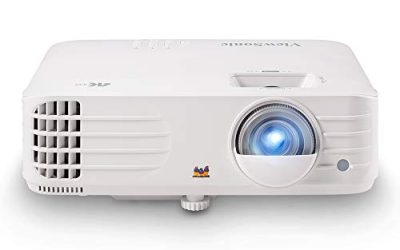
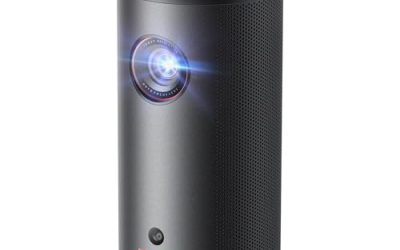
Our Short List of 3
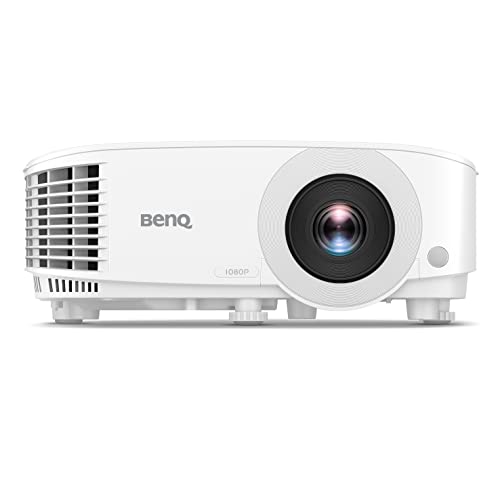
- Native resolution: 1920 x 1080
- Input lag: 16ms at 1080p at 60Hz; 16.7ms low latency in game mode
- Brightness: 3800 lumens
- Contrast ratio: 15000:1

- Native resolution: 1920 x 1080
- Input lag: 16ms at 1080p at 60Hz; 8.4ms at 1080p at 120Hz in Enhanced Gaming Mode
- Brightness: 3800 lumens
- Contrast ratio: 50,000:1

- Native resolution: 1080p
- Refresh and response: 120Hz at 1080p with 8.4ms response in Enhanced Game Mode
- Brightness: 3800 lumens
- Contrast ratio: 50,000:1
All 3 Picks at a Glance
| Product | Specs | Action |
|---|---|---|
| 1. BenQ TH575 |
| Check price on Amazon |
| 2. Optoma GT1080HDR |
| Check price on Amazon |
| 3. Optoma GT1080HDRx |
| Check price on Amazon |
Key takeaways
- Looking for the best affordable gaming projectors? Compare three 1080p projectors with low input lag, bright images and short-throw designs for big-screen play.
A gaming projector turns an ordinary wall into a screen that can be bigger than any television most people would buy, and the best affordable gaming projectors do it without the input lag that ruins a fast-paced match. For years, projectors carried a reputation for sluggish response times, washed-out images in bright rooms, and complicated setup. That reputation is out of date. Modern budget gaming projectors are built with dedicated game modes, measured input lag figures, and brightness levels that hold up in a living room with the lights on.
The three projectors in this guide share a practical formula: native 1080p resolution, a measured low-lag game mode, and brightness around 3800 lumens. That combination covers the things that matter most for gaming on a big screen. Resolution keeps the image sharp at large sizes, low input lag keeps your controls feeling connected to what happens on screen, and brightness keeps the picture visible without blackout curtains. None of these models asks you to give up a comfortable room setup, and two of them use short-throw lenses that produce a huge image from just a few feet away.
This guide compares the three verified models side by side, explains what each one does best, and walks through how to pick the right one for your room. Every product here was checked against its Amazon listing, and only specifications published on those listings are used below.
As an Amazon Associate, we earn from qualifying purchases.
Quick Answer
If you want the short version, the BenQ TH575 is the straightforward pick for a dedicated gaming setup: a 1080p projector with 16ms input lag at 1080p at 60Hz, 3800 lumens, and dual HDMI ports for connecting a console and a PC at the same time. The Optoma GT1080HDR is the pick for small rooms, thanks to its short-throw lens that creates a 120-inch image from about 4.3 feet away, plus an Enhanced Gaming Mode that drops input lag to 8.4ms at 1080p at 120Hz. The Optoma GT1080HDRx is the close sibling of the GT1080HDR, offering the same 120Hz gaming performance and short-throw convenience, with a 100-inch image from 3.6 feet.
All three projectors output at 1080p, all three publish a low input lag figure, and all three are rated at 3800 lumens. The differences that matter are throw distance, refresh rate support, and the extras each model brings, such as HDR10 input support and a built-in speaker. Choose based on your room size and how fast your games run, not on the brand name on the box.
Key Takeaways
- All three picks are native 1080p projectors with a dedicated low-lag game mode, so input lag is a published specification rather than a guess.
- Brightness is consistent across the group at 3800 lumens, which suits a living room or gaming room with normal lighting.
- Short-throw models, the Optoma GT1080HDR and GT1080HDRx, produce a large image from a short distance, which is ideal for small rooms and apartments.
- The GT1080HDR and GT1080HDRx accept a 4K input signal and support HDR10, while their output remains 1080p.
- Dual HDMI on the BenQ TH575 makes it easy to keep two gaming devices connected without swapping cables.
- The Optoma GT1080HDR includes a 10W built-in speaker and a lamp rated for 15,000 hours, which matters if you want sound without extra hardware.
The Picks
1. BenQ TH575
- Native resolution: 1920 x 1080
- Input lag: 16ms at 1080p at 60Hz; 16.7ms low latency in game mode
- Brightness: 3800 lumens
- Contrast ratio: 15000:1
The BenQ TH575 is positioned by its own listing as a 1080p indoor gaming projector, and the headline figure is its low latency. The listing publishes 16.7ms low latency in its title and 16ms input lag at 1080p at 60Hz in its description, which puts it in the range where most players will not notice a delay between pressing a button and seeing the result on screen. That is the single most important number for a gaming projector, and BenQ puts it front and center rather than burying it in a spec sheet. At 3800 lumens, it is also bright enough for a room that is not fully dark, so evening gaming sessions do not require closing every curtain.
The practical side of the TH575 is just as straightforward. Dual HDMI ports mean a console and a PC can stay connected at the same time, which removes the cable-swapping routine that gets old quickly. The DLP imaging system and 15000:1 contrast ratio are published on the listing, and the projector is listed as 3D Ready for anyone who still has a 3D collection. This is a no-frills gaming projector in the best sense: it spends its budget on the image and the response time rather than on features you may never use.
2. Optoma GT1080HDR
- Native resolution: 1920 x 1080
- Input lag: 16ms at 1080p at 60Hz; 8.4ms at 1080p at 120Hz in Enhanced Gaming Mode
- Brightness: 3800 lumens
- Contrast ratio: 50,000:1
The Optoma GT1080HDR is the projector for anyone whose room is too small for a standard throw distance. Its short-throw lens produces a 120-inch image from about 4.3 feet away, which means it can sit on a low table or shelf close to the wall and still fill your field of view. For apartments, bedrooms, and small gaming rooms, that is the difference between a projector that works and one that never gets used. The Enhanced Gaming Mode is the other headline: 16ms input lag at 1080p at 60Hz, dropping to 8.4ms at 1080p at 120Hz, so fast games feel responsive at both common refresh rates.
The rest of the specification list is generous for this price tier. Brightness is rated at 3800 lumens, contrast is published at 50,000:1, and the projector supports HDR10 with a 4K input signal, while its output remains 1080p. A 10W built-in speaker means you can play without external speakers, and the lamp is rated for 15,000 hours. At 6.61 lb with dimensions of 12.4 by 9.5 by 4.5 inches, it is also light enough to move between rooms or take to a friend’s place for a gaming night.
View the Optoma GT1080HDR on Amazon
3. Optoma GT1080HDRx
- Native resolution: 1080p
- Refresh and response: 120Hz at 1080p with 8.4ms response in Enhanced Game Mode
- Brightness: 3800 lumens
- Contrast ratio: 50,000:1
The Optoma GT1080HDRx is the close companion to the GT1080HDR, and the two models share most of their DNA. The GT1080HDRx runs its Enhanced Game Mode at 120Hz at 1080p with an 8.4ms response time, which is the figure that matters most for competitive play and fast shooters. Brightness is again 3800 lumens and contrast is again published at 50,000:1, so the image quality story is the same: bright, high-contrast, and sharp at the native 1080p resolution. Like its sibling, it supports HDR10 with a 4K UHD input signal while outputting at 1080p.
Where the GT1080HDRx differs is in its throw distance. It produces a 100-inch display from 3.6 feet, which is even shorter than the GT1080HDR, making it a strong fit for the smallest rooms or for a setup where the projector sits on a coffee table just in front of the seating position. The lamp light source is confirmed in the listing’s comparison table, and the unit measures 12.4 by 9.5 by 4.5 inches at 7.7 lb. If your room is tight and your games are fast, the GT1080HDRx is built for exactly that combination.
View the Optoma GT1080HDRx on Amazon
How to Choose
Start with input lag, because it is the one specification that directly affects how a game feels. A projector with 16ms of input lag at 60Hz is responsive enough for most players, including action games and sports titles. If you play competitive shooters or fighting games, look for the faster figures: 8.4ms at 120Hz, which both Optoma models publish, gives you a real advantage over a standard 60Hz setup. The BenQ TH575’s 16ms figure is solid for general gaming, but the Optoma pair has the edge at higher refresh rates.
Next, measure your room. Throw distance decides whether a projector can work in your space at all. A standard projector needs several feet between the lens and the wall to produce a large image, and many rooms simply do not have that space. A short-throw model changes the math: the GT1080HDR reaches 120 inches from about 4.3 feet, and the GT1080HDRx reaches 100 inches from 3.6 feet. Measure the distance from where the projector will sit to the wall, decide how large you want the image, and check the throw figures before you buy. If your room is large and the projector can sit far back, the BenQ TH575 is fine. If your room is small, short throw is not a luxury, it is a requirement.
Brightness is the third factor, and here all three models are evenly matched at 3800 lumens. That level suits a room with curtains drawn and normal indoor lighting. If your gaming room has large windows with direct sunlight, no projector in this class will compete with the sun, so plan for curtains or evening play. In a typical living room, 3800 lumens produces a clear, vivid image without needing total darkness.
Resolution and HDR deserve a clear-eyed look. All three projectors are native 1080p, which is the right resolution for this price range: it keeps the image sharp at the screen sizes projectors are used for, and it matches the output of most consoles and gaming PCs at the settings players actually use. The two Optoma models accept a 4K input and support HDR10, which is useful for compatibility with newer consoles, but the output remains 1080p. Do not buy any of these expecting a 4K image. Buy them expecting a large, bright, responsive 1080p image, which is what they deliver.
Finally, consider the small details that affect daily use. Dual HDMI ports on the BenQ TH575 let you keep two devices connected. The 10W built-in speaker on the GT1080HDR covers casual sound without extra hardware, though a soundbar or speakers will sound better for serious play. Lamp life matters over time: the GT1080HDR’s lamp is rated for 15,000 hours, which is many years of regular gaming. Weight and size matter if the projector will move between rooms. None of these details should override input lag and throw distance, but they can break a tie between two otherwise similar models.
Who Should Skip
A gaming projector is not the right choice for everyone, and it is worth being honest about that. If you play mostly in a bright room with direct sunlight and you cannot control the light, a television will give you a more consistent image than any projector in this price range. Projectors depend on a dark or dim surface, and sunlight washes out even a bright 3800-lumen image.
If you need a true 4K image, skip this guide entirely. All three models here are native 1080p projectors. The two Optoma models accept a 4K input signal, but they output at 1080p, so they will not show the detail of a native 4K display. Anyone whose main goal is 4K resolution should look at a different category of projector or a 4K television.
Portability is another reason to look elsewhere. These are home projectors that need a power outlet, a flat surface, and a wall or screen. If you want a projector to carry in a backpack or use outdoors on battery power, a portable mini projector is a better fit, and none of the three models here is designed for that use.
Finally, if your room has no suitable wall or screen space, or if you share a small space where a projector beam would cross a walkway, a large television may simply be more practical. A projector needs a clear line from the lens to the wall, and in some rooms that line does not exist. Short-throw models help, but they cannot solve a room with no free wall at all.
FAQ
Do I need a screen, or can I project onto a wall?
You can project onto a smooth, light-colored wall and get a good image, especially in a dim room. A dedicated screen improves contrast and brightness uniformity, and it gives you a clean, flat surface with no texture or color variation. If your wall is smooth and painted white or light grey, start with the wall and add a screen later if you want a better image. If your wall is textured, dark, or patterned, a screen is worth buying from the start.
Is 1080p enough for gaming on a projector?
For most players, yes. Native 1080p at the screen sizes projectors produce looks sharp from a normal seating distance, and it matches the resolution most consoles and gaming PCs output in practice. The benefit of 1080p in this price range is that the projector can spend its resources on brightness and low input lag instead of resolution. Players who sit very close to a very large image or who want the finest possible detail may prefer a native 4K projector, but that is a different price category.
What input lag should I look for in a gaming projector?
Look for a published input lag figure of 16ms or lower at 60Hz, which is what all three projectors in this guide offer. For competitive play, the faster figure matters: both Optoma models publish 8.4ms at 1080p at 120Hz in their Enhanced Gaming Mode. Avoid projectors that do not publish an input lag figure at all, because an unpublished figure is often a high one. Also check whether the low-lag figure requires a specific game mode to be turned on, and remember to enable it before you play.
Can these projectors handle 4K consoles?
Both Optoma models accept a 4K input signal and support HDR10, so they work with newer consoles that output 4K. The image they display, however, is 1080p, because that is their native resolution. The BenQ TH575 is a 1080p projector with dual HDMI, so it also connects to modern consoles, which will output at 1080p. In practice, this means your console will work with any of these three projectors, but you will see a 1080p image rather than a 4K one.
Final Verdict
The best affordable gaming projector for most people is the one that fits their room. The BenQ TH575 is the straightforward choice for a dedicated gaming space with room to spare: 16ms input lag, 3800 lumens, and dual HDMI make it a clean, capable projector that does the fundamentals well. The Optoma GT1080HDR is the choice for small rooms, pairing a short-throw lens with 8.4ms gaming at 120Hz, HDR10 support, a built-in 10W speaker, and a 15,000-hour lamp. The Optoma GT1080HDRx is nearly identical in spirit, with an even shorter throw that suits the tightest spaces.
All three deliver the same core promise: a large, bright, responsive 1080p image without the price of a high-end home theater projector. Measure your room, check the input lag figures against the games you play, and pick the model whose strengths match your space. Any of the three will turn a wall into a gaming screen that feels like an upgrade over a television.
Product and ASIN Reference
| Product | ASIN | Key Specs |
|---|---|---|
| BenQ TH575 | B0B4QV9YV6 | 1080p, 16ms input lag at 1080p at 60Hz, 3800 lumens, 15000:1 contrast, dual HDMI |
| Optoma GT1080HDR | B07W62S2SJ | 1080p, 8.4ms at 1080p at 120Hz, 3800 lumens, 50,000:1 contrast, short throw, HDR10 |
| Optoma GT1080HDRx | B0BDTPC3QG | 1080p, 8.4ms at 1080p at 120Hz, 3800 lumens, 50,000:1 contrast, short throw, HDR10 |
FAQ
Do I need a screen, or can I project onto a wall?
Is 1080p enough for gaming on a projector?
What input lag should I look for in a gaming projector?
Can these projectors handle 4K consoles?
More from Amazon
Programs that pair well with the guide above. Offers and eligibility are set by Amazon and may change.
Free shipping on eligible items, Prime Video and more. Eligible new members can start with a free trial.
Start a Prime free trialAd-free music streaming. Eligible new subscribers can start with a free trial.
Try Music Unlimited freeA Prime membership for ages 18-24 with a trial period. Eligibility is set by Amazon.
See Prime for Young AdultsAudiobooks and podcasts to listen to on the go. Eligible new members can start with a free trial.
Try Audible freeAs an Amazon Associate we earn from qualifying purchases.