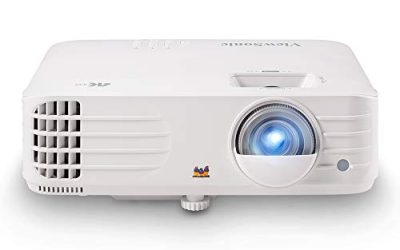
Our Short List of 3

- Best for: Standard classrooms where bright, colorful slides matter most.
- XGA resolution, 1024 x 768
- 3,600 lumens color brightness and 3,600 lumens white brightness
- 3LCD display technology
- HDMI input

- Best for: Widescreen lessons and video in a lit classroom.
- WXGA resolution, 1280 x 800
- 3,600 lumens brightness
- SuperColor technology for vivid images
- HDMI and VGA inputs

- Best for: Small rooms where the projector sits close to the screen.
- WXGA resolution, 1280 x 800
- Short throw lens for close placement
- 4,000 lumens brightness
- HDMI and VGA inputs
All 3 Picks at a Glance
| Product | Specs | Action |
|---|---|---|
| Epson EX3280 |
| Check price on Amazon |
| ViewSonic PA503W |
| Check price on Amazon |
| ViewSonic PS502W |
| Check price on Amazon |
Key takeaways
- Looking for the best and least expensive projectors for classroom use? Compare four bright, simple projectors that keep slides readable in a lit room all day.
A classroom projector has one job that matters more than any other: keep text readable with the lights on. A dim projector forces the teacher to darken the room, and a blurry one turns every slide into guesswork for the back row. The real decision is how much brightness and sharpness you get for a modest outlay, and which corners are safe to cut. A simple projector with strong brightness and an honest resolution beats a fancy one that washes out the moment the blinds open and leaves the back row guessing.
This guide is for teachers fitting out a classroom on a tight budget, school buyers choosing projectors for several rooms, and tutors who teach small groups from a laptop. Each projector below was picked from the names and specifications shown on its Amazon product page, with attention to brightness, resolution, connections, how it behaves in a lit room, and what it costs to keep running.
Quick Picks
As an Amazon Associate we earn from qualifying purchases
| Product | Best for | Key spec from title |
|---|---|---|
| Epson EX3280 | Bright slides in a lit room | XGA 3LCD projector |
| ViewSonic PA503W | Wide slides for modern lessons | WXGA 3,600 lumens projector |
| ViewSonic PS502W | Short-throw setups near the board | WXGA short throw projector |
| Epson VS250 | Basic slides on the smallest outlay | SVGA 3,200 lumens projector |
How to Choose
Brightness for a lit room
Brightness decides whether students can read the screen with the lights on, so it comes first for any classroom. Look for the lumens figure on the listing and favor projectors with strong color brightness as well as white brightness, because a projector that is bright only in white will wash out colored charts and diagrams. A classroom with big windows needs more brightness than a small room with blinds, so match the figure to the room rather than chasing the biggest number on the page. A projector with a high color brightness figure also keeps maps and science diagrams vivid, not just black text.
Resolution for text and diagrams
Resolution decides how sharp letters and lines look from the back row. A WXGA panel shows modern widescreen slides without black bars or stretched text, while an XGA panel suits older slide decks and simple worksheets. An SVGA panel is the lowest step and works for large text, but small fonts and fine diagrams will blur. Check the native resolution on the listing, not the maximum supported input, because a projector that accepts a high-resolution signal still displays at its own native sharpness. A native widescreen panel also matches the slides most teachers build today, so nothing gets cropped.
Connections and setup
A classroom projector should connect to whatever laptop the teacher brings, so check the ports before you buy. HDMI is the standard connection for modern laptops, while VGA still matters for older school machines. A projector with a built-in speaker saves you from wiring separate audio, and a simple remote with a clear source button keeps lessons moving. Look for keystone correction on the listing, since it straightens the image when the projector sits off-center on a cart or a shelf. A projector with a USB port for firmware updates also stays current without a service visit.
Lamp life and running costs
A cheap projector can grow costly if its lamp needs frequent replacement, so lamp life deserves a close look. Check the listing for the lamp life in normal and economy modes, and favor models with an economy mode that dims the lamp slightly for a longer life. A projector with a filter-free design also saves maintenance time in a busy school. A washable or long-life filter also cuts the maintenance visits a busy school must schedule. Ask how the projector is mounted before buying, since a ceiling mount needs a longer throw than a cart placed near the front row.
The 4 Best Options
Epson EX3280
- Best for: Standard classrooms where bright, colorful slides matter most.
- XGA resolution, 1024 x 768
- 3,600 lumens color brightness and 3,600 lumens white brightness
- 3LCD display technology
- HDMI input
Standard classrooms where bright, colorful slides matter most.
The XGA panel is not widescreen, so modern widescreen slides will show bars at the top and bottom.
The EX3280 suits a standard classroom where the lights stay on and the slides must stay readable. Its 3LCD design puts out strong color and white brightness together, so charts, maps, and diagrams keep their color instead of washing out to grey. The XGA resolution handles typical slide decks cleanly, and the HDMI input connects to any modern laptop without an adapter. It is a straightforward pick for a teacher who wants a bright, dependable projector without learning a new menu system. The simple menu also keeps setup quick for teachers who rotate between rooms. The remote also switches sources with one button.
ViewSonic PA503W
- Best for: Widescreen lessons and video in a lit classroom.
- WXGA resolution, 1280 x 800
- 3,600 lumens brightness
- SuperColor technology for vivid images
- HDMI and VGA inputs
Widescreen lessons and video in a lit classroom.
Check the throw distance before buying, since the standard lens needs room between the projector and the screen.
The PA503W suits classrooms that teach from widescreen slides and video. Its WXGA panel matches the shape of a modern laptop screen, so slides fill the projection without stretching or cropping. The strong brightness keeps text readable with the lights on, and the SuperColor technology keeps diagrams vivid. HDMI and VGA inputs cover both new and older school laptops, and the low fan noise keeps the room quiet during lessons. The SuperColor output also keeps science diagrams and maps vivid under classroom lights. The low fan noise also keeps the room quiet while students listen and take notes.
ViewSonic PS502W
- Best for: Small rooms where the projector sits close to the screen.
- WXGA resolution, 1280 x 800
- Short throw lens for close placement
- 4,000 lumens brightness
- HDMI and VGA inputs
Small rooms where the projector sits close to the screen.
A short-throw lens needs precise placement, so measure the room before mounting or rolling in a cart.
The PS502W suits small classrooms and tight setups where the projector must sit close to the board. Its short-throw lens fills a large screen from a short distance, so the teacher can stand beside the board without casting a shadow across the image. The WXGA resolution keeps widescreen slides sharp, and the strong brightness holds up with the lights on. It is the best fit for a room where a cart or a shelf sits just a few feet from the wall. The built-in speaker also covers a standard classroom without separate audio gear. The compact body also rides easily on a cart between rooms.
Epson VS250
The VS250 suits the smallest classroom budgets, where any working projector beats none at all. Its SVGA panel and strong brightness handle large text, simple worksheets, and basic slides in a lit room, and the 3LCD design keeps colors honest. HDMI connects to a modern laptop, and the compact body moves easily between rooms on a cart. It is a practical pick for a spare room, a small tutoring group, or a school that needs a backup projector on hand. The compact body also moves easily between rooms on a cart or in a storage cupboard. The simple controls also suit a substitute teacher in a hurry.
Specs
- SVGA resolution, 800 x 600
- 3,200 lumens color brightness and 3,200 lumens white brightness
- 3LCD display technology
- HDMI input
- Compact portable design
Best for: Small budgets and basic slides in a small room.
Watch out for: The SVGA resolution is low for small fonts and fine diagrams, so keep slide text large and simple.
ASIN: B073P73RTZ
Which One Fits Your Situation
You teach standard slides in a lit classroom
Choose the Epson EX3280. Its strong color and white brightness keep diagrams vivid with the lights on, and the HDMI input connects to any modern laptop. The XGA panel suits the slide decks most teachers already use, making it a dependable everyday pick. The built-in speaker also covers a standard room, so no extra audio gear is needed.
Your lessons use widescreen slides and video
Choose the ViewSonic PA503W. The WXGA panel matches a modern laptop screen, so slides fill the projection without bars or stretching. Its brightness and low fan noise suit a full day of lessons in a room that stays lit. The VGA input also covers older school laptops, so no teacher is left without a connection.
Your room is small and the projector sits near the board
Choose the ViewSonic PS502W. The short-throw lens fills a large screen from a short distance, so the teacher can stand at the board without blocking the image. It is the best fit for tight rooms and cart setups. The strong brightness also holds up with the lights on, so students can read and take notes.
You need a projector on the smallest outlay
Choose the Epson VS250. It covers basic slides and large text in a lit room at the lowest step in this guide, and its compact body moves between rooms easily. Keep slide text large, and it will serve a small group well. The HDMI input also connects to a modern laptop without an adapter hunt before class.
Common Mistakes
- Buying a dim projector and darkening the room for every lesson so students cannot take notes.
- Checking the maximum input resolution instead of the native panel resolution and wondering why text looks soft.
- Forgetting to measure the throw distance before mounting the projector and finding the image spills past the screen.
- Ignoring lamp life and facing a costly replacement halfway through the year when the budget is already spent.
- Connecting a modern laptop to a projector with no HDMI port and hunting for an adapter mid-lesson while the class waits.
Frequently Asked Questions
How bright should a classroom projector be?
For a lit classroom, look for strong brightness in both color and white, because a projector that is bright only in white will wash out colored diagrams. Most lit classrooms need a strong figure, and a room with large windows needs more. All four projectors in this guide suit a lit room, with the short-throw ViewSonic the brightest.
Is WXGA better than XGA for classroom slides?
Yes, when your slides are widescreen, because a WXGA panel matches the shape of a modern laptop screen and fills the projection without bars. An XGA panel still works well for older slide decks and simple worksheets, and it costs less. Choose WXGA for new lessons built in widescreen, and XGA when your existing slides are already in the older format.
Do classroom projectors need a separate speaker?
Not always. A projector with a built-in speaker covers a standard classroom for slides and short video clips, and it saves wiring and setup time. For a large hall or for film screenings, a separate speaker system will sound far better. Check the listing for a built-in speaker before you buy, and test the volume in the actual room.
What is short throw, and does my classroom need it?
A short-throw projector fills a large screen from a short distance, so it sits close to the board instead of at the back of the room. It suits small rooms and stops the teacher casting a shadow across the image. A standard projector needs more distance, so measure the room first and choose short throw only when space is tight.
FAQ
How bright should a classroom projector be?
Is WXGA better than XGA for classroom slides?
Do classroom projectors need a separate speaker?
What is short throw, and does my classroom need it?
More from Amazon
Programs that pair well with the guide above. Offers and eligibility are set by Amazon and may change.
Free shipping on eligible items, Prime Video and more. Eligible new members can start with a free trial.
Start a Prime free trialAd-free music streaming. Eligible new subscribers can start with a free trial.
Try Music Unlimited freeA Prime membership for ages 18-24 with a trial period. Eligibility is set by Amazon.
See Prime for Young AdultsAudiobooks and podcasts to listen to on the go. Eligible new members can start with a free trial.
Try Audible freeAs an Amazon Associate we earn from qualifying purchases.