Our Short List of 3
All 5 Picks at a Glance
| Product | Specs | Action |
|---|---|---|
 1. ASUS RT-AX86U Pro | Check price on Amazon | |
 2. NETGEAR Nighthawk RS700S | Check price on Amazon | |
 3. TP-Link Archer AXE75 | Check price on Amazon | |
 4. ASUS ROG Rapture GT-AXE16000 | Check price on Amazon | |
 5. TP-Link Archer BE800 | Check price on Amazon |
Our Top Picks
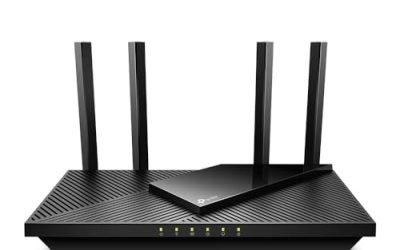
- TP-Link AXE5400 Tri-Band WiFi 6E RouterWiFi 6E, Tri-Band AXE540012.91 x 10.43 x 4.72 inches1.5 poundsCheck on Amazon
The best routers for heavy traffic are built for homes where dozens of devices compete for bandwidth at the same time. When several people stream video in 4K, play online games, join video calls, and back up files to the cloud all at once, an ordinary router starts to lag, drop connections, and buffer at the worst moments. A router designed for heavy traffic handles that load with a faster processor, more memory, wider channels, and smarter traffic management, so every device gets a fair share of the connection without constant slowdowns.
Heavy traffic means many simultaneous connections, large file transfers, and latency-sensitive activity happening side by side. A household with a gaming PC, two consoles, several phones, smart TVs, smart home gadgets, and laptops on video calls can easily push past 30 or 40 active devices. The routers in this guide are chosen for exactly that load: high device capacity, tri-band or quad-band Wi-Fi, multi-gig wired ports, and quality of service controls that keep gaming and calls smooth while someone else downloads a large game update.
This guide explains what to look for before you buy, then compares five routers that handle heavy traffic well. Every pick is a complete standalone router, and each one links to its Amazon listing so you can confirm the exact model, current availability, and specifications before ordering.
How to Choose
1. Device capacity and processor power
A router under heavy traffic is really a small computer managing dozens of connections at once. Look for a quad-core processor and at least 512 MB of memory, with 1 GB preferred. A stronger processor keeps the router responsive when many devices connect, disconnect, and reconnect through the day. Listings that state support for 100 or more devices are a good sign, but the processor and memory behind that claim matter more than the headline number. If your household regularly runs more than 25 active devices, skip entry-level models with dual-core chips.
2. Wi-Fi standard and bands
Wi-Fi 6 handles crowded networks far better than Wi-Fi 5 thanks to OFDMA and MU-MIMO, which let the router serve several devices in the same transmission window instead of one at a time. Wi-Fi 6E adds a 6 GHz band with wide, uncongested channels, and Wi-Fi 7 adds multi-link operation that can combine bands for a single device. For heavy traffic, tri-band is the sweet spot: one 2.4 GHz band for smart home gadgets and distant devices, plus two 5 GHz bands, or a 6 GHz band, to spread gaming, streaming, and work across separate channels. Quad-band models go further by adding a second 5 GHz band.
3. Multi-gig wired ports
Wireless speed gets the attention, but wired ports decide how fast your gaming PC, console, or network storage can actually move data. A 2.5 Gbps WAN port lets you use internet plans faster than a gigabit, and a 2.5 Gbps or 10 Gbps LAN port gives a wired gaming PC or console a direct high-speed lane that never competes with wireless traffic. If you have a fast fiber plan, make sure the router has at least one multi-gig WAN port, or the plan speed will be capped at the port. Two or more multi-gig LAN ports are useful when several wired devices need full speed at once.
4. Quality of service and traffic prioritization
Quality of service, often called QoS, lets the router decide which traffic matters most when the network is saturated. Gaming QoS and adaptive QoS modes can prioritize a game or a video call over a background download, which is the difference between a stable match and sudden lag spikes when someone starts a large update. Look for routers with a dedicated gaming port, which automatically gives top priority to whatever is plugged into it, and for app-level controls that let you rank gaming, streaming, calls, and browsing.
5. Coverage and mesh expansion
Heavy traffic often comes with a larger home, and a single router can struggle to cover every room with a strong signal. Check the coverage figure in the listing and think about wall materials and floor count. A router that supports mesh expansion lets you add a matching node later instead of replacing the whole unit, which is a practical way to extend coverage without rebuilding your network. Place the router centrally, elevated, and away from thick walls and metal objects for the strongest signal in the rooms that matter most.
6. Security and parental controls
A busy network with many connected devices has a larger attack surface, so built-in security matters. Look for lifetime network security features that scan for malicious sites and block intrusions without a subscription, plus WPA3 encryption. Parental controls that can pause internet access per device, schedule offline hours, and filter content are useful in households with children. VPN support, both client and server, is a bonus for remote work and for protecting traffic when you connect from outside the home.
7. USB ports and extra features
A USB 3.0 port turns a router into a simple file or media server when you plug in an external drive, which is handy for sharing files across a household without a separate device. Some routers also support a 4G or 5G USB modem as a backup connection. Link aggregation, which combines two LAN ports into one faster connection to a compatible device, is a niche but useful feature for network storage.
Top Picks
1. ASUS RT-AX86U Pro
The ASUS RT-AX86U Pro is a dual-band Wi-Fi 6 router rated AX5700, with a 2.0 GHz quad-core processor and 1 GB of memory. It is built for households where gaming and streaming happen at the same time, with a dedicated gaming port that automatically prioritizes whatever device is plugged into it. The router includes a 2.5 Gbps WAN and LAN port, so a fast fiber plan and a wired gaming PC both get full speed without bottlenecking at a gigabit port. AiMesh support means it can join or lead a mesh network with other compatible ASUS routers, and lifetime AiProtection Pro security is included without a subscription.
Specifications include dual-band Wi-Fi 6 with 4×4 MU-MIMO, OFDMA for crowded networks, a 2.5 Gbps port, four gigabit LAN ports, a USB 3.2 port, and support for VPN Fusion and port forwarding. The Mobile Game Mode in the companion app can prioritize a phone game with one tap, which is useful when a household member plays competitive mobile games while others stream video.
This router is for gamers and busy households that want strong traffic prioritization and a 2.5 Gbps wired lane without paying for a flagship quad-band model. The main caveat is that it is dual-band rather than tri-band, so very large households with many simultaneous 5 GHz streams may prefer a tri-band model from this guide. It also has only one multi-gig port, so only one wired device gets the faster lane.
2. NETGEAR Nighthawk RS700S
NETGEAR Nighthawk RS700S on Amazon
The NETGEAR Nighthawk RS700S is a tri-band Wi-Fi 7 router rated BE19000, designed for the heaviest home networks. It supports up to 200 devices and covers a large area, with a 10 Gbps internet port and three additional multi-gig ports for wired devices. Wi-Fi 7 brings 320 MHz channels and multi-link operation, which reduce congestion when many devices transmit at once. The router includes one year of NETGEAR Armor security, and the Nighthawk app provides network management, device prioritization, and speed checks from a phone.
Specifications include tri-band Wi-Fi 7 across 2.4 GHz, 5 GHz, and 6 GHz, combined wireless throughput up to 19 Gbps, one 10 Gbps port, one 10 Gbps LAN port, three gigabit ports, and a USB 3.0 port. The 6 GHz band gives Wi-Fi 7 and Wi-Fi 6E devices a wide, uncongested channel, while older devices use the 2.4 GHz and 5 GHz bands.
This router is for large households and home offices that run a very high device count, including smart home gadgets, multiple 4K streams, and competitive gaming at the same time. It is also a strong match for multi-gigabit fiber plans, since the 10 Gbps port will not cap the connection. The caveats are its size and its position at the top of the range: it is a large unit that needs shelf space and airflow, and households with modest internet plans will not use its full capacity. Wi-Fi 7 devices are still becoming common, so some of its newest features will matter more over time than on day one.
3. TP-Link Archer AXE75
TP-Link Archer AXE75 on Amazon
The TP-Link Archer AXE75 is a tri-band Wi-Fi 6E router rated AXE5400, and it is the most affordable way in this guide to add a 6 GHz band to a busy network. The 6 GHz band gives Wi-Fi 6E laptops, phones, and consoles a clean channel away from the crowded 5 GHz band, which helps when neighbors run many networks nearby. It has a 1.7 GHz quad-core processor, a 2.5 Gbps WAN port, four gigabit LAN ports, and a USB 3.0 port. OneMesh support lets it work with compatible TP-Link extenders, and HomeShield provides network security and parental controls.
Specifications include tri-band Wi-Fi 6E with 2.4 GHz, 5 GHz, and 6 GHz bands, combined throughput up to 5.4 Gbps, OFDMA and MU-MIMO, WPA3 security, VPN support, and Alexa compatibility. The six high-performance antennas are designed to push signal across a typical home, and the router can be managed through the Tether app.
This router is for households that want Wi-Fi 6E and a 6 GHz band for heavy traffic without moving to a flagship model. It suits a home with several Wi-Fi 6E devices, regular 4K streaming, and online gaming, plus a gigabit or faster internet plan. The main caveat is the single 2.5 Gbps port, which serves as the WAN connection, so wired devices beyond that share gigabit LAN ports. It also has less total throughput than the Wi-Fi 7 models here, so households planning a large jump in device count may want more headroom.
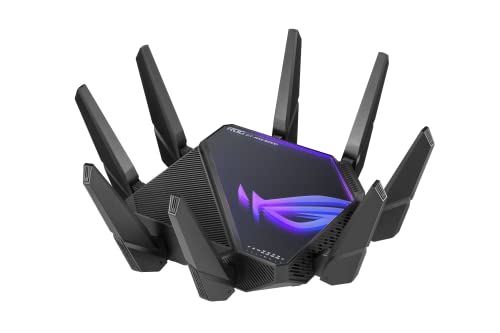
4. ASUS ROG Rapture GT-AXE16000
ASUS ROG Rapture GT-AXE16000 on Amazon
The ASUS ROG Rapture GT-AXE16000 is a quad-band Wi-Fi 6E gaming router rated AXE16000, and it is the most capable traffic manager in this guide. Its four bands, two 5 GHz bands plus 2.4 GHz and 6 GHz, let a household split gaming, streaming, work calls, and smart home traffic across separate channels so they rarely compete. It has dual 10 Gbps ports and a 2.5 Gbps WAN port, a 2.0 GHz quad-core processor, and 1 GB of memory. Triple-level game acceleration prioritizes game traffic from the device to the game server, and AiMesh support allows mesh expansion.
Specifications include quad-band Wi-Fi 6E with combined throughput up to 16 Gbps, dual 10 Gbps ports, four gigabit LAN ports, a USB 3.2 port, VPN Fusion, and lifetime AiProtection Pro.
This router is for serious gamers and large households where several people game, stream, and work online at the same time, and where lag spikes are not acceptable. It is also a good match for multi-gigabit fiber and for a wired gaming PC that needs a 10 Gbps lane. The caveats are its size, with eight antennas and a large footprint, and its position as the most advanced model here, which means households with lighter traffic will not use its extra bands. Setup takes longer than a basic router because of the many gaming and QoS options.
5. TP-Link Archer BE800
TP-Link Archer BE800 on Amazon
The TP-Link Archer BE800 is a tri-band Wi-Fi 7 router rated BE19000, with 12 streams and combined throughput up to 19 Gbps. It has two 10 Gbps ports and four 2.5 Gbps ports, which is the strongest wired lineup in this guide for households with several wired devices. Eight high-performance antennas and an LED screen on the front show time, weather, and network status at a glance. HomeShield security and EasyMesh support are included, and the router works with VPN clients and servers.
Specifications include tri-band Wi-Fi 7 with 2.4 GHz, 5 GHz, and 6 GHz bands, 320 MHz channels, multi-link operation, 4K-QAM, two 10 Gbps ports, four 2.5 Gbps LAN ports, a USB 3.0 port, and private IoT network support for smart home devices.
This router is for households that want Wi-Fi 7 and the most multi-gig wired ports in this guide, for example a home with a wired gaming PC, a console, and network storage all needing fast lanes at once. It suits multi-gigabit fiber plans and homes with a growing number of Wi-Fi 7 devices. The main caveat is that its full wireless speed depends on having Wi-Fi 7 devices, and older devices will use the same speeds as on a Wi-Fi 6 router. It is also a tall unit, so check shelf height before ordering.
Comparison Table
| Router | Wi-Fi Standard | Bands | Combined Throughput | Multi-Gig Ports | Best For |
|---|---|---|---|---|---|
| ASUS RT-AX86U Pro | Wi-Fi 6 | Dual-band | Up to 5.7 Gbps | One 2.5 Gbps | Gaming prioritization on a budget |
| NETGEAR Nighthawk RS700S | Wi-Fi 7 | Tri-band | Up to 19 Gbps | Two 10 Gbps | Very high device counts |
| TP-Link Archer AXE75 | Wi-Fi 6E | Tri-band | Up to 5.4 Gbps | One 2.5 Gbps WAN | Affordable 6 GHz band |
| ASUS ROG Rapture GT-AXE16000 | Wi-Fi 6E | Quad-band | Up to 16 Gbps | Dual 10 Gbps | Maximum traffic separation |
| TP-Link Archer BE800 | Wi-Fi 7 | Tri-band | Up to 19 Gbps | Two 10 Gbps, four 2.5 Gbps | Most wired multi-gig ports |
Which One Is Right for You?
If your household has a gigabit plan, several gamers, and a mix of streaming and work calls, the ASUS RT-AX86U Pro gives strong prioritization and a 2.5 Gbps wired lane at the most accessible point in this guide. Choose it when you want gaming QoS and solid capacity without flagship complexity.
If your device count is very high, with smart home gadgets, multiple 4K streams, and several people online at once, the NETGEAR Nighthawk RS700S is the pick. Its Wi-Fi 7 tri-band design and 10 Gbps port are built for the heaviest loads, and its 200-device capacity leaves room to grow.
If you want a 6 GHz band without a flagship outlay, the TP-Link Archer AXE75 is the sensible choice. It gives Wi-Fi 6E devices a clean channel and handles a busy household well, as long as one multi-gig WAN port is enough for your wired setup.
If gaming performance is the top priority and several people play online at the same time, the ASUS ROG Rapture GT-AXE16000 is the pick. Its quad-band layout separates traffic better than any other router here, and its dual 10 Gbps ports serve wired gaming PCs and consoles at full speed.
If you have multi-gigabit fiber and several wired devices that all need fast lanes, the TP-Link Archer BE800 is the pick. Its combination of Wi-Fi 7 and six multi-gig ports is unmatched in this guide for wired-heavy households.
Frequently Asked Questions
How many devices can a heavy-traffic router handle?
It depends on the model, but the routers in this guide are designed for busy households with dozens of active devices. The NETGEAR Nighthawk RS700S lists support for up to 200 devices, while the others handle large households with a strong quad-core processor and MU-MIMO.
Is Wi-Fi 7 worth it for heavy traffic?
Wi-Fi 7 helps most in crowded networks and multi-gigabit homes. Its 320 MHz channels, multi-link operation, and 4K-QAM increase capacity and reduce latency when many devices transmit at once. If you have a multi-gigabit plan and Wi-Fi 7 devices, a Wi-Fi 7 router such as the RS700S or BE800 makes a real difference. If your plan is a gigabit or slower and your devices are Wi-Fi 5 or Wi-Fi 6, a good Wi-Fi 6 or Wi-Fi 6E router will serve you well.
Should I use QoS or a gaming port for heavy traffic?
Both help, and they work best together. QoS lets the router rank traffic types, so a game or video call gets priority over a background download. A dedicated gaming port applies that priority automatically to whatever is plugged in, with no configuration. Enable adaptive QoS if your router has it, plug your main gaming PC or console into the gaming port, and keep large downloads and cloud backups on a lower priority so they do not cause lag spikes during play.
Does a heavy-traffic router need multi-gig ports?
Yes, if your internet plan is faster than a gigabit or your wired devices move large amounts of data. A standard gigabit WAN port caps a faster plan at gigabit speed. A 2.5 Gbps port suits plans up to that speed, while a 10 Gbps port suits multi-gigabit fiber. If your plan is a gigabit or slower, gigabit ports are enough.
Disclosure: As an Amazon Associate, we may earn from qualifying purchases.
FAQ
Which One Is Right for You?
How many devices can a heavy-traffic router handle?
Is Wi-Fi 7 worth it for heavy traffic?
Should I use QoS or a gaming port for heavy traffic?
Does a heavy-traffic router need multi-gig ports?
More from Amazon
Programs that pair well with the guide above. Offers and eligibility are set by Amazon and may change.
Free shipping on eligible items, Prime Video and more. Eligible new members can start with a free trial.
Start a Prime free trialAd-free music streaming. Eligible new subscribers can start with a free trial.
Try Music Unlimited freeA Prime membership for ages 18-24 with a trial period. Eligibility is set by Amazon.
See Prime for Young AdultsAudiobooks and podcasts to listen to on the go. Eligible new members can start with a free trial.
Try Audible freeAs an Amazon Associate we earn from qualifying purchases.