Our Short List of 3

- Best for: A spare room or small flat that needs cheap Wireless N coverage.
- 300Mbps wireless speed
- 2 x 5dBi high power antennas
- 802.11b, 802.11g, 802.11n
- Access Point and WISP modes

- Best for: A two bedroom home that needs stronger Wireless N coverage than a two antenna router gives.
- 450Mbps wireless speed
- Three fixed antennas
- 802.11n, 802.11g, 802.11b
- Router, Range Extender and Access Point modes
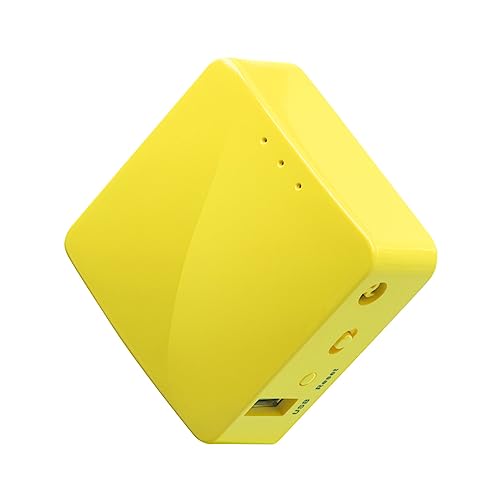
- Best for: Travel and hotel Wi-Fi where you want a private network for your devices.
- 300Mbps wireless speed
- 128MB RAM, 16MB Flash ROM
- Dual Ethernet ports
- OpenVPN and WireGuard support
All 3 Picks at a Glance
| Product | Specs | Action |
|---|---|---|
| TP-Link TL-WR841N |
| Check price on Amazon |
| TP-Link TL-WR940N |
| Check price on Amazon |
| GL.iNet Mango GL-MT300N-V2 |
| Check price on Amazon |
Key takeaways
- Looking for the best n routers wireless for home use? Compare three Wireless N routers for light browsing, small rooms, spare rooms and travel use at home.
Wireless N routers are old technology, and that is exactly why buyers still ask about them. A Wireless N router will not feed a gigabit connection or a house full of 4K streams, but it can cover a spare room, a small flat, a holiday let or a travel bag for very little money. The real decision is not the headline speed on the box. It is the antenna count, the working modes, and whether the router fits the job you actually have.
This guide is for buyers who need cheap coverage for light use, for landlords furnishing a spare room, and for travellers who want a pocket router with a private network. The three routers below were chosen from the names and specifications shown on their Amazon pages, with a focus on wireless standard, speed, antennas and working modes. A spare router also makes a handy backup when the main unit fails, and a pocket router turns any hotel room into a private network.
Quick Picks
As an Amazon Associate we earn from qualifying purchases
| Product | Best for | Key spec from title |
|---|---|---|
| TP-Link TL-WR841N | A spare room or small flat on a tight budget | 300Mbps, 2 x 5dBi antennas |
| TP-Link TL-WR940N | A two bedroom home that needs stronger coverage | 450Mbps, three antennas |
| GL.iNet Mango GL-MT300N-V2 | Travel and hotel Wi-Fi with a private network | 300Mbps, pocket size, VPN support |
How to Choose
Speed class and what it really covers
Wireless N speed is measured in megabits per second, and the number on the box is a laboratory maximum, not the speed you will see on a laptop two rooms away. A 300Mbps router suits browsing, email, video calls and one standard definition stream at a time. A 450Mbps router with three antennas handles a few more devices at once and holds its signal better through a wall. Match the speed class to the number of devices in the home, and remember that a Wireless N router caps out well below modern fibre speeds. Count the devices that will use the router before you buy, because each one shares the same ceiling.
Antennas and coverage
Antennas decide how far the signal reaches and how stable it stays. Two external antennas cover a single room or a small flat, while three antennas spread the signal wider and cope better with walls and furniture. Fixed antennas are simple and sturdy, while removable antennas let you swap in a longer one later. Place the router in the open, up high and away from thick walls, because even the best antennas struggle inside a closed cabinet or behind a television. A router on a high shelf covers more rooms than one buried in a corner, and a clear line of sight to the seating area helps more than any antenna upgrade.
Working modes beyond a plain router
Many Wireless N routers do more than route. Access point mode turns a wired connection into Wi-Fi, range extender mode stretches an existing network into a dead spot, and client mode lets the router join another network as a single device. A pocket router adds a private network mode for hotel Wi-Fi, which keeps your devices behind one password. Check which modes the listing names, because the cheapest models often ship with router mode only. If you travel often, a pocket router with repeater mode earns its place in the bag, because it turns one hotel login into a private network for every device you carry.
Security and setup
Wireless N routers are old enough that some still ship with dated setup wizards, so the security settings matter more than the brand name. Look for WPA2 encryption, a WPS button for quick pairing, and a guest network option if visitors use your Wi-Fi. Parental controls and bandwidth control help when one device hogs the connection. Set a strong admin password on day one, and update the firmware if the maker still publishes it, because an unpatched router is an open door. Write the new password down and store it somewhere safe, and check the maker site for firmware updates every few months so known flaws get patched.
The 3 Best Options
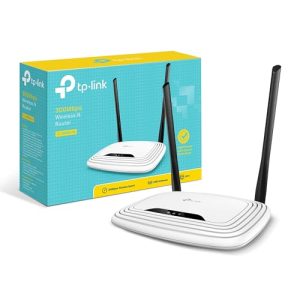
TP-Link TL-WR841N
- Best for: A spare room or small flat that needs cheap Wireless N coverage.
- 300Mbps wireless speed
- 2 x 5dBi high power antennas
- 802.11b, 802.11g, 802.11n
- Access Point and WISP modes
A spare room or small flat that needs cheap Wireless N coverage.
Two antennas and a 300Mbps ceiling mean it struggles with several streams at once.
The TP-Link TL-WR841N is the cheapest way to put Wi-Fi in a spare room or a small flat. Its two 5dBi antennas push a 300Mbps signal far enough for browsing, email and video calls, and the access point and WISP modes let it serve as a second network point or pick up a distant signal. The WPS button makes pairing a phone or laptop quick, and the four fast LAN ports cover a wired desktop or console. It is a simple box that does one job well, and it suits buyers who want Wi-Fi in one room without paying for features they will never use. Setup takes minutes.
Watch out for: Two antennas and a 300Mbps ceiling mean it struggles with several streams at once.
TP-Link TL-WR940N
- Best for: A two bedroom home that needs stronger Wireless N coverage than a two antenna router gives.
- 450Mbps wireless speed
- Three fixed antennas
- 802.11n, 802.11g, 802.11b
- Router, Range Extender and Access Point modes
A two bedroom home that needs stronger Wireless N coverage than a two antenna router gives.
The 450Mbps figure is a laboratory maximum, so real world speeds run lower through walls.
The TP-Link TL-WR940N steps up to 450Mbps with three antennas, which makes it the better pick for a two bedroom home or a flat with more than a couple of devices. The extra antenna improves stability through walls, and the three working modes cover router, range extender and access point duties, so one box can serve as the main router or stretch an existing network into a dead corner. Bandwidth control lets you give priority to the devices that matter, and the WPS button keeps setup quick. It is still only a Wireless N router, so it will not match modern fibre speeds, but it still covers light homes well.
Watch out for: The 450Mbps figure is a laboratory maximum, so real world speeds run lower through walls.
GL.iNet Mango GL-MT300N-V2
- Best for: Travel and hotel Wi-Fi where you want a private network for your devices.
- 300Mbps wireless speed
- 128MB RAM, 16MB Flash ROM
- Dual Ethernet ports
- OpenVPN and WireGuard support
Travel and hotel Wi-Fi where you want a private network for your devices.
The tiny size means short range, so it suits one room rather than a whole house.
The GL.iNet Mango is a pocket router for travellers who want their own private network on hotel or public Wi-Fi. It is barely larger than a matchbox, yet it carries two Ethernet ports, a USB port and built in VPN support, so your phone and laptop sit behind one encrypted connection instead of joining an open network directly. The 300Mbps wireless speed suits browsing and calls on the road, and the repeater mode lets it pick up a hotel signal and rebroadcast it to your devices. It is the pick for anyone who travels with more than one device. The USB port adds storage or modem options on the road.
Watch out for: The tiny size means short range, so it suits one room rather than a whole house.
Which One Fits Your Situation
You need Wi-Fi in one spare room
Pick the TP-Link TL-WR841N. Two antennas and a 300Mbps ceiling cover browsing, email and calls in a single room, and the access point mode lets it extend a wired connection. It is the cheapest route to Wi-Fi where you only need it in one place. The four LAN ports also cover a wired desktop or console in the same room.
You have a two bedroom home with several devices
Pick the TP-Link TL-WR940N. Three antennas and 450Mbps hold up better through walls, and the range extender mode can push the signal into a dead corner. Bandwidth control helps when one device tries to hog the connection during the evening. The three working modes also let one box serve as the main router or as an extender later.
You travel and use hotel Wi-Fi
Pick the GL.iNet Mango. Its pocket size fits a travel bag, and the built in VPN support puts your devices behind one encrypted connection instead of joining open hotel Wi-Fi directly. The repeater mode turns one hotel login into a private network for everything you carry. Its tiny size fits a jacket pocket, and the private network keeps every device behind one login.
You want a backup router for emergencies
Pick the TP-Link TL-WR841N as a spare. Keep it in a drawer and plug it in when the main router fails, so the house stays online while you arrange a replacement. Its access point mode also lets it serve as a second network point in a room the main router cannot reach, which makes it useful even after the emergency passes.
Common Mistakes
- Buying a Wireless N router for a gigabit fibre connection, then wondering why the speed never rises above the router ceiling no matter what the line promises.
- Hiding the router inside a closed cabinet or behind a television, where the signal dies before it leaves the room and the house loses its signal.
- Ignoring the working modes and buying a router only model when an access point or extender would have solved the problem for less money and less fuss.
- Leaving the default admin password in place, which leaves the router open to anyone on the network who cares to look for it.
- Expecting one cheap router to cover a large house, when a second access point would have cost less than the frustration and the dead spots.
Frequently Asked Questions
Is a Wireless N router still worth buying?
A Wireless N router is worth buying when the job is light: browsing, email, calls and one stream in a small space. It is not worth buying as the main household router for a fast home fibre connection or a house full of heavy users, because the 300Mbps or 450Mbps ceiling caps the speed far below what the line can deliver.
What is the difference between 300Mbps and 450Mbps Wireless N?
The difference comes from the antenna count and the number of spatial streams. A 300Mbps router usually carries two antennas, while a 450Mbps router carries three, which gives it better coverage and more stable speeds through walls. Real world speeds run lower than either figure, especially at distance. More antennas usually mean more streams and better coverage.
Can a Wireless N router work as a range extender?
Many Wireless N routers include a range extender mode that picks up an existing network and rebroadcasts it into a dead spot. Check the listing for the modes it names, because the cheapest models often ship with router mode only. The TP-Link TL-WR940N in this guide includes extender and access point modes. Check the modes before you buy.
Is the GL.iNet Mango safe on hotel Wi-Fi?
The Mango helps by putting your devices behind its own private network with VPN support, so they do not join the hotel network directly. That is safer than connecting each device to open hotel Wi-Fi, but no travel router replaces basic care: keep your software updated and avoid entering sensitive details on networks you do not trust. Stay careful on open networks.
FAQ
Is a Wireless N router still worth buying?
What is the difference between 300Mbps and 450Mbps Wireless N?
Can a Wireless N router work as a range extender?
Is the GL.iNet Mango safe on hotel Wi-Fi?
More from Amazon
Programs that pair well with the guide above. Offers and eligibility are set by Amazon and may change.
Free shipping on eligible items, Prime Video and more. Eligible new members can start with a free trial.
Start a Prime free trialAd-free music streaming. Eligible new subscribers can start with a free trial.
Try Music Unlimited freeA Prime membership for ages 18-24 with a trial period. Eligibility is set by Amazon.
See Prime for Young AdultsAudiobooks and podcasts to listen to on the go. Eligible new members can start with a free trial.
Try Audible freeAs an Amazon Associate we earn from qualifying purchases.