Our Short List of 3

- Best for: A household that wants solid VPN speed and gaming features in one box.
- AX5700 dual-band Wi-Fi 6, 2.4GHz quad-core processor
- VPN client with OpenVPN and WireGuard support, VPN Fusion
- 2.5G WAN/LAN port, dedicated gaming port, 4 LAN ports
- AiMesh compatible, lifetime AiProtection Pro security

- Best for: Maximum VPN throughput and flexible per-device routing.
- AX6000 dual-band Wi-Fi 6, quad-core 2.0GHz processor
- Native OpenWrt firmware with built-in VPN client dashboard
- WireGuard and OpenVPN support, per-device VPN routing
- Two 2.5GbE ports, four 1GbE LAN ports, USB 3.0 port
- Best for: Large homes with many wired devices and a fast internet plan.
- AX6000 dual-band Wi-Fi 6, quad-core processor
- VPN client with OpenVPN and WireGuard support, VPN Fusion
- Dual 2.5G WAN/LAN ports, 8 LAN ports
- AiMesh compatible, lifetime AiProtection Pro security
All 3 Picks at a Glance
| Product | Specs | Action |
|---|---|---|
| ASUS RT-AX86U Pro |
| Check price on Amazon |
| GL.iNet Flint 2 GL-MT6000 |
| Check price on Amazon |
| ASUS RT-AX88U Pro |
| Check price on Amazon |
Our Top Picks
Running a VPN on a router protects every device on your network at once, including smart TVs, game consoles and phones that cannot run a VPN app themselves. The catch is that not every router can do it well: a weak processor turns encrypted traffic into a bottleneck, and some firmware hides the VPN client behind menus that take real patience to configure. The right router makes the whole setup a one-time job rather than a weekend project.
This guide is for households that want network-wide VPN coverage without installing apps on every device, and for travelers who want a home network that routes traffic through a chosen location. It compares four routers with built-in VPN client support, from a travel-friendly OpenWrt model to full-size Wi-Fi 6 routers, on the specs that decide real VPN speed: processor power, protocol support and port layout.
Quick Picks
As an Amazon Associate we earn from qualifying purchases.
| Product | Best for | Key spec from title |
|---|---|---|
| ASUS RT-AX86U Pro | All-round home VPN | AX5700 Wi-Fi 6, VPN client, 2.5G port |
| GL.iNet Flint 2 GL-MT6000 | Fast VPN throughput | Wi-Fi 6, OpenWrt, WireGuard, dual 2.5GbE |
| ASUS RT-AX58U | Budget home VPN | AX3000 Wi-Fi 6, VPN client, AiMesh |
| ASUS RT-AX88U Pro | Large homes and many devices | AX6000 Wi-Fi 6, dual 2.5G ports, 8 LAN ports |
How to Choose
Check the VPN client, not just the VPN label
A router that mentions VPN may only run a VPN server, which lets you connect into your home network from outside, rather than a VPN client, which routes your household traffic out through a provider. What you want for NordVPN is a client: OpenVPN and WireGuard support in the router firmware, with a place to paste or upload a configuration file. ASUS routers carry this in their VPN Fusion and VPN client menus, while GL.iNet routers ship with OpenWrt and a ready-made VPN dashboard. Confirm the client exists before you buy, since adding it later can mean third-party firmware.
Mind the processor, because encryption is work
Encrypting traffic costs processor cycles, and a router with a slow chip will cap your VPN speed far below your internet plan. A modern quad-core processor with hardware acceleration for encryption keeps WireGuard speeds high, while an older dual-core chip can struggle past a few hundred megabits. WireGuard is lighter than OpenVPN and usually runs faster on the same hardware, so a router that supports both gives you a fast lane and a compatible fallback. If your internet plan is gigabit, treat processor power as the first spec to check, not an afterthought.
Pick the protocol that fits your devices
WireGuard is the fastest option on most routers and the easiest to keep running, with a simple key-based setup and quick reconnections when the connection drops. OpenVPN is slower but works almost everywhere and is the fallback when a network blocks newer protocols. Some routers let you run both at once and route different devices through different tunnels, which is handy when a game console needs a low-latency path while a streaming box uses the VPN. A router that supports per-device routing, often called policy routing or VPN Fusion, gives you that flexibility without extra hardware.
Count ports and check Wi-Fi coverage
A router that handles the VPN well still needs to cover your home. Dual-band Wi-Fi 6 is the baseline here, with enough throughput for several streams and calls at once, and a 2.5G WAN port helps if your internet plan runs past gigabit speeds. Count the LAN ports too: a router with eight ports can wire a desktop, a console and a media box at home without a separate switch, while a four-port model may need one. Mesh support is worth having in a larger home if the house has dead spots, since adding a matching node later beats replacing the whole router.
The 4 Best Options
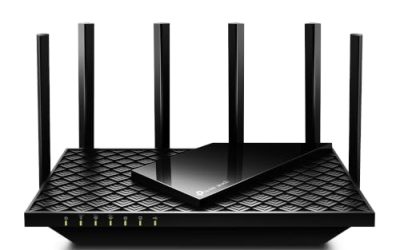
ASUS RT-AX86U Pro
- Best for: A household that wants solid VPN speed and gaming features in one box.
- AX5700 dual-band Wi-Fi 6, 2.4GHz quad-core processor
- VPN client with OpenVPN and WireGuard support, VPN Fusion
- 2.5G WAN/LAN port, dedicated gaming port, 4 LAN ports
- AiMesh compatible, lifetime AiProtection Pro security
A household that wants solid VPN speed and gaming features in one box.
Four LAN ports may need a switch in a heavily wired setup.
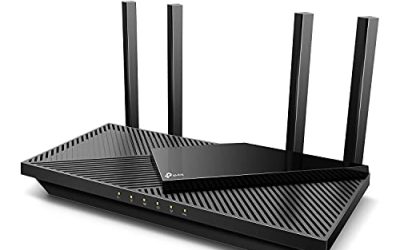
The ASUS RT-AX86U Pro is the most rounded router here, pairing strong Wi-Fi 6 coverage with a VPN client that handles NordVPN through both OpenVPN and WireGuard. Its quad-core processor keeps encrypted traffic moving, and the dedicated gaming port gives a console or PC priority when the network is busy. A 2.5G port suits a fast internet connection, and AiMesh support means you can add a matching node later instead of replacing the router. Lifetime network security is included without a subscription, and the setup app walks through the VPN configuration in plain steps.
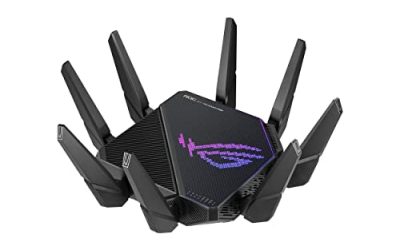
GL.iNet Flint 2 GL-MT6000
- Best for: Maximum VPN throughput and flexible per-device routing.
- AX6000 dual-band Wi-Fi 6, quad-core 2.0GHz processor
- Native OpenWrt firmware with built-in VPN client dashboard
- WireGuard and OpenVPN support, per-device VPN routing
- Two 2.5GbE ports, four 1GbE LAN ports, USB 3.0 port
Maximum VPN throughput and flexible per-device routing.
OpenWrt interface is deeper than a standard consumer router app.
The GL.iNet Flint 2 is the speed pick of this group, built on OpenWrt with a VPN dashboard that treats NordVPN as a first-class feature rather than an add-on. Its quad-core processor and hardware encryption keep WireGuard throughput high, and the interface lets you route some devices through the VPN while others use the direct connection. Two 2.5GbE ports suit a fast fiber connection, and the open firmware means advanced users can add ad blocking and custom firewall rules. It is the best choice when VPN performance is the whole point of the purchase.
ASUS RT-AX58U
The ASUS RT-AX58U is the budget route into a NordVPN-ready network, with the same VPN client menus as its larger siblings in a smaller package. It runs OpenVPN and WireGuard through the ASUS firmware, and its AX3000 Wi-Fi 6 radio covers a flat or small house without fuss. AiMesh support lets it join a mesh network later, and the built-in security features run without a subscription. The processor is lighter than the Pro models, so VPN speeds are lower, but it is a fair trade for a household with a modest internet plan and a handful of devices.
Specs
- AX3000 dual-band Wi-Fi 6, dual-band 802.11ax
- VPN client with OpenVPN and WireGuard support
- 1 WAN port, 4 LAN ports, 1 USB 3.0 port
- AiMesh compatible, AiProtection Pro security
- Adaptive QoS, MU-MIMO, OFDMA
Best for: A smaller home that wants VPN coverage without a large outlay.
Watch out for: Lower VPN throughput than the Pro models on fast connections.
ASIN: B082N5RF5F
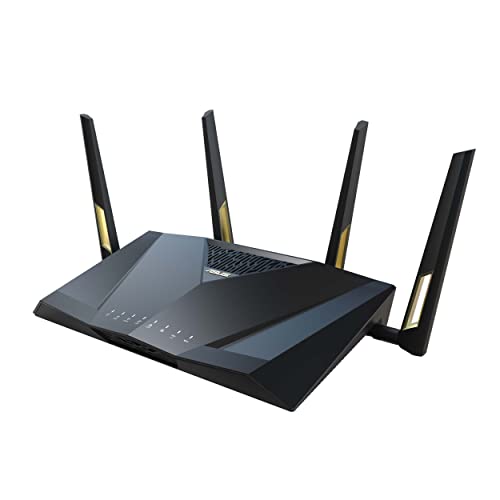
ASUS RT-AX88U Pro
- Best for: Large homes with many wired devices and a fast internet plan.
- AX6000 dual-band Wi-Fi 6, quad-core processor
- VPN client with OpenVPN and WireGuard support, VPN Fusion
- Dual 2.5G WAN/LAN ports, 8 LAN ports
- AiMesh compatible, lifetime AiProtection Pro security
Large homes with many wired devices and a fast internet plan.
Larger and heavier than the other routers here, with a bigger footprint.
The ASUS RT-AX88U Pro is the heavy-duty option, with eight LAN ports, dual 2.5G ports and a strong processor that keeps VPN traffic fast even with many devices connected. Its AX6000 Wi-Fi 6 radio covers a large home, and the VPN client supports both OpenVPN and WireGuard with per-device routing through VPN Fusion. Port aggregation and a fast WAN port suit a multi-gigabit internet plan, and AiMesh support extends coverage without replacing the router. It is the pick when the network has a wired desktop, a console, a media server and a dozen phones all at once.
Which One Fits Your Situation
You want VPN on everything without fuss
Choose the ASUS RT-AX86U Pro. Its VPN client is straightforward to configure, its processor keeps speeds respectable, and the gaming port and AiMesh support cover the extras most households need. It is the router to buy when you want the VPN running by the evening and never think about it again.
You want the fastest VPN speeds possible
Take the GL.iNet Flint 2. Its OpenWrt firmware and strong processor deliver the highest WireGuard throughput in this group, and per-device routing lets you choose exactly which gadgets use the tunnel. It suits a fast fiber connection where a weaker router would become the bottleneck.
You have a small home and a modest budget
Pick the ASUS RT-AX58U. It carries the same VPN client as its bigger siblings, covers a flat or small house, and costs less than the Pro models. Just keep your expectations in line with its processor: it is a good match for a standard internet plan, not a gigabit one.
You have a big house full of wired gear
Go with the ASUS RT-AX88U Pro. Eight LAN ports and dual 2.5G ports mean the desktop, console and media box all plug in directly, and the strong processor keeps VPN traffic fast with many devices online. It is the only router here that truly suits a large, heavily wired home.
Common Mistakes
- Buying a router with only a VPN server and finding it cannot route traffic out through a provider.
- Ignoring processor power, then wondering why VPN speeds fall far below the internet plan.
- Using OpenVPN on a slow router when WireGuard would run far faster on the same hardware.
- Forgetting to check that the router supports per-device routing before buying.
- Setting the VPN to cover every device, including a console that needs the lowest latency path.
Frequently Asked Questions
Do I need a NordVPN subscription to use these routers?
Yes. The router provides the VPN client, but the encrypted tunnel connects to NordVPN servers, which need an active NordVPN account. You load the configuration files from your NordVPN account into the router, and the router handles the connection from then on. Without a subscription there is no server to connect to, so the client alone does nothing.
Is WireGuard faster than OpenVPN on a router?
Usually yes. WireGuard uses a leaner design and modern encryption that runs efficiently on router processors, so it often delivers far higher speeds than OpenVPN on the same hardware. OpenVPN is still useful as a fallback on networks that block newer protocols. If your router supports both, start with WireGuard and keep OpenVPN as a backup.
Can I use a VPN on only some devices?
Yes, on routers that support per-device routing. The GL.iNet Flint 2 and the ASUS Pro models let you pick which devices use the VPN tunnel and which use a direct connection. That way a streaming box can use the VPN while a console keeps the lowest-latency direct path. Budget routers may route everything or nothing, so check this before you buy.
Will a VPN router slow down my internet?
Some slowdown is normal, since encryption takes processor time and the tunnel adds a hop. A strong router with WireGuard keeps the loss small, while a weak router can cut speeds sharply. Limit the loss by picking a router with a fast processor, using WireGuard, and choosing a nearby VPN server in your NordVPN account settings.
FAQ
Do I need a NordVPN subscription to use these routers?
Is WireGuard faster than OpenVPN on a router?
Can I use a VPN on only some devices?
Will a VPN router slow down my internet?
More from Amazon
Programs that pair well with the guide above. Offers and eligibility are set by Amazon and may change.
Free shipping on eligible items, Prime Video and more. Eligible new members can start with a free trial.
Start a Prime free trialAd-free music streaming. Eligible new subscribers can start with a free trial.
Try Music Unlimited freeA Prime membership for ages 18-24 with a trial period. Eligibility is set by Amazon.
See Prime for Young AdultsAudiobooks and podcasts to listen to on the go. Eligible new members can start with a free trial.
Try Audible freeAs an Amazon Associate we earn from qualifying purchases.