Our Top Picks
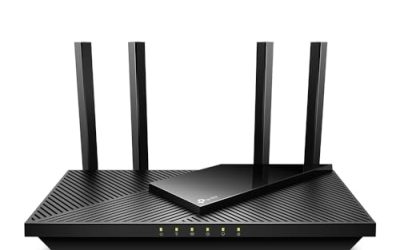
 TP-Link AXE5400 Tri-Band WiFi 6E RouterWiFi 6E, Tri-Band AXE540012.91 x 10.43 x 4.72 inches1.5 poundsCheck on Amazon

A live stream fails in a way a recorded video never does. When the connection stutters for a few seconds, viewers see frozen frames, dropped audio, and a chat full of complaints, and there is no second take. The real decision is not which router advertises the biggest combined wireless number. It is which router keeps the upload from the streaming PC steady while the rest of the household keeps gaming, calling, and watching video at the same time.


This guide is for streamers broadcasting to Twitch or YouTube from a PC or console, whether they stream competitive games, creative work, or talk shows. The five routers below were chosen from the names and specifications shown on their Amazon product pages, with priority given to traffic prioritisation, fast wired ports, and Wi-Fi 6 or Wi-Fi 6E radios that keep a busy network moving.
Quick Picks
As an Amazon Associate we earn from qualifying purchases.
| Product | Best for | Key spec from title |
|---|---|---|
| ASUS ROG Rapture GT-AX11000 Pro | A dedicated streaming room with a wired PC and console | Tri-Band WiFi 6, 10G and 2.5G ports, Triple-Level Game Acceleration |
| NETGEAR Nighthawk RAXE500 | A large home where many devices share the network during a stream | AXE11000 Tri-Band WiFi 6E, up to 10.8Gbps, new 6GHz band |
| ASUS RT-AX86U Pro | A single streamer who wants a gaming port and strong QoS | AX5700 Dual Band WiFi 6, 2.5G port, gaming port, Adaptive QoS |
| TP-Link Archer AXE75 | A first Wi-Fi 6E upgrade for a streamer on a gigabit plan | AXE5400 Tri-Band WiFi 6E, 6GHz band, 2.5Gbps WAN port |
| ASUS RT-AX88U | A desk full of wired gear that needs many LAN ports | AX6000 Dual Band WiFi 6, 8 ports, Adaptive QoS |
How to Choose
Upload stability matters more than download speed
A stream lives or dies on the upload path. Download speed decides how fast a game patch arrives, but the encoder sends a constant flow of video upstream for the whole broadcast, and any dip shows up on screen immediately. Look for a router that holds a steady connection under load rather than one that only peaks well in a speed check. A wired Ethernet connection from the streaming PC to the router removes the biggest source of variation, so a router with fast wired ports and a stable processor earns its place before one with a flashier wireless number. If the stream still drops frames on a wired connection, check the internet plan next.
QoS decides what gets through when the network is busy
Quality of Service, or QoS, is the setting that tells the router which traffic goes first when several devices compete for bandwidth. A stream competing with a game download, a cloud backup, or a video call will lose without it, because the router treats every packet the same. Gaming routers usually include an adaptive or gaming QoS mode that can prioritise the streaming PC or the game traffic, and some add a dedicated gaming port that gets priority automatically. Check that the QoS controls let you pick the streaming device by name, because a preset that only favours gaming traffic may not help an encoder running on the same machine.
Fast wired ports protect the stream from the rest of the house
Wireless is convenient, but a wired streaming PC is the reliable choice, and the port it plugs into sets a ceiling on the connection. A 2.5G port gives headroom above a gigabit plan and keeps the wired link from becoming the bottleneck when the plan is faster than gigabit. A 10G port matters mainly for a streamer who also moves large video files across a local network or runs a capture setup with a network-attached drive. Count the LAN ports too: a streaming desk with a PC, a console, a capture device, and a network drive fills four ports quickly, and running out means adding a switch later.
Wi-Fi generation and bands decide how crowded the air gets
Wi-Fi 6 improves how a router shares airtime between many devices, and Wi-Fi 6E adds a 6GHz band that is far less crowded than the 2.4GHz and 5GHz bands most neighbours use. A tri-band router can put the stream, or the devices around it, on separate bands so they interfere less with each other. That matters most in apartments and shared houses, where dozens of nearby networks compete for the same channels. A dual-band Wi-Fi 6 router is still enough for a single streamer in a quieter home, especially when the streaming PC is wired and the wireless bands only serve phones, tablets, and viewers in other rooms.
The 5 Best Options
ASUS ROG Rapture GT-AX11000 Pro
The GT-AX11000 Pro is built for a setup where the stream and the game share one network and neither can afford to wait. Its triple-level game acceleration works across the PC, the router, and the game server path, and the 10G and 2.5G ports give a wired streaming PC plenty of headroom. RangeBoost Plus helps the wireless signal reach a capture setup or a second room, and AiMesh support means the network can grow with another ASUS router later. This is the pick for a streamer who wants the strongest wired options and the most aggressive traffic handling in this roundup.
Specs
- Tri-Band WiFi 6 extendable gaming router
- 10G and 2.5G ports
- Triple-Level Game Acceleration
- ASUS RangeBoost Plus
- Subscription-free network security
- AiMesh compatible
Best for: A dedicated streaming room with a wired PC and console that must stay stable during long broadcasts.
Watch out for: Its size and eight antennas need real desk or shelf space, and a small room may not use its full port selection.
NETGEAR Nighthawk RAXE500
The RAXE500 is the wide-coverage option for a household where a stream runs while other people game, work, and watch video. Its tri-band Wi-Fi 6E layout adds a 6GHz band that stays clear of the crowded 2.4GHz and 5GHz traffic, and its 12-stream design is made for many devices at once. The listing describes coverage up to 3,500 sq. ft and support for 60 devices, which suits a larger home better than a single-room setup. Built-in security features cover the connected devices without a separate subscription service named in the title.
Specs
- 12-stream Gigabit router, AXE11000 tri-band wireless speed up to 10.8Gbps
- New 6GHz band with Wi-Fi 6E
- Coverage up to 3,500 sq. ft
- Connects up to 60 devices
- Security features included
Best for: A large home where the stream shares the network with many devices and several people at once.
Watch out for: The 6GHz band only helps devices that support Wi-Fi 6E, so older phones and laptops will still use the 5GHz band.
ASUS RT-AX86U Pro
The RT-AX86U Pro is the focused choice for one streamer who wants strong traffic controls without a flagship-sized router. Its dedicated gaming port gives the connected device priority automatically, and Adaptive QoS can favour the streaming PC when the household network gets busy. Mobile Game Mode targets low latency for phones, which helps when a streamer monitors chat or runs a companion app on a mobile device. The 2.5G port keeps a wired streaming PC ahead of a gigabit plan, and AiMesh support leaves room to extend coverage later.
Specs
- AX5700 Dual Band WiFi 6 extendable gaming router
- 2.5G port and dedicated gaming port
- Adaptive QoS with Mobile Game Mode
- Port forwarding and VPN support
- Subscription-free network security
- AiMesh compatible
Best for: A single streamer who wants a gaming port and strong QoS in a mid-sized setup.
Watch out for: It has fewer wired ports than the larger routers here, so a desk with many wired devices may need a switch.
TP-Link Archer AXE75
The Archer AXE75 brings Wi-Fi 6E within reach of a streamer upgrading from an older dual-band router. Its tri-band layout includes the 6GHz band, so the stream setup can move wireless devices off the crowded 5GHz band, and the 2.5Gbps WAN port suits a gigabit internet plan with room to spare. OneMesh support lets it join a mesh network with compatible TP-Link devices, and the listing names VPN and WPA3 security plus HomeShield protection. Six antennas and a quad-core CPU handle a household where the stream runs alongside everyday browsing and video calls.
Specs
- AXE5400 Tri-Band WiFi 6E router
- New 6GHz band with 160MHz channels
- 2.5Gbps WAN port for gaming and streaming
- OneMesh compatible
- Quad-core CPU
- VPN and WPA3 security
Best for: A first Wi-Fi 6E upgrade for a streamer on a gigabit plan who wants the 6GHz band.
Watch out for: Its LAN ports are gigabit only, so a wired device cannot exceed gigabit speed on the local network.
ASUS RT-AX88U

The RT-AX88U is the wired-heavy option for a streaming desk that already has too many cables and not enough ports. Eight Gigabit LAN ports take a PC, a console, a capture device, and network storage without a switch in between, and Adaptive QoS prioritises game packets for smoother online play. Its AX6000 dual-band Wi-Fi 6 radio uses 160MHz bandwidth and 1024-QAM, with combined speeds of 1148Mbps on 2.4GHz and 4804Mbps on 5GHz. AiProtection Pro adds lifetime security, and AiMesh support means it can become part of a larger network later.
Specs
- AX6000 Dual Band WiFi 6 gaming router
- 8 Gigabit LAN ports
- Adaptive QoS
- 160MHz bandwidth and 1024-QAM
- AiProtection Pro lifetime security
- AiMesh compatible
Best for: A desk full of wired gear that needs many LAN ports for a PC, console, and capture setup.
Watch out for: It has no 6GHz band and no 2.5G port, so it is not the pick for a Wi-Fi 6E household or a plan faster than gigabit.
Which One Fits Your Situation
You stream competitive games from one PC
Pick the ASUS RT-AX86U Pro. Its dedicated gaming port and Adaptive QoS keep the game and the encoder prioritised when the network gets busy, and the 2.5G port gives a wired PC headroom above a gigabit plan. It covers a single-streamer setup without the size and port count of a flagship router.
You stream while the whole household is online
Pick the NETGEAR Nighthawk RAXE500. Its tri-band Wi-Fi 6E layout and 12-stream design spread many devices across three bands, and the 6GHz band gives the newest devices a clear channel. The wide coverage suits a larger home where the stream competes with gaming, video, and work calls, and it also suits a stream that moves between rooms.
You want the strongest wired setup for a dedicated stream room
Pick the ASUS ROG Rapture GT-AX11000 Pro. Its 10G and 2.5G ports, triple-level game acceleration, and tri-band Wi-Fi 6 cover a wired PC, a console, and wireless devices around the room. The extra ports also leave room for a capture setup and network storage. It is the most capable option here when the stream is the main job of the network.
You are upgrading to Wi-Fi 6E on a gigabit plan
Pick the TP-Link Archer AXE75. Its 6GHz band moves wireless traffic off crowded bands, the 2.5Gbps WAN port matches a gigabit plan, and OneMesh support leaves a path to extend coverage. The 6GHz band keeps wireless traffic clear while the wired PC carries the stream. If the desk needs many wired ports, the ASUS RT-AX88U is the better fit instead.
Common Mistakes
- Judging a router by its combined wireless number, which adds every band together and no single device will ever use.
- Streaming over Wi-Fi when an Ethernet cable to the router is available, then blaming the router for wireless interference.
- Leaving QoS off or on a default preset that does not prioritise the streaming PC.
- Buying a router with too few LAN ports for a PC, console, capture device, and storage, then adding a switch as an afterthought.
- Expecting a new router to fix an internet plan whose upload speed is too low for the chosen stream resolution and bitrate.
Frequently Asked Questions
How much upload speed do I need to stream?
A 1080p stream at 60 frames per second typically needs a stable upload of around 6 to 8 Mbps for video alone, plus headroom for the game, voice chat, and other devices. A 720p stream needs less, while a 4K stream needs far more. Check the plan upload figure, not the download figure, and leave a margin above the encoder bitrate so a brief dip drops no frames.
Should I stream over wired Ethernet or Wi-Fi?
Wired Ethernet is the better choice for a stream that must stay stable for hours. A cable removes wireless interference, neighbouring networks, and signal changes when someone walks between the PC and the router. Wi-Fi 6 or 6E can work for a stream when wiring is impossible, but the PC should sit close to the router on a clear band, and QoS should prioritise the streaming device.
Does Wi-Fi 6E help live streaming?
Wi-Fi 6E helps when the stream or the devices around it can use the 6GHz band, because that band is far less crowded than 2.4GHz and 5GHz. It does not raise the internet plan speed, and it does nothing for devices that only support older Wi-Fi. The benefit is biggest in apartments and shared houses, where many nearby networks compete for the same channels.
Can a gaming router fix a slow internet plan?
No. A router can prioritise traffic, reduce local congestion, and keep the connection stable, but it cannot create upload bandwidth the plan does not provide. If the plan upload is below the encoder bitrate, the stream will drop frames on any router. Upgrade the plan first, then choose a router that protects the stream from the rest of the household.
FAQ
How much upload speed do I need to stream?
Should I stream over wired Ethernet or Wi-Fi?
Does Wi-Fi 6E help live streaming?
Can a gaming router fix a slow internet plan?
More from Amazon
Programs that pair well with the guide above. Offers and eligibility are set by Amazon and may change.
Free shipping on eligible items, Prime Video and more. Eligible new members can start with a free trial.
Start a Prime free trialAd-free music streaming. Eligible new subscribers can start with a free trial.
Try Music Unlimited freeA Prime membership for ages 18-24 with a trial period. Eligibility is set by Amazon.
See Prime for Young AdultsAudiobooks and podcasts to listen to on the go. Eligible new members can start with a free trial.
Try Audible freeAs an Amazon Associate we earn from qualifying purchases.