Key takeaways
- The best routers for small apartments cover one or two rooms with stable Wi-Fi for gaming. Compare four routers and mesh systems on speed, range and setup.
A small apartment does not need a router built for a large house, but it does need one that holds a steady connection through walls, across a living room, and into a bedroom. The real decision is whether one strong router covers the whole flat, or whether a mesh system suits thick walls and a layout with rooms on opposite ends. A good router keeps game latency low, streams steady, and handles a phone, a laptop, and a console at the same time.
This guide is for gamers in studios and one-bedroom flats, renters who cannot run cables through walls, and anyone whose current router drops the connection in the bedroom. A mesh system can help too, when one router cannot reach every corner of the flat. The routers below were chosen from the names and specifications on their Amazon pages, so every speed, coverage figure, and device count mentioned here comes from the listing itself.
Quick Picks
As an Amazon Associate we earn from qualifying purchases.
| Product | Best for | Key spec from title |
|---|---|---|
| TP-Link Archer AX21 | One strong router for a small flat | AX1800 WiFi 6, dual band, gigabit, Easy Mesh |
| TP-Link Deco X20 3-Pack | Thick walls and rooms at opposite ends | WiFi 6 mesh, 3-pack, covers up to 5,800 sq. ft. |
| Amazon eero 6+ | A simple router with an easy app | 1.0 Gbps Ethernet, covers up to 1,500 sq. ft., 75+ devices |
| NETGEAR R6700AX | A 4-stream router for many devices | 4-stream WiFi 6, AX1800, covers up to 1,500 sq. ft., 20 devices |
How to Choose
Match the coverage to the floor plan
Coverage figures on a listing assume open space, so a router rated for a large area may still struggle through concrete walls and a long hallway. A studio or a one-bedroom flat usually needs one well-placed router, while a flat with rooms at opposite ends benefits from a mesh system with a node in each room. Place the router in the centre of the flat, raised off the floor, and away from thick walls and metal furniture. If the bedroom signal stays weak after moving the router, a mesh node in that room will fix it more reliably than a stronger single router. Test the bedroom signal before you choose.
Check the Wi-Fi generation and the speed
Wi-Fi 6 routers handle many devices at once, which matters when a console, a laptop, a phone, and a smart TV all share the connection. The AX1800 label means the combined wireless speed across the bands, so compare it with the speed of the internet plan rather than treating it as a promise. A gigabit Ethernet port matters for a wired console or PC, since a cable removes wireless interference entirely. Check the listing for the Wi-Fi generation, the speed label, and the Ethernet ports, and make sure the router is not slower than the plan it will serve. A router slower than the plan wastes the speed you already pay for.
Count the devices the router can serve
A small apartment can still hold many connected devices, from a console and a laptop to phones, a TV, and smart home gear. A router rated for twenty devices suits a gamer with a handful of gadgets, while one rated for seventy-five or more suits a flat full of smart bulbs, speakers, and cameras. Check the device count on the listing and add a margin for guests and new gadgets, since a router that runs out of capacity drops connections at the worst moments. A mesh system spreads the load across nodes, which helps when every room has its own devices. Count the smart gear too, since bulbs use the network.
Look for setup and control that suits a renter
Renters cannot drill holes or run cables through walls, so a router should set up in minutes and run from an app. A simple app lets you change the network name, set a guest network, and restart the router without touching the hardware. Mesh systems that replace a router and an extender need no extra wiring, which suits a rented flat. Check the listing for the setup method and the app features, and confirm the router works with the modem the internet provider supplied, since some providers need a specific connection type. A guest network keeps visitors off the main network without sharing the main password.
The 4 Best Options
TP-Link Archer AX21

The TP-Link Archer AX21 is the single-router pick in this guide, a Wi-Fi 6 router that covers a small flat from one central spot. Its AX1800 dual-band wireless speed handles a console, a laptop, and a phone at the same time, while the gigabit ports give a wired option for a gaming PC or a console. Easy Mesh support means a second unit can join later if the flat grows, and the router works with Alexa for voice control. It is the router to pick when one strong unit, placed well, is all the apartment needs. The dual-band design keeps the console and the phone on separate bands.
Specs
- AX1800 WiFi 6 router
- Dual band wireless
- Gigabit router
- Easy Mesh support
- Works with Alexa
- Certified for Humans device
Best for: A studio or one-bedroom flat that needs one strong central router.
Watch out for: Thick concrete walls may still block the signal in a far bedroom.
ASIN: B08H8ZLKKK
TP-Link Deco X20 3-Pack
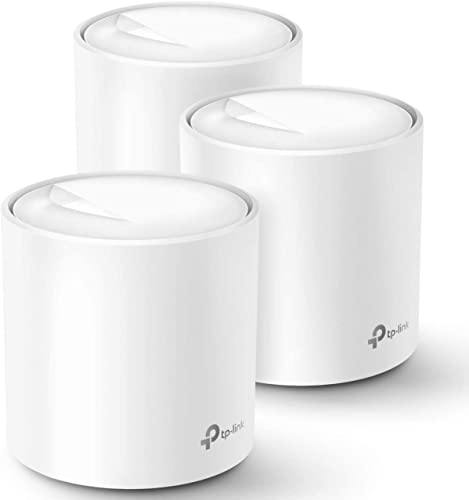
The TP-Link Deco X20 is the mesh pick, a three-unit Wi-Fi 6 system that replaces a router and an extender. Its three nodes spread the signal across the flat, so a bedroom at the far end gets the same connection as the living room, and the system covers up to 5,800 square feet in open space. The AX1800 speed suits gaming and streaming on several devices at once, and the nodes need no cables between them, which suits a rented flat. If the apartment has thick walls or rooms at opposite ends, this is the system that fixes dead spots. Each node covers its own room.
Specs
- WiFi 6 mesh system
- 3-pack
- Covers up to 5,800 sq. ft.
- Replaces wireless router and extender
- AX1800 speed
Best for: A flat with thick walls or rooms at opposite ends that need even coverage.
Watch out for: Three nodes may be more than a small studio needs, so place them carefully.
ASIN: B085Z35GY6
Amazon eero 6+

The Amazon eero 6+ is the simple pick, a mesh Wi-Fi router built around an easy app and a clean setup. Its gigabit Ethernet port connects a console or a PC by cable, the coverage reaches up to 1,500 square feet, and it connects more than seventy-five devices, which suits a flat full of smart gear. The app handles setup, guest networks, and restarts without touching the hardware, and the router can join a larger eero mesh later if the flat grows. It is the router to pick when setup ease matters as much as speed. The clean design suits a living room shelf without looking like network hardware.
Specs
- Mesh WiFi router
- 1.0 Gbps Ethernet
- Coverage up to 1,500 sq. ft.
- Connects 75+ devices
- 2022 release
Best for: A renter who wants a simple app-driven router for a small flat.
Watch out for: Advanced settings live in the app, so check the features before buying.
ASIN: B08ZK39NSL
NETGEAR R6700AX
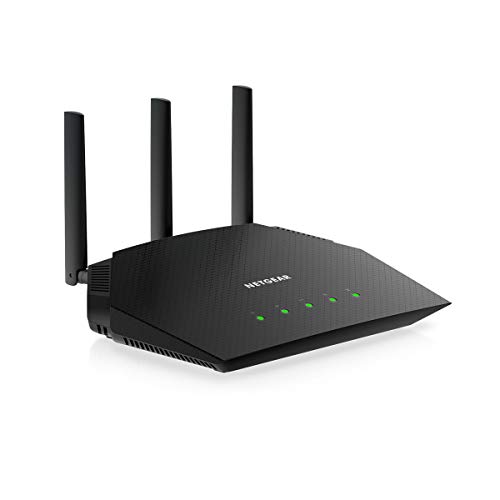
The NETGEAR R6700AX is the multi-device pick, a four-stream Wi-Fi 6 router that keeps twenty devices connected at once. Its AX1800 wireless speed reaches up to 1.8 Gbps across the bands, and the coverage reaches up to 1,500 square feet, which suits a one- or two-bedroom flat. Four streams mean the router talks to several devices at the same time instead of taking turns, so a console, a laptop, and a TV can stream together without stutter. It is the router to pick when the flat holds a lot of gadgets and every one of them needs a steady connection. The four streams serve several devices at once.
Specs
- 4-stream WiFi 6 router
- AX1800 wireless speed
- Up to 1.8 Gbps
- Coverage up to 1,500 sq. ft.
- 20 devices
Best for: A flat with many devices that all need a steady connection at once.
Watch out for: Twenty devices is the rated limit, so count the smart home gear too.
ASIN: B08KTXG8Q5
Which One Fits Your Situation
You live in a studio or a one-bedroom flat
Pick the TP-Link Archer AX21. One well-placed router covers the whole flat, the gigabit ports wire a console directly, and Easy Mesh leaves room to grow. Place it in the centre of the flat, raised off the floor, and the dual-band Wi-Fi 6 signal reaches the bedroom as well as the living room. It is the simplest pick for a small flat.
Your flat has thick walls or far-apart rooms
Pick the TP-Link Deco X20 3-Pack. The three nodes spread the signal into every room, so the bedroom connection matches the living room one. The mesh replaces a router and an extender with no cables between nodes, which suits a rented flat, and the Wi-Fi 6 speed keeps gaming and streaming steady on several devices at once. Place a node in each weak room.
You rent and want the simplest setup
Pick the Amazon eero 6+. The app handles setup and control, the gigabit port wires a console, and the router covers a small flat on its own. The coverage reaches up to 1,500 square feet and the router connects more than seventy-five devices, so a flat full of smart gear stays connected. It can join a larger eero mesh later if the flat grows.
Your flat is full of phones, consoles, and smart gear
Pick the NETGEAR R6700AX. The four streams and the twenty-device capacity keep a crowded network steady when everything runs at once. The AX1800 speed reaches up to 1.8 Gbps across the bands, the coverage reaches up to 1,500 square feet, and the four streams let a console, a laptop, and a TV run together without stutter. Count the smart home gear before you buy.
Common Mistakes
- Hiding the router behind a TV or inside a cabinet, where the signal has to fight through furniture.
- Buying a router rated for a large house when the flat only needs one well-placed unit.
- Ignoring the device count, then wondering why the connection drops when guests arrive or a new smart speaker joins the network.
- Placing the router at one end of the flat, so the far bedroom gets the weakest signal.
- Skipping the wired port, and gaming over Wi-Fi when a cable to the console was right there. A cable is the cheapest latency fix there is.
Frequently Asked Questions
Is one router enough for a small apartment?
One well-placed router usually covers a studio or a one-bedroom flat, especially a Wi-Fi 6 model with a gigabit port. A mesh system suits flats with thick walls or rooms at opposite ends, where a single router cannot reach every corner. Move the router to the centre first, since a corner spot leaves far rooms weak.
Where should I place a router in a small apartment?
Place it near the centre of the flat, raised off the floor, and away from thick walls, metal furniture, and large appliances. A central spot gives every room a fair signal, while a corner spot leaves the far rooms weak. Keep it out of a cabinet, since closed doors block the signal.
Does Wi-Fi 6 matter for gaming in a small apartment?
Wi-Fi 6 handles many devices at once, which keeps latency low when a console, a laptop, and a phone share the connection. It matters most in a flat with several gadgets, while a wired Ethernet cable still gives the steadiest connection for competitive play. A cable removes wireless interference entirely, so wire the console when you can.
Can a mesh system work in a rented apartment?
Yes, because mesh nodes need no cables between them and no drilling. Place one node near the modem and another in the weak room, and the system spreads the signal without any changes to the walls. The nodes plug into wall outlets, so the setup takes minutes and leaves no marks.
FAQ
Is one router enough for a small apartment?
Where should I place a router in a small apartment?
Does Wi-Fi 6 matter for gaming in a small apartment?
Can a mesh system work in a rented apartment?
More from Amazon
Programs that pair well with the guide above. Offers and eligibility are set by Amazon and may change.
Free shipping on eligible items, Prime Video and more. Eligible new members can start with a free trial.
Start a Prime free trialAd-free music streaming. Eligible new subscribers can start with a free trial.
Try Music Unlimited freeA Prime membership for ages 18-24 with a trial period. Eligibility is set by Amazon.
See Prime for Young AdultsAudiobooks and podcasts to listen to on the go. Eligible new members can start with a free trial.
Try Audible freeAs an Amazon Associate we earn from qualifying purchases.