Our Top Picks
 SteelSeries Apex 3 TKL RGB Gaming KeyboardApex 3 TKL5.9 x 14.3 x 1.57 inches1.4 poundsCheck on Amazon

Buying a SteelSeries keyboard is really a decision about switch systems, not about the logo on the box. The range runs from OmniPoint magnetic switches with per-key adjustable actuation, through OptiPoint optical switches built purely for speed, down to a membrane board designed to stay quiet. Picking the wrong system means paying for rapid-fire features you never use, or missing the actuation control you actually wanted, so the switch choice has to come before size, lighting or price tier.
This guide is for PC gamers choosing inside one brand: competitive players chasing the fastest inputs, desk builders who want a smaller footprint, and players in shared rooms who need quiet keys. The five picks below were chosen from the switch types, form factors and connection options named on their Amazon listings, and each one is a single fixed configuration, because SteelSeries sells the same model name in several sizes, layouts and generations that are not interchangeable.
Quick Picks
As an Amazon Associate we earn from qualifying purchases
| Product | Best for | Key spec from title |
|---|---|---|
| SteelSeries Apex Pro Gen 3 | Full-size players who want every flagship feature | OmniPoint 3.0 with actuation adjustable from 0.1 to 4.0mm |
| SteelSeries Apex Pro TKL Gen 3 | Esports desks that need mouse room | Tenkeyless OmniPoint 3.0 with OLED Smart Display |
| SteelSeries Apex 9 TKL | Players who want optical speed and hot-swappable switches | OptiPoint optical switches with 0.2ms response as listed |
| SteelSeries Apex Pro Mini Wireless | Cable-free 60 percent setups | OmniPoint 2.0 with Quantum 2.0 Wireless |
| SteelSeries Apex 3 TKL | Quiet late-night play in shared rooms | Whisper Quiet membrane switches, IP32 resistant |
How to Choose
Start With the Switch System, Not the Size
SteelSeries sells three different switch ideas under one brand, and they feel nothing alike. OmniPoint switches are magnetic and adjustable: the Apex Pro line lets you set how far a key travels before it registers, and adds Rapid Trigger behaviour for fast repeated inputs. OptiPoint switches in the Apex 9 are optical, fixed in travel but extremely fast, and hot-swappable if you want to change them later. The Apex 3 TKL uses Whisper Quiet membrane switches, which are neither mechanical nor adjustable. Decide which of those three behaviours you actually want before comparing anything else on this page.
Match the Form Factor to Your Desk and Games
The full-size Apex Pro Gen 3 keeps the number pad, which suits players who also work, stream with macros, or bind extra keys for simulation and MMO play. Tenkeyless boards such as the Apex Pro TKL Gen 3 and Apex 9 TKL drop the number pad so the mouse hand gets a wider, lower sweep area, the setup most competitive players prefer. The 60 percent Apex Pro Mini Wireless removes the function row and arrow cluster too, pushing those keys onto a secondary layer. Smaller is not automatically better: if you use arrows or F-keys constantly, a 60 percent layout will slow you down.
Decide Whether Wireless Is Worth It to You
Only one pick here is wireless: the Apex Pro Mini Wireless, whose Quantum 2.0 connection offers 2.4GHz, Bluetooth 5.0 and a wired USB-C fallback in the same board. Everything else in this guide is wired only, including the wired Apex Pro Mini, which shares the Mini name but has no radio at all. A wired board never needs charging and never drops a connection mid-match, while wireless clears the cable off a small desk and travels better. Because the Mini name covers both a wired and a wireless product, always check the exact listing title for the word Wireless before ordering.
Watch Generations, Layouts and Listing Variants
SteelSeries names overlap across generations: the Apex Pro Mini models use OmniPoint 2.0, while the current Gen 3 boards use OmniPoint 3.0, and the actuation claims in one listing do not transfer to the other. Regional layouts are a second trap, since UK, German and French versions of the same keyboard sit on separate Amazon listings with their own codes, and a QWERTZ or AZERTY board is a nasty surprise if you type on a US layout. Renewed listings are separate pages again. Before buying, confirm the listing states the generation, the layout and the new condition you expect, all three on the same page.
The 5 Best Options
SteelSeries Apex Pro Gen 3
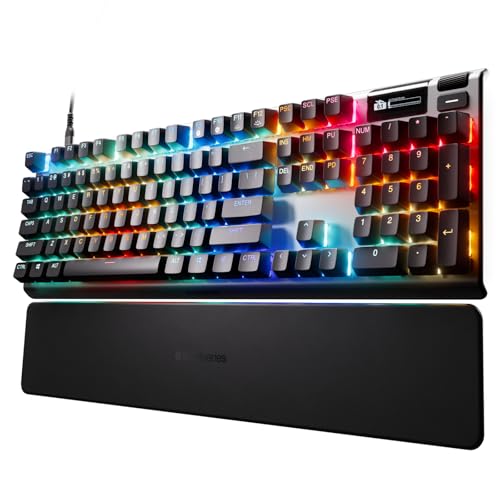
This is the full-size flagship of the current line, and it suits players who want the complete OmniPoint 3.0 feature set without giving up the number pad. Its listing leads with adjustable actuation across a wide range, Rapid Trigger for fast key resets, Rapid Tap and Protection Mode for cleaner strafing inputs, plus an OLED Smart Display and per-key RGB. The listing also claims actuation many times faster than standard switches, which is the brand’s own framing of the magnetic design. If you play several genres and also type or stream at the same desk, this is the most complete SteelSeries board in the guide.
Specs
- OmniPoint 3.0 Adjustable HyperMagnetic switches
- Actuation adjustable from 0.1mm to 4.0mm, 40 levels
- Rapid Trigger, Rapid Tap/SOCD and Protection Mode
- OLED Smart Display and per-key RGB
- PBT keycaps
- Wired USB-C connection, full-size layout
Best for: Players who want the full flagship feature set and a number pad.
Watch out for: The listing’s speed multipliers are SteelSeries marketing claims; judge the board on the adjustable actuation itself, and skip the separate Renewed listing if you want a new board.
ASIN: B0D4RKYZJ5
SteelSeries Apex Pro TKL Gen 3
The tenkeyless version of the Gen 3 flagship keeps the same OmniPoint 3.0 switches, the same adjustable actuation range and the OLED display, then cuts the number pad so your mouse hand gets proper room. That makes it the natural pick for competitive players who found the full-size board crowding their aim. Rapid Trigger carries over, which matters in shooters where quick direction changes decide fights. You lose the pad for spreadsheet work and some simulation bindings, but for a gaming-first desk this is the Gen 3 configuration most players should start from, and the one that fits smaller trays and keyboard shelves.
Specs
- Tenkeyless layout
- OmniPoint 3.0 HyperMagnetic switches
- Actuation adjustable from 0.1 to 4.0mm, 40 levels
- Rapid Trigger
- OLED Smart Display and RGB
- PBT keycaps
- Wired USB-C connection
Best for: Competitive players who want Gen 3 features with more mouse space.
Watch out for: Third-party teardowns report that only 61 keys carry OmniPoint 3.0 switches, with the function row and arrows on conventional switches, while the listing presents the board as OmniPoint throughout — confirm on the live listing which keys are adjustable before relying on full-board adjustment.
ASIN: B0DGZLHN8G
SteelSeries Apex 9 TKL

The Apex 9 takes a different route to speed: OptiPoint optical switches instead of magnetic ones. Its listing states a 0.2ms response time with zero debounce and a two-point actuation design, registering at 1.0mm in gaming mode or 1.5mm for typing, so you can soften the board for desk work without swapping hardware. The switches are hot-swappable, which no other pick here offers, and the frame is aluminum alloy with double-shot PBT keycaps. Choose this one if you like the idea of optical speed and the freedom to change switches later, rather than per-key actuation tuning.
Specs
- OptiPoint optical switches, hot-swappable
- Response time 0.2ms with zero debounce, as listed
- Two-point actuation: 1.0mm for gaming, 1.5mm for typing
- Tenkeyless esports form factor
- Aluminum alloy frame
- Double-shot PBT keycaps
- Wired connection
Best for: Players who want optical speed and the option to swap switches.
Watch out for: Regional-layout listings of this model circulate under different codes, so confirm the live listing is the US layout version before ordering.
ASIN: B0B169JSRT
SteelSeries Apex Pro Mini Wireless

This is the small, cable-free option: a 60 percent board with OmniPoint 2.0 adjustable switches, Rapid Trigger and 2-in-1 Action Keys that let one key carry two inputs at different press depths. Its Quantum 2.0 Wireless connection covers 2.4GHz for gaming, Bluetooth 5.0 for a second device, and USB-C when you want to plug in or charge. Double-shot PBT keycaps and RGB complete a board built for minimal desks, travel setups and players who rest the keyboard at an angle. The trade is the missing function row and arrows, which live on a secondary layer here.
Specs
- 60 percent form factor
- OmniPoint 2.0 Adjustable HyperMagnetic switches
- Rapid Trigger and 2-in-1 Action Keys
- Quantum 2.0 Wireless: 2.4GHz, Bluetooth 5.0 and wired USB-C
- Double-shot PBT keycaps
- RGB lighting
Best for: Minimal or portable setups that still want adjustable actuation.
Watch out for: A wired-only keyboard shares the Apex Pro Mini name with a different code and no wireless at all — make sure the listing title says Wireless and names Quantum 2.0 before you buy.
ASIN: B0B16JFF54
SteelSeries Apex 3 TKL
The Apex 3 TKL is the quiet, spill-resistant member of the family, and it needs one fact stated plainly: its Whisper Quiet Gaming Switches are membrane switches. This listing never claims mechanical switches or OmniPoint adjustment, and the board should never be bought expecting either. What it does offer is a tenkeyless layout with soft, low-noise key presses, an IP32 water and dust resistance rating for desk accidents, 8-zone RGB illumination and gaming-grade anti-ghosting. For a bedroom, dorm or shared flat where clicky keys annoy everyone else in the room, those traits matter more than actuation tuning.
Specs
- Whisper Quiet Gaming Switches (membrane, not mechanical)
- IP32 water and dust resistance
- 8-zone RGB illumination
- Gaming-grade anti-ghosting
- Tenkeyless layout
- Wired USB connection
Best for: Quiet rooms and shared spaces where noise matters more than switch tuning.
Watch out for: UK, German and French layout versions of this keyboard sit on separate listings — confirm the live listing is the US layout, and do not order it expecting a mechanical feel.
ASIN: B09FTNMT84
Which One Fits Your Situation
You Play Competitive Shooters and Need Mouse Room
Take the Apex Pro TKL Gen 3. Dropping the number pad frees the wide, low mouse sweep that aim-heavy games reward, and you keep the Gen 3 package: OmniPoint 3.0 switches with actuation adjustable from 0.1 to 4.0mm, Rapid Trigger for fast resets and the OLED display. Just check the live listing on which keys carry the adjustable switches, since teardown reports and listing copy differ on full-board coverage.
Your Desk Is Tiny or Your Keyboard Travels With You
The Apex Pro Mini Wireless is the fit. The 60 percent footprint leaves room for a large mousepad or a laptop beside it, Quantum 2.0 Wireless removes the cable entirely, and Bluetooth 5.0 lets it pair with a second machine. You will use the secondary layer for arrows and F-keys, so this suits players who already live on WASD and rarely touch the top row during a match.
You Game at Night in a Room Other People Use
Choose the Apex 3 TKL. Its Whisper Quiet membrane switches keep key noise down in a way no mechanical or magnetic board here matches, and the IP32 rating shrugs off the drink spills that happen at shared desks. You give up adjustable actuation and hot-swappable switches, but if the real problem is waking a partner, a roommate or a baby in the next room, quiet is the feature that counts.
You Want One Board for Gaming, Work and Streaming
The full-size Apex Pro Gen 3 covers all three jobs. The number pad stays available for data entry and stream macros, the actuation range lets you set a hair trigger for games and a deeper press for typing, and the OLED display handles quick settings without opening software. It is the largest and most feature-heavy board in this guide, so measure your desk first, but nothing else here asks you to compromise as little.
Common Mistakes
- Assuming every SteelSeries keyboard is mechanical — the Apex 3 TKL uses membrane Whisper Quiet switches and has no actuation adjustment at all.
- Confusing the Apex Pro Mini with the Apex Pro Mini Wireless — they are different products with different codes, and only the Wireless model has Quantum 2.0.
- Buying a regional-layout listing by accident — UK, German QWERTZ and French AZERTY versions of these models sit on separate Amazon pages.
- Treating Gen 2 and Gen 3 actuation claims as interchangeable — the Mini models run OmniPoint 2.0, the Gen 3 boards run OmniPoint 3.0, and their listing claims differ.
- Expecting every key on the Apex Pro TKL Gen 3 to be adjustable — teardowns report a conventional-switch function row, so confirm coverage on the live listing.
Frequently Asked Questions
Is the SteelSeries Apex 3 TKL a mechanical keyboard?
No. The Apex 3 TKL uses Whisper Quiet Gaming Switches, which are membrane switches, and its listing never claims mechanical switches or OmniPoint technology. That is exactly why it is the quietest board in this guide. If you want a mechanical-style feel with adjustable actuation, the Apex Pro models are the relevant picks instead.
What does adjustable actuation actually change?
It changes how far you press a key before the press registers. On the Apex Pro Gen 3 boards the listing gives a range from 0.1 to 4.0mm across 40 levels, so a shallow setting reacts almost instantly for gaming while a deeper setting reduces accidental presses while typing. You can set different depths for different keys instead of accepting one fixed travel for the whole board.
What is the difference between the Apex Pro Mini and the Apex Pro Mini Wireless?
They are separate products that share a name and a 60 percent shape. The Wireless model, covered in this guide, adds Quantum 2.0 Wireless with 2.4GHz, Bluetooth 5.0 and USB-C. The wired Mini has no radio and connects by USB-C only. Both use OmniPoint 2.0 switches, so check the listing title and connection list carefully before ordering either one.
Are all the keys on the Apex Pro TKL Gen 3 adjustable?
The listing presents the board as an OmniPoint 3.0 keyboard, but third-party teardowns report that 61 keys carry the adjustable switches while the function row and arrow cluster use conventional switches. Since the two sources differ, confirm the coverage on the live Amazon listing if full-board adjustment matters to your setup, especially before mapping macros to the function row.
FAQ
Is the SteelSeries Apex 3 TKL a mechanical keyboard?
What does adjustable actuation actually change?
What is the difference between the Apex Pro Mini and the Apex Pro Mini Wireless?
Are all the keys on the Apex Pro TKL Gen 3 adjustable?
More from Amazon
Programs that pair well with the guide above. Offers and eligibility are set by Amazon and may change.
Free shipping on eligible items, Prime Video and more. Eligible new members can start with a free trial.
Start a Prime free trialAd-free music streaming. Eligible new subscribers can start with a free trial.
Try Music Unlimited freeA Prime membership for ages 18-24 with a trial period. Eligibility is set by Amazon.
See Prime for Young AdultsAudiobooks and podcasts to listen to on the go. Eligible new members can start with a free trial.
Try Audible freeAs an Amazon Associate we earn from qualifying purchases.