Key takeaways
- Steam Deck or a similar handheld. SteamDB and ProtonDB list the game as Steam Deck Verified, a status those sites attribute to Valve’s checks. A controller selection quirk with external gamepads is reported.
- A modern thin-and-light laptop. The integrated graphics in current laptops are well beyond the listed minimum, and a battery-friendly workload suits them.
- A used or previous-generation card. Cards from earlier generations such as the GeForce GTX 10 series or Radeon RX 400 and 500 series exceed the listed integrated chip, but driver support for older families can end, so read the maker’s support notes first.
The best GPU for Night in the Woods is whatever graphics hardware you already own, because the publisher lists an Intel HD 4000 as the minimum and publishes no recommended tier. Buyers who want a new card for 1080p, 1440p or 4K should shop for their other games and treat this one as a free passenger: a budget card covers it at every resolution, and spending more only makes sense for different titles.
What the publisher actually asks for
Finji’s Steam page for the game, developed by Infinite Fall and released in February 2017, lists Windows 7, an Intel i5 quad-core processor, 4 GB of RAM, an Intel HD 4000 graphics chip and 8 GB of storage. It gives no resolution targets, frame-rate goals, VRAM requirement or recommended specification. Reviewers of the game concentrate on writing, art and music, not on technical load, and no benchmark tables from major hardware outlets for this title turned up in the research behind this guide, so no frame-rate figures appear here.
Because nothing is published beyond the minimum, any advice about tiers is a judgment about headroom rather than a measured result. That caveat applies to every row below.
Picks at a glance
| Tier | Example current cards | Key stated specs (from the makers) | Best for | Limit |
|---|---|---|---|---|
| Use what you have | Recent integrated graphics (Ryzen APUs, Intel Core Ultra) | Shared system memory | 1080p play on a laptop or small build | No separate video memory; 4K on a big screen is untested territory |
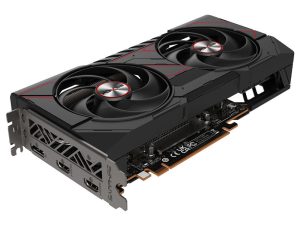
| Budget | GeForce RTX 5050, Radeon RX 9060 (8 GB variants), Intel Arc B570 | 8 to 10 GB video memory on most models | 1080p and 1440p across many games | 8 GB can be tight in newer titles |
| Mid-range | GeForce RTX 5060, RTX 5060 Ti, Radeon RX 9060 XT, Intel Arc B580 | NVIDIA lists the RTX 5060 at 8 GB GDDR7 and the RTX 5060 Ti at 8 GB or 16 GB GDDR7, both on a 128-bit bus | 1440p gaming and a bit of 4K | Overkill for this game alone |
| Premium | GeForce RTX 5070 and above, Radeon RX 9070 class | 12 to 16 GB or more on current models | High-refresh 4K in demanding games | Not justified by this game’s published needs |
The cards named are examples of current product families, so check the maker’s own page for the exact configuration before buying, since memory sizes and variants differ within a family.
1080p: nothing special needed
At 1080p, the published baseline is an integrated chip from over a decade ago, so any card sold today clears it. If you are building a small or quiet PC and want to skip a discrete card, modern integrated graphics are a reasonable fit for this game’s published needs. If you want a card for other 1080p titles, the budget tier is enough. Nothing on the Steam page suggests a heavy texture load, so video memory is not a stated concern here.
1440p: the same answer with a bit more margin
Moving to 1440p raises pixel count but the game was designed with a stylized look that does not depend on heavy effects. The publisher gives no 1440p guidance, so the sensible approach is to choose a card for the most demanding game in your library. A card in the budget or mid-range tier handles this one with ease based on the very low listed baseline. If you also play recent releases, a card with 12 GB or 16 GB of memory ages better than an 8 GB model, which is a general trend that reviewers across outlets discuss and not something specific to this title.
4K: still no special requirement
The Steam page does not state 4K support or recommendations. Whether the game scales cleanly to a 4K display depends on its engine and menus, which the publisher does not describe. A mid-range card is the usual starting point for 4K in modern games, but for this one the listed baseline does not point to a need for it. If you only intend to play lighter indie titles at 4K, an entry-level card or strong integrated graphics is a more economical choice than a premium model, though you should read player reports on the game’s community hub for any resolution quirks.
Upscaling: DLSS, FSR and frame generation
The publisher’s page does not list DLSS, FSR or XeSS support for Night in the Woods, and the sources reviewed do not mention any. NVIDIA describes DLSS 4 with Multi Frame Generation on the RTX 5060 and 5060 Ti, which is a selling point for newer games, not this one. If you are weighing cards partly on upscaling, base that on your other titles. For this game, native rendering is the plan.
VRAM: how much is enough?
No video memory requirement is published. The listed Intel HD 4000 uses shared system memory, so the game’s needs are clearly modest. An 8 GB card is plenty here. If you are choosing between 8 GB and 16 GB versions of the same card, make that decision on other games, because this one gives you no reason to pay for extra memory.
Pick X if… decision table
| Pick this if… | Choose | Why |
|---|---|---|
| You only want to play this and similar light indies | Integrated graphics or the cheapest current discrete card | The published baseline is very low |
| You play a mix of esports and indie games at 1080p | Budget tier card | Covers this game with room to spare |
| You want 1440p in new releases | Mid-range card with 12 GB or more where possible | The need comes from other games |
| You want 4K in demanding games | Premium tier | Not driven by Night in the Woods |
| You game on a handheld | Steam Deck | Community trackers list the game as Verified |
| You run an older Mac | Check the OS version | The page lists Mac OS X 10.8 and Intel i5 |
Alternatives to buying a card
- Steam Deck or a similar handheld. SteamDB and ProtonDB list the game as Steam Deck Verified, a status those sites attribute to Valve’s checks. A controller selection quirk with external gamepads is reported.
- A modern thin-and-light laptop. The integrated graphics in current laptops are well beyond the listed minimum, and a battery-friendly workload suits them.
- A used or previous-generation card. Cards from earlier generations such as the GeForce GTX 10 series or Radeon RX 400 and 500 series exceed the listed integrated chip, but driver support for older families can end, so read the maker’s support notes first.
What to skip
Skip a premium card bought for this game. Skip paying extra for ray tracing or frame generation features that the game does not list. Skip very old graphics cards that no longer receive driver updates, because driver support matters for display stability across all of your software. And skip an upgrade if your symptoms are stutter or crashes: those are more often caused by drivers, background software or low free disk space than by raw GPU power.
Common buying mistakes
- Buying for the title name instead of the published numbers.
- Assuming a missing recommended tier means a hidden high requirement.
- Paying for 16 GB of video memory on the strength of one light game.
- Forgetting power supply and case clearance when fitting a new discrete card; check the card maker’s stated power connector and length before ordering.
- Ignoring the monitor. A card cannot exceed what the display supports, so match the card to your resolution and refresh rate.
Frequently Asked Questions
What GPU do I need for Night in the Woods?
The publisher lists an Intel HD 4000 as the minimum graphics, which is an old integrated chip. Any current integrated or discrete graphics exceeds that, so no particular card is required. There is no separate recommended tier on the Steam page.
Is 8 GB of VRAM enough?
Yes, no video memory requirement is listed and the baseline is an integrated chip that shares system memory. Larger memory sizes only help in other, heavier games.
Does Night in the Woods support DLSS or FSR?
None of the publisher information or reviewed sources mention upscaling support for this game. Native rendering is the expected mode. Upscaling matters more for newer releases.
Can I play it at 4K?
The publisher does not state resolution limits or 4K guidance. A modern graphics card or strong integrated graphics should have little difficulty with such a light title, but check the community hub for any menu or scaling issues on your display.
Is it worth upgrading my graphics card for this game?
Not based on the published requirements. If your PC already meets the quad-core, 4 GB RAM and Intel HD 4000 minimum, an upgrade should be driven by other games you play.
Does it run on Steam Deck?
Community trackers such as SteamDB and ProtonDB list it as Steam Deck Verified. They also note that you may have to select an external controller manually in the quick access menu.
FAQ
VRAM: how much is enough?
What GPU do I need for Night in the Woods?
Is 8 GB of VRAM enough?
Does Night in the Woods support DLSS or FSR?
Can I play it at 4K?
Is it worth upgrading my graphics card for this game?
Does it run on Steam Deck?
More from Amazon
Programs that pair well with the guide above. Offers and eligibility are set by Amazon and may change.
Free shipping on eligible items, Prime Video and more. Eligible new members can start with a free trial.
Start a Prime free trialAd-free music streaming. Eligible new subscribers can start with a free trial.
Try Music Unlimited freeA Prime membership for ages 18-24 with a trial period. Eligibility is set by Amazon.
See Prime for Young AdultsAudiobooks and podcasts to listen to on the go. Eligible new members can start with a free trial.
Try Audible freeAs an Amazon Associate we earn from qualifying purchases.