Key takeaways
- Find the best multimedia projector for movies, presentations, and family entertainment. Compare 5 bright 1080p and WXGA models with real Amazon specs.
Buying a multimedia projector means choosing between a dim picture that only works in a dark room and a bright, sharp image that holds up with the lights on. The real decision is not about the biggest screen size on the box, but about matching brightness, resolution, and connections to the room where the projector will actually live. A living room with windows needs far more brightness than a basement movie corner, and a projector used for slides needs different strengths than one used for films and games.

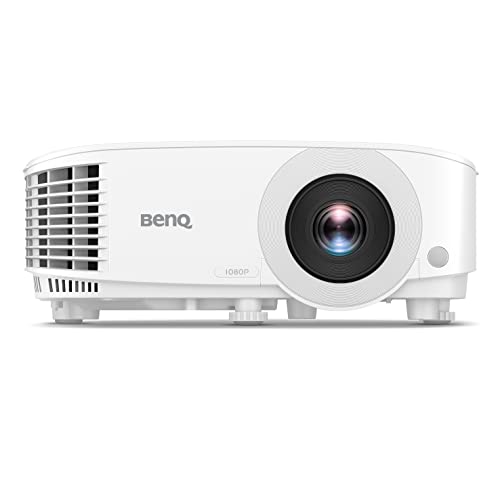
This guide is for people setting up a home projector for movies, presentations, schoolwork, and casual gaming, whether in a living room, bedroom, classroom, or small office. Every projector below was chosen from the product name and specifications shown on its Amazon listing, so the brightness, resolution, and connectivity figures come from the seller’s own page rather than from a roundup claim.
Quick Picks
As an Amazon Associate we earn from qualifying purchases
| Product | Best for | Key spec from title |
|---|---|---|
| Epson Home Cinema 1080 | Movie nights in a living room | 3-chip 3LCD 1080p projector, 3400 lumens color and white brightness |
| BenQ TH575 | Bright-room viewing and casual gaming | 1080p projector, 3800 lumens, 16.7ms low latency |
| Optoma HD146X | Movies and fast-paced games | 1080p projector, 3600 lumens, enhanced gaming mode 16ms response time |
| ViewSonic PA503W | Presentations in lit rooms | 4000 lumens WXGA projector with HDMI and vertical keystone |
| Epson VS260 | Portable presentations on the go | 3-chip 3LCD XGA projector, 3300 lumens color and white brightness |
How to Choose
Match Brightness to Your Room
Brightness, measured in lumens, decides whether the picture survives daylight. A projector rated around 3,300 to 4,000 lumens can hold a watchable image in a room with curtains drawn but lights still on, while a dimmer model needs near darkness to look good. Check whether the listing states color brightness as well as white brightness, because a projector can quote a high white figure while colors look washed out. For a living room with windows, aim for the higher end of this range; for a dedicated dark room, a lower figure is acceptable.
Pick the Resolution for Your Content
Resolution decides how sharp text and film detail look on a large screen. Full HD 1080p is the sensible baseline for movies and streaming, since it keeps faces and subtitles crisp at screen sizes of 100 inches and above. WXGA at 1280 by 800 and XGA at 1024 by 768 are cheaper options that suit slides, spreadsheets, and classroom material, where large text matters more than fine detail. If the projector will show small text from a laptop, a higher resolution is worth the step up.
Check the Connections Before You Buy
A multimedia projector earns its name by accepting whatever source you plug in. Two HDMI ports let you leave a streaming stick and a console connected at the same time instead of swapping cables behind the unit. VGA still matters for older laptops and school equipment, and a USB port can power a streaming stick or play media directly. Confirm the exact ports on the listing, because one missing HDMI input can force an extra adapter or a daily cable swap.
Plan Throw Distance and Placement
Throw distance decides how far back the projector must sit to fill your screen, and it varies widely between models. A projector with a zoom lens and keystone correction is far easier to place on a shelf or table, since it can adjust the image size and square up a picture projected at an angle. Measure the distance from the projector spot to the wall or screen before ordering, and check the listing for zoom and keystone features. Ceiling mounting is another option, but it needs a compatible mount and a power outlet overhead.
The 5 Best Options
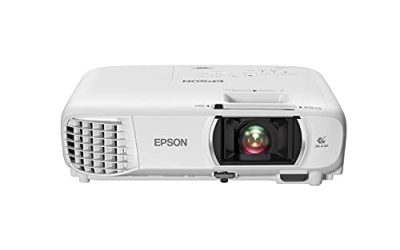
Epson Home Cinema 1080
The Epson Home Cinema 1080 is the most balanced home theater pick here, pairing a true 1080p image with equal color and white brightness so films keep their color in rooms that are not fully dark. Its 3LCD design is built around accurate color rather than raw punch, which suits movie nights and sports where skin tones and grass should look natural. Two HDMI ports cover a streaming device and a console at once, and the built-in speaker handles casual viewing without extra audio gear.
Specs
- Native resolution: 1920 x 1080 (Full HD 1080p)
- Brightness: 3,400 lumens of color brightness and 3,400 lumens of white brightness
- Display technology: 3-chip 3LCD
- Dynamic contrast ratio: up to 16,000:1
- Connectivity: two HDMI ports
- Built-in speaker
- Auto picture skew correction
- Warranty: 2-year limited warranty with full-unit replacement
Best for: Movie nights and streaming in a living room where the lights are dimmed but not fully off.
Watch out for: At 8.2 pounds and a fairly large body, it is a stay-in-one-place projector rather than a carry-around unit.
BenQ TH575
The BenQ TH575 is the brightest 1080p projector in this group, and that brightness is what makes it work in a living room with lamps on or curtains open. Its low input lag and dedicated game mode also make it a natural fit for a console hooked up beside the streaming stick, so one projector can cover both film night and game night. The 10W built-in speaker is loud enough for a small room, and auto vertical keystone correction squares up the picture quickly when the projector sits on a coffee table.
Specs
- Native resolution: 1920 x 1080 (Full HD 1080p)
- Brightness: 3,800 lumens
- Input lag: 16.7ms low latency with enhanced game mode
- Color standard: Rec.709
- Connectivity: dual HDMI
- Built-in 10W speaker
- Auto vertical keystone correction
- Zoom: 1.1x
- 3D ready
Best for: Bright living rooms where movies, sports, and casual console gaming share one screen.
Watch out for: It has no built-in streaming apps, so you will need a streaming stick or another source device plugged into one of its HDMI ports.
Optoma HD146X

The Optoma HD146X is built around the same idea as the BenQ: a bright 1080p picture with a fast gaming mode, but in a DLP design that some buyers prefer for its sharp image and strong contrast. Its enhanced gaming mode cuts response time to 16ms, which keeps fast games feeling responsive on a screen far larger than any television. With 3,600 lumens it holds up well in a dimmed room, and the single-chip DLP layout keeps the unit compact enough to move between rooms when needed.
Specs
- Native resolution: 1920 x 1080 (Full HD 1080p)
- Brightness: 3,600 lumens
- Display technology: DLP single-chip design
- Enhanced gaming mode: 16ms response time
- Connectivity: HDMI input
Best for: Movie lovers who also play fast-paced console games on a big screen.
Watch out for: It has only one HDMI port, so switching between a streaming stick and a console means swapping cables unless you add an HDMI switch.
ViewSonic PA503W

The ViewSonic PA503W is the presentation specialist of this list, and its 4,000-lumen output is the reason it leads here for lit rooms. Where the 1080p models prioritize film detail, this WXGA projector prioritizes a bright, readable slide or spreadsheet in a classroom, meeting room, or office with the lights on. Vertical keystone correction and an optical zoom make it quick to set up on a table, and the VGA ports keep it compatible with older laptops and school hardware.
Specs
- Native resolution: 1280 x 800 (WXGA)
- Brightness: 4,000 ANSI lumens
- Display technology: DLP lamp projector
- Connectivity: HDMI, VGA, USB, audio in/out
- Vertical keystone correction
- Optical zoom
- SuperColor technology for a wide color gamut
- Ceiling mountable
Best for: Classrooms, meeting rooms, and offices where slides must stay readable with the lights on.
Watch out for: Its WXGA resolution is lower than 1080p, so fine text and film detail look softer on very large screens.
Epson VS260

The Epson VS260 is the portable option for people who carry a projector between rooms, offices, or classrooms. It is a compact 3LCD unit with 3,300 lumens of both color and white brightness, which is enough for a clear presentation in a lit room without needing a large, heavy machine. The built-in speaker covers small-group audio, and the HDMI port takes a laptop or streaming stick directly, so setup is a single cable and a power cord.
Specs
- Native resolution: 1024 x 768 (XGA)
- Brightness: 3,300 lumens of color brightness and 3,300 lumens of white brightness
- Display technology: 3-chip 3LCD
- Dynamic contrast ratio: 15,000:1
- Connectivity: HDMI
- Built-in speaker
Best for: Teachers, trainers, and presenters who carry a projector from room to room.
Watch out for: Its XGA resolution suits slides and video but shows less detail than 1080p models for films and small on-screen text.
Which One Fits Your Situation
You Want Movie Nights in the Living Room
Choose the Epson Home Cinema 1080. Its equal color and white brightness keep films looking natural in a dimmed living room, and the 1080p resolution holds detail on a large screen. Dual HDMI ports mean the streaming stick and console can both stay connected, and the built-in speaker covers casual viewing without extra audio gear.
Your Room Has Daylight or Lamps On
Choose the BenQ TH575. Its 3,800 lumens are the highest among the 1080p models here, so the picture stays visible with ambient light in the room. The low input lag is a bonus if a console shares the same setup, and auto vertical keystone correction makes table placement quick and easy.
You Play Fast Games on a Big Screen
Choose the Optoma HD146X. Its enhanced gaming mode drops response time to 16ms, which matters in fast-paced games, while 3,600 lumens and 1080p resolution keep the picture bright and sharp. Plan around its single HDMI port with a switch if you also use a streaming stick, and keep the room dimmed for the best image.
You Present Slides in a Lit Classroom or Office
Choose the ViewSonic PA503W. Its 4,000 lumens beat every other model here for readability with the lights on, and its VGA ports and keystone correction suit shared rooms and older laptops. If you travel between rooms instead, the Epson VS260 is the lighter carry option, with enough brightness for small-group presentations.
Common Mistakes
- Buying on brightness alone without checking whether the figure is white brightness, color brightness, or both, since a high white figure can still mean washed-out color.
- Choosing a low-resolution projector for films and then finding subtitles and fine detail blurry on a 100-inch image.
- Forgetting to measure throw distance, then discovering the projector must sit in the middle of the room to fill the screen.
- Assuming every projector has built-in streaming apps, when most models in this class need a separate streaming stick.
- Ignoring the number of HDMI ports and ending up swapping cables every time you switch from a console to a streaming device.
Frequently Asked Questions
How many lumens do I need for a multimedia projector?
For a dark room, around 3,000 lumens is enough, but for a living room with lamps or daylight, look for 3,300 lumens or more. All five projectors here are rated between 3,300 and 4,000 lumens, so each one works in a dimmed room and the brighter models cope better with ambient light.
Is 1080p enough for a home projector?
Yes, 1080p is enough for most home use, including films, streaming, and casual gaming on screens up to around 120 inches. It keeps subtitles and faces sharp at normal viewing distances. Lower resolutions like WXGA and XGA suit slides better than films.
Can I use a multimedia projector for gaming?
Yes, provided the projector has a low input lag mode. The BenQ TH575 and Optoma HD146X both list a 16ms-class response time in their gaming modes, which keeps controls feeling responsive. A projector without a game mode can add noticeable delay.
Do I need a screen, or can I project onto a wall?
A plain white or light-grey wall works well for casual viewing, but a dedicated screen gives a flatter, more even surface and better contrast. If your wall has texture, bumps, or a strong color, a screen is worth adding before upgrading the projector itself.
FAQ
How many lumens do I need for a multimedia projector?
Is 1080p enough for a home projector?
Can I use a multimedia projector for gaming?
Do I need a screen, or can I project onto a wall?
More from Amazon
Programs that pair well with the guide above. Offers and eligibility are set by Amazon and may change.
Free shipping on eligible items, Prime Video and more. Eligible new members can start with a free trial.
Start a Prime free trialAd-free music streaming. Eligible new subscribers can start with a free trial.
Try Music Unlimited freeA Prime membership for ages 18-24 with a trial period. Eligibility is set by Amazon.
See Prime for Young AdultsAudiobooks and podcasts to listen to on the go. Eligible new members can start with a free trial.
Try Audible freeAs an Amazon Associate we earn from qualifying purchases.