Key takeaways
- Find the best routers for Comcast Xfinity, from budget WiFi 6 picks to WiFi 7 flagships and an approved modem-router combo for every plan and home size.
Comcast Xfinity will happily rent you a gateway every month, but that rented box is rarely the best router for your home. The real decision is not just which router to buy, it is how your whole setup fits together: a standalone router needs an Xfinity-approved cable modem beside it, while a modem-router combo replaces the rented gateway in a single box. Get that choice wrong and even a fast router will sit behind a slow modem or a plan it cannot use.
This guide is for Xfinity customers who want to own their equipment, stop paying the monthly rental, and match the router to their plan and home. The five picks below were chosen from names and specs on Amazon product pages, covering budget WiFi 6, mid-range WiFi 6E, a gaming-ready WiFi 6 flagship, a WiFi 7 option for gigabit plans, and one approved combo for buyers who want a single box.
Quick Picks
As an Amazon Associate we earn from qualifying purchases
| Product | Best for | Key spec from title |
|---|---|---|
| TP-Link Archer AX55 | Light plans and small homes | AX3000 WiFi 6, dual-band |
| TP-Link Archer AXE75 | Busy homes that want the 6 GHz band | AXE5400 WiFi 6E, tri-band |
| ASUS RT-AX88U Pro | Gaming and heavy multitasking | AX6000 WiFi 6, dual 2.5G ports |
| NETGEAR Nighthawk RS700S | Gigabit plans in large homes | BE19000 WiFi 7, 10G ports |
| Motorola MG7700 | Replacing the rented gateway in one box | DOCSIS 3.0 combo, AC1900 |
How to Choose
Match the router to your Xfinity plan
Start with the speed tier on your Xfinity bill, not the biggest number on the router box. A router rated AX3000 is plenty for plans up to a few hundred megabits, while a gigabit plan deserves a router with a 2.5G or 10G WAN port so the wired connection does not cap the speed you pay for. Count the people and devices in the home too: a household with two streamers, a gamer, and a dozen smart devices needs more capacity than a single person browsing on a laptop. If you plan to upgrade your Xfinity tier in the next year or two, buy one step above what you need today rather than replacing the router again.
Router or modem-router combo
A standalone router only creates your WiFi network; it still needs a cable modem to talk to the Xfinity line. If you already own an Xfinity-approved modem, a standalone router gives you the widest choice and the easiest upgrade path, since you can swap either half later. A modem-router combo does both jobs in one box, which suits buyers who want to hand back the rented gateway and keep things simple. The trade-off is flexibility: when one half of a combo ages out, the whole unit goes. Check the combo against Xfinity’s approved device list for your plan before buying, because approval depends on the exact model.
WiFi generation and bands
WiFi 6 is the sensible baseline for most Xfinity homes in 2026, with better handling of many devices than older standards. WiFi 6E adds a 6 GHz band that is less crowded, which helps in apartment buildings where the 2.4 GHz and 5 GHz bands are full of neighbouring networks, though only newer phones and laptops can use it. WiFi 7 adds even more capacity and lower latency, but it only pays off on fast plans with WiFi 7 devices, and the routers cost more. Dual-band covers most homes; tri-band is worth it when dozens of devices compete for airtime at once.
Coverage, ports, and software
Coverage matters more than raw speed once the router is in a real house. A single router with four or six external antennas suits a flat or a small house, while a large or multi-floor home may need the stronger radios of a flagship model or a mesh add-on later. Look at the ports on the back: gigabit LAN is standard, a 2.5G port helps a fast NAS or a gaming PC, and a USB port lets you share a drive or a printer. Built-in security, parental controls, and quality-of-service settings are worth having, since they let you prioritise gaming traffic and keep the network safe without extra hardware.
The 5 Best Options
TP-Link Archer AX55

The Archer AX55 is the straightforward pick for Xfinity customers on a light or mid-tier plan who want modern WiFi 6 without paying for features they will never use. It handles everyday streaming, video calls, and casual gaming well, and its four antennas and beamforming keep the signal steady across a small home. Setup runs through the Tether app, and the HomeShield security tools cover the basics. Pair it with an Xfinity-approved modem and it quietly does its job, which is exactly what a budget router should do.
Specs
- AX3000 WiFi 6, dual-band with 2,402 Mbps on 5 GHz and 574 Mbps on 2.4 GHz
- 4 high-gain external antennas with beamforming
- 4 gigabit LAN ports and 1 gigabit WAN port
- 1 USB 3.0 port
- OFDMA and MU-MIMO for many devices at once
- HomeShield security, VPN server and client, WPA3
- EasyMesh compatible
Best for: Small homes and light Xfinity plans that need reliable WiFi 6 on a budget.
Watch out for: It has gigabit ports only, so it cannot pass a multi-gigabit plan at full speed; confirm your plan speed before buying.
ASIN: B09G5W9R6R
TP-Link Archer AXE75

The Archer AXE75 adds a 6 GHz band to the formula, which makes it a strong step up for busy homes where the usual bands are crowded. Its tri-band design spreads phones, laptops, consoles, and smart devices across three bands instead of two, and the 2.5G WAN port keeps it useful if you move to a faster Xfinity tier later. Six antennas give it solid coverage for a medium home, and the quad-core processor keeps things smooth when many devices are active at once.
Specs
- AXE5400 WiFi 6E, tri-band with 2.4 GHz, 5 GHz, and 6 GHz bands
- 6 high-performance antennas
- 2.5 Gbps WAN port and gigabit LAN ports
- 1 USB 3.0 port
- 1.7 GHz quad-core CPU
- OneMesh compatible, HomeShield security, WPA3, VPN support
- 160 MHz channel support
Best for: Busy households that want the less crowded 6 GHz band and room to grow into faster plans.
Watch out for: Only WiFi 6E devices can use the 6 GHz band; older phones and laptops will still connect on 5 GHz or 2.4 GHz.
ASIN: B0B3SQK74L
ASUS RT-AX88U Pro
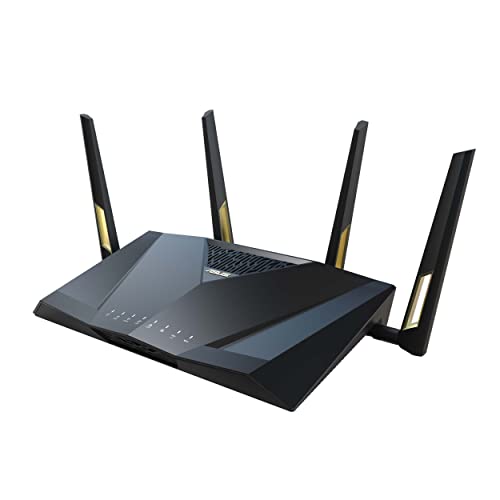
The RT-AX88U Pro is the pick for Xfinity customers who game, stream, and run a busy home network at the same time. Eight LAN ports mean wired consoles, PCs, and streaming boxes can all plug in directly, and the dual 2.5G ports give fast wired devices room to breathe. Adaptive QoS lets gaming traffic jump the queue, and the lifetime AiProtection security runs without a subscription. AiMesh support means you can add another ASUS router later to stretch coverage instead of starting over.
Specs
- AX6000 WiFi 6, dual-band
- 8 gigabit LAN ports and dual 2.5G ports
- Adaptive QoS and port forwarding
- AiMesh support for whole-home coverage
- Lifetime AiProtection internet security, WPA3, parental controls
- WAN aggregation
Best for: Gamers and heavy multitaskers who want many wired ports and traffic prioritisation.
Watch out for: It has no 6 GHz band, so if you specifically want WiFi 6E, look at a tri-band model instead.
ASIN: B0BTTY7QFH
NETGEAR Nighthawk RS700S

The Nighthawk RS700S is the flagship pick for Xfinity customers on a gigabit or multi-gigabit plan who want the newest standard. WiFi 7 with a tri-band design and up to 19 Gbps of wireless capacity gives it headroom for many devices, 4K streams, and fast downloads at the same time. A 10G WAN port and a 10G LAN port mean wired devices can use the full plan speed, and coverage rated up to 3,500 square feet suits larger homes without extra hardware.
Specs
- BE19000 WiFi 7, tri-band with 2.4 GHz, 5 GHz, and 6 GHz bands
- Up to 19 Gbps wireless speed
- 1 x 10G WAN port and 1 x 10G LAN port, plus 4 x 1G LAN ports
- Coverage up to 3,500 square feet
- Supports up to 200 connected devices
- 1-year NETGEAR Armor security included
Best for: Large homes on gigabit or multi-gigabit Xfinity plans that want WiFi 7 headroom.
Watch out for: It is a large, premium router; confirm your plan and devices can actually use WiFi 7 before paying for it.
ASIN: B0C9JQLDCG
Motorola MG7700
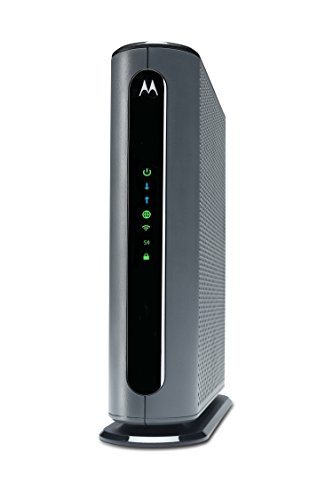
The Motorola MG7700 is the one-box answer for Xfinity customers who want to return the rented gateway and be done with it. It combines a DOCSIS 3.0 cable modem with an AC1900 dual-band WiFi router, and the listing states it is approved by Comcast Xfinity, Cox, and Spectrum for cable plans up to 800 Mbps. Four gigabit LAN ports cover wired devices, and the setup is simple because there is only one box to install and activate. For many households it is the simplest way to stop the monthly rental fee.
Specs
- DOCSIS 3.0 cable modem, 24×8 channel bonding
- AC1900 dual-band WiFi router built in
- Approved by Comcast Xfinity, Cox, and Spectrum
- For cable plans up to 800 Mbps
- 4 gigabit LAN ports
- Power Boost technology
Best for: Xfinity customers who want a single approved box to replace the rented gateway.
Watch out for: It is DOCSIS 3.0, not 3.1, so it does not suit gigabit plans; check the approved list for your exact plan before buying.
ASIN: B07BRZ2KW5
Which One Fits Your Situation
Small apartment on a light plan
Pick the TP-Link Archer AX55. A light Xfinity plan and a small space do not need tri-band radios or multi-gigabit ports, and the AX55 covers streaming, calls, and casual gaming with WiFi 6 at a sensible level. Spend the money you save on an approved modem if you do not already own one, since the modem is the other half of the setup.
Busy family home with gaming and 4K
Pick the TP-Link Archer AXE75 or the ASUS RT-AX88U Pro. The AXE75 suits homes where the 6 GHz band helps cut through crowded airwaves, while the RT-AX88U Pro suits homes with many wired devices and a gamer who wants traffic prioritisation. Both handle several 4K streams and a gaming session at the same time without fuss.
Gigabit plan in a large home
Pick the NETGEAR Nighthawk RS700S. Its WiFi 7 radios, 10G ports, and wide coverage match a fast plan and a big floor plan, and it supports enough devices for a household full of phones, laptops, consoles, and smart home gear. Just make sure your modem is DOCSIS 3.1 and your plan actually reaches gigabit speeds first.
You want to stop renting the gateway
Pick the Motorola MG7700. One approved box replaces the rented Xfinity gateway, the modem and the router arrive together, and activation is a single step. It fits plans up to 800 Mbps, so check your tier first; if you are on a gigabit plan, buy a DOCSIS 3.1 modem and a standalone router instead.
Common Mistakes
- Buying a standalone router and forgetting the modem: Xfinity cable internet needs an approved cable modem, and a router alone cannot connect to the line.
- Paying for WiFi 7 or a 10G port on a slow plan: a 200 Mbps tier will never use that headroom, so match the router to the speed you actually buy.
- Choosing a modem-router combo without checking approval: Xfinity approval depends on the exact model and plan, so confirm it on the approved device list first.
- Putting the router in a corner or a cabinet: walls and metal block WiFi, so place it central, open, and raised for the best coverage.
- Ignoring the 6 GHz catch: only WiFi 6E and WiFi 7 devices can use the 6 GHz band, so older devices gain nothing from it.
Frequently Asked Questions
Do I need a modem with a standalone router for Xfinity?
Yes. A standalone router only builds your home WiFi network; the cable modem is the part that talks to the Xfinity line. You can buy an Xfinity-approved modem separately, or choose a modem-router combo such as the Motorola MG7700 that does both jobs in one box. Either way, the modem must be on Xfinity’s approved list for your plan.
Will any router work with Comcast Xfinity?
Almost any standard router works once it is connected to an approved Xfinity modem, because the router itself does not need provider approval. The part that needs approval is the cable modem. If you buy a modem-router combo, the whole unit must be approved, so check the exact model against Xfinity’s list before you buy.
What speed router do I need for a gigabit Xfinity plan?
For a gigabit plan, look for a router with a 2.5G or 10G WAN port and a DOCSIS 3.1 modem, since gigabit LAN ports cap wired speed just below a full gigabit. WiFi 6 or newer is a good match, and WiFi 7 adds headroom if your devices support it. On slower plans, a gigabit-port WiFi 6 router is plenty.
Can a modem-router combo replace the rented Xfinity gateway?
Yes, as long as the combo is approved by Xfinity for your plan. You return the rented gateway, connect the combo to the coaxial line, and activate it through Xfinity. The Motorola MG7700 is one approved example for plans up to 800 Mbps, but gigabit plans need a DOCSIS 3.1 combo or a separate modem and router.
FAQ
Do I need a modem with a standalone router for Xfinity?
Will any router work with Comcast Xfinity?
What speed router do I need for a gigabit Xfinity plan?
Can a modem-router combo replace the rented Xfinity gateway?
More from Amazon
Programs that pair well with the guide above. Offers and eligibility are set by Amazon and may change.
Free shipping on eligible items, Prime Video and more. Eligible new members can start with a free trial.
Start a Prime free trialAd-free music streaming. Eligible new subscribers can start with a free trial.
Try Music Unlimited freeA Prime membership for ages 18-24 with a trial period. Eligibility is set by Amazon.
See Prime for Young AdultsAudiobooks and podcasts to listen to on the go. Eligible new members can start with a free trial.
Try Audible freeAs an Amazon Associate we earn from qualifying purchases.