Key takeaways
- Five bright pixel-shift 4K projectors that can replace a living-room TV, compared on brightness, smart TV setup, throw distance, gaming and limits.
Replacing a TV with a projector is a decision about room light, wall space and viewing habits, not just screen size. A TV works in any light and turns on instantly, while a projector needs a dark enough room, a clear throw path and a screen or a clean wall. The reward is a picture far larger than any affordable flat panel, from a box that disappears when it is off. The trade is convenience, and every model in this guide handles that trade a little differently.
This guide is for living-room buyers who want a big screen without a giant black panel, for gamers who want a hundred-inch display, and for home theater fans building a dedicated dark room. Every projector here was chosen from Amazon product titles and listing specs, and all five use pixel-shift 4K rather than native 4K. Brightness figures are stated exactly as each listing states them, because ANSI, ISO and unlabelled lumens are measured differently and cannot be compared across brands.
Quick Picks
As an Amazon Associate we earn from qualifying purchases
| Product | Best for | Key spec from title |
|---|---|---|
| Hisense C2 Ultra | Bright living-room TV replacement with Netflix built in | Triple laser, 3,000 lumens, 65–300 in image |
| XGIMI Horizon Ultra | Compact home theater with automatic setup | Dual light laser and LED, 2,300 ISO lumens |
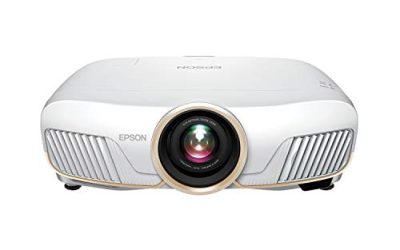
| Epson Home Cinema LS11000 | Dedicated dark-room home theater | 4K PRO-UHD laser, 2,500 lumens, HDMI 2.1 |
| BenQ X3100i | 4K gaming on a huge screen | 4LED, 3,300 ANSI lumens, 4.2 ms at 1080p |
| Hisense PX3-PRO | Ultra short throw replacement on a TV stand | Triple laser UST, 3,000 ANSI lumens, Google TV |
How to Choose
Match brightness to your room light
Brightness is the first filter. The five models here state their output in three different ways: the BenQ and the Hisense PX3-PRO use ANSI lumens, the XGIMI uses ISO lumens, and the Hisense C2 Ultra simply says 3,000 lumens with no label at all. Those numbers come from different measurement methods, so a higher headline does not automatically mean a brighter picture in your room. A dark room works with any of these five, while a living room with daylight needs the brightest models and a screen that rejects ambient light. The dimmest model here, the XGIMI at 2,300 ISO lumens, is best kept for evening viewing or a light-controlled room.
Check the smart TV setup before you buy
A projector only replaces a TV if it behaves like one. The Hisense PX3-PRO has Google TV built in, and the Hisense C2 Ultra runs VIDAA with Netflix included, so both turn on straight into apps. The XGIMI Horizon Ultra has Android TV 11, but Netflix is not native on it and may need sideloading, so check the live listing first. The BenQ X3100i gets Android TV through an included dongle rather than built into the chassis, which occupies a port. The Epson LS11000 has no smart OS and no built-in apps at all, so it needs an external streamer such as a Fire TV, Roku or Apple TV to act like a television.
Measure throw distance and screen size
Four of these projectors are standard throw and need real room depth, roughly eight to fifteen feet depending on the image size you want, plus space for the projector itself. The Hisense PX3-PRO is different: as an ultra short throw model it sits on the TV stand inches from the wall, the truest drop-in TV replacement. That convenience has a condition. The PX3-PRO is designed to work with an ALR screen, and that screen is an extra cost not included in the box. Image size on the PX3-PRO is fixed by distance because it has no zoom, while the standard-throw models offer zoom and lens shift to fit the picture to your wall.
Plan for sound and gaming
Sound varies wildly across this group, and a projector sits far from the viewer. The PX3-PRO has 50W Harman Kardon speakers and the C2 Ultra has sound by JBL, both can skip a soundbar. The XGIMI has two 12W Harman Kardon speakers, the BenQ a 10W TreVolo system, and the Epson has no built-in speakers worth using as a TV, so add external sound. Gamers should check lag figures. The BenQ hits 4.2 ms only at 1080p and 240Hz, while 4K is capped at 60Hz with 16.7 ms lag, and HDMI 2.0b means no 4K at 120Hz. The Epson, with HDMI 2.1 and up to 120Hz, is the stronger pick for high-refresh play.
The 5 Best Options
Hisense C2 Ultra

The C2 Ultra is the most TV-like projector in this group for a bright living room. Its triple laser TriChroma light source puts out 3,000 lumens as listed, and the image runs from 65 to 300 inches with a 1.67x optical zoom, so it fits modest walls and full theater screens. VIDAA is built in with Netflix included, Dolby Vision and IMAX Enhanced are supported, and sound comes from JBL, so it can stand alone as a TV replacement without extra boxes. A gimbal stand lets it turn and tilt to aim at the wall, which helps where the projector cannot sit dead center.
- Specs: 4K UHD 3840 x 2160 by pixel-shift, not native 4K; triple laser TriChroma; 3,000 lumens as listed, no ANSI label; VIDAA smart OS with Netflix included; Dolby Vision; IMAX Enhanced; sound by JBL; 1.67x optical zoom; 65–300 in image; 11.3 x 9.7 x 9.7 in; 13.9 lb
- Best for: A bright living room where the projector must replace the TV outright, apps included.
- Watch out for: Check the live listing before buying, since crawls show a third-party seller and conflicting availability signals; laser light-source life was not stated in the Amazon text, so take it from the live listing only, and never buy a Renewed listing of this model.
XGIMI Horizon Ultra

The Horizon Ultra is the compact, set-it-and-forget-it pick of the group. Its dual light source mixes laser and LED, and ISA 3.0 handles autofocus, auto keystone and obstacle avoidance, so setup takes minutes rather than an evening of fiddling. Two 12W Harman Kardon speakers give it respectable sound for its size, and Dolby Vision support keeps movies looking rich in a darkened room. It is the dimmest model here at 2,300 ISO lumens, so it suits evening viewing and light-controlled rooms far better than a sunlit living room, and its image reaches up to 200 inches.
- Specs: 4K UHD 3840 x 2160 by pixel-shift on a 0.47-inch DLP chip, not native 4K; 2,300 ISO lumens; dual light source, laser plus LED; Android TV 11 with Chromecast built in; Dolby Vision; 2 x 12W Harman Kardon speakers; ISA 3.0 auto focus, auto keystone and obstacle avoidance; 25,000-hour light source; up to 200 in image
- Best for: A small or tidy living room where automatic setup and compact size matter most.
- Watch out for: Netflix is not native on its Android TV 11 and may need sideloading, so verify your apps on the live listing; at 2,300 ISO lumens it is the weakest of the five for bright rooms, and its low native contrast is the known compromise.
Epson Home Cinema LS11000

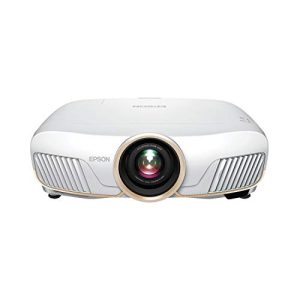
The LS11000 is the purist of the five, a dedicated theater machine that trades TV convenience for picture quality in a dark room. Its 4K PRO-UHD image uses pixel-shift to put 8.29 million pixels on screen, with 2,500 lumens of color and white brightness from a 3LCD laser-array source rated for 20,000 hours. HDMI 2.1 supports up to 120Hz refresh, and a motorized lens with shift, focus and zoom makes installation precise. HDR10+ is supported, and dynamic contrast is rated at 1,200,000 to 1. This is for a room you can darken, not a bright family room.
- Specs: 4K PRO-UHD 3840 x 2160 by pixel-shift, 8.29 million pixels on screen, not native 4K; 2,500 lumens color and 2,500 lumens white brightness; 3LCD; laser-array light source, 20,000-hour life; HDR10+; HDMI 2.1; up to 120 Hz refresh; motorized lens with lens shift, focus and zoom; 1,200,000:1 dynamic contrast; 17.6 x 20.5 x 7.6 in; 28 lb; 2-year limited warranty
- Best for: A dedicated dark theater room where picture quality matters more than smart TV convenience.
- Watch out for: It has no smart OS and no built-in apps, so you must add an external streamer, and it has no built-in speakers worth using as a TV, so plan for external sound; check the live listing, since crawls show conflicting availability signals.
BenQ X3100i

The X3100i is the gamer of the group, built around a 4LED light source and a bright 3,300 ANSI lumen output that holds up well in a lit room. Its headline figure is 4.2 ms input lag, but that exists only at 1080p and 240Hz; at 4K the lag is 16.7 ms and refresh is capped at 60Hz, and HDMI 2.0b means no 4K at 120Hz. Android TV arrives through an included dongle, not built into the chassis, and the 10W TreVolo speakers support Dolby Atmos output through eARC. A 1.3x zoom and vertical lens shift fit awkward rooms.
- Specs: 4K UHD 3840 x 2160 by pixel-shift, not native 4K; 3,300 ANSI lumens as listed; 4LED light source; Android TV via included dongle, Google-certified; HDR10 and HDR-PRO; 4.2 ms input lag at 1080p and 240Hz, 16.7 ms at 4K and 60Hz; 1.3x zoom; vertical lens shift 40–60 percent; 20,000-hour LED life Normal, 30,000-hour ECO; 10W TreVolo speakers, 2 x 5W; eARC for Dolby Atmos; HDMI 2.0b; 60–200 in image; 10.7 x 8.4 x 10.2 in; 15 lb
- Best for: Gamers who want a huge low-lag screen and a bright picture in a living room.
- Watch out for: The listing spec tables say native resolution is 1920 x 1080 with 4K by pixel-shift, so never treat it as native 4K; one retailer lists 2,640 ISO lumens instead of 3,300 ANSI, so use the listing figure; live-confirm the ASIN first, since it was verified through a review source rather than a direct Amazon crawl, and never buy a Renewed listing.
Hisense PX3-PRO

The PX3-PRO is the closest thing here to a television in shape, because it sits on the TV stand inches from the wall and throws an 80 to 150 inch image. Its triple laser TriChroma source is rated at 3,000 ANSI lumens, Google TV is built in, and Dolby Vision and Dolby Atmos are both supported, with 50W Harman Kardon speakers that can carry a room. The 240Hz high refresh mode suits fast motion, though it is not 4K at 240Hz. IMAX Enhanced is supported, and the 0.22 to 1 ultra short throw ratio makes placement simple, as long as the wall and screen are right.
- Specs: 4K UHD 3840 x 2160 by pixel-shift on a 0.47-inch DLP chip, not native 4K; 3,000 ANSI lumens; triple laser TriChroma; ultra short throw 0.22:1; Google TV built in; Dolby Vision and Dolby Atmos; IMAX Enhanced; 240 Hz high refresh rate mode; 25,000-hour light source; 80–150 in image; 3000:1 contrast; 50W Harman Kardon speakers; 21.7 x 11.7 x 4.8 in; 19.8 lb
- Best for: A living room where the projector must sit on the TV stand and replace the TV exactly.
- Watch out for: A compatible ALR screen is required for best results and is an extra cost not included in the box; image size is fixed by distance with no zoom; check the live listing, since crawls show a third-party seller and conflicting availability signals.
Which One Fits Your Situation
A bright living room with daytime viewing
Pick the Hisense C2 Ultra or the BenQ X3100i. Both are the brightest models here on their own terms, the C2 Ultra at 3,000 lumens as listed and the X3100i at 3,300 ANSI lumens, and both carry a smart TV setup so they behave like a television. The C2 Ultra adds Netflix built in and stronger JBL sound, while the X3100i adds gaming speed. Either way, pair them with a light-rejecting screen for daytime use.
A dedicated dark theater room
Pick the Epson LS11000. Its 3LCD laser image, 2,500 lumens of color and white brightness, and motorized lens are built for a room you can darken, and HDMI 2.1 with up to 120Hz refresh suits movies and console gaming alike. Accept the trade: you will add an external streamer for apps and external speakers for sound, because the LS11000 has neither built in.
A small room or a TV stand with no depth
Pick the Hisense PX3-PRO. Its ultra short throw design sits inches from the wall, so it needs no throw distance at all and replaces the TV exactly where the TV used to stand. Google TV is built in and the 50W Harman Kardon speakers are strong, but budget for the ALR screen it needs, since that cost is not included.
A gamer who wants a huge screen
Pick the BenQ X3100i. Its 4.2 ms lag at 1080p and 240Hz is the fastest response in this group, and its 3,300 ANSI lumen brightness keeps the picture visible with the lights on. Know the limit before you buy: 4K gaming is capped at 60Hz with 16.7 ms lag, and the HDMI 2.0b ports mean no 4K at 120Hz, so high-refresh play happens at 1080p.
Common Mistakes
- Comparing headline lumens across brands as if ANSI, ISO and unlabelled lumens were the same measurement.
- Calling any of these five native 4K, when every one of them reaches 4K by pixel-shift.
- Buying the Epson LS11000 expecting built-in apps or speakers, then discovering it needs a streamer and external sound.
- Skipping the ALR screen for the Hisense PX3-PRO, which needs one for its best picture.
- Assuming the BenQ X3100i does 4K at 120Hz, when its HDMI 2.0b ports cap 4K gaming at 60Hz.
Frequently Asked Questions
Can a projector really replace a TV?
Yes, if the room and the model match. A bright projector with a smart TV system, like the C2 Ultra or the PX3-PRO, can serve as the main screen in a living room, especially with a light-rejecting screen. Dark rooms work best, and models without a smart OS, like the LS11000, need an external streamer before they can act like a television.
Is pixel-shift 4K the same as native 4K?
No, and the difference matters for honest shopping. Pixel-shift projectors start from a lower-resolution chip and shift pixels rapidly to display a 3840 x 2160 image. Every model in this guide works this way, including the ones marketed as 4K UHD or 4K PRO-UHD. The picture is sharp and detailed, but none of them is native 4K.
Do I need a special screen for these projectors?
It depends on the model and the room. Standard-throw projectors can work on a clean white wall, though a proper screen improves contrast and brightness. The Hisense PX3-PRO is different: as an ultra short throw projector it needs a compatible ALR screen for its best results, and that screen is an extra cost not included in the box.
Which of these work without an external streaming stick?
The Hisense PX3-PRO with Google TV built in and the Hisense C2 Ultra with VIDAA and Netflix included work straight out of the box. The XGIMI Horizon Ultra and BenQ X3100i have Android TV, though the X3100i uses an included dongle and Netflix is not native on the Horizon Ultra. The Epson LS11000 has no smart OS, so it always needs an external streamer.
FAQ
Can a projector really replace a TV?
Is pixel-shift 4K the same as native 4K?
Do I need a special screen for these projectors?
Which of these work without an external streaming stick?
More from Amazon
Programs that pair well with the guide above. Offers and eligibility are set by Amazon and may change.
Free shipping on eligible items, Prime Video and more. Eligible new members can start with a free trial.
Start a Prime free trialAd-free music streaming. Eligible new subscribers can start with a free trial.
Try Music Unlimited freeA Prime membership for ages 18-24 with a trial period. Eligibility is set by Amazon.
See Prime for Young AdultsAudiobooks and podcasts to listen to on the go. Eligible new members can start with a free trial.
Try Audible freeAs an Amazon Associate we earn from qualifying purchases.