Our Top Picks
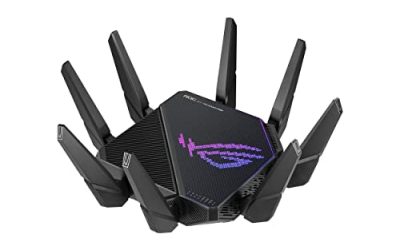
 TP-Link AXE5400 Tri-Band WiFi 6E RouterWiFi 6E, Tri-Band AXE540012.91 x 10.43 x 4.72 inches1.5 poundsCheck on Amazon
The best wifi routers for Mac are the ones that treat Apple devices as first-class citizens rather than an afterthought. A MacBook, an iMac, an iPad, and an iPhone all connect over standard Wi-Fi, so almost any modern router will get them online, but the experience varies a lot once you look closer. Setup that depends on a Windows-only utility, a companion app that has not been updated in years, or a web interface that misbehaves in Safari can turn a simple upgrade into an afternoon of frustration. The right router pairs strong wireless performance with browser-based setup, a well-maintained mobile app, and features that suit the way Apple devices behave on a network.

Macs have their own habits worth planning around. Apple devices roam aggressively between bands and access points, use private Wi-Fi addresses by default, and expect modern security standards. A router that supports WPA3, band steering, and smooth roaming keeps a MacBook connected as you move from a desk to a couch to a garden room. A router with a 6 GHz band gives Wi-Fi 6E Macs a quiet, uncongested lane for large downloads, video calls, and cloud backups. And if your household leans on AirPlay, AirDrop, and HomeKit, the router needs solid local networking, not just a fast internet connection.
How to Choose
Mac-Friendly Setup and Management
Start with setup. The best routers for Mac households can be configured entirely through a web browser or an app that runs on iOS, so you never need a Windows computer to get online. Check that the maker offers a current iOS app covering the everyday jobs: changing the Wi-Fi name and password, viewing connected devices, running a guest network, and updating firmware. A router whose app is abandoned quickly becomes a chore, while regular firmware updates keep security fixes and compatibility improvements flowing.
Wi-Fi Standard and Bands
Wi-Fi 6 is the sensible baseline for a Mac household today, and Wi-Fi 6E adds a 6 GHz band that newer MacBook Pro, MacBook Air, iMac, and Mac mini models can use. The 6 GHz band is less crowded than the 2.4 GHz and 5 GHz bands, which makes it a good fit for video calls, large file transfers, and cloud backups that run while the rest of the household streams video.
Speed Class and Internet Plan
Routers advertise a combined speed class such as AX3000, AX5400, or AXE5400, which adds together the maximum link rates of every band. Those figures describe ideal conditions rather than the speed any single device will reach, so treat them as a rough guide to the router class rather than a promise. What matters more is whether the router can keep up with your internet plan and your household at the same time. A gigabit plan with several people streaming, calling, and backing up at once needs a capable processor and enough capacity for many simultaneous connections.
Coverage and Home Layout
Coverage depends on the size and construction of your home as much as on the router itself. A single powerful router suits a flat or a small house with open-plan rooms, while a larger home, a house with thick walls, or a home spread over several floors is usually better served by a mesh system with two or three units. Mesh nodes hand a MacBook from one node to another as you move around, which keeps video calls steady in rooms far from the main router.
Wired Ports and Connected Storage
Even in a Mac household, wired connections still matter. A desktop Mac, a network storage drive, a game console, and a smart television all benefit from a wired link that frees up wireless capacity for laptops and phones. Look for enough gigabit LAN ports for the devices that sit near the router, and a USB port if you want to share a hard drive or a printer on the network. A 2.5 gigabit port is a useful extra for a wired Mac with a multi-gigabit adapter or for a network storage device.
Security, Parental Controls, and Guest Access
A router is the front door to your home network, so its security features deserve attention. WPA3 encryption is the current standard and works with recent Macs, iPhones, and iPads, while automatic firmware updates help close vulnerabilities without you having to remember to check. Built-in security tools that flag suspicious traffic, a guest network that keeps visitors off your main network, and parental controls that schedule access for younger family members are all genuinely useful.
Apple Ecosystem Compatibility
Finally, think about how the router fits the Apple ecosystem. Stable support for AirPlay between a Mac and a television or speaker matters, as does reliable Bonjour discovery so printers and shared drives appear without fuss. The network should handle Apple private addresses and fast roaming without dropping connections. Mesh systems need to handle roaming cleanly, because a MacBook that clings to a distant node will feel slow even when the signal looks strong.
Top Picks
TP-Link Archer AXE75 Wi-Fi 6E Router
TP-Link Archer AXE75 Wi-Fi 6E Router
The TP-Link Archer AXE75 is a tri-band Wi-Fi 6E router that gives Wi-Fi 6E Macs access to the 6 GHz band while keeping the familiar 2.4 GHz and 5 GHz bands for everything else. Its AXE5400 class covers a 574 Mbps link on 2.4 GHz and a 2,402 Mbps link on each of the 5 GHz and 6 GHz bands, leaving plenty of capacity for a household where a MacBook backs up to the cloud while someone else streams video in another room. A 2.5 gigabit WAN port suits plans above a gigabit, and four gigabit LAN ports plus a USB 3.0 port cover a wired Mac, a console, and a shared drive.
Setup runs through the Tether app on iOS or a web browser on a Mac, covering Wi-Fi details, connected devices, a guest network, and firmware updates. This is a strong fit for a Mac household that wants Wi-Fi 6E without a mesh system, especially where the newest Mac supports the 6 GHz band.
Specs
- Standard: Wi-Fi 6E, tri-band AXE5400; bands: 2.4, 5, 6 GHz
- Wired: 2.5 gigabit WAN, four gigabit LAN, one USB 3.0
- Processor: 1.7 GHz quad-core; antennas: six external
- Management: Tether app on iOS, web browser on Mac
- Security: WPA3, HomeShield, VPN server and client
ASUS RT-AX86U Pro Wi-Fi 6 Router
ASUS RT-AX86U Pro Wi-Fi 6 Router
The ASUS RT-AX86U Pro is a dual-band Wi-Fi 6 router built around the AX5700 class, with a 2.5 gigabit port and a dedicated gaming port that prioritises traffic from whatever is plugged into it. For a Mac household, the appeal is the depth of the software: the ASUS Router app on iOS and the full web interface on a Mac give detailed control, including traffic analysis, device prioritisation, and a guest network, without extra software on the Mac itself. AiProtection Pro provides network security at no extra subscription cost, and AiMesh support means a second compatible ASUS router can be added later to extend coverage.
A 2.0 GHz quad-core processor and generous memory keep the router responsive when many devices are connected, and the AX5700 class pairs a fast 5 GHz band with a solid 2.4 GHz band for older gadgets. This pick suits a Mac household that wants detailed control and strong wired features, especially a home office with a desktop Mac and a fast internet plan.
Specs
- Standard: Wi-Fi 6, dual-band AX5700; bands: 2.4, 5 GHz
- Wired: 2.5 gigabit port, dedicated gaming LAN port, gigabit LAN ports
- Processor: 2.0 GHz quad-core; memory: 1 GB
- Management: ASUS Router app on iOS, web browser on Mac
- Security: WPA3, AiProtection Pro, VPN support, AiMesh compatible
NETGEAR Nighthawk RAX50 AX5400 Wi-Fi 6 Router

NETGEAR Nighthawk RAX50 AX5400 Wi-Fi 6 Router
The NETGEAR Nighthawk RAX50 is a dual-band Wi-Fi 6 router in the AX5400 class, aimed at households that want strong wireless coverage from a single unit. Its six-stream design supports many devices at once, which suits a home where MacBooks, iPhones, iPads, and a television all connect at the same time. The Nighthawk app on iOS handles setup and everyday management, including pausing internet access for a device, running a guest network, and checking which devices are online, while the web interface on a Mac covers deeper settings.
The RAX50 pairs a fast 5 GHz band with a 2.4 GHz band for longer range and older devices, and it includes four gigabit LAN ports and a USB 3.0 port for a wired Mac or a shared drive. NETGEAR Armor provides network security tools, and the router supports WPA3 encryption for recent Apple devices. This is a good choice for a Mac household in a medium-sized home that wants a single router rather than a mesh system, and for a family that values a simple app and a guest network.
Specs
- Standard: Wi-Fi 6, dual-band AX5400, six-stream; bands: 2.4, 5 GHz
- Wired: gigabit WAN, four gigabit LAN, one USB 3.0
- Antennas: four external
- Management: Nighthawk app on iOS, web browser on Mac
- Security: WPA3, NETGEAR Armor, guest network
Amazon eero Pro 6E Mesh Wi-Fi Router, 1-Pack

Amazon eero Pro 6E Mesh Wi-Fi Router, 1-Pack
The Amazon eero Pro 6E is a compact tri-band mesh router that brings Wi-Fi 6E to a Mac household in a small, unobtrusive unit. The single pack covers a smaller home or flat on its own, and additional units can be added later to build a mesh that covers a larger house, with each node handing a MacBook from one to the next as you move around. It supports internet plans up to 2.5 gigabits through its wired port, connects a large number of devices, and includes a built-in smart home hub for compatible Zigbee devices.
Setup is deliberately simple: the eero app on iOS walks through placement and configuration in a few minutes, and the app then handles updates, device lists, guest access, and parental controls. The web interface is minimal by design, so most management happens in the app rather than in a browser on a Mac. This pick suits a Mac household that wants a clean, simple mesh system, especially a flat or small house where one unit is enough today and more can be added later.
Specs
- Standard: Wi-Fi 6E, tri-band AXE5400 mesh; bands: 2.4, 5, 6 GHz
- Wired: 2.5 gigabit Ethernet port
- Coverage: single unit for a smaller home, expandable with more units
- Smart home: built-in Zigbee smart home hub
- Management: eero app on iOS
- Security: WPA3, automatic updates, guest network
TP-Link Archer AX55 AX3000 Wi-Fi 6 Router

TP-Link Archer AX55 AX3000 Wi-Fi 6 Router
The TP-Link Archer AX55 is a dual-band Wi-Fi 6 router in the AX3000 class, and it is the most straightforward pick in this guide for a Mac household that wants a reliable upgrade without a complex setup. Its 5 GHz band supports a 2,402 Mbps link with 160 MHz channels, while the 2.4 GHz band covers older devices and smart home gadgets at longer range. Four gigabit LAN ports and a USB 3.0 port cover a wired Mac and a shared drive, and EasyMesh support means it can join a mesh network later if coverage needs grow.
Setup runs through the Tether app on iOS or a web browser on a Mac, covering Wi-Fi settings, connected devices, guest access, parental controls, and firmware updates. HomeShield provides network security tools, and the router supports WPA3, VPN server and client functions, OFDMA, and MU-MIMO for handling many devices at once. This is a good fit for a smaller Mac household, a first router upgrade, or a home office where a MacBook and a handful of Apple devices need a steady connection.
Specs
- Standard: Wi-Fi 6, dual-band AX3000; bands: 2.4, 5 GHz
- Wired: gigabit WAN, four gigabit LAN, one USB 3.0
- Management: Tether app on iOS, web browser on Mac
- Security: WPA3, HomeShield, VPN server and client
- Mesh: EasyMesh compatible
Comparison Table
| Router | Standard | Bands | Wired highlights | Best for |
|---|---|---|---|---|
| TP-Link Archer AXE75 | Wi-Fi 6E, AXE5400 | 2.4, 5, 6 GHz | 2.5 gigabit WAN, 4 LAN, USB 3.0 | Wi-Fi 6E Macs in a single-router home |
| ASUS RT-AX86U Pro | Wi-Fi 6, AX5700 | 2.4, 5 GHz | 2.5 gigabit port, gaming LAN port | Detailed control and wired devices |
| NETGEAR Nighthawk RAX50 | Wi-Fi 6, AX5400 | 2.4, 5 GHz | 4 LAN, USB 3.0 | Strong single-router coverage |
| Amazon eero Pro 6E, 1-pack | Wi-Fi 6E, AXE5400 mesh | 2.4, 5, 6 GHz | 2.5 gigabit port | Simple mesh that can grow |
| TP-Link Archer AX55 | Wi-Fi 6, AX3000 | 2.4, 5 GHz | 4 LAN, USB 3.0 | Straightforward upgrade, smaller homes |
Which One Is Right for You?
Start with the size of your home and the age of your Macs. If your newest Mac supports Wi-Fi 6E, choose between the TP-Link Archer AXE75 for a single-router setup and the Amazon eero Pro 6E for a mesh that can grow. The Archer AXE75 gives you more wired ports and a fuller web interface, while the eero Pro 6E gives you a smaller unit, simpler setup, and an easy path to whole-home coverage.
If your Macs are Wi-Fi 6 models and you want detailed control, the ASUS RT-AX86U Pro is the strongest choice, especially in a home office where a wired desktop Mac or console benefits from the dedicated gaming port. If you want a capable single router with a simple app, the NETGEAR Nighthawk RAX50 covers a medium-sized home well. And if your household is smaller and your plan is up to a gigabit, the TP-Link Archer AX55 covers the essentials without excess.
Frequently Asked Questions
Do Macs need a special router?
No. Macs connect over standard Wi-Fi, so any modern router will get a Mac online. What matters is the quality of the experience: browser or iOS app setup, regular firmware updates, WPA3 security, and smooth roaming between bands and mesh nodes.
Is Wi-Fi 6E worth it for a Mac?
Wi-Fi 6E is worth it if your newest Mac supports it and your household has enough wireless traffic to benefit from a quieter band. The 6 GHz band is less crowded than the 2.4 GHz and 5 GHz bands, which helps with video calls, large downloads, and cloud backups.
Can I set up these routers from a Mac without a Windows computer?
Yes. Every router in this guide can be set up and managed from a Mac using a web browser, an iOS app, or both. The TP-Link, ASUS, and NETGEAR picks offer a full web interface in Safari alongside their iOS apps, while the eero Pro 6E is managed mainly through its iOS app. None of them requires a Windows computer at any stage.
Should I choose a single router or a mesh system for a Mac household?
Choose a single router for a flat or a small house with open-plan rooms, and a mesh system for a larger home, a house with thick walls, or a home spread over several floors. Mesh nodes hand a MacBook from one unit to another as you move around, which keeps calls and streams steady in rooms far from the main router.
Disclosure: As an Amazon Associate, we may earn from qualifying purchases.
FAQ
Which One Is Right for You?
Do Macs need a special router?
Is Wi-Fi 6E worth it for a Mac?
Can I set up these routers from a Mac without a Windows computer?
Should I choose a single router or a mesh system for a Mac household?
More from Amazon
Programs that pair well with the guide above. Offers and eligibility are set by Amazon and may change.
Free shipping on eligible items, Prime Video and more. Eligible new members can start with a free trial.
Start a Prime free trialAd-free music streaming. Eligible new subscribers can start with a free trial.
Try Music Unlimited freeA Prime membership for ages 18-24 with a trial period. Eligibility is set by Amazon.
See Prime for Young AdultsAudiobooks and podcasts to listen to on the go. Eligible new members can start with a free trial.
Try Audible freeAs an Amazon Associate we earn from qualifying purchases.