Key takeaways
- Two genuinely portable projectors for business presentations, compared on ANSI brightness, native resolution, battery life and laptop connectivity from their listings.
A portable projector for business presentations lives or dies on three numbers: how bright it is in a real meeting room, whether its native resolution keeps spreadsheet text readable, and how fast it sets up when the meeting starts in five minutes. The honest constraint is brightness. Even the best battery projectors in this class produce a few hundred ANSI lumens, which means they suit small groups, dimmable rooms and screens kept to sensible sizes — not a sunlit boardroom wall. A washed-out deck in a bright room loses the audience within minutes.

This guide is for consultants, sales staff, trainers and small teams who present in client offices, hotel rooms and shared spaces where no projector is installed. Both picks are true portables with built-in batteries and speakers, chosen from the brightness, resolution and connectivity figures stated on their listings. They take different positions: one maximises image quality and automatic setup, the other maximises flexibility and value for basic slides.
Quick Picks
As an Amazon Associate we earn from qualifying purchases
| Product | Best for | Key spec from title |
|---|---|---|
| NEBULA by Anker Capsule 3 Laser Projector | Presenters who need 1080p text and autofocus in a pocket-size body | 1080p Laser, 120-Inch Picture, 2.5H Built-in Battery |
| ViewSonic M1X Portable LED Projector | Travellers who present from USB drives and phones as often as laptops | Built-In Battery, H/V Keystone, 4-Corner Adjustment |
How to Choose
Read Brightness in ANSI Lumens, and Nothing Else
Projector listings quote brightness in several incompatible units, and only ANSI lumens — or the closely related ISO lumens — describe light output measured to a standard. Figures printed as plain lumens or LED lumens on budget listings can be several times higher than the ANSI number for the same machine. For presentations, a few hundred ANSI lumens handles a small group in a dimmed room at screen sizes up to roughly 80 inches; beyond that, text washes out. Judge every candidate in this class by its ANSI figure and plan your room around it. When a listing refuses to state an ANSI or ISO figure at all, assume the real output is low and that the omission is deliberate.
Native Resolution Decides Whether Text Survives
Slides are text with pictures attached, so native resolution matters more for presentations than for films. A native 1080p panel keeps body text, chart labels and spreadsheet cells legible at meeting distances. A native 854 x 480 panel can accept a 1080p signal, and listings often headline that input figure, but the image it projects is still 480p — fine for bold headlines and video, risky for a dense financial table. Always find the word native or the panel resolution in the specification section before trusting a headline number. If your deck’s smallest text is a footnote, treat native 1080p as a requirement rather than a preference.
Setup Speed Is a Feature, Not a Luxury
In a client meeting, the projector that focuses itself wins. Autofocus and automatic keystone correction turn a five-minute cable-and-tripod ritual into placing the unit down and pressing power, and four-corner adjustment rescues you when the only available surface is off to one side. A built-in stand or a standard tripod thread matters for the same reason. Check the listing for these automation features by name, because manual focus wheels and two-axis keystone are still common in this class. Remember that digital keystone shrinks the usable image slightly, so a projector that can sit square to the wall still beats one that corrects a bad angle electronically.
Match Connectivity and Battery to Your Presenting Style
If you present from a laptop, HDMI is non-negotiable and USB-C video input is a welcome second path. If you present from files, a USB-A port that reads a flash drive lets you leave the laptop behind entirely, and Wi-Fi mirroring covers phone-based presenting. Battery life on the listing is quoted at a stated brightness mode, and the brighter mode drains it faster, so compare the runtime against your longest meeting and treat mains power as the default for anything over an hour. Built-in speakers deserve a glance too: a small meeting room needs only a few watts, but a speaker you cannot hear forces a second device into your bag.
The 2 Best Options
NEBULA by Anker Capsule 3 Laser Projector
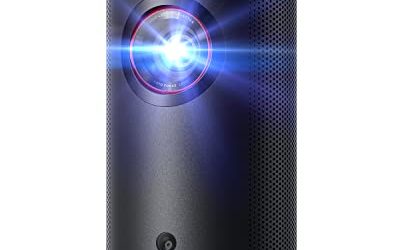
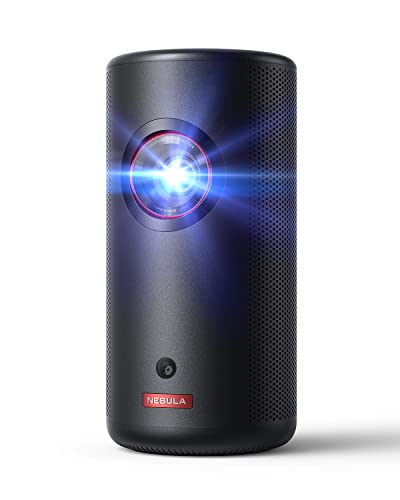
The Capsule 3 Laser is the presentation-first pick because it solves the two problems that sink portable projectors in meetings: it is natively 1080p, so slide text stays sharp, and it focuses and squares its own image automatically. The laser light source delivers a listed 300 ANSI lumens, the built-in battery runs up to 2.5 hours, and the whole unit weighs about two pounds and stands no taller than a drinks can. Google TV is built in, HDMI and USB-C cover laptop connections, and the 8W Dolby speaker is loud enough for a small room without a separate speaker.
Specs
- Brand: NEBULA by Anker
- Model: Capsule 3 Laser (D2426)
- Light source: Laser
- Brightness: 300 ANSI lumens
- Native resolution: 1920 x 1080 (1080p)
- Image size: Up to 120 inches
- Battery: Built-in, up to 2.5 hours of video playtime
- Setup: Autofocus and auto keystone correction
- Speaker: 8W, Dolby Digital
- Connectivity: HDMI, USB-C, Wi-Fi, Bluetooth
- Weight: About 2 pounds (900 g)
Best for: Consultants and trainers presenting detailed slides to small groups in dimmable rooms.
Watch out for: 300 ANSI lumens is honest but modest; in a brightly lit room you will need to shrink the image and close the blinds for text to stay readable.
ASIN: B0BCWNQPQ7
ViewSonic M1X Portable LED Projector
The M1X is built around flexibility. Its patented stand rotates the projector through a full circle of projection angles and switches it on as you swing it open, the battery is built in, and it accepts content from HDMI, USB-C, a powered USB-A port for streaming sticks or drives, and Wi-Fi mirroring. Horizontal and vertical keystone plus four-corner adjustment make it forgiving about placement on a crowded meeting table. The trade is resolution: the panel is natively 854 x 480, so this is a projector for bold slides, charts at a glance and video, not fine print.
Specs
- Brand: ViewSonic
- Model: M1X
- Light source: LED
- Brightness: 150 ANSI lumens
- Native resolution: 854 x 480 (WVGA), accepts up to 1080p input
- Image size: 24 to 100 inches
- Battery: Built-in 12,000 mAh, up to 2.5 hours in normal mode
- Setup: H/V keystone, 4-corner adjustment, 360-degree smart stand
- Speakers: Dual Harman Kardon, 3W each
- Connectivity: HDMI, USB-C, powered USB-A, Wi-Fi, Bluetooth
- Weight: Under 2 pounds
Best for: Travelling presenters who value placement flexibility and presenting from a USB drive.
Watch out for: The native 480p panel is the ceiling on sharpness no matter what signal you feed it, so test your smallest slide text before relying on it for data-heavy decks.
ASIN: B0DCZKT4BR
Which One Fits Your Situation
Your Slides Are Dense With Figures and Small Text
Choose the NEBULA Capsule 3 Laser. Native 1080p is the difference between a spreadsheet the back row can read and one they photograph and zoom into later. Its autofocus also means the sharpness you get is the sharpness the panel actually has, every single setup. For client-facing work, that reliability is the feature you are really buying.
You Present in Odd Spaces With No Screen and No Table Centre
Choose the ViewSonic M1X. The rotating stand, four-corner correction and battery power let you project from a side shelf, a windowsill or a stack of books and still land a squared image, which is the situation travelling presenters actually face most weeks. Its powered USB-A port also means a streaming stick or a flash drive can run the show without a laptop.
You Run Workshops Longer Than the Battery
Either projector works on mains power, and both charge or run over USB connections, so plan to plug in for sessions beyond two hours. The Capsule 3 Laser’s brighter image holds up better as ambient light creeps in during a long afternoon session, while the M1X’s flexible stand earns its keep when the training room’s only surface is a side cabinet.
You Present the Same Deck From Many Different Devices
The M1X covers the widest spread of sources in one body — laptop over HDMI or USB-C, files from a USB drive, a streaming stick in its powered USB-A port, or a phone over Wi-Fi — which suits trainers who inherit whatever device the venue hands them. Keep your deck on a flash drive as the universal fallback, whatever projector you choose.
Common Mistakes
- Comparing brightness figures quoted in different units and concluding the bigger number is the brighter projector.
- Trusting a headline 1080p claim without checking the native panel resolution in the specifications.
- Planning a 120-inch image in a lit room, when a smaller image at 60 to 80 inches would keep text readable.
- Forgetting that battery runtime is quoted at a reduced brightness mode, then presenting at full brightness on battery.
- Arriving without the cable your laptop actually needs, because the projector’s port list and the laptop’s ports were never compared.
Frequently Asked Questions
How bright does a portable projector need to be for presentations?
For small groups in rooms where you can dim the lights, 150 to 300 ANSI lumens is workable at moderate image sizes, and both projectors here sit in that band. If your rooms are bright and the blinds do not close, no battery projector in this class will give crisp text; keep the image small or use an installed projector.
Can these projectors really run a meeting without mains power?
Yes, for typical meeting lengths. Both listings state around 2.5 hours of battery runtime, which covers most presentations and workshops. For a full training day, run on mains power and keep the battery as the backup for rooms where the only socket is across the floor.
Will my laptop connect without adapters?
Mostly, yes. Both projectors take HDMI, which covers the majority of laptops directly or with the adapter many already carry, and both also accept USB-C video. The M1X adds a powered USB-A port and Wi-Fi mirroring, so phones and streaming sticks can present without a laptop at all.
Is native 1080p worth it for slides?
If your slides carry body text, tables or code, yes. A native 1080p panel like the Capsule 3 Laser’s keeps small text legible at the back of a small room. For headline-driven decks, product photos and video, a 480p panel like the M1X’s is serviceable and buys you placement flexibility instead.
FAQ
How bright does a portable projector need to be for presentations?
Can these projectors really run a meeting without mains power?
Will my laptop connect without adapters?
Is native 1080p worth it for slides?
More from Amazon
Programs that pair well with the guide above. Offers and eligibility are set by Amazon and may change.
Free shipping on eligible items, Prime Video and more. Eligible new members can start with a free trial.
Start a Prime free trialAd-free music streaming. Eligible new subscribers can start with a free trial.
Try Music Unlimited freeA Prime membership for ages 18-24 with a trial period. Eligibility is set by Amazon.
See Prime for Young AdultsAudiobooks and podcasts to listen to on the go. Eligible new members can start with a free trial.
Try Audible freeAs an Amazon Associate we earn from qualifying purchases.