Our Top Picks
An iPad can be a serious gaming machine. The current lineup pairs fast Apple silicon with large, bright displays, and the best model adds a 120Hz ProMotion screen that makes fast action look fluid. The catch is that not every iPad suits every kind of player. A competitive shooter player needs a high-refresh display and a chip that holds frame rates during long sessions, while a casual player who mostly plays puzzle games and streams video can save money on a simpler model.
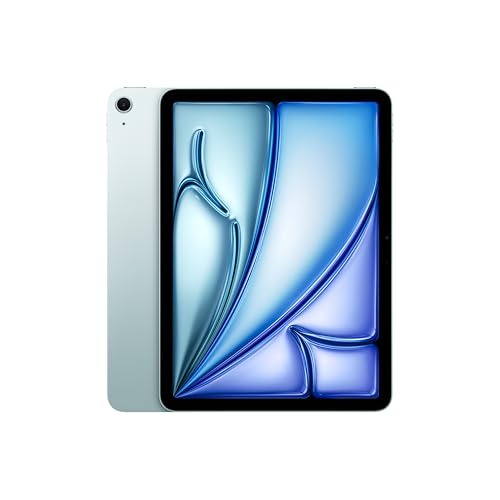

This guide compares five current iPads, led by the iPad Air with the M4 chip and topped by the iPad Pro with the M5 chip. Each pick is a distinct size or storage configuration, judged on chip speed, display refresh, heat handling, storage, and controller support. The M4 Pro is covered in the site’s Pro-only guides, so the Pro slot here goes to the newer M5 model.
Disclosure: As an Amazon Associate, we earn from qualifying purchases.
Quick Picks
Our Short List of 3
- Best for: Most players. The 11-inch Air is the sweet spot of this guide: the M4 chip runs demanding games at high settings, the screen is big enough for touch controls without being heavy, and at 464 grams it stays comfortable during long sessions. Wi-Fi 7 keeps online play stable, and Pencil Pro support adds drawing and note-taking when the games are done.
- Chip: Apple M4, 9-core CPU, 10-core GPU, 16-core Neural Engine
- Display: 11-inch Liquid Retina, 2360-by-1640 resolution at 264 ppi, P3 wide color, True Tone, 500 nits brightness
- Storage: 128GB
- Connectivity: Wi-Fi 7 with Apple N1, Bluetooth 5.3, USB-C
- Best for: Players who want the smoothest display here and room for the biggest library. The tandem OLED panel with ProMotion is the clearest upgrade over every other iPad here: deep blacks, bright highlights, and motion that stays fluid in fast games. The M5 chip is the fastest in the lineup, 512GB holds a large library without deleting games, and Thunderbolt opens up external displays and docks.
- Chip: Apple M5, 9-core CPU, 10-core GPU with hardware ray tracing, 16-core Neural Engine, 12GB memory
- Display: 11-inch Ultra Retina XDR tandem OLED, 2420-by-1668 resolution at 264 ppi, ProMotion 10–120Hz, P3 wide color, 1000 nits brightness, 1600 nits peak
- Storage: 512GB
- Connectivity: Wi-Fi 7 with Apple N1, Bluetooth 5.3, Thunderbolt / USB 4
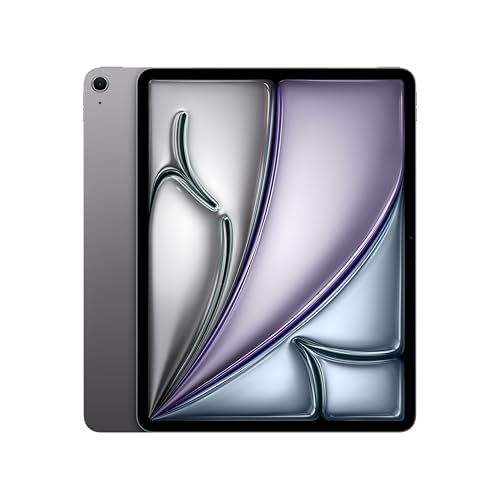
- Best for: Players who want the biggest screen without paying for the Pro. The 13-inch display makes on-screen controls larger and easier to hit, split-screen play works well, and the extra room helps in strategy and simulation games with dense interfaces. The M4 chip matches the 11-inch Air, the larger body handles long sessions well, and 256GB leaves room for a solid library.
- Chip: Apple M4, 9-core CPU, 10-core GPU, 16-core Neural Engine
- Display: 13-inch Liquid Retina, 2732-by-2048 resolution at 264 ppi, P3 wide color, True Tone, 600 nits brightness
- Storage: 256GB
- Connectivity: Wi-Fi 7 with Apple N1, Bluetooth 5.3, USB-C
All 5 Picks at a Glance
| Product | Specs | Action |
|---|---|---|
| 1. Apple iPad Air 11-inch (M4), 128GB, Wi-Fi |
| Check price on Amazon |
| 2. Apple iPad Pro 11-inch (M5), 512GB, Wi-Fi |
| Check price on Amazon |
| 3. Apple iPad Air 13-inch (M4), 256GB, Wi-Fi |
| Check price on Amazon |
| 4. Apple iPad Air 11-inch (M4), 256GB, Wi-Fi |
| Check price on Amazon |
 5. Apple iPad Air 11-inch (M4), 512GB, Wi-Fi |
| Check price on Amazon |
How to Choose
Chip first, then display. The chip decides which games run at high settings and how long frame rates hold during a long session. The M5 in the Pro is the fastest chip in this guide, with hardware ray tracing and 12GB of memory. The M4 in the Air is a clear step below the M5 but still handles demanding games well. Both chips run the full App Store catalog; the difference shows up in the heaviest games at the highest settings.
Refresh changes how games feel. Only the iPad Pro has ProMotion, which adapts from 10Hz to 120Hz and makes fast motion look smooth. The Air uses a fixed-refresh Liquid Retina panel. If you play fast shooters or racing games, the ProMotion screen is the single biggest upgrade in this guide. If you play turn-based games, puzzles, or story adventures, a fixed-refresh screen is fine and the money is better spent on storage or a controller.
Sustained performance matters more than peak speed. Every iPad here is fanless, so heat builds up during long sessions and chips ease off their peak pace. The larger body of the 13-inch Air spreads heat better than the 11-inch models, so it suits the longest sessions. For hours of play, favor the bigger model and keep the tablet out of direct sun and off soft bedding that traps heat.
Storage decides how many games live on the tablet. Large games now take tens of gigabytes each, and 128GB fills up fast once you add a few big titles plus photos and video. The 128GB pick suits players who keep two or three big games installed at a time, the 256GB picks suit players who rotate through a mid-size library, and the 512GB picks suit players who keep everything installed. None of these iPads takes a memory card, so choose capacity for the life of the device.
Controller support is universal here. All five iPads pair with Bluetooth controllers, including Xbox and PlayStation controllers, and all five have a USB-C port for wired or clip-on controllers. The Pro adds Thunderbolt, which helps if you connect an external display or a dock. Apple Pencil support also differs across the lineup, and all five picks here work with Apple Pencil Pro and Apple Pencil (USB-C). Keyboard fit differs too: the Magic Keyboard for iPad Pro does not fit the Air, and the Air keyboard does not fit the Pro.
Size and weight. The 11-inch models weigh less and are easier to hold for long sessions. The 13-inch Air gives a bigger view for split-screen play and small on-screen controls, but it is heavier and better suited to a lap, a desk, or a stand. Picture where you will play most often before choosing a size.
The 5 Best iPads for Gaming
1. Apple iPad Air 11-inch (M4), 128GB, Wi-Fi
- Best for: Most players. The 11-inch Air is the sweet spot of this guide: the M4 chip runs demanding games at high settings, the screen is big enough for touch controls without being heavy, and at 464 grams it stays comfortable during long sessions. Wi-Fi 7 keeps online play stable, and Pencil Pro support adds drawing and note-taking when the games are done.
- Chip: Apple M4, 9-core CPU, 10-core GPU, 16-core Neural Engine
- Display: 11-inch Liquid Retina, 2360-by-1640 resolution at 264 ppi, P3 wide color, True Tone, 500 nits brightness
- Storage: 128GB
- Connectivity: Wi-Fi 7 with Apple N1, Bluetooth 5.3, USB-C
Most players. The 11-inch Air is the sweet spot of this guide: the M4 chip runs demanding games at high settings, the screen is big enough for touch controls without being heavy, and at 464 grams it stays comfortable during long sessions. Wi-Fi 7 keeps online play stable, and Pencil Pro support adds drawing and note-taking when the games are done.
The fixed-refresh display has no ProMotion, so fast shooters will not look as smooth as they do on the Pro. The 128GB tier fills up if you keep many large games installed at once, so plan on managing your library. Confirm the exact finish and configuration on the product page before ordering.
Watch out for: The fixed-refresh display has no ProMotion, so fast shooters will not look as smooth as they do on the Pro. The 128GB tier fills up if you keep many large games installed at once, so plan on managing your library. Confirm the exact finish and configuration on the product page before ordering.
2. Apple iPad Pro 11-inch (M5), 512GB, Wi-Fi
- Best for: Players who want the smoothest display here and room for the biggest library. The tandem OLED panel with ProMotion is the clearest upgrade over every other iPad here: deep blacks, bright highlights, and motion that stays fluid in fast games. The M5 chip is the fastest in the lineup, 512GB holds a large library without deleting games, and Thunderbolt opens up external displays and docks.
- Chip: Apple M5, 9-core CPU, 10-core GPU with hardware ray tracing, 16-core Neural Engine, 12GB memory
- Display: 11-inch Ultra Retina XDR tandem OLED, 2420-by-1668 resolution at 264 ppi, ProMotion 10–120Hz, P3 wide color, 1000 nits brightness, 1600 nits peak
- Storage: 512GB
- Connectivity: Wi-Fi 7 with Apple N1, Bluetooth 5.3, Thunderbolt / USB 4
Players who want the smoothest display here and room for the biggest library. The tandem OLED panel with ProMotion is the clearest upgrade over every other iPad here: deep blacks, bright highlights, and motion that stays fluid in fast games. The M5 chip is the fastest in the lineup, 512GB holds a large library without deleting games, and Thunderbolt opens up external displays and docks.
The thin body can feel warm during long sessions in a hot room, so give it airflow and avoid charging it under a blanket. The Magic Keyboard is a separate purchase. This listing is the 512GB Wi-Fi configuration as identified from Amazon sales data, so confirm the storage tier on the product page before ordering.
Watch out for: The thin body can feel warm during long sessions in a hot room, so give it airflow and avoid charging it under a blanket. The Magic Keyboard is a separate purchase. This listing is the 512GB Wi-Fi configuration as identified from Amazon sales data, so confirm the storage tier on the product page before ordering.
3. Apple iPad Air 13-inch (M4), 256GB, Wi-Fi
- Best for: Players who want the biggest screen without paying for the Pro. The 13-inch display makes on-screen controls larger and easier to hit, split-screen play works well, and the extra room helps in strategy and simulation games with dense interfaces. The M4 chip matches the 11-inch Air, the larger body handles long sessions well, and 256GB leaves room for a solid library.
- Chip: Apple M4, 9-core CPU, 10-core GPU, 16-core Neural Engine
- Display: 13-inch Liquid Retina, 2732-by-2048 resolution at 264 ppi, P3 wide color, True Tone, 600 nits brightness
- Storage: 256GB
- Connectivity: Wi-Fi 7 with Apple N1, Bluetooth 5.3, USB-C
Players who want the biggest screen without paying for the Pro. The 13-inch display makes on-screen controls larger and easier to hit, split-screen play works well, and the extra room helps in strategy and simulation games with dense interfaces. The M4 chip matches the 11-inch Air, the larger body handles long sessions well, and 256GB leaves room for a solid library.
At 616 grams it is the heaviest pick in this guide, so handheld play gets tiring and a stand or lap setup works better. It has the same fixed-refresh panel as the smaller Air, so it does not match the Pro for fast motion. Confirm the exact finish and configuration on the product page before ordering.
Watch out for: At 616 grams it is the heaviest pick in this guide, so handheld play gets tiring and a stand or lap setup works better. It has the same fixed-refresh panel as the smaller Air, so it does not match the Pro for fast motion. Confirm the exact finish and configuration on the product page before ordering.
4. Apple iPad Air 11-inch (M4), 256GB, Wi-Fi
- Best for: Players who love the 11-inch Air but keep a mid-size library. This is the same tablet as the first pick with double the storage, so big games, offline downloads, and media all fit without constant deleting. It is the right pick if you rotate through many games or download large titles for travel where Wi-Fi is unreliable.
- Chip: Apple M4, 9-core CPU, 10-core GPU, 16-core Neural Engine
- Display: 11-inch Liquid Retina, 2360-by-1640 resolution at 264 ppi, P3 wide color, True Tone, 500 nits brightness
- Storage: 256GB
- Connectivity: Wi-Fi 7 with Apple N1, Bluetooth 5.3, USB-C
Players who love the 11-inch Air but keep a mid-size library. This is the same tablet as the first pick with double the storage, so big games, offline downloads, and media all fit without constant deleting. It is the right pick if you rotate through many games or download large titles for travel where Wi-Fi is unreliable.
It shares the first pick’s fixed-refresh display, so it does not close the gap to the Pro for fast motion. The extra storage is the only difference from the 128GB model, so if your library is small, the cheaper configuration is the better buy. This listing was last confirmed through a March 2026 deal listing, so confirm stock on the product page before ordering.
Watch out for: It shares the first pick’s fixed-refresh display, so it does not close the gap to the Pro for fast motion. The extra storage is the only difference from the 128GB model, so if your library is small, the cheaper configuration is the better buy. This listing was last confirmed through a March 2026 deal listing, so confirm stock on the product page before ordering.
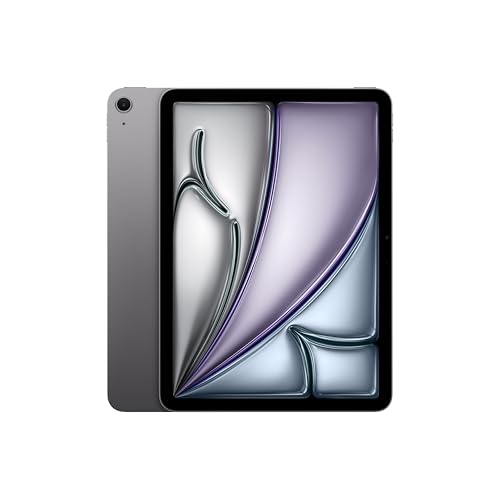
5. Apple iPad Air 11-inch (M4), 512GB, Wi-Fi
- Best for: Players who want the most storage in the most portable body. This is the same 11-inch Air as the first two Air picks with 512GB inside, so the largest games, offline downloads, and media libraries all fit at once. It is the right pick if you never want to think about deleting a game to make room for another.
- Chip: Apple M4, 9-core CPU, 10-core GPU, 16-core Neural Engine
- Display: 11-inch Liquid Retina, 2360-by-1640 resolution at 264 ppi, P3 wide color, True Tone, 500 nits brightness
- Storage: 512GB
- Connectivity: Wi-Fi 7 with Apple N1, Bluetooth 5.3, USB-C
Players who want the most storage in the most portable body. This is the same 11-inch Air as the first two Air picks with 512GB inside, so the largest games, offline downloads, and media libraries all fit at once. It is the right pick if you never want to think about deleting a game to make room for another.
It shares the other Air picks’ fixed-refresh display, so it does not close the gap to the Pro for fast motion. The extra storage is the only difference from the cheaper Air configurations, so if your library is small, the lower tiers are the better buy. This listing was last confirmed through a March 2026 deal listing, so confirm stock on the product page before ordering.
Watch out for: It shares the other Air picks’ fixed-refresh display, so it does not close the gap to the Pro for fast motion. The extra storage is the only difference from the cheaper Air configurations, so if your library is small, the lower tiers are the better buy. This listing was last confirmed through a March 2026 deal listing, so confirm stock on the product page before ordering.
Which One Fits
Pick the 11-inch Air with 128GB if you want one iPad that does everything well and you keep a small library. The M4 chip, the comfortable weight, and the 11-inch screen cover the most players.
Pick the 11-inch Pro with the M5 chip if display smoothness is your top priority. The ProMotion OLED panel is the one feature no other iPad here can match, and the M5 chip plus 512GB make it the most capable gaming tablet in the list.
Pick the 13-inch Air if screen size matters more than portability. It is the best choice for strategy games, split-screen play, and playing on a stand or a desk, and it costs less than the Pro.
Pick the 11-inch Air with 256GB if you already know the 11-inch Air is right but your library is mid-size. The extra storage is the only change, and it removes the one real weakness of the first pick.
Pick the 11-inch Air with 512GB if you keep everything installed and never want to delete a game. It is the same tablet as the first pick with the most room inside.
Common Mistakes
Buying for peak speed instead of sustained speed. Every iPad here can run demanding games, but fanless tablets ease off their peak pace as heat builds. A chip that looks fast in a short burst can still slow down in hour three, so favor the larger bodies for long sessions and give the tablet airflow.
Ignoring refresh when you play fast games. The ProMotion display is the biggest real difference between the Pro and the Air. If shooters and racing games are your main diet, the fixed-refresh Air will feel like a step down no matter how fast its chip is.
Choosing 128GB for a large library. Big games take tens of gigabytes each, and no iPad has a memory card slot. Count the games you keep installed, add room for updates and media, and step up to 256GB if the math is close.
Assuming every accessory fits every iPad. The Magic Keyboard for iPad Pro does not fit the Air, the Air keyboard does not fit the Pro, and the mini has no Apple keyboard case at all. Pencil support also differs across the lineup: the base iPad does not work with Apple Pencil Pro, while every pick in this guide does.
Skipping the controller. Touch controls work, but a good Bluetooth controller changes how most games feel, and all five picks pair with Xbox and PlayStation controllers. Budget for one if you play anything that needs precise movement.
FAQ
Do I need an iPad Pro for mobile gaming, or is the Air enough?
For most players, the Air is enough. The M4 chip runs demanding games at high settings, and the 11-inch screen suits touch controls well. The Pro earns its place only if you play fast games where the 120Hz ProMotion display makes a visible difference, or if you want the fastest chip and Thunderbolt for docks and external displays.
Is 128GB of storage enough for games?
It depends on your library. Two or three large games plus apps, photos, and video fit comfortably on 128GB, but a player who keeps ten or more big titles installed will run out of room. There is no memory card slot, so if you rotate through many games or download titles for offline travel, choose the 256GB Air or the 512GB Pro.
Do iPads slow down during long gaming sessions?
They can. All five picks are fanless, so heat builds up over time and the chip eases off its peak pace. The effect is small in light games and larger in demanding titles played for hours. A cool room, shade from direct sun, and avoiding soft surfaces that trap heat all help.
Can I use a controller with an iPad for gaming?
Yes. All five iPads pair with Bluetooth controllers, including Xbox and PlayStation controllers, and all five have a USB-C port for wired or clip-on controllers. Most App Store games support controllers, and the ones that do feel much better with physical buttons and sticks than with touch controls.
FAQ
Do I need an iPad Pro for mobile gaming, or is the Air enough?
Is 128GB of storage enough for games?
Do iPads slow down during long gaming sessions?
Can I use a controller with an iPad for gaming?
More from Amazon
Programs that pair well with the guide above. Offers and eligibility are set by Amazon and may change.
Free shipping on eligible items, Prime Video and more. Eligible new members can start with a free trial.
Start a Prime free trialAd-free music streaming. Eligible new subscribers can start with a free trial.
Try Music Unlimited freeA Prime membership for ages 18-24 with a trial period. Eligibility is set by Amazon.
See Prime for Young AdultsAudiobooks and podcasts to listen to on the go. Eligible new members can start with a free trial.
Try Audible freeAs an Amazon Associate we earn from qualifying purchases.