Our Short List of 3

- Best for: Dedicated or light-controlled home theaters that want the highest rated brightness and the broadest HDR format support.
- Resolution: 4K UHD output, per listing
- Brightness: 3,200 lumens
- Light source: LED
- HDR: HDR10+, HDR10, HLG

- Best for: Living rooms that want Dolby Vision, automatic setup, and built-in sound strong enough to skip a separate speaker.
- Resolution: 4K output, per listing
- Brightness: 2,300 ISO lumens
- Light source: Dual light (LED and laser)
- HDR: Dolby Vision

- Best for: Bright living rooms and mixed movie-and-gaming setups that need color brightness and low input lag.
- Resolution: 4K PRO-UHD output, per listing
- Brightness: 2,800 lumens color and white brightness
- Display technology: 3-chip 3LCD
- HDR: HDR10, HLG
All 3 Picks at a Glance
| Product | Specs | Action |
|---|---|---|
| BenQ HT4550i |
| Check price on Amazon |
| XGIMI HORIZON Ultra |
| Check price on Amazon |
| Epson Home Cinema 2350 |
| Check price on Amazon |
Key takeaways
- Three top-tier projectors chosen by verified listing specifications, not ratings: BenQ HT4550i, XGIMI HORIZON Ultra and Epson Home Cinema 2350 compared on brightness and resolution.
Shoppers use the phrase “5 star projector” to mean one thing: a model at the top of its class that they will not regret. The honest way to find that projector is not to count rating badges, which mix sizes of rooms, screens, and expectations into one meaningless number, but to compare the specifications that decide the picture: how bright the image is, what resolution the projector actually produces, and how it handles color and contrast in a real room.
This list is for buyers setting up a living-room or dedicated home theater who want a top-tier machine the first time. Every projector here was selected from its Amazon listing specifications: brightness in lumens as the listing states it, the stated resolution and HDR formats, the light source, and the built-in streaming and audio. Read the brightness and resolution lines carefully, because those two numbers separate this class from the budget projectors most people upgrade away from.
Quick Picks
As an Amazon Associate we earn from qualifying purchases.
| Product | Best for | Key spec from title |
|---|---|---|
| BenQ HT4550i | Dedicated home theater with the strongest rated brightness | 4K HDR LED with 3,200 lumens |
| XGIMI HORIZON Ultra | Living rooms that want Dolby Vision and easy setup | 4K with Dolby Vision and 2,300 ISO lumens |
| Epson Home Cinema 2350 | Bright rooms and mixed movie and gaming use | 4K PRO-UHD with 2,800 lumens and 3LCD |
How to Choose
Read brightness in the right unit for your room
Brightness decides whether a projector survives ambient light or only works in a cave. Listings state it in ANSI lumens, ISO lumens, or unqualified “lumens,” and the numbers are not directly interchangeable, so compare like with like where you can and treat unqualified figures with suspicion. As a working guide, a dedicated dark theater is happy with less, while a living room with lamps and daylight needs the highest rated brightness you can get, because every lumen you add buys back contrast that ambient light washes out. Also check whether the figure quoted is for the light source at full power; the usable brightness in an accurate color mode is always lower.
Know what the resolution claim really means
Most projectors in this class reach 4K by pixel shifting: a 1080p imaging chip moves rapidly to place multiple sub-frames, producing a full 3840×2160 addressable image on screen. Epson labels its version 4K PRO-UHD, and DLP models use XPR technology; both are legitimate and look genuinely sharp, but neither is a native 4K chip, which remains the territory of far more expensive machines. What matters for your decision is that the listing states a true 4K-class output and HDR support, and that you do not mistake a “supports 4K input” line on a 1080p projector for the same thing. That phrase only means it can accept the signal before downscaling it.
Light source decides ownership costs and color
Lamp projectors are bright and cheaper to buy but dim over a few thousand hours and need replacement lamps. LED and laser light sources hold their brightness far longer, switch on instantly, and usually cover a wider color gamut, which is why every model in this class uses solid-state light. Check the listing for the rated light-source life and the color gamut claim, and note whether brightness is quoted for the LED or laser mode you will actually use. A wide gamut only helps if the projector also supports the HDR formats, such as HDR10, HDR10+, or Dolby Vision, that deliver that color to the screen.
Throw distance and setup features decide where it can live
A top specification sheet is useless if the projector cannot fill your screen from the seat you have. Check the throw ratio and any optical zoom in the listing: optical zoom lets you resize the image without moving the unit or losing resolution to digital keystone, and lens shift, where fitted, lets you align the image without tilting the projector and degrading the picture. Smart features such as autofocus and auto keystone help portable setups but cannot fix a fundamentally wrong placement. Measure your room, note the screen size you want, and confirm the listing’s projection size range covers it from your mounting distance.
The 3 Best Options
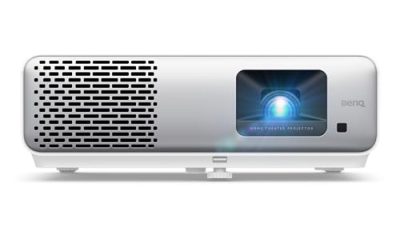
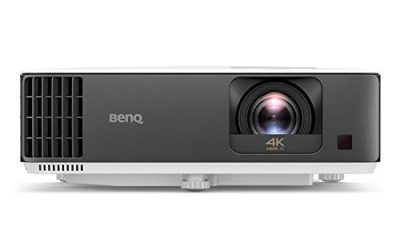
BenQ HT4550i
- Best for: Dedicated or light-controlled home theaters that want the highest rated brightness and the broadest HDR format support.
- Resolution: 4K UHD output, per listing
- Brightness: 3,200 lumens
- Light source: LED
- HDR: HDR10+, HDR10, HLG
Dedicated or light-controlled home theaters that want the highest rated brightness and the broadest HDR format support.
It is a standard-throw projector, so confirm your room depth and mounting position against its throw range; also confirm the listing is for a new unit before ordering, and plan on external audio for serious movie sound.
The HT4550i is the theater-first pick: its listing leads with 3,200 lumens from an LED light source, true 4K-class output, and the widest HDR support in this group, covering HDR10+, HDR10, and HLG. That combination is what a dedicated room rewards, because high brightness headroom lets you run an accurate picture mode without the image going dull, and HDR10+ adds per-scene tone mapping for supported content. Android TV with Netflix and built-in Chromecast cover streaming without extra hardware, and there is a built-in speaker for casual use. If your priority is the strongest cinema specification on the page and your room can be darkened, this is the one to build around.
Watch out for: It is a standard-throw projector, so confirm your room depth and mounting position against its throw range; also confirm the listing is for a new unit before ordering, and plan on external audio for serious movie sound.
XGIMI HORIZON Ultra
- Best for: Living rooms that want Dolby Vision, automatic setup, and built-in sound strong enough to skip a separate speaker.
- Resolution: 4K output, per listing
- Brightness: 2,300 ISO lumens
- Light source: Dual light (LED and laser)
- HDR: Dolby Vision
Living rooms that want Dolby Vision, automatic setup, and built-in sound strong enough to skip a separate speaker.
Its rated brightness is the lowest here in a brighter unit of measurement debate; in a sunlit room it still needs curtains for films, and Netflix support on Android TV projectors can require the maker’s own app arrangement, so check the listing’s streaming notes.
The HORIZON Ultra is the living-room pick, built around convenience without giving up the headline specifications. Its listing states 4K output with Dolby Vision, which none of the others here offer, and 2,300 ISO lumens from a dual light system that combines LED and laser for wide color. The ISA 3.0 setup system handles focus, keystone, and screen alignment automatically, and the optical zoom gives placement flexibility that fixed-lens lifestyle projectors lack. Sound is a genuine strength rather than an afterthought, with two 12W Harman Kardon speakers built in. For a room that hosts daytime sports and evening films, it is the most complete single-box answer.
Watch out for: Its rated brightness is the lowest here in a brighter unit of measurement debate; in a sunlit room it still needs curtains for films, and Netflix support on Android TV projectors can require the maker’s own app arrangement, so check the listing’s streaming notes.
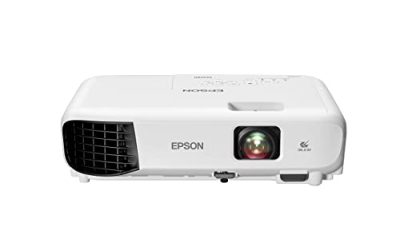
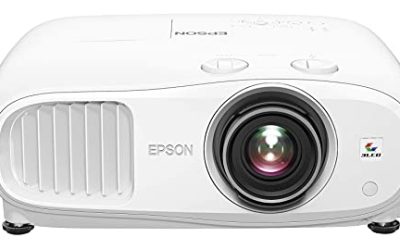
Epson Home Cinema 2350
- Best for: Bright living rooms and mixed movie-and-gaming setups that need color brightness and low input lag.
- Resolution: 4K PRO-UHD output, per listing
- Brightness: 2,800 lumens color and white brightness
- Display technology: 3-chip 3LCD
- HDR: HDR10, HLG
Bright living rooms and mixed movie-and-gaming setups that need color brightness and low input lag.
The 4K PRO-UHD image is pixel-shifted rather than native 4K, as with most of this class, and there is no Dolby Vision or HDR10+; confirm the exact listing variant, because this model is also sold in a renewed version under a different listing.
The Home Cinema 2350 is the brightness-per-room pick for spaces that never get fully dark. Its listing states 2,800 lumens of both color and white brightness from a 3-chip 3LCD engine, and that equal color brightness is the specification that keeps colors from washing out when the lights are up. The 4K PRO-UHD image uses Epson’s pixel shifting, HDR10 and HLG are supported, and the listing highlights low latency, which makes it the natural choice here for a room that splits time between films and a games console. Android TV streaming and a 10W built-in speaker are included, and the 3LCD design also means no rainbow artifacts for viewers who are sensitive to them on single-chip DLP models.
Watch out for: The 4K PRO-UHD image is pixel-shifted rather than native 4K, as with most of this class, and there is no Dolby Vision or HDR10+; confirm the exact listing variant, because this model is also sold in a renewed version under a different listing.
Which One Fits Your Situation
You have a dedicated, light-controlled theater room
Choose the BenQ HT4550i. In a dark room its brightness headroom translates into punchy HDR highlights in accurate modes, and its HDR10+ support covers the widest range of discs and streaming sources. Pair it with a proper screen and external audio, and it is the closest thing here to a no-regrets cinema build.
Your projector lives in the family living room
Choose the XGIMI HORIZON Ultra. Automatic setup, optical zoom, Dolby Vision, and genuinely capable built-in speakers make it the easiest to live with day to day, and the dual light source keeps colors rich for both sports and films. It asks the least of the room and of the person setting it up.
Your room is bright and the console shares the screen
Choose the Epson Home Cinema 2350. Equal color and white brightness keeps the image saturated with the lights on, and the low latency the listing highlights suits gaming sessions between films. It is the pragmatic pick when the projector has to serve every kind of content in an imperfect room.
You are upgrading from a budget mini projector
Any of the three is a generational step up in brightness, resolution, and color, but match the upgrade to your room rather than the specification sheet alone. Measure your throw distance, decide whether the room can be darkened, and let those two answers choose between the BenQ’s theater focus, the XGIMI’s convenience, and the Epson’s bright-room strength.
Common Mistakes
- Comparing brightness figures across different units, such as ANSI and ISO lumens or unqualified marketing lumens, as if they were the same scale.
- Reading “supports 4K input” on a native 1080p projector as if it were a 4K projector; the image is still downscaled.
- Choosing by rating badges instead of the listing’s brightness, resolution, and HDR specifications that actually decide the picture.
- Ignoring throw distance and ordering a projector that cannot fill the intended screen from the only place it can sit.
- Forgetting that built-in speakers, even good ones, sit behind the screen image; serious movie sound still wants an external system.
Frequently Asked Questions
What makes a projector top tier rather than mid-range?
The specifications on the listing: a 4K-class image rather than 1080p, brightness high enough for the room it will serve, a solid-state LED or laser light source instead of a lamp, and support for modern HDR formats. When those four are present together, as they are in the models here, the projector belongs to the top tier regardless of badges.
Is pixel-shifted 4K the same as native 4K?
Not technically, but closer than the names suggest. Pixel shifting places the full count of 4K pixels on screen by moving a lower-resolution chip at high speed, and at normal viewing distances the result is visibly far sharper than 1080p. True native 4K chips exist only in much more expensive home theater models, so every projector in this class uses some form of shifting.
How bright does a projector need to be for a living room?
More than a dark theater needs, because ambient light competes with the image and washes out contrast. The models here are rated between 2,300 and 3,200 lumens in their respective units, which is the working range for rooms with some light control. For a truly sunlit room, plan on curtains as well; no consumer projector fully defeats direct daylight on a large screen.
Can these projectors replace a TV for gaming?
For big-screen gaming, yes, with the right pick. Look for a low latency or gaming mode in the listing, as the Epson here states, and keep the image size sensible so the projector’s brightness stays punchy. Fast competitive play still favors a gaming monitor for the lowest delay, but for console gaming on a wall-sized image these projectors are entirely capable.
FAQ
What makes a projector top tier rather than mid-range?
Is pixel-shifted 4K the same as native 4K?
How bright does a projector need to be for a living room?
Can these projectors replace a TV for gaming?
More from Amazon
Programs that pair well with the guide above. Offers and eligibility are set by Amazon and may change.
Free shipping on eligible items, Prime Video and more. Eligible new members can start with a free trial.
Start a Prime free trialAd-free music streaming. Eligible new subscribers can start with a free trial.
Try Music Unlimited freeA Prime membership for ages 18-24 with a trial period. Eligibility is set by Amazon.
See Prime for Young AdultsAudiobooks and podcasts to listen to on the go. Eligible new members can start with a free trial.
Try Audible freeAs an Amazon Associate we earn from qualifying purchases.