Our Short List of 3

- Best for: movie-first 3D demos in a darkened, permanent setup.
- Native resolution: 1080p (1920 x 1080), accepts 4K input
- Light source: LED
- 3D: supported, listed in the product title
- Refresh and lag from title: 120Hz, 8.3ms at 1080p

- Best for: 3D demos in brighter rooms and mixed movie-and-game sessions.
- Native resolution: 1080p (1920 x 1080)
- Brightness: 3,600 lumens
- Technology: DLP, single chip design
- 3D: Full 3D support

- Best for: one projector covering 4K gaming demos and occasional 3D nights.
- Resolution: 4K UHD (3840 x 2160)
- Brightness: 3,200 lumens
- Input lag: 16ms at 4K; 240Hz support at 1080p
- 3D: supported, listed in the product title (Full HD 3D)
All 4 Picks at a Glance
| Product | Specs | Action |
|---|---|---|
| BenQ HT2060 |
| Check price on Amazon |
| Optoma HD146X |
| Check price on Amazon |
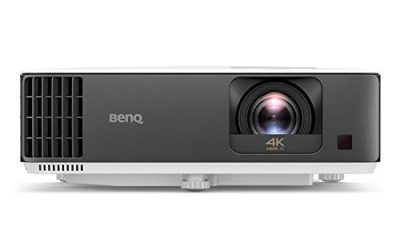
| BenQ TK700 |
| Check price on Amazon |
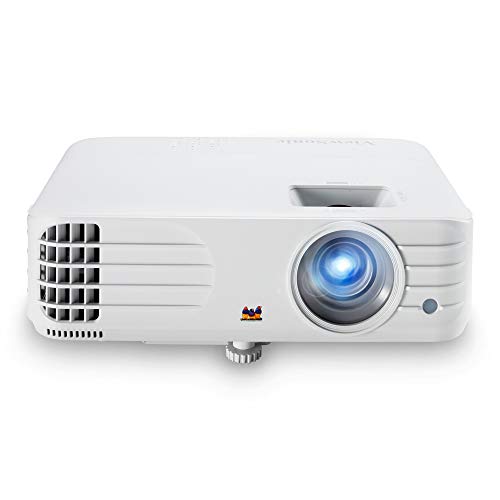 ViewSonic PX701HD |
| Check price on Amazon |
Key takeaways
- 3D-capable projectors compared by their Amazon listings: BenQ HT2060 and TK700, Optoma HD146X and ViewSonic PX701HD, picked for running 3D demo content at home.
A quick note on what this keyword means in practice: there is no separate product category called a “3D demo projector.” The sensible reading is a projector that can actually display 3D content — 3D Blu-ray discs, 3D demo reels, games and files — so every pick below has 3D support stated on its Amazon listing. That filter removes most modern home projectors, because many brands quietly dropped 3D from newer models even when the rest of the spec sheet looks impressive.
This guide is for home theater owners building a 3D demo setup, gamers who want big-screen 3D, and anyone replacing an older 3D machine. Every projector here was chosen from its Amazon listing title and spec table, with 3D support as the hard requirement, and the glasses format and brightness trade-offs are spelled out per model.
Quick Picks
As an Amazon Associate we earn from qualifying purchases.
| Product | Best for | Key spec from title |
|---|---|---|
| BenQ HT2060 | Color-focused 3D movie demos | 1080p HDR LED, 3D, vertical lens shift |
| Optoma HD146X | Bright rooms and 3D gaming demos | 1080p, 3,600 lumens, Full 3D |
| BenQ TK700 | 4K demos with a 3D option | 4K UHD, 3,200 lumens, 3D, 16ms at 4K |
| ViewSonic PX701HD | Flexible placement on a budget path | 1080p, 3,500 lumens, 3D-Ready |
How to Choose
Confirm the listing actually states 3D support
This is the single most important check, and it is where most shortlists fall apart. A projector that accepts a 4K signal, carries an HDR badge or lists a high refresh rate may still have no 3D mode at all. Look for the words 3D, 3D-Ready or Full 3D in the title, feature list or spec table of the exact model you are buying, and be careful with model families: a near-identical model number from the same brand can drop 3D while keeping everything else. If the listing is silent about 3D, treat the answer as no.
Match the glasses system before you buy
Projector 3D is not glasses-free. DLP projectors in this class work with active shutter glasses that sync to the image, and the glasses are almost never included in the box. Budget for at least two pairs if demos are a shared activity, and confirm the glasses match the projector’s sync system before ordering. Active glasses also need charging or batteries, and each pair dims the picture noticeably, which is why brightness headroom matters more for 3D than for ordinary 2D viewing in the same room.
Brightness headroom for shutter-glass viewing
Because active shutter glasses cut the light reaching your eyes, a projector that looks punchy in 2D can look flat in 3D at the same settings. For demo use in a light-controlled room, the LED and lamp models here cope well; in a living room with lamps on, lean toward the higher-lumen picks. Screen size matters too: a 100-inch image spreads the same lumens far thinner than an 84-inch one, so if you plan very large 3D demos, brightness and a darker room do more for the result than a resolution upgrade.
Source content and connection checks
A 3D projector is only half the chain. Frame-packed 3D from a Blu-ray player needs an HDMI link that carries the 3D signal end to end, and side-by-side or top-and-bottom files from a PC or media box need the projector to offer those formats in its 3D menu. Check that your player, console or PC can output the format your demo files use, and keep a short, direct HDMI run for demos instead of routing through old switchers or capture gear that may strip the 3D flag from the signal.
The 4 Best Options
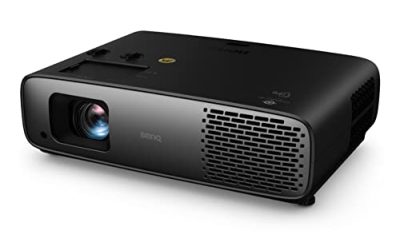
BenQ HT2060
- Best for: movie-first 3D demos in a darkened, permanent setup.
- Native resolution: 1080p (1920 x 1080), accepts 4K input
- Light source: LED
- 3D: supported, listed in the product title
- Refresh and lag from title: 120Hz, 8.3ms at 1080p
movie-first 3D demos in a darkened, permanent setup.
3D glasses are not part of the listed package, and LED brightness is better suited to controlled light than to a bright lounge.
The HT2060 is the pick for viewers whose demo material is mostly 3D Blu-ray and film content, where color accuracy matters more than raw brightness. Its listing leads with wide color coverage and an LED light source, and 3D is named in the title rather than buried in fine print. Vertical lens shift and a 1.3x zoom make it easier to square the image on a fixed screen without digital correction, which keeps demo footage clean. It suits a dedicated, light-controlled room where the projector stays mounted and the same demo reels run repeatedly.
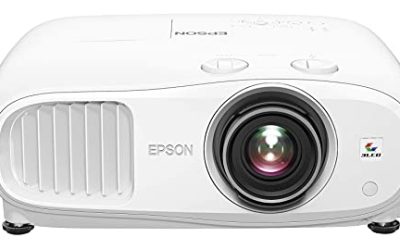
Optoma HD146X
- Best for: 3D demos in brighter rooms and mixed movie-and-game sessions.
- Native resolution: 1080p (1920 x 1080)
- Brightness: 3,600 lumens
- Technology: DLP, single chip design
- 3D: Full 3D support
3D demos in brighter rooms and mixed movie-and-game sessions.
lamp-based light means a replacement lamp is a running cost over the projector’s life, and placement flexibility is limited compared with lens-shift models.
The HD146X is the brightness-first option, built around a lamp DLP design with Full 3D branding on the unit itself. That combination suits demo sessions in rooms that cannot go fully dark, and the enhanced gaming mode with a 16ms response figure gives it a second life for 3D and 2D gaming demos. It is a simpler machine than the BenQ models — fewer placement aids and a single-chip DLP design — but for showing 3D content to a group in an ordinary living room, the lumen output does the heavy lifting.
BenQ TK700
- Best for: one projector covering 4K gaming demos and occasional 3D nights.
- Resolution: 4K UHD (3840 x 2160)
- Brightness: 3,200 lumens
- Input lag: 16ms at 4K; 240Hz support at 1080p
- 3D: supported, listed in the product title (Full HD 3D)
one projector covering 4K gaming demos and occasional 3D nights.
no lens shift, so mounting position has to be planned carefully, and 3D playback is 1080p rather than 4K.
The TK700 is the choice when the same projector has to headline 4K demo content most of the time and switch to 3D when the material calls for it. Its listing pairs a 4K UHD image and 3,200 lumens with 3D named in the title, plus a 16ms input lag figure at 4K aimed at console gaming. That makes it the natural demo machine for a PS5 or Xbox Series X setup that also keeps a shelf of 3D Blu-rays. The trade-off is that 3D runs at 1080p, as it does on every model here, so set expectations accordingly.
ViewSonic PX701HD
- Best for: shelf or ceiling setups that need lens shift and two permanent sources.
- Native resolution: 1080p (1920 x 1080)
- Brightness: 3,500 lumens
- 3D: 3D-Ready, stated in the listing’s feature list
- Color: SuperColor technology
shelf or ceiling setups that need lens shift and two permanent sources.
it is an older lamp model, so confirm the exact listing variant before ordering, and budget separately for 3D glasses.
The PX701HD earns its place through placement flexibility and a spec sheet that states 3D-Ready in its feature list instead of leaving buyers to guess. A 3,500-lumen lamp and vertical lens shift are an unusual pairing at this level, and the lens shift is genuinely useful for demo setups where the projector sits on a shelf or mount that cannot be perfectly centered. Dual HDMI inputs let a Blu-ray player and a PC stay connected, which suits demo work where you switch between disc-based 3D and file-based 3D clips.
Which One Fits Your Situation
Your demos are 3D films in a dedicated dark room
Choose the BenQ HT2060. Its LED light source, wide color positioning and lens shift are built for a fixed screen and controlled light, which is exactly where film-based 3D demos look their best. The lower brightness compared with the lamp models stops mattering once the room is dark, and color quality becomes the difference you actually see.
You demo to groups in a living room with some ambient light
Choose the Optoma HD146X. The 3,600-lumen lamp output holds up better through shutter glasses when the room is not fully dark, and Full 3D support covers both disc and file formats. It is also the simplest machine here to hand to a non-technical household member.
One projector must cover 4K gaming demos and 3D movies
Choose the BenQ TK700. It is the only pick here with a 4K image for your main demo content, and the 3D support is stated on the listing rather than assumed. Console players also get the low input lag figure at 4K that the other 1080p models cannot offer in the same way.
Your mount or shelf cannot sit dead-center to the screen
Choose the ViewSonic PX701HD. Vertical lens shift lets you correct the image position optically instead of leaning on keystone, which keeps demo footage sharper. The dual HDMI inputs also help if a player and a PC both live in the setup permanently.
Common Mistakes
- Assuming a projector supports 3D because it is marketed for movies or carries an HDR badge, without the listing ever stating 3D.
- Buying glasses before confirming which sync system the projector uses, or forgetting that glasses are sold separately.
- Judging 3D brightness from 2D viewing; shutter glasses dim the image, so a marginal 2D setup becomes a poor 3D setup.
- Routing the 3D signal through old HDMI switchers, splitters or capture devices that strip the 3D flag.
- Using heavy digital keystone to fix a bad mount, which softens the fine detail that demo content is meant to show off.
Frequently Asked Questions
Do these projectors include 3D glasses?
No. None of the listings here bundles glasses as a headline component, so treat glasses as a separate purchase. Buy the active shutter type that matches your projector’s sync system, and order at least as many pairs as you have regular viewers, because a demo session stops being a demo when half the room cannot watch in 3D.
Can a 4K projector play 3D at 4K resolution?
No. Consumer 3D formats top out at 1080p per eye in this class of machine, including on the 4K BenQ TK700. The projector switches to its 3D mode at Full HD when it receives a 3D signal. That is a format limit, not a defect, and 3D demo material is produced with that ceiling in mind.
What sources can feed 3D content to these projectors?
A 3D Blu-ray player is the most reliable source for frame-packed 3D. PCs and media boxes can send side-by-side or top-and-bottom 3D files, and some consoles support 3D games or apps. Check that your source outputs a format the projector’s 3D menu lists, and connect it with a direct HDMI cable for demo sessions.
Why does the 3D picture look dimmer than 2D?
Active shutter glasses block light alternately to each eye, so perceived brightness drops sharply compared with 2D viewing of the same scene. This is normal. Counter it with a darker room, a smaller image, or one of the higher-lumen picks in this guide, and avoid judging a projector’s 3D quality in a brightly lit room.
FAQ
Do these projectors include 3D glasses?
Can a 4K projector play 3D at 4K resolution?
What sources can feed 3D content to these projectors?
Why does the 3D picture look dimmer than 2D?
More from Amazon
Programs that pair well with the guide above. Offers and eligibility are set by Amazon and may change.
Free shipping on eligible items, Prime Video and more. Eligible new members can start with a free trial.
Start a Prime free trialAd-free music streaming. Eligible new subscribers can start with a free trial.
Try Music Unlimited freeA Prime membership for ages 18-24 with a trial period. Eligibility is set by Amazon.
See Prime for Young AdultsAudiobooks and podcasts to listen to on the go. Eligible new members can start with a free trial.
Try Audible freeAs an Amazon Associate we earn from qualifying purchases.