Our Short List of 3

- Best for: Meeting rooms that need strong colour brightness for charts and graphs.
- 3-Chip 3LCD XGA projector
- 3600 lumens color brightness
- 3600 lumens white brightness
- HDMI input

- Best for: Bright rooms with a standard throw distance and wide documents.
- 4000 lumens brightness
- WXGA resolution 1280 x 800
- HDMI input
- Vertical keystone correction

- Best for: Small rooms where the projector sits close to the wall.
- 4000 lumens brightness
- WXGA resolution 1280 x 800
- 0.52 short throw ratio
- HDMI and USB Type A connectivity
All 3 Picks at a Glance
| Product | Specs | Action |
|---|---|---|
| Epson EX3280 |
| Check price on Amazon |
| ViewSonic PA503W |
| Check price on Amazon |
| ViewSonic PS502W |
| Check price on Amazon |
Key takeaways
- Looking for the best affordable projectors for business use? Compare three bright, easy to set up projectors for meeting rooms, classrooms and small offices.
A business projector has a different job from a home cinema projector. It must show a spreadsheet clearly with the lights on, start quickly before a meeting, and connect to whatever laptop a colleague brings. The real decision is brightness first, then resolution, then how far the projector can sit from the wall. A dim projector forces the room into darkness, and a projector with the wrong throw distance forces the furniture to move. A bright image also keeps the room usable for note taking, and a fast setup means the meeting starts on time instead of after ten minutes of cable swapping.
This guide is for small offices, meeting rooms and classrooms that need a bright, simple projector for slides and spreadsheets. The three projectors below were chosen from the names and specifications shown on their Amazon pages, with a focus on brightness, resolution, throw distance and connectivity. Brightness, resolution, throw distance and connectivity are the four numbers that decide whether a projector earns its place in the room.
Quick Picks
As an Amazon Associate we earn from qualifying purchases
| Product | Best for | Key spec from title |
|---|---|---|
| Epson EX3280 | Meeting rooms that need strong colour brightness for charts | 3600 lumens, 3-Chip 3LCD, HDMI |
| ViewSonic PA503W | Bright rooms with a standard throw distance and wide documents | 4000 lumens, WXGA, keystone |
| ViewSonic PS502W | Small rooms where the projector sits close to the wall for shadow free presenting | 4000 lumens, short throw, USB |
How to Choose
Brightness for lit rooms
Brightness decides whether a projector works with the lights on, and for business use that is the first number to check. A projector rated at 3600 lumens or above keeps slides readable in a lit meeting room, while dimmer models force the blinds shut and slow the meeting down. Colour brightness matters as much as white brightness, because charts and graphs lose their meaning when colours wash out. Check both figures in the listing, and favour projectors that state them separately rather than hiding behind one headline number. Ask for both figures when the listing shows only one, and treat a projector that hides its colour brightness as a weaker pick for charts.
Resolution and text sharpness
Resolution decides how sharp text looks on screen, and for business use sharp text matters more than deep blacks. XGA resolution suits simple slides and spreadsheets, while WXGA adds width for side by side documents and wider tables. A projector that accepts higher resolutions still helps when a laptop outputs a larger signal, but the native resolution sets the limit for fine text. If the room mostly shows dense spreadsheets, favour the wider WXGA panel over a basic XGA unit. Text sharpness also depends on the lens quality and the focus range, so check that the projector holds focus across the whole image and not just the centre.
Throw distance and room size
Throw distance decides where the projector can sit, and getting it wrong means moving furniture every meeting. A standard throw projector needs several feet between the lens and the wall for a large image, which suits a long meeting room. A short throw projector shows the same image from just a few feet away, which suits a small room where the table sits close to the wall. Measure the room before you buy, and check the throw ratio in the listing so the image size fits the wall you have. A zoom lens helps when the room layout changes, because it adjusts the image size without moving the projector.
Connections and setup speed
A business projector meets a different laptop every week, so connectivity decides how fast meetings start. HDMI is the connection to look for first, with VGA as a backup for older machines and USB for a quick file display. Keystone correction straightens the image when the projector sits off centre, and a built in speaker covers small rooms without extra gear. A projector that starts fast and corrects its own image saves more meeting time than any extra feature on the box. A remote control helps when the projector hangs from the ceiling, and a simple menu means anyone in the office can run it without a manual.
The 3 Best Options
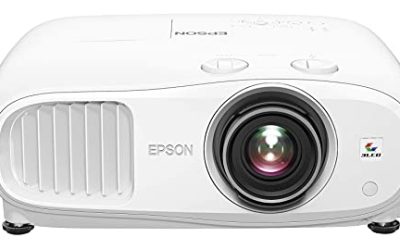
Epson EX3280
- Best for: Meeting rooms that need strong colour brightness for charts and graphs.
- 3-Chip 3LCD XGA projector
- 3600 lumens color brightness
- 3600 lumens white brightness
- HDMI input
Meeting rooms that need strong colour brightness for charts and graphs.
XGA resolution is narrower than WXGA, so wide spreadsheets may need scrolling.
The Epson EX3280 is the colour brightness pick for meeting rooms where charts and graphs must stay vivid with the lights on. Its three chip 3LCD design gives equal brightness for colour and white, so a red bar in a chart looks as strong as the white background behind it. The XGA resolution suits slides and spreadsheets, and the built in speaker covers a small room without extra audio gear. HDMI connects modern laptops in seconds, and the high contrast ratio keeps text edges sharp on a white screen. The compact body fits a meeting room shelf, and the lamp design keeps maintenance simple for a shared office.
Watch out for: XGA resolution is narrower than WXGA, so wide spreadsheets may need scrolling.
ViewSonic PA503W
- Best for: Bright rooms with a standard throw distance and wide documents.
- 4000 lumens brightness
- WXGA resolution 1280 x 800
- HDMI input
- Vertical keystone correction
Bright rooms with a standard throw distance and wide documents.
The standard throw needs several feet of space, so measure the room before buying.
The ViewSonic PA503W is the bright all rounder for rooms with a standard throw distance. Its 4000 lumens output keeps slides readable even when the room lights stay on, and the WXGA resolution gives extra width for side by side documents. Vertical keystone correction straightens the image when the projector sits above or below the screen centre, which saves time at the start of every meeting. HDMI covers modern laptops, and the lamp based design keeps the unit simple to maintain in a shared office. The wide WXGA panel suits modern laptops, and the bright output means the blinds can stay open during afternoon meetings.
Watch out for: The standard throw needs several feet of space, so measure the room before buying.
ViewSonic PS502W
- Best for: Small rooms where the projector sits close to the wall.
- 4000 lumens brightness
- WXGA resolution 1280 x 800
- 0.52 short throw ratio
- HDMI and USB Type A connectivity
Small rooms where the projector sits close to the wall.
Short throw placement is fussy, so a small shift in position changes the image size noticeably.
The ViewSonic PS502W is the short throw pick for small rooms where the projector must sit close to the wall. Its 0.52 throw ratio shows a large image from just a few feet away, so the presenter can stand beside the screen without casting a shadow across it. The 4000 lumens output keeps the image bright in a lit classroom or meeting room, and the WXGA resolution suits wide slides and tables. HDMI and USB Type A cover modern laptops and quick file display, and the built in speaker handles small rooms on its own. The short throw design also keeps the presenter out of the light path.
Watch out for: Short throw placement is fussy, so a small shift in position changes the image size noticeably.
Which One Fits Your Situation
Your meetings rely on colour charts
Pick the Epson EX3280. Its three chip 3LCD design gives equal brightness for colour and white, so charts keep their colours with the lights on. The built in speaker covers a small meeting room, and HDMI connects a modern laptop in seconds. The XGA resolution suits simple slides, and the equal colour brightness keeps every chart vivid. The equal brightness also helps when the room lights stay on.
Your room is bright with a long throw
Pick the ViewSonic PA503W. The 4000 lumens output holds up in a lit room, and the WXGA resolution gives extra width for wide documents. Vertical keystone correction straightens the image when the projector sits off centre, which saves setup time. The wide panel suits side by side documents, and the bright output holds up in afternoon light. The bright output also suits afternoon meetings with the blinds open.
Your room is small and the wall is close
Pick the ViewSonic PS502W. The short throw ratio shows a large image from just a few feet away, so the presenter can stand beside the screen without blocking it. The 4000 lumens output and WXGA resolution suit classrooms and small meeting rooms alike. The presenter can stand beside the screen without casting a shadow across the slides.
You share one projector between rooms
Pick the ViewSonic PA503W. Its bright output and standard throw suit most rooms, and the simple setup means anyone can carry it to the next meeting and have it running in minutes. The lamp based design keeps it light enough to move, and HDMI covers whatever laptop the next room brings. The bright panel also suits a classroom with the lights on.
Common Mistakes
- Buying on brightness alone for business use and ignoring resolution, so dense spreadsheets turn into a blur at the back of the room during long meetings when eyes tire.
- Forgetting to measure the room before buying, then finding the projector cannot fill the wall from where the table sits in a small room.
- Choosing a cheap projector with no keystone correction, so every single meeting starts with a tilted image and wasted time at every meeting.
- Assuming any laptop will connect without checking, when the projector lacks the HDMI port the team actually uses every day most often in the room.
- Ignoring lamp life and replacement cost, which decide what the projector really costs over years of daily meetings in a busy office for the whole team.
Frequently Asked Questions
How bright should a business projector be?
A business projector should be rated at 3600 lumens or above for a lit meeting room, because lower brightness forces the blinds shut and slows the meeting. Colour brightness matters as much as white brightness, since charts lose meaning when colours wash out. All three projectors in this guide meet that brightness level. Check both figures in the listing carefully before you buy.
Is WXGA better than XGA for business use?
WXGA is wider than XGA, which helps with side by side documents and broad spreadsheets. XGA still suits simple slides and standard tables. If the room mostly shows wide documents, favour WXGA; if the slides are simple, XGA is enough and often costs less to run. Always check the native resolution in the listing, not just the maximum input the projector accepts.
What is a short throw projector?
A short throw projector shows a large image from a very short distance, with a throw ratio near 0.5 showing a 100 inch image from just a few feet away. It suits small rooms where the table sits close to the wall, and it lets the presenter stand beside the screen without casting a shadow. Measure the room first.
Do business projectors need a separate speaker?
A built in speaker covers a small meeting room or classroom on its own, and all three projectors in this guide include one. Larger rooms need external speakers, so check the audio output on the projector if the room holds more than a dozen people. Check the audio output on the projector if the room is large.
FAQ
How bright should a business projector be?
Is WXGA better than XGA for business use?
What is a short throw projector?
Do business projectors need a separate speaker?
More from Amazon
Programs that pair well with the guide above. Offers and eligibility are set by Amazon and may change.
Free shipping on eligible items, Prime Video and more. Eligible new members can start with a free trial.
Start a Prime free trialAd-free music streaming. Eligible new subscribers can start with a free trial.
Try Music Unlimited freeA Prime membership for ages 18-24 with a trial period. Eligibility is set by Amazon.
See Prime for Young AdultsAudiobooks and podcasts to listen to on the go. Eligible new members can start with a free trial.
Try Audible freeAs an Amazon Associate we earn from qualifying purchases.