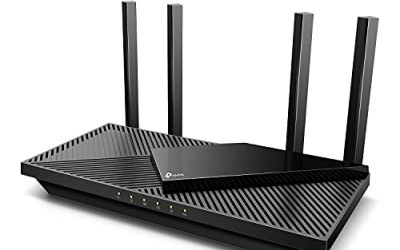
Our Short List of 3

- Best Overall: TP-Link Archer AX55 — AX3000 Wi-Fi 6, four gigabit LAN ports, USB 3.0, and a strong feature set for most homes.
- Best Value for Small Homes: NETGEAR Nighthawk R6700AX — AX1800 Wi-Fi 6 in a compact four-stream design, listed for coverage up to 1,500 square feet.
- Best for Gaming: ASUS RT-AX86U Pro — AX5700 Wi-Fi 6 with a 2.5 gigabit port, a dedicated gaming port, and gaming traffic tools.
- Best Budget Wi-Fi 6 Entry: TP-Link Archer AX21 — AX1800 Wi-Fi 6 with gigabit ports and four high-gain antennas.
All 5 Picks at a Glance
| Product | Specs | Action |
|---|---|---|
| Our Top Picks |
| Check price on Amazon |
 2. NETGEAR Nighthawk R6700AX — Best Value for Small Homes | Check price on Amazon | |
 3. ASUS RT-AX86U Pro — Best for Gaming | Check price on Amazon | |
 4. TP-Link Archer AX21 — Best Budget Wi-Fi 6 Entry | Check price on Amazon | |
 5. ASUS RT-AX1800S — Best Compact Wi-Fi 6 Pick | Check price on Amazon |
Our Top Picks
- ASUS RT-AX1800S Dual Band WiFi 6 Extendable RouterRouter9.06 x 5.28 x 2.2 inches0.82 poundsCheck on Amazon
As an Amazon Associate I earn from qualifying purchases.
The Short Answer
If you want one router that covers most homes well, pick the TP-Link Archer AX55. It pairs Wi-Fi 6 with a full set of gigabit Ethernet ports, four antennas, and a USB 3.0 port, and it handles streaming, gaming, and a house full of connected devices.
Every router in this guide is a standalone unit with gigabit wired ports. A gigabit port moves data at up to 1,000 megabits per second over a cable, so a wired desktop, console, or network drive is never held back by a slower port. That matters when your internet plan is fast and when you move large files between devices at home.
The five picks cover different homes. The Archer AX55 is the all-rounder, the NETGEAR Nighthawk R6700AX suits smaller homes, the ASUS RT-AX86U Pro adds gaming features and a 2.5 gigabit port, the TP-Link Archer AX21 is the simplest way into Wi-Fi 6, and the ASUS RT-AX1800S is the compact Wi-Fi 6 pick with four gigabit LAN ports. None is a mesh system; each one connects to your modem and takes over your home network.
Our Top Picks
- Best Overall: TP-Link Archer AX55 — AX3000 Wi-Fi 6, four gigabit LAN ports, USB 3.0, and a strong feature set for most homes.
- Best Value for Small Homes: NETGEAR Nighthawk R6700AX — AX1800 Wi-Fi 6 in a compact four-stream design, listed for coverage up to 1,500 square feet.
- Best for Gaming: ASUS RT-AX86U Pro — AX5700 Wi-Fi 6 with a 2.5 gigabit port, a dedicated gaming port, and gaming traffic tools.
- Best Budget Wi-Fi 6 Entry: TP-Link Archer AX21 — AX1800 Wi-Fi 6 with gigabit ports and four high-gain antennas.
Quick Comparison
| Router | Wi-Fi Standard | Combined Wireless Speed | Gigabit Ports | USB Port | Best For |
|---|---|---|---|---|---|
| TP-Link Archer AX55 | Wi-Fi 6 | AX3000, up to 2,976 Mbps | 1 WAN + 4 LAN | USB 3.0 | Most homes |
| NETGEAR Nighthawk R6700AX | Wi-Fi 6 | AX1800, up to 1,800 Mbps | 1 WAN + 4 LAN | None listed | Small homes |
| ASUS RT-AX86U Pro | Wi-Fi 6 | AX5700, up to 5,700 Mbps | 1 WAN + 4 LAN, plus 2.5G | USB 3.0 | Gaming |
| TP-Link Archer AX21 | Wi-Fi 6 | AX1800, up to 1,800 Mbps | 1 WAN + 4 LAN | USB 2.0 | Simple Wi-Fi 6 upgrade |
| ASUS RT-AX1800S | Wi-Fi 6 | AX1800, up to 1,800 Mbps | 1 WAN + 4 LAN | USB 2.0 | Compact Wi-Fi 6 |
Speed figures are the combined totals listed for each model, adding both bands together. No single device reaches the combined total. Confirm the exact port count and USB version on the listing, because hardware revisions can change small details.
How to Choose
Start with the wired ports: every Ethernet port should be listed at 10/100/1000 Mbps. Some older routers still ship with 100 megabit ports, which cap every wired device at one tenth of gigabit speed. All five picks here pass that check.
Next, match the Wi-Fi generation to your devices. Wi-Fi 6 handles many connected devices more efficiently than Wi-Fi 5, thanks to OFDMA and MU-MIMO, which serve several devices in the same transmission window. For a household running phones, laptops, a TV, a console, and smart home gadgets at once, Wi-Fi 6 is the sensible baseline. Wi-Fi 5 is still workable for lighter households, but every pick in this guide is Wi-Fi 6, so you get the efficiency gains across the board.
Coverage is the check most buyers get wrong. Manufacturers list coverage for open floor plans with the router in a central spot, and walls, floors, and a closed cabinet all shrink real coverage. A model listed for 1,500 square feet suits a flat or a small house; one listed for 3,000 square feet suits a larger home. If your home is larger, look at mesh-capable models such as the Archer AX55 or the ASUS picks, which can add a second compatible unit later.
Count your wired devices before you choose. A desktop, a console, a smart TV, and a network drive already need four LAN ports, which is what most routers here provide. If you need more, a gigabit switch can add ports to any router here. A USB port is useful for sharing a drive or a printer; the Archer AX55 and the RT-AX86U Pro include USB 3.0, and the RT-AX1800S includes a USB 2.0 port.
Gaming households should look at traffic tools. Adaptive QoS, a dedicated gaming port, and a 2.5 gigabit port all help when a wired gaming machine shares the connection with streams and downloads, and the RT-AX86U Pro bundles those features. On security, look for WPA3 encryption, automatic firmware updates, parental controls, and a guest network. TP-Link includes HomeShield, ASUS includes AiProtection, and NETGEAR includes Armor, though some advanced features need a subscription — confirm on the listing which are included.
The Picks in Detail
1. TP-Link Archer AX55 — Best Overall
The Archer AX55 gets the balance right. This dual-band Wi-Fi 6 router is listed at AX3000, with combined speeds up to 2,976 Mbps — 2,402 Mbps on 5 GHz and 574 Mbps on 2.4 GHz. Its wired side is complete: one gigabit WAN port, four gigabit LAN ports, and a USB 3.0 port.
Four fixed antennas with beamforming focus the signal toward your devices, and TP-Link lists coverage for three-bedroom homes. OFDMA and MU-MIMO keep the connection steady when many devices are active, and 160 MHz channel support gives the 5 GHz band extra room. It supports WPA3 security, VPN clients and server, and HomeShield for parental controls, and it works with EasyMesh, so a second compatible unit can extend coverage later. Setup runs through the Tether app or a web interface. The one real gap is the absence of a 2.5 gigabit port, so a wired device that could use faster-than-gigabit speeds is capped at gigabit — not a limitation for most homes, where the internet plan itself is the ceiling.
Pros:
– Full gigabit wired ports plus USB 3.0
– Wi-Fi 6 with 160 MHz channels and OFDMA
– EasyMesh support for later expansion
– VPN client and server built in
Cons:
– No 2.5 gigabit port for faster wired links
– Some HomeShield features need a subscription
2. NETGEAR Nighthawk R6700AX — Best Value for Small Homes
The R6700AX is the simplest pick in this guide, and that is its strength. It is a four-stream AX1800 Wi-Fi 6 router with combined speeds up to 1,800 Mbps — 1,200 Mbps on 5 GHz and 600 Mbps on 2.4 GHz. NETGEAR lists coverage up to 1,500 square feet and support for up to 20 devices, which fits a flat or a small house.
The wired side matches the rest of the guide: one gigabit WAN port and four gigabit LAN ports. A dual-core processor running at 880 MHz handles everyday traffic, and the Nighthawk app manages setup, pausing the internet, and checking connection speed. NETGEAR Armor is included with a 30-day trial, and Smart Parental Controls help manage screen time for children. There is no USB port, so you cannot attach shared storage or a printer directly — the main trade-off against the Archer AX55. Note the model number: this link is the R6700AX-3AZPAS version, the current revision — confirm the exact variant on the listing before you buy.
Pros:
– Straightforward Wi-Fi 6 with gigabit ports
– Compact design suited to flats and small homes
– Nighthawk app makes setup and management simple
– Armor and parental controls included on trial
Cons:
– No USB port for shared storage or a printer
– Coverage and device limits suit smaller homes only
3. ASUS RT-AX86U Pro — Best for Gaming
The RT-AX86U Pro is the most capable router in this guide, built for households where gaming shares the connection with everything else. It is a dual-band Wi-Fi 6 router listed at AX5700, with combined speeds up to 5,700 Mbps across both bands. A 1.8 GHz quad-core processor and 1 GB of RAM sit behind that performance, per the manufacturer’s specifications for this series — confirm the exact processor and memory on the listing, because ASUS sells several variants in the AX86 family.
The wired side is where this router stands apart. Alongside four gigabit LAN ports and a gigabit WAN port, it has a 2.5 gigabit port and a dedicated gaming port that gives a connected gaming machine priority. Mobile Game Mode, Adaptive QoS, and port forwarding round out the gaming feature set, and a USB 3.0 port handles shared storage. AiProtection provides network security without a subscription, and AiMesh lets the router join a mesh network with other compatible ASUS units. The standing design needs open air around it rather than a closed cabinet. It is the most complex router here, but the defaults work well out of the box, and the ASUS Router app keeps common tasks simple.
Pros:
– 2.5 gigabit port plus a dedicated gaming port
– AX5700 Wi-Fi 6 with strong multi-device handling
– AiProtection security included without a subscription
– AiMesh support for whole-home expansion
Cons:
– More expensive and more complex than the other picks
– Several similar AX86 variants exist — confirm the exact model on the listing
4. TP-Link Archer AX21 — Best Budget Wi-Fi 6 Entry
The Archer AX21 is the simplest route into Wi-Fi 6 with gigabit ports. It is a dual-band AX1800 router with combined speeds up to 1,800 Mbps — 1,200 Mbps on 5 GHz and 574 Mbps on 2.4 GHz. Four high-gain antennas with beamforming give it solid reach for its class, and the wired side is the standard set: one gigabit WAN port and four gigabit LAN ports, each listed at 10/100/1000 Mbps.
OFDMA and MU-MIMO are included, so the router handles several devices at once better than older Wi-Fi 5 models. It supports VPN server functions, works with Alexa, and runs through the Tether app. The listing notes a two-year manufacturer warranty. The trade-offs are modest: no 6 GHz band, so Wi-Fi 6E devices cannot use it, and a thinner feature set than the Archer AX55 — no USB 3.0 port and no 160 MHz channel support. Availability has varied, so confirm the exact variant and availability on the live listing before buying.
Pros:
– Wi-Fi 6 and gigabit ports at an entry-level position
– Four high-gain antennas with beamforming
– VPN server support and Alexa compatibility
– Simple setup through the Tether app
Cons:
– No 6 GHz band and no USB 3.0 port
– Availability has varied — confirm on the live listing
5. ASUS RT-AX1800S — Best Compact Wi-Fi 6 Pick
The RT-AX1800S is the compact pick in this guide: a dual-band Wi-Fi 6 router listed at AX1800, with combined speeds up to 1,800 Mbps — 1,201 Mbps on 5 GHz and 574 Mbps on 2.4 GHz. Four fixed antennas with beamforming give it solid reach for its size, and the wired side is the standard set: one gigabit WAN port and four gigabit LAN ports, each listed at 10/100/1000 Mbps.
OFDMA and MU-MIMO handle several devices at once, and the router includes AiProtection Classic security, WPA3 encryption, and AiMesh support, so it can join a mesh network with other compatible ASUS units. A USB 2.0 port covers shared storage or a printer. The trade-off is scope: there is no 2.5 gigabit port and no 6 GHz band, and the feature list is thinner than the RT-AX86U Pro — this is a straightforward Wi-Fi 6 router, not a gaming flagship. Confirm the exact variant on the listing before you buy.
Pros:
– Wi-Fi 6 with gigabit ports in a compact design
– AiProtection security and AiMesh support
– USB 2.0 port for shared storage or a printer
– Simple setup through the ASUS Router app
Cons:
– No 2.5 gigabit port and no 6 GHz band
– Thinner feature set than the larger ASUS pick
Who Should Choose What
Choose the TP-Link Archer AX55 if you want the safest all-round pick. It covers a three-bedroom home and leaves room to grow through EasyMesh.
Choose the NETGEAR Nighthawk R6700AX if your home is small and you want Wi-Fi 6 without extra features. It is the easiest router here to set up and forget, and its limits match a flat or a small house.
Choose the ASUS RT-AX86U Pro if gaming is the priority. The 2.5 gigabit port, the dedicated gaming port, and the traffic tools set it apart.
Choose the TP-Link Archer AX21 if you want Wi-Fi 6 and gigabit ports with the smallest feature list and the simplest setup. It suits a smaller home or a first upgrade from an older provider-supplied router.
Choose the ASUS RT-AX1800S if you want a compact Wi-Fi 6 router with ASUS security tools and AiMesh support in a modest size.
Common Mistakes
Buying a router with 100 megabit ports. A router can advertise fast wireless speeds while its Ethernet ports cap wired devices far below gigabit. Always check that the LAN port bandwidth is listed at 10/100/1000 Mbps.
Trusting the combined speed figure. AX3000, AX5700, and similar class names add the speeds of every band together. No single device ever sees that total. Compare routers by their per-band speeds and their port set, not by the headline number alone.
Hiding the router. A router inside a closed cabinet, behind a TV, or on the floor loses signal through every obstacle in the way. Place it in the open, near the center of the home, and raised off the floor.
Forgetting the modem. A standalone router does not replace a modem or a gateway supplied by your internet provider. If your provider’s device is a combined modem and router, put it in bridge mode or turn off its wireless network.
Ignoring firmware updates. Router makers ship security fixes through firmware, and an unpatched router is an easy target. Turn on automatic updates where the router supports them.
FAQ
What does gigabit mean on a wireless router?
Gigabit refers to the wired Ethernet ports. A gigabit port supports data transfer up to 1,000 megabits per second over a cable. The wireless side is separate: Wi-Fi speeds depend on the standard, the band, and the device.
Do I need a gigabit router if my internet plan is slower than gigabit?
Yes, it is still worth having. Gigabit ports remove the port as a bottleneck, so wired devices always get the full speed of your plan. They also speed up transfers between devices inside your home.
Is Wi-Fi 6 worth it over Wi-Fi 5 for a gigabit router?
For most homes, yes. Wi-Fi 6 handles many connected devices more efficiently through OFDMA and MU-MIMO. Wi-Fi 5 remains usable, but every pick in this guide is Wi-Fi 6, so you get the efficiency gains across the board.
Can these routers work with a mesh system later?
The Archer AX55 supports EasyMesh, and the two ASUS picks support AiMesh, so each can join a mesh network with a second compatible unit from the same maker. The R6700AX and the AX21 do not list the same mesh expansion, so confirm mesh support on the listing if that matters to you.
How many wired devices can I connect to these routers?
Every pick here has four gigabit LAN ports. If you need more, a gigabit switch connects to one LAN port and adds several more. Count your desktop, console, TV, and network drive before you choose.
Conclusion
The best gigabit wireless routers pair fast wireless with wired ports that never hold your devices back, and the Archer AX55 does that for most homes. The NETGEAR Nighthawk R6700AX suits smaller homes, the ASUS RT-AX86U Pro suits gamers who want a 2.5 gigabit port and traffic tools, the TP-Link Archer AX21 is the simple Wi-Fi 6 entry point, and the ASUS RT-AX1800S is the compact Wi-Fi 6 pick with ASUS security and mesh support.
Before you buy, confirm three things on the listing: gigabit LAN ports listed at 10/100/1000 Mbps, the exact model and hardware revision, and current availability. Those checks prevent the most common regret in router buying — a unit that looks fast on the box and caps your network at the port.
FAQ
What does gigabit mean on a wireless router?
Do I need a gigabit router if my internet plan is slower than gigabit?
Is Wi-Fi 6 worth it over Wi-Fi 5 for a gigabit router?
Can these routers work with a mesh system later?
How many wired devices can I connect to these routers?
More from Amazon
Programs that pair well with the guide above. Offers and eligibility are set by Amazon and may change.
Free shipping on eligible items, Prime Video and more. Eligible new members can start with a free trial.
Start a Prime free trialAd-free music streaming. Eligible new subscribers can start with a free trial.
Try Music Unlimited freeA Prime membership for ages 18-24 with a trial period. Eligibility is set by Amazon.
See Prime for Young AdultsAudiobooks and podcasts to listen to on the go. Eligible new members can start with a free trial.
Try Audible freeAs an Amazon Associate we earn from qualifying purchases.