Our Short List of 3
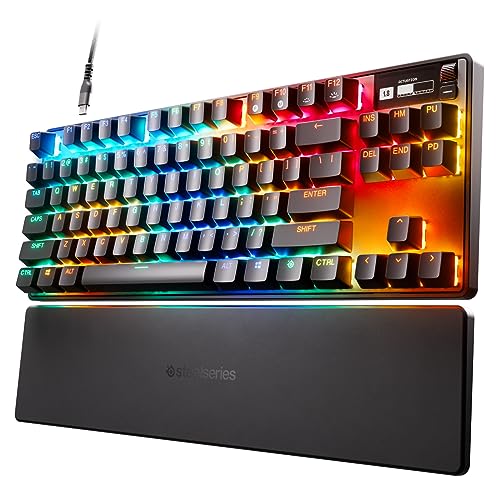
- Best for: Gamers who want one board that adjusts from hair-trigger shooting to comfortable typing.
- OmniPoint 2.0 adjustable HyperMagnetic switches
- OLED Smart Display
- Aircraft-grade aluminium frame
- PBT keycaps
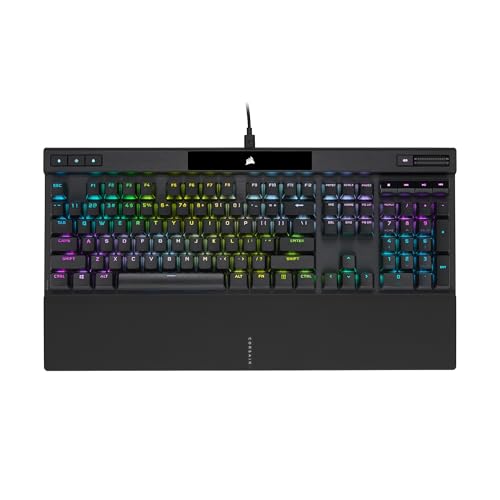
- Best for: Gamers who want a proven Cherry MX Red board with the fastest polling rate here.
- Cherry MX Red linear switches
- 8000Hz hyper-polling rate
- PBT double-shot keycaps
- Anodised brushed aluminium frame

- Best for: Players who want a compact, rigid aluminium board with smooth HyperX Red switches.
- HyperX Red linear switches
- Aircraft-grade aluminium body
- RGB backlighting with NGENUITY software
- Compact form factor
All 4 Picks at a Glance
| Product | Specs | Action |
|---|---|---|
| SteelSeries Apex Pro TKL (2023) |
| Check price on Amazon |
| Corsair K70 RGB PRO |
| Check price on Amazon |
| HyperX Alloy Origins |
| Check price on Amazon |
 Razer Huntsman V2 |
| Check price on Amazon |
Key takeaways
- Our guide to the best linear keyboards compares smooth-switch boards for gaming, covering Hall effect, Cherry MX Red, HyperX Red and Razer optical switches.
A linear switch travels straight down with no bump and no click, and that smooth, predictable press is why so many gamers prefer it. The real decision when choosing a linear keyboard is not the brand on the case, but which kind of linear switch sits under the keys: a classic Cherry MX Red, a fast optical switch, or an adjustable Hall effect switch that lets you change the actuation point. Each type feels different under the fingers, and the right one depends on whether you play fast shooters, type all day, or want one board that does both.
This guide is for gamers who want smooth, consistent key presses, fast typists who dislike tactile bumps, and anyone curious about adjustable switches after years on a standard membrane board. Every keyboard below was chosen from the names and specifications stated on its Amazon product page, with switch type, keycap material, polling rate and connection details taken from the listing itself.
Quick Picks
As an Amazon Associate we earn from qualifying purchases
| Product | Best for | Key spec from title |
|---|---|---|
| SteelSeries Apex Pro TKL (2023) | Adjustable Hall effect switches and an OLED display | OmniPoint 2.0 adjustable switches, OLED display |
| Corsair K70 RGB PRO | A classic Cherry MX Red board with 8000Hz polling | Cherry MX Red linear switches, 8000Hz hyper-polling |
| HyperX Alloy Origins | A compact aluminium board with HyperX Red switches | Linear HyperX Red switches, aircraft-grade aluminium |
| Razer Huntsman V2 | Fast optical switches with a wrist rest included | Linear Optical Switches Gen-2, 8000Hz polling |
How to Choose
Know the three kinds of linear switch
Linear switches come in three main types, and the differences matter more than the brand on the box. A classic mechanical linear switch such as Cherry MX Red or HyperX Red uses a metal spring and contacts, with a fixed actuation point and a familiar press. An optical linear switch uses a beam of light to register the press, which removes the metal contact and makes the switch faster and longer lasting. A Hall effect switch uses magnets and lets you adjust how far the key travels before it registers, from a hair trigger for shooters to a deeper press for typing.
Actuation force and travel decide how the board feels
Actuation force is how hard you press before the key registers, and travel is how far the key moves, so both numbers shape the feel of every press. Light switches around 45 grams suit fast games where you tap keys constantly, while heavier switches resist accidental presses when your fingers rest on the keys. A short actuation point makes a board feel faster in shooters, but it can cause mistypes if you rest heavy fingers on the home row. Adjustable Hall effect switches solve this by letting you set a different actuation point for each key, so the movement keys can be hair-trigger while the typing keys stay deeper.
Keycaps, frame and layout matter for daily use
A keyboard is a tool you touch for hours every day, so the keycaps and frame deserve as much attention as the switches. Double-shot PBT keycaps resist shine and wear far better than ABS caps, which turn glossy within months of heavy use, and the listing usually names the keycap material directly. An aluminium frame keeps the board rigid and stops it flexing during intense play, while a plastic frame is lighter and cheaper but can feel hollow. Layout matters too: a tenkeyless board saves desk space for a wide mouse sweep, while a full-size board keeps the number pad for work and everyday use.
Polling rate, connection and software complete the picture
Polling rate is how often the keyboard reports to the computer, and 8000Hz polling means the board checks in eight times as often as a standard 1000Hz board, which cuts input delay in fast games. The difference is small in casual play but real in competitive shooters, so the listing usually states the rate plainly. A detachable USB-C cable is worth having, since it survives trips and lets you replace a worn cable instead of the whole board. Finally, check the software: SteelSeries, Corsair, HyperX and Razer each offer their own app for lighting, macros and switch settings, and a board is only as flexible as the software that configures it.
The 4 Best Options
SteelSeries Apex Pro TKL (2023)
- Best for: Gamers who want one board that adjusts from hair-trigger shooting to comfortable typing.
- OmniPoint 2.0 adjustable HyperMagnetic switches
- OLED Smart Display
- Aircraft-grade aluminium frame
- PBT keycaps
Gamers who want one board that adjusts from hair-trigger shooting to comfortable typing.
The adjustable switches take time to tune, so expect an afternoon of experimenting before the board feels right.
The Apex Pro TKL is the most flexible keyboard in this guide, because its OmniPoint 2.0 Hall effect switches let you adjust the actuation point of every key from a hair trigger to a deep press. That means one board can feel fast for shooters and forgiving for typing, without swapping switches or buying a second keyboard. The OLED smart display shows settings, game information and notifications at a glance, and the aircraft-grade aluminium frame keeps the tenkeyless board rigid on the desk. PBT keycaps resist shine, the USB-C cable detaches for travel, and the tenkeyless layout leaves room for a wide mouse sweep.
Watch out for: The adjustable switches take time to tune, so expect an afternoon of experimenting before the board feels right.
Corsair K70 RGB PRO
- Best for: Gamers who want a proven Cherry MX Red board with the fastest polling rate here.
- Cherry MX Red linear switches
- 8000Hz hyper-polling rate
- PBT double-shot keycaps
- Anodised brushed aluminium frame
Gamers who want a proven Cherry MX Red board with the fastest polling rate here.
The board is full-size, so it takes more desk space than the tenkeyless boards and leaves less room for a wide mouse sweep.
The K70 RGB PRO is the classic linear board in this guide, built around Cherry MX Red switches that have been the default choice for gamers for years. Its 8000Hz hyper-polling reports key presses eight times as often as a standard board, which cuts input delay in fast games, and the PBT double-shot keycaps resist shine far longer than ABS caps. The anodised aluminium frame keeps the board rigid, the detachable USB-C cable survives travel, and the magnetic palm rest supports long sessions. A dedicated tournament switch locks the backlight to static and disables macros, which suits players who compete in person.
Watch out for: The board is full-size, so it takes more desk space than the tenkeyless boards and leaves less room for a wide mouse sweep.
HyperX Alloy Origins
- Best for: Players who want a compact, rigid aluminium board with smooth HyperX Red switches.
- HyperX Red linear switches
- Aircraft-grade aluminium body
- RGB backlighting with NGENUITY software
- Compact form factor
Players who want a compact, rigid aluminium board with smooth HyperX Red switches.
The compact layout has no number pad, so it suits gaming better than spreadsheet work.
The Alloy Origins is the compact pick in this guide, a solid aluminium board with HyperX Red linear switches that feels far more expensive than its size suggests. The aircraft-grade aluminium body keeps the board rigid and heavy enough to stay put during intense play, while the compact layout drops the number pad to save desk space. HyperX Red switches give a smooth, light press with a short travel, and the RGB lighting is fully customisable through the NGENUITY software. It is the simplest board here, with no screen or adjustable switches, and that simplicity is its appeal for players who want a tough, no-fuss linear keyboard.
Watch out for: The compact layout has no number pad, so it suits gaming better than spreadsheet work.
Razer Huntsman V2
- Best for: Gamers who want the fastest optical switches with media controls and a wrist rest in the box.
- Linear Optical Switches Gen-2
- 8000Hz polling rate
- Doubleshot PBT keycaps
- Dedicated media keys and dial
Gamers who want the fastest optical switches with media controls and a wrist rest in the box.
The optical switches cannot be swapped for other switch types, so the feel you buy is the feel you keep.
The Huntsman V2 is the fastest-feeling board in this guide, thanks to its second-generation linear optical switches that register presses with a beam of light instead of a metal contact. That design makes the switches faster and longer lasting than classic mechanical switches, and sound dampeners keep the keystrokes quieter than most gaming boards. The 8000Hz polling rate matches the Corsair board for input speed, while doubleshot PBT keycaps resist wear and shine. Dedicated media keys and a dial control volume without leaving the game, and the included ergonomic wrist rest supports long sessions at the desk.
Watch out for: The optical switches cannot be swapped for other switch types, so the feel you buy is the feel you keep.
Which One Fits Your Situation
You want one board for gaming and typing
Choose the SteelSeries Apex Pro TKL. Its adjustable OmniPoint switches let you set a hair trigger for movement keys and a deeper press for typing keys, so one board covers both jobs. The OLED display and tenkeyless layout make it the most versatile keyboard in this guide.
You want the classic linear feel with the fastest response
Choose the Corsair K70 RGB PRO. Cherry MX Red switches give the familiar smooth press that gamers have trusted for years, and 8000Hz polling keeps input delay low. The PBT keycaps and aluminium frame make it a board that lasts.
You want a compact board that stays put on the desk
Choose the HyperX Alloy Origins. Its aircraft-grade aluminium body is heavy and rigid, the compact layout saves desk space for a wide mouse sweep, and the HyperX Red switches give a smooth, light press. It suits players who want a tough, simple board.
You want the fastest switches with media controls
Choose the Razer Huntsman V2. Its second-generation optical switches register presses faster than classic mechanical switches, the sound dampeners keep it quiet, and the media keys, dial and wrist rest make long sessions comfortable. The 8000Hz polling rate matches the Corsair board for input speed, so fast games feel responsive from the first press.
Common Mistakes
- Buying a board for its lighting or looks without checking the switch type, then finding the feel wrong for your games.
- Choosing a full-size board when your desk is small, and losing mouse space to a number pad you never use.
- Picking a hair-trigger actuation point for typing, then mistyping constantly because your fingers rest too heavily on the keys.
- Assuming all switches with the same colour name feel the same, when Cherry MX Red, HyperX Red and Razer optical switches each have a different press.
- Ignoring the keycap material, and watching ABS caps turn shiny and smooth within months of heavy use.
Frequently Asked Questions
What is a linear switch?
A linear switch travels straight down with no tactile bump and no click, giving a smooth, consistent press from top to bottom. It registers when the key reaches its actuation point, which is usually around 2 mm of travel. Linear switches suit fast gaming because the press is predictable, and many typists prefer them because there is no bump to push through on every keystroke.
Are linear switches good for gaming?
Yes, linear switches are the most popular choice for gaming. Their smooth travel makes rapid repeated presses easy, and the lack of a tactile bump means the key resets quickly for the next press. Light linear switches around 45 grams suit fast shooters, while adjustable Hall effect switches let you tune each key for the game you are playing.
Do linear keyboards make noise?
Linear keyboards are quieter than clicky boards, since there is no click mechanism, but they are not silent. The sound comes from the key bottoming out, and a board with sound dampeners, such as the Razer Huntsman V2, is noticeably quieter. Lubricated switches and a solid frame also reduce noise, though most linear boards still make a soft sound.
Can you swap the switches on a linear keyboard?
It depends on the board. Hot-swappable boards let you pull switches out and fit new ones, but none of the four boards here is sold as hot-swappable, and the Razer optical switches cannot be replaced with other types. If swapping switches matters, check the listing for hot-swap support before buying, since a soldered board locks in the switches it ships with.
FAQ
What is a linear switch?
Are linear switches good for gaming?
Do linear keyboards make noise?
Can you swap the switches on a linear keyboard?
More from Amazon
Programs that pair well with the guide above. Offers and eligibility are set by Amazon and may change.
Free shipping on eligible items, Prime Video and more. Eligible new members can start with a free trial.
Start a Prime free trialAd-free music streaming. Eligible new subscribers can start with a free trial.
Try Music Unlimited freeA Prime membership for ages 18-24 with a trial period. Eligibility is set by Amazon.
See Prime for Young AdultsAudiobooks and podcasts to listen to on the go. Eligible new members can start with a free trial.
Try Audible freeAs an Amazon Associate we earn from qualifying purchases.