Our Short List of 3
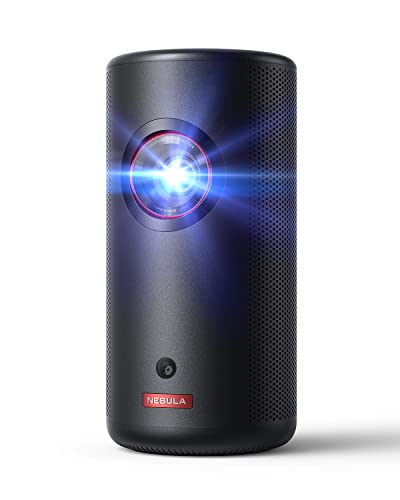
- Best for: Movie and series nights in dark rooms where the iPad feeds it by cable or the built-in apps take over.
- Display technology: DLP with laser light source
- Native resolution: 1920 x 1080 (1080p)
- Brightness: 300 ANSI lumens
- Maximum image size: 120 inches

- Best for: Travellers and students who stream from built-in apps and occasionally plug an iPad in for downloaded content.
- Native resolution: 1920 x 1080 (1080p)
- Brightness: 200 lumens
- Maximum image size: 120 inches
- Operating system: Google TV with officially licensed Netflix
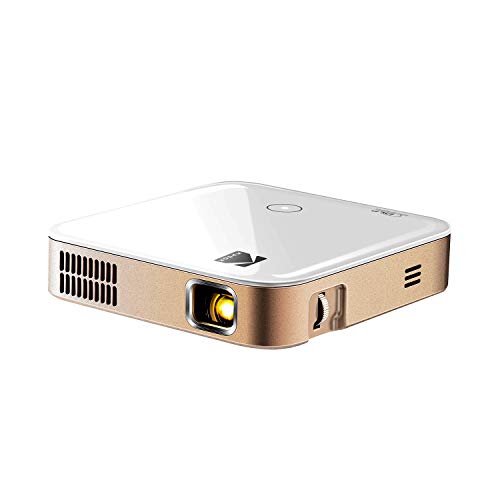
- Best for: iPad owners who mainly mirror their own photos, files and downloaded videos rather than streaming apps.
- Display technology: DLP
- Operating system: Android 6.0 onboard
- Maximum image size: Up to 150 inches per the listing
- Connectivity: Wi-Fi, Bluetooth, HDMI, USB, 3.5mm audio
All 4 Picks at a Glance
| Product | Specs | Action |
|---|---|---|
| NEBULA Capsule 3 Laser |
| Check price on Amazon |
| NEBULA Capsule 3 |
| Check price on Amazon |
| KODAK Luma 350 |
| Check price on Amazon |
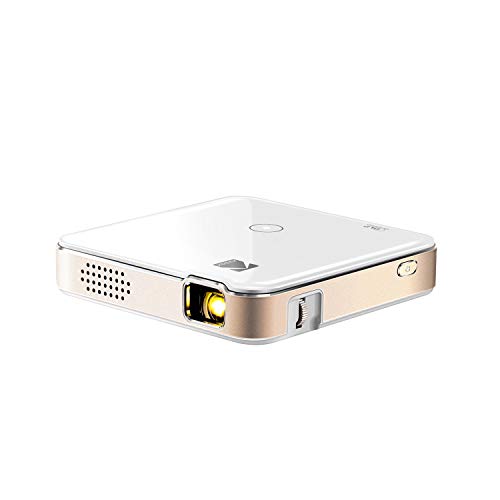 KODAK Luma 150 |
| Check price on Amazon |
Key takeaways
- The best mini projectors for iPad, compared: AirPlay mirroring models, USB-C and HDMI picks, native 1080p screens and pocket pico projectors.
The real decision when buying a mini projector for an iPad is not screen size. It is how the picture gets from the tablet to the wall. Some of these projectors mirror an iPad wirelessly over AirPlay, some need a USB-C or Lightning-to-HDMI cable, and some sidestep the iPad almost entirely by running streaming apps themselves. Pick the wrong connection style and a projector that looked perfect on paper becomes the one you stop carrying.
This roundup is for iPad owners who watch films in dark bedrooms, present slides in small rooms, share photos with family, or travel with a screen in a carry-on. Every model below was chosen from its Amazon listing title and specifications, and each one has a stated way to connect an iPad: AirPlay mirroring, HDMI, or USB-C.
Quick Picks
As an Amazon Associate we earn from qualifying purchases
| Product | Best for | Key spec from title |
|---|---|---|
| NEBULA Capsule 3 Laser | Dark-room movie nights from a sofa or bed | 1080p laser picture, 300 ANSI lumens |
| NEBULA Capsule 3 | Travel streaming without extra devices | 1080p Google TV, Netflix licensed |
| XGIMI MoGo 2 Pro (New) | Brighter rooms and shared presentations | 430 ISO lumens, 1080p native |
| KODAK Luma 350 | Mirroring the iPad screen itself | Screen mirroring with iOS Luma app |
| KODAK Luma 150 | Pocket-size photo sharing anywhere | AirPlay and Miracast mirroring |
How to Choose
Decide how the iPad will connect before anything else
Three routes exist, and they behave very differently. AirPlay mirroring sends whatever is on the iPad screen over Wi-Fi with no cable, which is ideal for photos, slides and downloaded files. A wired link through a USB-C or Lightning-to-HDMI adapter is dumber but more reliable, and it works in hotel rooms with captive Wi-Fi portals. The third route ignores mirroring: projectors with Google TV built in run Netflix and similar apps natively, so the iPad becomes just the remote. Choose based on what you actually show, because no single model is best at all three.
Separate native resolution from supported resolution
Mini projector listings love the phrase “supports 1080p,” which often means the chip accepts a Full HD signal and then displays it at 854 x 480. That downscaling is fine for cartoons and slides at modest sizes, yet text in a spreadsheet turns fuzzy fast. If you read documents or subtitles on the projected image, prioritise a model whose native resolution is 1920 x 1080, and check the listing’s specification table rather than the headline. Two projectors in this roundup are native 1080p designs; the smaller Kodak models trade sharpness for size, and that trade should be a conscious one.
Match brightness to the room, not the marketing number
Brightness decides whether a mini projector is a toy or a tool. Figures quoted in plain “lumens” on budget listings are not comparable with ANSI or ISO lumens, which follow a measurement standard. As a working rule, a model rated around 200 to 300 ANSI lumens handles a dark bedroom or a tent at image sizes up to roughly 80 inches. Pushing towards 100 inches, or presenting in a lit meeting room, calls for the brightest unit here and a smaller picture. Every mini projector looks dimmer as the image grows, so rate your room honestly before choosing.
Weigh battery freedom against plug-in brightness
A built-in battery turns a projector into something you aim at a ceiling or a garden wall without hunting for a socket, and the capsule-style models here manage about two and a half hours of video per charge. The cost is bulk, weight, and a brightness ceiling. The brightest pick in this list skips the battery entirely and runs from USB-C power delivery, which suits desks and classrooms where an outlet is always near. Think about your last three viewing sessions: if a cable would have reached in all of them, battery life is a weaker argument than it first appears.
The 5 Best Options
NEBULA Capsule 3 Laser
- Best for: Movie and series nights in dark rooms where the iPad feeds it by cable or the built-in apps take over.
- Display technology: DLP with laser light source
- Native resolution: 1920 x 1080 (1080p)
- Brightness: 300 ANSI lumens
- Maximum image size: 120 inches
Movie and series nights in dark rooms where the iPad feeds it by cable or the built-in apps take over.
Copyrighted streaming apps cannot be screen-mirrored from the iPad; use the projector’s own Google TV apps or a wired connection for those services.
This is the pick for people who mostly watch films and series in the dark and want the strongest picture a can-sized projector can produce. Its laser light source gives it the highest ANSI brightness among the battery models here, along with autofocus and automatic keystone correction, so setup on a bedside table takes seconds. The iPad connects by cable over HDMI or USB-C, while Google TV with licensed Netflix covers streaming without the tablet at all. Sound from the single 8W speaker is respectable at bedroom distances, and the whole unit travels like a drinks can.
NEBULA Capsule 3
- Best for: Travellers and students who stream from built-in apps and occasionally plug an iPad in for downloaded content.
- Native resolution: 1920 x 1080 (1080p)
- Brightness: 200 lumens
- Maximum image size: 120 inches
- Operating system: Google TV with officially licensed Netflix
Travellers and students who stream from built-in apps and occasionally plug an iPad in for downloaded content.
The 200-lumen picture washes out quickly in daylight, so plan on curtains or evening viewing, and update the firmware before first use as the listing advises.
The standard Capsule 3 keeps the same soda-can shape and Google TV platform as the laser model, swapping the laser engine for an LED one and a lower brightness rating. That makes it the sensible travel unit: it streams Netflix, YouTube and similar services on its own, fits in a jacket pocket or a small bag, and still accepts the iPad over HDMI or USB-C when you want your own files on the wall. Intelligent screen adaptation handles fit, focus and keystone automatically, which matters in hotel rooms where you cannot choose the furniture layout.
XGIMI MoGo 2 Pro (New)
Where the capsule models chase portability, the MoGo 2 Pro (New) chases brightness. Its 430 ISO lumens are the strongest figure in this roundup, which makes it the one to consider for a living room with lamps on or a small meeting where slides must stay readable. Google TV with licensed Netflix is built in, autofocus and screen adaptation are automatic, and twin 8W speakers give presentations and films more presence than the smaller units manage. There is no battery inside; it runs from USB-C power delivery, so a wall adapter or a suitable power bank becomes part of the kit.
Specs
- Native resolution: 1920 x 1080 (1080p), supports 4K input
- Brightness: 430 ISO lumens
- Operating system: Google TV with officially licensed Netflix
- Speakers: 2 x 8W
- Setup features: Auto focus, object avoidance, screen adaption
- Connectivity: HDMI, USB-C, USB, Wi-Fi, Bluetooth
- Power: USB-C power delivery (65W class); no built-in battery
- Weight: About 2.4 lb
Best for: Presentations, classrooms and brighter rooms where the picture must survive ambient light.
Watch out for: This model name covers several variants and regional listings, so confirm the exact “(New)” Google TV version and its port layout on the product page before ordering.
ASIN: B0FBWVK4YG
KODAK Luma 350
- Best for: iPad owners who mainly mirror their own photos, files and downloaded videos rather than streaming apps.
- Display technology: DLP
- Operating system: Android 6.0 onboard
- Maximum image size: Up to 150 inches per the listing
- Connectivity: Wi-Fi, Bluetooth, HDMI, USB, 3.5mm audio
iPad owners who mainly mirror their own photos, files and downloaded videos rather than streaming apps.
The listing states that copyrighted services such as Netflix and Hulu cannot be mirrored or screencast; watch those through the projector’s own apps instead.
The Luma 350 takes the opposite approach to the Google TV models: it is built around mirroring. Its listing highlights screen mirroring for phones and tablets, an iOS Luma app that turns the iPad into the controller, and onboard Android for downloading apps directly. That combination suits people whose content already lives on the iPad — photo libraries, saved videos, documents — and who would rather cast it than manage a second app library. The flat, pocketable body with touch controls travels well, and HDMI plus USB ports cover wired fallbacks when Wi-Fi is unavailable or unreliable.
KODAK Luma 150
- Best for: Sharing photos and home videos from an iPad at close range, anywhere, with zero setup.
- Display technology: DLP
- Native resolution: 854 x 480, supports 1080p input
- Brightness: 60 ANSI lumens
- Contrast ratio: 1000:1
Sharing photos and home videos from an iPad at close range, anywhere, with zero setup.
Current stock on this listing runs through third-party sellers and offer signals are mixed, so check the seller and availability on the product page before ordering.
The Luma 150 is the true pocket option: a flat square barely larger than a coaster that slips into a bag and exists for spontaneous sharing. Its listing calls out AirPlay and Miracast mirroring by name, which is exactly the feature iPad owners need for photos and home videos, and HDMI, USB and microSD inputs cover the wired route. The trade-offs are plain — a 480p-class native picture and modest brightness — so it earns its place for close-range, lights-down sharing rather than film nights. For showing a room full of people the pictures you just took, nothing else here is this small.
Which One Fits Your Situation
You watch downloaded films on trips and in hotel rooms
Take the NEBULA Capsule 3. Its built-in Google TV apps handle streaming when hotel Wi-Fi cooperates, the battery covers a full film, and when the network demands a captive-portal login your iPad cannot complete on the projector, a short USB-C or HDMI cable from the tablet solves it. The laser version is better still if the room has blackout curtains and you value the extra brightness.
You want to show photos and slides straight off the iPad
Choose the KODAK Luma 350 for regular presenting, or the Luma 150 when pocket size matters most. Both mirror the iPad screen wirelessly — the Luma 150 names AirPlay in its listing — so the tablet stays in your hand as the controller. Keep the image modest and the room dim, because these are convenience-first projectors rather than brightness leaders.
You present to small groups in rooms you cannot darken
The XGIMI MoGo 2 Pro (New) is the realistic choice. Its 430 ISO lumens hold up better against ceiling lights, the twin speakers carry a small room, and automatic focus and screen adaption shorten setup between meetings. Budget for the USB-C power supply in your bag, since there is no battery to fall back on when the only outlet is across the room.
You want a ceiling cinema in a dark bedroom
The NEBULA Capsule 3 Laser suits this best. Aim it upward from a nightstand, let autofocus and keystone correction square the picture, and stream from its own apps so the iPad stays free. The laser engine’s extra brightness keeps a large ceiling image watchable, and the battery means no cable trailing across the bed for a late-night film.
Common Mistakes
- Assuming AirPlay mirroring works for every app: major streaming services block mirroring of protected content, so buyers who plan to mirror Netflix from an iPad end up disappointed; use built-in apps or a cable for those services.
- Reading “supports 1080p” as native 1080p, then wondering why text looks soft; the specification table’s native resolution is the number that describes the actual picture.
- Comparing raw “lumens” from one listing against ANSI or ISO lumens from another, which makes dim projectors look brighter on paper than they are in the room.
- Forgetting the adapter: older iPads need a Lightning-to-HDMI adapter and newer ones a USB-C video cable or hub, and the genuine Apple adapters behave more predictably than unbranded ones.
- Buying a battery projector for a fixed desk setup, or a plug-in model for camping; matching the power style to where you actually watch saves a return.
Frequently Asked Questions
Can I mirror Netflix or Disney+ from my iPad to these projectors?
Usually not directly. Protected streaming apps block AirPlay mirroring and screencasting, a restriction the Kodak listings state openly. The practical workaround is to use the streaming app built into the Google TV models here, or connect the iPad with an HDMI adapter, which the apps treat as an external display rather than a wireless mirror.
Which adapter does my iPad need for a wired connection?
iPads with a USB-C port — recent iPad Pro, Air and mini models — connect with a USB-C to HDMI cable or a USB-C hub. Older iPads with a Lightning port need Apple’s Lightning Digital AV Adapter plus a standard HDMI cable. Either way, the projector end is a normal HDMI input on every model in this roundup.
Does AirPlay mirroring need a Wi-Fi network?
The mirroring models here join a Wi-Fi network and receive the iPad’s screen through it, so both devices must share that network. In places with no usable network, such as some hotel rooms or outdoor spots, a wired HDMI connection is the dependable fallback, which is one reason every pick in this list keeps a physical video input.
How large an image can a mini projector realistically fill?
In a dark room, the brighter models here stay convincing up to about 80 to 100 inches, even though several listings quote maximum sizes of 120 to 150 inches. Treat those maximums as geometric limits rather than quality promises: as the picture grows, brightness per area falls, so a smaller image in a dim room almost always looks better than a huge washed-out one.
FAQ
Can I mirror Netflix or Disney+ from my iPad to these projectors?
Which adapter does my iPad need for a wired connection?
Does AirPlay mirroring need a Wi-Fi network?
How large an image can a mini projector realistically fill?
More from Amazon
Programs that pair well with the guide above. Offers and eligibility are set by Amazon and may change.
Free shipping on eligible items, Prime Video and more. Eligible new members can start with a free trial.
Start a Prime free trialAd-free music streaming. Eligible new subscribers can start with a free trial.
Try Music Unlimited freeA Prime membership for ages 18-24 with a trial period. Eligibility is set by Amazon.
See Prime for Young AdultsAudiobooks and podcasts to listen to on the go. Eligible new members can start with a free trial.
Try Audible freeAs an Amazon Associate we earn from qualifying purchases.