Our Short List of 3
All 5 Picks at a Glance
| Product | Specs | Action |
|---|---|---|
 TP-Link Deco X55 | Check price on Amazon | |
 Amazon eero 6+ | Check price on Amazon | |
 Google Nest Wifi Pro | Check price on Amazon | |
 NETGEAR Orbi RBK753 | Check price on Amazon | |
 TP-Link Deco XE75 | Check price on Amazon |
Our Top Picks
- TP-Link Deco XE75 AXE5400 Tri-Band WiFi 6E System3 Pack4.13 x 4.13 x 6.65 inches3.5 poundsCheck on Amazon
The best home wifi mesh routers replace a single router struggling to reach every room with a team of units that work together as one network. Instead of one box in a corner trying to push a signal through walls, floors, and furniture, a mesh system places two or three nodes around the home so each room gets a strong connection. Devices move between nodes without dropping, and the network stays under a single name and password, so there is nothing to switch manually as you walk from the living room to the bedroom.
A mesh system makes the most sense when a single router leaves dead zones, when the home has more than one floor, or when dozens of phones, laptops, consoles, smart TVs, and smart home gadgets all compete for bandwidth at once. This guide compares five mesh systems that suit different home sizes, internet plans, and budgets, from affordable WiFi 6 kits to tri-band WiFi 6E systems built for large homes.
How to Choose
Coverage and home size
Start with the size and layout of the home. Manufacturers rate each pack for a maximum square footage under open-space conditions, and thick walls, metal ductwork, and multiple floors all shrink real-world coverage. A two-node kit suits a small apartment or a single-story home, while a three-node kit is the safer choice for a larger house or a home with two or more floors.
WiFi standard: WiFi 6 versus WiFi 6E
WiFi 6 systems handle modern homes well, with enough capacity for streaming, video calls, and gaming at the same time. WiFi 6E adds the 6 GHz band, a newer and less crowded frequency that compatible phones and laptops can use for faster, cleaner connections. The 6 GHz band is especially useful as a backhaul lane, which is the private channel nodes use to talk to each other, because it keeps that traffic away from the bands devices use. Choose WiFi 6E if the household has newer devices or a gigabit internet plan; WiFi 6 remains a solid choice for more modest plans and older hardware.
Number of bands
Dual-band systems broadcast on 2.4 GHz and 5 GHz. Tri-band systems add a third band, either a second 5 GHz band or a 6 GHz band, which gives the mesh backhaul its own lane. Tri-band kits cost more, but they hold up better in busy homes where many devices stream and game at once, because node-to-node traffic does not compete with device traffic. For a small home with light use, dual-band is enough. For a large home with heavy simultaneous use, tri-band is worth the step up.
Ethernet ports and wired backhaul
Each node usually carries two or three Ethernet ports. One port connects the main node to the modem, and the remaining ports can wire a gaming PC, a console, or a TV directly to the network for the most stable connection available. Some systems also support wired backhaul, where nodes connect to each other through Ethernet cables instead of wirelessly, which frees up wireless capacity and improves consistency across the whole home. If the home already has Ethernet runs in the walls, a system with wired backhaul support makes full use of them.
Device capacity
Count the connected devices in the home, including phones, tablets, laptops, consoles, smart TVs, speakers, cameras, and smart home gear. Mesh systems list a maximum number of connected devices, and that figure is a ceiling rather than a comfortable working load. A household with more than fifty connected devices should look for a system rated for at least seventy-five, and a smart-home-heavy household should aim higher still, because every sensor and bulb takes a slot.
App setup and management
Mesh systems are managed through a companion app, which handles setup, firmware updates, device lists, and parental controls. A clear app matters, because it is where guest networks get created, unknown devices get checked, and individual devices get paused. Look for an app that shows which node each device is connected to, lets the network be split into separate bands when a smart device only works on 2.4 GHz, and sends alerts when a new device joins. Subscription services for advanced security or parental controls are optional extras on some systems, so check what is included free and what requires a paid plan.
Compatibility with the internet plan
Match the system to the speed of the internet plan. A mesh system rated for gigabit plans is wasted on a basic plan, and a budget system can become a bottleneck on a gigabit plan. Check the maximum supported plan speed, the speed of the Ethernet ports, and whether the system has a multi-gigabit port for plans faster than one gigabit. The modem itself matters too: mesh systems are routers, not modems, so a separate modem or a modem-router in bridge mode is still needed unless the internet provider supplies one.
Top Picks
TP-Link Deco X55
TP-Link Deco X55 AX3000 WiFi 6 Mesh System (3-Pack)
The TP-Link Deco X55 is a WiFi 6 mesh system in a three-pack that covers up to 6,500 square feet, which makes it a strong fit for a medium to large home. Its AX3000 class combines a 2.4 GHz band up to 574 Mbps with a 5 GHz band rated up to 2,402 Mbps, and the three units support up to 150 connected devices, so a busy household with phones, laptops, consoles, and smart home gear can all stay online at once. Each unit carries three gigabit Ethernet ports, giving nine ports across the kit for wired connections to a gaming PC, a console, a smart TV, or a network drive.
Setup runs through the Deco app, which walks through placement and configuration step by step and suggests better node positions when the signal between units is weak. The system supports Ethernet backhaul, so homes with wired runs can link nodes by cable for a steadier connection. AI-driven mesh technology adjusts the connection between nodes as conditions change, and the included HomeShield features cover network scanning, parental controls, and quality of service settings that let gaming or video calls take priority over background downloads.
Who it is for: households that want wide coverage and plenty of wired ports at a mid-range tier, especially families with many devices and a gaming setup that benefits from a wired link.
Caveats: the system is dual-band WiFi 6 rather than tri-band WiFi 6E, so node-to-node traffic shares the same bands devices use. Homes with a gigabit plan and many simultaneous streams may get more headroom from a tri-band kit. The advanced HomeShield Pro features require a paid subscription, while the basic set is included.
Amazon eero 6+
Amazon eero 6+ Mesh WiFi System (3-Pack)
The Amazon eero 6+ is a dual-band WiFi 6 mesh system in a three-pack that covers up to 4,500 square feet and supports internet plans up to a gigabit, with capacity for more than seventy-five connected devices. Its 5 GHz band uses 160 MHz channels, a wider lane that lets compatible devices move data faster than standard 80 MHz channels allow. Each unit has two gigabit Ethernet ports, and the system doubles as a built-in Zigbee smart home hub, so compatible smart home devices can connect through Alexa without a separate hub box.
Setup is famously straightforward: the eero app guides placement, names the network, and handles updates automatically in the background. The eero 6+ suits households that want the network to disappear into the background, with minimal fiddling and automatic maintenance. It also pairs well with homes already using Alexa devices, since the hub function removes one more box from the shelf.
Who it is for: households that value simple setup and app-based management, Alexa users who want a built-in Zigbee hub, and homes on a gigabit plan or slower that need reliable coverage across several rooms.
Caveats: two Ethernet ports per unit is fewer than some rivals provide, so a home with several wired devices near one node may need a small switch. The system is dual-band, so heavy simultaneous use in a very large home may favor a tri-band alternative. Some advanced features, including enhanced security and activity controls, sit behind the eero Plus subscription.
Google Nest Wifi Pro
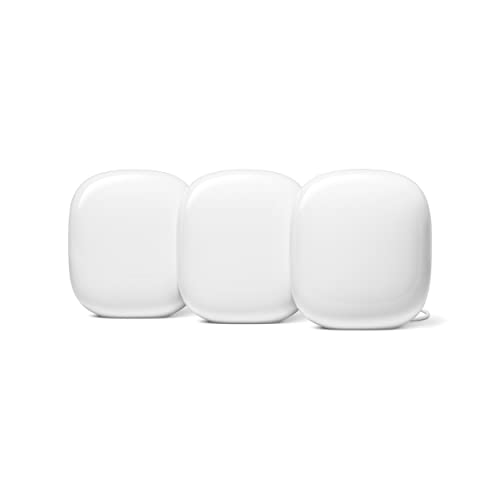
Google Nest Wifi Pro WiFi 6E Mesh Router (3-Pack, Snow)
The Google Nest Wifi Pro is a WiFi 6E mesh system in a three-pack that covers up to 6,600 square feet, with each router covering up to 2,200 square feet. Its tri-band design adds the 6 GHz band to the usual 2.4 GHz and 5 GHz bands, with combined speeds up to 4.2 Gbps, and the 6 GHz band serves as a clean backhaul lane that keeps node-to-node traffic away from device traffic. Each unit has two 1 Gbps Ethernet ports, and the system also works as a smart home hub for Matter and Thread devices, which covers a growing range of smart lights, locks, and sensors.
The Google Home app handles setup and management, and the system fits naturally into a home already using Google devices, with network controls available alongside other smart home gear in the same app. The rounded, fabric-free design is meant to sit visibly on a shelf or side table without looking like networking hardware, which matters for nodes that need to be out in the open to broadcast well.
Who it is for: Google ecosystem households, homes with newer WiFi 6E devices, and larger homes that need tri-band capacity and wide coverage from three nodes.
Caveats: the system has two Ethernet ports per unit, so heavy wired setups may need a switch. It has no dedicated USB port and no web-based management interface, with configuration handled entirely through the Google Home app. Households without WiFi 6E devices will not see the full benefit of the 6 GHz band, though the system still performs well on the other bands.
NETGEAR Orbi RBK753
NETGEAR Orbi Whole Home Tri-Band Mesh WiFi 6 System (RBK753)
The NETGEAR Orbi RBK753 is a tri-band WiFi 6 system with one router and two satellite extenders, covering up to 7,500 square feet and supporting more than forty connected devices. Its AX4200 class reaches up to 4.2 Gbps across three bands, and the dedicated third band works as backhaul, so the connection between the router and the satellites does not compete with device traffic. That dedicated lane is the Orbi line’s signature strength, and it keeps speeds consistent even when the satellites sit far from the router.
The router carries three Ethernet ports plus a dedicated internet port, and each satellite adds two more, giving the kit enough wired capacity for a gaming PC, a console, and a media streamer without extra hardware. The Orbi app handles setup, and the system includes NETGEAR Armor security features and parental controls, with some advanced functions tied to a subscription after an included trial period.
Who it is for: large homes where the router and the far rooms are separated by distance or thick walls, and households that want a dedicated backhaul band for steady performance across the whole house.
Caveats: the device capacity is lower than some rivals, so a smart-home-heavy household should check its device count against the limit. The satellites are bulky, and the advanced security features require a subscription after the trial. Orbi systems use a distinct router-and-satellite design rather than interchangeable nodes, so a satellite cannot act as the main router.
TP-Link Deco XE75
TP-Link Deco XE75 AXE5400 Tri-Band WiFi 6E Mesh System (3-Pack)
The TP-Link Deco XE75 is a tri-band WiFi 6E mesh system in a three-pack that covers up to 7,200 square feet and supports up to 200 connected devices. Its AXE5400 rating splits across three bands: 6 GHz up to 2,402 Mbps, 5 GHz up to 2,402 Mbps, and 2.4 GHz up to 574 Mbps. The 6 GHz band gives the mesh a fast, uncongested backhaul lane, which keeps the link between nodes strong even when many devices are streaming and gaming at once. Each unit has three gigabit Ethernet ports, and the system supports wired backhaul for homes with Ethernet runs.
The Deco app guides setup and placement, and the system works with other Deco models, so a single Deco XE75 node can join an existing Deco network or the kit can expand later. AI-driven mesh technology tunes the connection between nodes, and HomeShield provides network scanning, parental controls, and quality of service controls, with a Pro tier available for more advanced features. The XE75 suits homes that want WiFi 6E capacity and tri-band performance without moving to the most expensive tier of mesh hardware.
Who it is for: large or multi-story homes with many devices, households on a gigabit plan, and buyers who want WiFi 6E and a dedicated 6 GHz backhaul lane at a balanced tier.
Caveats: a cached Amazon listing snapshot showed no buying options listed at the time of that crawl, while other sources listed the system as in stock on Amazon more recently, so confirm the listing and the exact pack before ordering. The Ethernet ports are gigabit rather than multi-gigabit, so plans faster than one gigabit will not get their full speed through a wired connection. As with other Deco systems, the advanced HomeShield Pro features require a paid subscription.
Comparison Table
| System | WiFi Standard | Bands | Coverage (3-Pack) | Devices | Ethernet Ports per Unit |
|---|---|---|---|---|---|
| TP-Link Deco X55 | WiFi 6 | Dual-band | Up to 6,500 sq ft | Up to 150 | 3 gigabit |
| Amazon eero 6+ | WiFi 6 | Dual-band | Up to 4,500 sq ft | 75+ | 2 gigabit |
| Google Nest Wifi Pro | WiFi 6E | Tri-band | Up to 6,600 sq ft | Not specified | 2 x 1 Gbps |
| NETGEAR Orbi RBK753 | WiFi 6 | Tri-band | Up to 7,500 sq ft | 40+ | Router 3, satellites 2 |
| TP-Link Deco XE75 | WiFi 6E | Tri-band | Up to 7,200 sq ft | Up to 200 | 3 gigabit |
Which One Is Right for You?
For a medium home on a modest plan with many devices, the TP-Link Deco X55 covers a lot of ground and provides the most Ethernet ports per unit, which suits a gaming setup with several wired devices. For a household that wants the simplest setup and already uses Alexa, the Amazon eero 6+ keeps management light and adds a Zigbee hub for smart home gear. For a Google household with newer devices, the Nest Wifi Pro brings WiFi 6E and Matter and Thread support into the same app that runs the rest of the smart home.
For the largest homes, the choice comes down to backhaul. The NETGEAR Orbi RBK753 uses a dedicated third band for node-to-node traffic, which keeps performance steady across long distances, while the TP-Link Deco XE75 pairs a 6 GHz backhaul lane with the highest device capacity in this group and full WiFi 6E support. Either one suits a multi-story home where the far rooms sit well away from the modem. Before ordering, measure the home, count the devices, check the internet plan speed, and confirm the exact pack size, since every system here is sold in one, two, and three-pack configurations.
Frequently Asked Questions
How many mesh nodes does a home need?
A two-node kit usually covers a small apartment or a single-story home, while a three-node kit suits a larger house or a home with two or more floors. Start with the coverage figure of the pack and add a node if a far room still shows a weak signal.
Is a mesh system better than a single powerful router?
A mesh system wins when the problem is distance and dead zones rather than raw speed in one room. A single powerful router can serve a small open-plan space well, but its signal fades through walls and floors. Mesh nodes spread the signal around the home so each room gets a strong connection, and devices roam between nodes without dropping. For a large or multi-story home, mesh is usually the better answer.
Do mesh routers replace the modem?
No. Mesh systems are routers, not modems, so a modem is still needed to connect to the internet service. The main mesh node plugs into the modem with an Ethernet cable. If the provider supplied a modem-router combination unit, it can usually be set to bridge mode so the mesh system handles routing.
Can a mesh network be used for gaming?
Yes, and it works well when a node sits near the gaming setup. Wiring the console or gaming PC into the node’s Ethernet port gives the most stable connection, and a tri-band system keeps node-to-node traffic on its own lane so gaming traffic does not compete with streaming in other rooms. Place the main node near the modem and the satellite within a strong signal of the main node for the best result.
Disclosure: As an Amazon Associate, we may earn from qualifying purchases.
FAQ
Which One Is Right for You?
How many mesh nodes does a home need?
Is a mesh system better than a single powerful router?
Do mesh routers replace the modem?
Can a mesh network be used for gaming?
More from Amazon
Programs that pair well with the guide above. Offers and eligibility are set by Amazon and may change.
Free shipping on eligible items, Prime Video and more. Eligible new members can start with a free trial.
Start a Prime free trialAd-free music streaming. Eligible new subscribers can start with a free trial.
Try Music Unlimited freeA Prime membership for ages 18-24 with a trial period. Eligibility is set by Amazon.
See Prime for Young AdultsAudiobooks and podcasts to listen to on the go. Eligible new members can start with a free trial.
Try Audible freeAs an Amazon Associate we earn from qualifying purchases.