
Our Short List of 3

- 27-inch 4K Nano IPS panel, 3840 x 2160 resolution, 144Hz refresh rate with 160Hz overclock, 1ms quoted response time, HDMI 2.1 and DisplayPort 1.4 inputs, HDR600 support, 98 percent DCI-P3 coverage, FreeSync Premium Pro and G-Sync Compatible.

- 27-inch QHD IPS panel, 2560 x 1440 resolution, 165Hz refresh rate, 1ms quoted response time, built-in speakers, HDR10 support, FreeSync Premium and G-Sync Compatible, DisplayPort and HDMI inputs, height-adjustable stand.
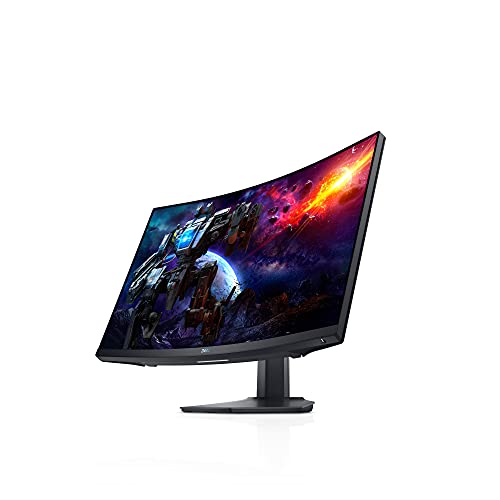
- 27-inch curved QHD VA panel, 2560 x 1440 resolution, 165Hz refresh rate, 1ms quoted response time, 1500R curvature, FreeSync Premium, DisplayPort and two HDMI inputs, height-adjustable stand.
All 3 Picks at a Glance
| Product | Specs | Action |
|---|---|---|
| 1. LG 27GP950-B — Best 4K Monitor for PUBG |
| Check price on Amazon |
| 4. ASUS TUF Gaming VG27AQ — Best PUBG Monitor With Built-In Speakers |
| Check price on Amazon |
| 5. Dell S2722DGM — Best Curved Value Monitor for PUBG |
| Check price on Amazon |
Key takeaways
- The best monitors for PUBG, from fast 1440p panels to sharp 4K screens — compare refresh rates, response times and adaptive sync for battlegrounds.
The best monitors for PUBG are fast, sharp, and honest about motion. PUBG is a battle royale where a distant enemy is a handful of pixels on a hillside, a firefight turns on who spots movement first, and the circle keeps shrinking until every decision happens at speed. A monitor that smears motion, washes out a dark building interior, or stutters when the frame rate dips will cost fights that skill alone should have won.
What PUBG needs most is a high refresh rate paired with a low response time. A 144Hz or faster panel shows more frames each second, which makes enemy movement smoother and easier to track, while a fast response time keeps the image clean when the camera whips around. Resolution matters too: 1440p is the sweet spot for most players, sharp enough to spot distant movement without demanding a flagship graphics card, while 4K suits players with strong hardware who want the clearest possible picture.
Every monitor in this guide runs at 120Hz or above, supports adaptive sync to smooth out frame rate changes, and uses a panel type that keeps colours and contrast strong in the varied lighting of Erangel and Miramar. Whether the priority is competitive speed, a curved immersive view, or a 4K picture, there is a pick below that fits.
How to Choose
1. Refresh rate
Refresh rate is the single most important specification for PUBG. A 144Hz panel refreshes more than twice as often as a standard 60Hz screen, which makes tracking a running enemy visibly smoother. A 165Hz panel adds a little more headroom. Even a 120Hz panel is a large step up from 60Hz, and every pick in this guide meets or exceeds that mark. If the graphics card can only reach 60 frames per second, a faster panel still helps, because the monitor will be ready the moment a hardware upgrade arrives.
2. Response time
Response time measures how quickly a pixel changes colour, and a slow response time shows up as ghosting: a faint trail behind moving objects. For PUBG, look for a monitor with a 1ms or similarly fast quoted response time, and check whether the overdrive setting is adjustable, since the fastest overdrive mode can cause overshoot artefacts. IPS panels in this guide balance speed and colour well, while VA panels offer deeper blacks at the cost of slightly slower dark transitions.
3. Resolution
A 1440p panel is the natural partner for PUBG at high refresh rates. It is sharp enough to pick out distant enemies and read the terrain, yet a mid-range graphics card can still push frame rates into triple digits. A 4K panel is sharper still and suits players with strong graphics cards who value clarity over maximum frame rate, while 1080p remains the choice for competitive players on modest hardware who want the highest frame rates possible.
4. Adaptive sync
PUBG frame rates swing with the scene: a quiet looting run may hold high frame rates, while a final-circle firefight with smoke and vehicles can dip sharply. Adaptive sync matches the monitor refresh rate to the graphics card output, which removes tearing and stuttering when the frame rate changes. Look for FreeSync or G-Sync Compatible support, and confirm the adaptive sync range covers the frame rates the system actually reaches.
5. Panel type
IPS panels offer wide viewing angles and accurate, consistent colour, which makes them the safest all-round choice for PUBG, work, and media on one desk. VA panels deliver deeper blacks and stronger contrast, so dark interiors and night scenes look richer, but they can show smearing on fast-moving dark objects. For most PUBG players, IPS is the default, and VA is the pick for players who value atmosphere and contrast in equal measure.
6. Size and curvature
A 27-inch monitor suits most desks and keeps the whole screen inside a comfortable field of view, which matters when the minimap, health bar, and kill feed all need to stay in peripheral vision. A curved 27-inch panel wraps the image slightly around the player and suits immersive play, though it changes the geometry of straight lines at the screen edges. Larger screens demand a deeper desk and a longer viewing distance, so measure before choosing.
7. Ports and extras
Check the port list against the devices on the desk. DisplayPort is the best connection for high refresh rates from a PC, while HDMI 2.1 is needed for 4K at 120Hz from a console. Built-in speakers are convenient for casual play, though a headset is better for hearing footsteps. A height-adjustable stand matters for long sessions, since the top of the screen should sit at eye level.
Top Picks
1. LG 27GP950-B — Best 4K Monitor for PUBG
- 27-inch 4K Nano IPS panel, 3840 x 2160 resolution, 144Hz refresh rate with 160Hz overclock, 1ms quoted response time, HDMI 2.1 and DisplayPort 1.4 inputs, HDR600 support, 98 percent DCI-P3 coverage, FreeSync Premium Pro and G-Sync Compatible.
The LG 27GP950-B is the sharpest monitor in this guide, a 27-inch 4K Nano IPS panel running at 144Hz with an overclock option to 160Hz, and the pick for PUBG players whose graphics card can drive 4K at high frame rates. At 4K, distant enemies resolve into clear shapes rather than ambiguous pixels, and the Nano IPS panel covers 98 percent of the DCI-P3 colour gamut with HDR600 support, so the varied landscapes of the battlegrounds look rich and distinct.
HDMI 2.1 ports carry 4K at 120Hz from a console as well as a PC, and DisplayPort 1.4 handles the full 144Hz from a graphics card. Adaptive sync support covers both FreeSync Premium Pro and G-Sync Compatible operation, so frame rate swings in busy final circles do not turn into tearing. The 1ms quoted response time keeps fast camera movement clean.
Who it is for: PUBG players with a strong graphics card who want the clearest possible picture, and anyone who also edits photos or video on the same screen.
Caveats: 4K at high frame rates needs serious graphics hardware, so players on mid-range cards will get more frames from a 1440p pick. Confirm the 27GP950-B model on the listing, since the closely named 27GN950-B is a different monitor.
2. Samsung Odyssey G5 G55C 27-Inch — Best Curved Monitor for PUBG
Samsung Odyssey G5 G55C on Amazon
The Samsung Odyssey G5 G55C is a 27-inch curved QHD monitor running at 165Hz, and the pick for players who want the battleground to wrap around them. The 1000R curvature is pronounced: the screen edges curve toward the player, which fills more of the field of view and makes the game feel larger. The VA panel delivers strong contrast, so dark buildings and night scenes hold detail instead of washing out to grey.
The 165Hz refresh rate and 1ms quoted response time keep motion smooth when the camera turns quickly, and FreeSync Premium support smooths out frame rate changes. QHD resolution at 27 inches is sharp enough to spot distant movement while remaining easy for a mid-range graphics card to drive at high frame rates. HDR10 support adds punch to bright outdoor scenes.
Specs
- 27-inch curved QHD VA panel, 2560 x 1440 resolution, 165Hz refresh rate, 1ms quoted response time, 1000R curvature, HDR10 support, FreeSync Premium, DisplayPort and HDMI inputs.
Who it is for: players who want an immersive curved view for long PUBG sessions, and anyone who values deep blacks and strong contrast.
Caveats: the strong curve changes the look of straight lines at the screen edges, which some players dislike, and VA panels can show slight smearing on very fast dark transitions. Check the curve in person if possible before committing.
3. LG 27GP850-B — Best All-Round Monitor for PUBG
The LG 27GP850-B is the balanced pick in this guide: a 27-inch QHD Nano IPS panel at 165Hz with an overclock to 180Hz, wide colour coverage, and a 1ms quoted response time. It does nothing extreme and nothing wrong, which is exactly what most PUBG players need. The Nano IPS panel covers 98 percent DCI-P3, so colours stay vivid and consistent, and the wide viewing angles keep the picture accurate when the chair shifts during a long session.
QHD resolution pairs well with a mid-range graphics card, holding high frame rates in most PUBG situations, while the overclock headroom gives a little extra smoothness when the hardware allows it. FreeSync Premium and G-Sync Compatible support handle frame rate dips without tearing, and the height-adjustable stand suits long evenings at the desk.
Specs
- 27-inch QHD Nano IPS panel, 2560 x 1440 resolution, 165Hz refresh rate with 180Hz overclock, 1ms quoted response time, 98 percent DCI-P3 coverage, HDR400 support, FreeSync Premium and G-Sync Compatible, DisplayPort and HDMI inputs.
Who it is for: most PUBG players, especially those who want one monitor for gaming, work, and media without a specialist trade-off.
Caveats: HDR400 is entry-level high dynamic range, so it adds some punch but not the dramatic highlights of an HDR600 panel. Confirm the 27GP850-B model on the listing, since LG sells several 27-inch gaming monitors with similar names.
4. ASUS TUF Gaming VG27AQ — Best PUBG Monitor With Built-In Speakers
- 27-inch QHD IPS panel, 2560 x 1440 resolution, 165Hz refresh rate, 1ms quoted response time, built-in speakers, HDR10 support, FreeSync Premium and G-Sync Compatible, DisplayPort and HDMI inputs, height-adjustable stand.
ASUS TUF Gaming VG27AQ on Amazon
The ASUS TUF Gaming VG27AQ is a 27-inch QHD IPS monitor at 165Hz with built-in speakers, and the pick for players who want a complete setup without separate audio hardware. The speakers are genuinely useful for casual play, video, and voice chat, while a headset remains the better choice for hearing footsteps in competitive matches.
The IPS panel runs at 165Hz with a 1ms quoted response time, and supports FreeSync Premium and G-Sync Compatible operation, so motion stays clean and frame rate changes stay smooth. HDR10 support and wide colour coverage keep the battlegrounds looking vivid, and the stand adjusts for height, tilt, swivel, and pivot. ASUS includes its Extreme Low Motion Blur feature, which can sharpen fast motion further at the cost of some brightness.
Who it is for: players who want speakers built into the monitor, and anyone building a clean desk without separate audio hardware.
Caveats: built-in speakers cannot match a headset for directional audio, so competitive players should still use a headset for ranked matches. The motion blur reduction feature lowers brightness, so it suits bright rooms less well.
5. Dell S2722DGM — Best Curved Value Monitor for PUBG
- 27-inch curved QHD VA panel, 2560 x 1440 resolution, 165Hz refresh rate, 1ms quoted response time, 1500R curvature, FreeSync Premium, DisplayPort and two HDMI inputs, height-adjustable stand.
The Dell S2722DGM is the value curved pick in this guide: a 27-inch curved QHD VA monitor at 165Hz with strong contrast and a 1ms quoted response time. The 1500R curve is gentler than the Samsung in this guide, which suits players who want some immersion without a dramatic wrap, and the VA panel delivers deep blacks that make night play and dark interiors look atmospheric.
QHD resolution at 165Hz is easy for a mid-range graphics card to drive, and FreeSync Premium support keeps frame rate changes smooth. The stand adjusts for height and tilt, and the monitor includes DisplayPort and two HDMI inputs for a PC and a console side by side. For the outlay, it is hard to find a curved high-refresh monitor with a better balance of speed and contrast.
Who it is for: players who want a curved high-refresh screen on a tighter budget, and anyone who plays a lot of night matches where VA contrast shines.
Caveats: VA panels can show slight smearing on fast dark-to-light transitions, so players who prioritise the fastest possible motion clarity should look at the IPS picks above. Confirm the S2722DGM model on the listing, since Dell sells several S-series monitors.
Comparison Table
| Monitor | Size | Resolution | Refresh Rate | Panel | Best For |
|---|---|---|---|---|---|
| LG 27GP950-B | 27-inch | 4K | 144Hz, 160Hz OC | Nano IPS | Sharpest picture, strong hardware |
| Samsung Odyssey G5 G55C | 27-inch curved | QHD | 165Hz | VA | Immersive curved play |
| LG 27GP850-B | 27-inch | QHD | 165Hz, 180Hz OC | Nano IPS | All-round balance |
| ASUS TUF VG27AQ | 27-inch | QHD | 165Hz | IPS | Built-in speakers |
| Dell S2722DGM | 27-inch curved | QHD | 165Hz | VA | Curved value |
Which One Is Right for You?
Start with the graphics card. A strong card that holds high frame rates at 4K makes the LG 27GP950-B the clearest choice in this guide, while a mid-range card will deliver more frames and smoother play on one of the QHD picks. Frame rate matters more than resolution in PUBG, so a 1440p panel running at 165Hz usually beats a 4K panel struggling at 60 frames per second.
Then decide on curve. The Samsung wraps the game around the player with its strong 1000R curve, the Dell offers a gentler 1500R curve at a lower outlay, and the three flat IPS panels suit players who want a neutral picture for work and media as well as gaming. If the monitor also serves as a work screen, a flat IPS panel is the safer choice.
For most players, the LG 27GP850-B is the default answer: fast, sharp, colour-accurate, and easy to drive. Players who want speakers built in should take the ASUS, players who want the deepest blacks should take one of the VA curved panels, and players with flagship hardware should take the 4K LG.
Frequently Asked Questions
Is 144Hz enough for PUBG?
Yes. The jump from 60Hz to 120Hz or 144Hz is the largest improvement a monitor can make for PUBG, and every pick in this guide meets or exceeds that mark. Higher refresh rates such as 165Hz or 180Hz add a little more smoothness, but the difference beyond 144Hz is smaller than the difference between 60Hz and 144Hz.
Does a 4K monitor help in PUBG?
It helps with spotting distant enemies, since 4K resolves fine detail more clearly than 1440p. The trade-off is frame rate: 4K needs much stronger graphics hardware to hold high frame rates, and a 1440p panel at 165Hz will usually feel smoother than a 4K panel at 60 frames per second. Choose 4K only when the graphics card can drive it.
Do I need a curved monitor for PUBG?
No. Curved monitors add immersion and fill more of the field of view, but they do not improve aiming or spotting. Flat panels suit mixed use better, since they also serve as work and media screens without distorted straight lines. Choose a curve because the immersion appeals, not because it offers a competitive edge.
What is adaptive sync and do I need it for PUBG?
Adaptive sync matches the monitor refresh rate to the graphics card output, which removes screen tearing and stuttering when the frame rate changes. PUBG frame rates swing with the scene, so adaptive sync makes a visible difference in busy fights. Every monitor in this guide supports it, so it is one less thing to worry about.
Disclosure: As an Amazon Associate, we may earn from qualifying purchases.
FAQ
Which One Is Right for You?
Is 144Hz enough for PUBG?
Does a 4K monitor help in PUBG?
Do I need a curved monitor for PUBG?
What is adaptive sync and do I need it for PUBG?
More from Amazon
Programs that pair well with the guide above. Offers and eligibility are set by Amazon and may change.
Free shipping on eligible items, Prime Video and more. Eligible new members can start with a free trial.
Start a Prime free trialAd-free music streaming. Eligible new subscribers can start with a free trial.
Try Music Unlimited freeA Prime membership for ages 18-24 with a trial period. Eligibility is set by Amazon.
See Prime for Young AdultsAudiobooks and podcasts to listen to on the go. Eligible new members can start with a free trial.
Try Audible freeAs an Amazon Associate we earn from qualifying purchases.









