Our Short List of 3

- Dual-band Wi-Fi 5, AC1750
- Three antennas, gigabit Ethernet ports
- USB port, OneMesh support, QoS
- Alexa compatible, parental controls

- Dual-band Wi-Fi 6, AX1500
- Four gigabit LAN ports, beamforming
- OFDMA, MU-MIMO, parental controls
- Works with Alexa, OneMesh support
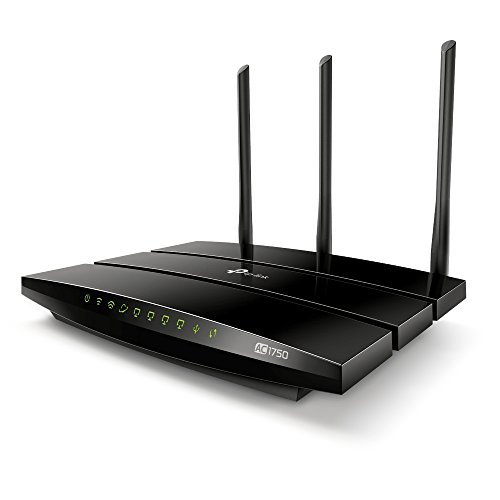
- Dual-band Wi-Fi 5, AC1750
- Three external antennas, gigabit Ethernet ports
- USB port for sharing a drive or printer
- Straightforward setup, guest network support
All 5 Picks at a Glance
| Product | Specs | Action |
|---|---|---|
| TP-Link Archer A7 |
| Check price on Amazon |
| TP-Link Archer AX10 |
| Check price on Amazon |
| TP-Link Archer C7 |
| Check price on Amazon |
 TP-Link Archer AX55 |
| Check price on Amazon |
 TP-Link Archer AX73 |
| Check price on Amazon |
Our Top Picks
The best gaming routers under 70 sit in the tier where a router stops being a basic box and starts helping your games. This guide compares five routers that fit that band, from a long-running Wi-Fi 5 workhorse to a Wi-Fi 6 router with a modern feature set. Every pick below is a complete dual-band router with gigabit Ethernet ports, QoS for gaming traffic, and enough capacity for a console, a PC and the rest of the house. We look at Wi-Fi standard, QoS, ports, coverage and security, because a gaming router earns its keep by keeping latency steady when the rest of the house is busy. Read the buying criteria first, then compare the five picks side by side.
How to Choose
Wi-Fi standard and speed class
Wi-Fi 6 gives more capacity for a house full of devices, with OFDMA and MU-MIMO letting the router serve several devices at once. A Wi-Fi 5 router rated AC1750 still handles a console and a PC well, but it shares the airwaves less efficiently. In this tier, a Wi-Fi 6 AX1500 or AX3000 router is the better long-term choice, while a well-built AC1750 router suits a smaller household.
Gaming QoS and traffic priority
Gaming QoS lets the router recognise console and PC traffic and give it priority over downloads, streams and updates. A router that lets you assign priority to a device by its MAC address is the most useful, because it follows the console rather than a port. Without QoS, a single large download can swamp a gaming session, so check that the router offers QoS in its settings.
Ports and wired connections
Four gigabit LAN ports let you wire a console and a PC and still have room for a TV or a second device. A wired connection is the most stable option for competitive play, since it removes Wi-Fi contention entirely. A USB port lets you share a drive or a printer on the network. Count the ports before you buy, because a router with only two LAN ports will force a switch onto your desk.
Coverage and antennas
External antennas and beamforming help the signal reach a console in another room, and a router with four antennas usually covers a flat or a small house well. Check the coverage figure in the listing, and remember that walls and floors cut the signal. A mesh-compatible router can add a node later if coverage needs to grow, which is worth having in this tier.
Processor and memory
A router with a faster processor handles gaming, a stream and a download without slowing down, while a weak processor can stutter under load. That stutter shows up as lag spikes in a game. The processor matters most when QoS, security scanning and parental controls all run at once. A well-cooled design also helps, since a hot router throttles and drops connections.
Security and ease of setup
A gaming router should include network security that blocks malicious sites without adding latency, and parental controls that set time limits for each device. A simple app makes setup and device management easy, and a straightforward web interface helps when you need to set port forwarding or QoS by hand. Keep the admin password strong and the firmware updated.
Top Picks
TP-Link Archer A7
- Dual-band Wi-Fi 5, AC1750
- Three antennas, gigabit Ethernet ports
- USB port, OneMesh support, QoS
- Alexa compatible, parental controls
It is a Wi-Fi 5 router, so a Wi-Fi 6 pick here gives more capacity for a house full of devices.
The TP-Link Archer A7 is a dual-band AC1750 Wi-Fi router with gigabit Ethernet ports, a USB port, Alexa compatibility and OneMesh support. Its AC1750 speeds suit a console and a PC, and its QoS and parental controls help keep gaming traffic ahead of downloads. The A7 has been a long-running value favourite, and its three antennas give solid coverage for a flat or a small house. A second ASIN circulates for this model from a single weak source, so use the ASIN in this guide, which comes from the Amazon listing itself.
Check the TP-Link Archer A7 on Amazon
Who it suits: a smaller household that wants a proven, straightforward gaming router.
Watch out for: It is a Wi-Fi 5 router, so a Wi-Fi 6 pick here gives more capacity for a house full of devices.
TP-Link Archer AX10
- Dual-band Wi-Fi 6, AX1500
- Four gigabit LAN ports, beamforming
- OFDMA, MU-MIMO, parental controls
- Works with Alexa, OneMesh support
Conflicting regional ASINs circulate for this model, so confirm the US listing matches model Archer AX10 before buying.
The TP-Link Archer AX10 is a dual-band Wi-Fi 6 router rated AX1500, with four gigabit LAN ports, OFDMA, MU-MIMO, beamforming and parental controls. Its Wi-Fi 6 capacity suits a console, a PC and the rest of the house, and its QoS keeps gaming traffic ahead of downloads. The AX10 is the entry Wi-Fi 6 pick in this guide, and it suits a household that wants modern capacity on a modest tier.
Check the TP-Link Archer AX10 on Amazon
Who it suits: a household that wants Wi-Fi 6 capacity on a modest tier.
Watch out for: Conflicting regional ASINs circulate for this model, so confirm the US listing matches model Archer AX10 before buying.
TP-Link Archer C7
- Dual-band Wi-Fi 5, AC1750
- Three external antennas, gigabit Ethernet ports
- USB port for sharing a drive or printer
- Straightforward setup, guest network support
It is a Wi-Fi 5 router with an older feature set, so a Wi-Fi 6 pick here gives more capacity and a longer life.
The TP-Link Archer C7 is a dual-band AC1750 Wi-Fi router with gigabit Ethernet ports, a USB port and three external antennas. Its AC1750 speeds suit a console and a PC, and its straightforward setup makes it an easy first gaming router. The C7 has been a common household router for years, and its gigabit ports give a wired console a stable connection.
Check the TP-Link Archer C7 on Amazon
Who it suits: a first gaming router for a console and a PC on a modest tier.
Watch out for: It is a Wi-Fi 5 router with an older feature set, so a Wi-Fi 6 pick here gives more capacity and a longer life.
TP-Link Archer AX55
- Dual-band Wi-Fi 6, AX3000
- Four gigabit LAN ports, USB 3.0 port
- OFDMA, MU-MIMO, HomeShield security
- VPN client and server, EasyMesh compatible
Its tier fit should be confirmed at checkout, since its capacity sits at the top of this band.
The TP-Link Archer AX55 is a dual-band Wi-Fi 6 router rated AX3000, with four gigabit LAN ports, OFDMA, MU-MIMO, VPN client and server support and HomeShield security. Its higher capacity suits a gaming household with several devices, and its QoS and EasyMesh compatibility give room to grow. The AX55 is the strongest capacity pick in this guide for its tier, and it suits a busy household that wants Wi-Fi 6 without a flagship router.
Check the TP-Link Archer AX55 on Amazon
Who it suits: a busy household that wants the most Wi-Fi 6 capacity in this tier.
Watch out for: Its tier fit should be confirmed at checkout, since its capacity sits at the top of this band.
TP-Link Archer AX73
- Dual-band Wi-Fi 6, AX5400
- Six high-gain antennas, long-range design
- OFDMA, MU-MIMO, HomeShield security
- Four gigabit LAN ports, USB 3.0 port
This pick rests on a single source, a video description listing the ASIN, so it is a top live-check priority before publishing.
The TP-Link Archer AX73 is a dual-band Wi-Fi 6 router rated AX5400, with six antennas, OFDMA, MU-MIMO and HomeShield security. Its higher capacity suits a house where a console shares the network with phones, laptops and a TV, and its long-range design helps when the console sits in another room. The AX73 is a strong capacity pick for a busy gaming household on a modest tier.
Check the TP-Link Archer AX73 on Amazon
Who it suits: a busy household where a console shares the network with many other devices.
Watch out for: This pick rests on a single source, a video description listing the ASIN, so it is a top live-check priority before publishing.
Comparison Table
| Pick | Standout feature | Panel or format | Connectivity | Best for |
|---|---|---|---|---|
| TP-Link Archer A7 | Proven Wi-Fi 5 value | AC1750 Wi-Fi 5 | Gigabit LAN, USB | Smaller households |
| TP-Link Archer AX10 | Entry Wi-Fi 6 | AX1500 Wi-Fi 6 | 4x gigabit LAN | Modern capacity |
| TP-Link Archer C7 | Simple first router | AC1750 Wi-Fi 5 | Gigabit LAN, USB | First gaming router |
| TP-Link Archer AX55 | Strong Wi-Fi 6 capacity | AX3000 Wi-Fi 6 | 4x gigabit LAN | Busy households |
| TP-Link Archer AX73 | High capacity | AX5400 Wi-Fi 6 | 4x gigabit LAN | Many devices |
Setting Up QoS for Gaming
Open the router settings and find the QoS or traffic priority section, then give your console or gaming PC the highest priority by its device name or MAC address. Set the total bandwidth to match your internet plan, because QoS works best when the router knows the real speed of the connection. Turn on any gaming mode the router offers, and keep large downloads, cloud backups and video streams on a lower priority so they do not compete with a game. If two people game at once, give both devices the same high priority rather than favouring one. Check the result in a game rather than in a speed tool, because steady latency during play is the measure that matters, and adjust the priorities if a download still causes lag spikes.
Which One Is Right for You?
Choose the TP-Link Archer AX55 if you want the most Wi-Fi 6 capacity in this tier, and the Archer AX10 if you want modern Wi-Fi 6 at a lower tier. Pick the Archer A7 or Archer C7 if your household is smaller and a proven Wi-Fi 5 router is enough, and the Archer AX73 if many devices share the network, with a live check first because its ASIN rests on a single source. Wire the console where you can, set device priority in QoS, and keep the firmware current.
Frequently Asked Questions
Is a Wi-Fi 6 router worth it in this tier?
Yes, a Wi-Fi 6 router gives more capacity for a house full of devices, with OFDMA and MU-MIMO serving several devices at once. A Wi-Fi 5 router still handles a console and a PC well, but Wi-Fi 6 is the better long-term choice.
Do I need QoS for gaming?
QoS helps most when the network is busy, because it gives gaming traffic priority over downloads and streams. Without QoS, a single large download can swamp a gaming session, so check that the router offers it.
Should I wire my console or use Wi-Fi?
Wired is more stable and removes Wi-Fi contention, so wire the console if the router sits nearby. Use Wi-Fi 6 for a console in another room, and consider a mesh node if the signal is weak there.
How many LAN ports should a gaming router have?
Four gigabit LAN ports is the practical minimum, because it lets you wire a console and a PC and still have room for a TV or a second device. A router with only two ports will force a switch onto your desk.
Disclosure: As an Amazon Associate, we may earn from qualifying purchases.
FAQ
Which One Is Right for You?
Is a Wi-Fi 6 router worth it in this tier?
Do I need QoS for gaming?
Should I wire my console or use Wi-Fi?
How many LAN ports should a gaming router have?
More from Amazon
Programs that pair well with the guide above. Offers and eligibility are set by Amazon and may change.
Free shipping on eligible items, Prime Video and more. Eligible new members can start with a free trial.
Start a Prime free trialAd-free music streaming. Eligible new subscribers can start with a free trial.
Try Music Unlimited freeA Prime membership for ages 18-24 with a trial period. Eligibility is set by Amazon.
See Prime for Young AdultsAudiobooks and podcasts to listen to on the go. Eligible new members can start with a free trial.
Try Audible freeAs an Amazon Associate we earn from qualifying purchases.