
Our Short List of 3
All 4 Picks at a Glance
| Product | Specs | Action |
|---|---|---|
 1. LG 34WN80C-B | Check price on Amazon | |
 2. Dell S3422DW | Check price on Amazon | |
 3. Samsung ViewFinity S65UC | Check price on Amazon | |
 4. Philips 346E2CUAE | Check price on Amazon |
Key takeaways
- Best computer monitors for day trading: wide ultrawide screens with sharp text and room for charts, watchlists and order windows.
The best computer monitors for day trading are wide ultrawide screens that keep charts, watchlists, news feeds and order windows visible at the same time, without the bezels and cable clutter of a multi-monitor setup. A day trader reads small text and fine chart detail for hours, so sharpness, screen space and comfortable viewing matter far more than gaming features such as extreme refresh rates or HDR.
An ultrawide monitor with a 21:9 aspect ratio replaces two standard monitors with a single seamless panel, which makes it easier to arrange a workspace and easier on the eyes during a long session. A 34-inch ultrawide with 3440 x 1440 resolution is the sweet spot for most traders: wide enough for several windows side by side, sharp enough for small chart text, and affordable enough to leave budget for a good chair and a reliable internet connection.
This guide explains what to look for in a day trading monitor, then covers five ultrawide models that suit different desks and budgets. Every pick is a complete monitor, not a part or an accessory, and each one is still listed on Amazon US.
How to Choose
1. Screen size and aspect ratio
A 34-inch ultrawide with a 21:9 aspect ratio is the standard choice for day trading, because it holds three or four windows side by side without overlap. A 29-inch ultrawide is cheaper but cramped for several charts, while a 38-inch or 49-inch model is wider still but costs far more and needs a deep desk. Measure your desk depth before choosing a very wide panel.
2. Resolution and text sharpness
Resolution decides how sharp small chart text looks. A 34-inch ultrawide should have 3440 x 1440 resolution; a 2560 x 1080 panel at that size looks soft and makes small numbers hard to read. A 4K panel is sharper still, but it costs more and needs display scaling to keep text readable, so 1440p ultrawide is the practical balance.
3. Panel type
IPS panels offer wide viewing angles and accurate colours, which suit a trader who shares the screen or views it from an angle. VA panels offer deeper blacks and better contrast, which suits a dark room, but they can show smearing in fast motion and narrower viewing angles. For chart work in a bright office, IPS is the safer choice; for a dark home office, VA contrast is pleasant.
4. Curved or flat
A curved ultrawide wraps the edges of the screen toward you, which reduces eye movement across a wide panel and feels natural during a long session. A gentle curve suits most traders, while a flat ultrawide is better when you also do design work that needs straight lines. Try a curve in a shop if you can, because some users prefer flat.
5. USB-C and connectivity
A USB-C port with power delivery lets a laptop connect to the monitor, charge and use USB peripherals through a single cable, which keeps a trading desk tidy. Check the power delivery wattage against your laptop, and confirm the monitor also has DisplayPort and HDMI for a desktop or a second machine.
6. Ergonomics and eye comfort
A trading monitor is used for hours, so height, tilt and swivel adjustment matter, along with a flicker-free backlight and a low blue light mode. A monitor that cannot rise to eye level will cause neck strain within a week, so check the stand range or budget for a monitor arm with a VESA mount.
7. Refresh rate
Day trading does not need a 144 Hz or faster gaming panel, but a 75 Hz or 100 Hz refresh rate makes scrolling and window movement feel smoother than 60 Hz. Paying extra for a very high refresh rate is wasted money for chart work, so treat 75 Hz to 100 Hz as enough and spend the difference on size or sharpness.
Top Picks
1. LG 34WN80C-B
The LG 34WN80C-B is a 34-inch ultrawide IPS monitor with 3440 x 1440 resolution and a USB-C port, which makes it the most office-ready pick in this group. Its IPS panel keeps text sharp and colours accurate from any angle, and the USB-C connection carries video, data and charging over a single cable to a laptop.
It suits a trader who works from a laptop and wants a clean desk, because one cable connects the whole setup. The screen is wide enough for a main chart, a watchlist and a news feed side by side, and the IPS viewing angles mean the edges of the panel stay true even when viewed from the side.
The main caveat is its 60 Hz refresh rate, which is smooth enough for chart work but less fluid than the faster picks below. It also has no strong HDR support, which does not matter for trading. Live-check this listing before publishing, because one tracker flagged it as unavailable, although that is a tracker claim rather than opened-page evidence.
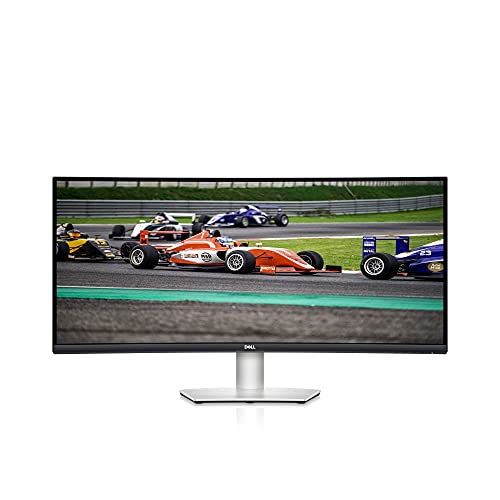
2. Dell S3422DW
The Dell S3422DW is a 34-inch curved ultrawide VA monitor with 3440 x 1440 resolution and a 100 Hz refresh rate. Its curved panel wraps the workspace toward you, which reduces head turning during a long session, and its VA contrast makes dark chart backgrounds look deep and clean.
It has a USB-C port with power delivery, HDMI and DisplayPort, so it connects to a laptop or a desktop without an adapter. The 100 Hz refresh rate makes scrolling through charts and news feel smooth. It suits a home office trader who wants a curved, immersive workspace and a tidy single-cable laptop connection.
The caveat is the VA panel, which has narrower viewing angles than IPS, so the edges can shift in tone when viewed from a sharp angle. It is also a heavier monitor that needs a sturdy desk or a strong monitor arm.
3. Samsung ViewFinity S65UC
The Samsung ViewFinity S65UC is a 34-inch ultrawide monitor with 3440 x 1440 resolution, a 100 Hz refresh rate and a USB-C port, aimed at office and creative work. Its slim design and clean stand suit a modern desk, and its picture quality is tuned for long hours of document and chart work rather than gaming.
It connects to a laptop over a single USB-C cable, with HDMI and DisplayPort for a desktop, and its 100 Hz refresh rate keeps window movement smooth. It suits a trader who wants a modern, understated ultrawide with a single-cable laptop setup and a bright, sharp panel.
The caveat is that this pick has the thinnest verification in this group, so it is the top live-check priority before publishing. Also confirm the model code on the listing, because the older S65UA sibling uses a different model number and a different listing.
4. Philips 346E2CUAE
The Philips 346E2CUAE is a 34-inch curved ultrawide VA monitor with 3440 x 1440 resolution and a 100 Hz refresh rate, and it is the value pick in this group. Its curved panel and wide screen give the same workspace as the more expensive picks, while its cost sits noticeably lower.
It has DisplayPort, HDMI and a USB-C port, so it connects to a laptop or a desktop without extra adapters. The VA panel offers strong contrast for dark chart themes, and the 100 Hz refresh rate keeps scrolling smooth. It suits a trader who wants the full ultrawide workspace on a budget and does not need the premium build of the LG or Dell picks.
The caveat is that the stand offers limited adjustment, so a monitor arm may be needed for the right eye height. Confirm the US listing when live-checking, because a regional variant with a different code exists for other markets.
5. LG 34WP65C-B
The LG 34WP65C-B is a 34-inch curved ultrawide monitor with 3440 x 1440 resolution, a high refresh rate and HDR support, which makes it the most versatile pick in this group. Its curved panel suits long sessions, and its faster refresh rate makes it usable for gaming after the market closes.
It has DisplayPort and HDMI inputs, a USB-C port and a height-adjustable stand, so it fits a desk without extra accessories. It suits a trader who also games or watches video on the same monitor and wants one screen that does both jobs well.
The caveat is a conflicting code seen under a similar listing title for a different LG model, so live-check the model code on the listing before publishing. Its HDR support is basic and does not change chart work, so do not pay extra for HDR alone.
Comparison Table
| Monitor | Size | Resolution | Panel | Refresh Rate | USB-C | Best For |
|---|---|---|---|---|---|---|
| LG 34WN80C-B | 34-inch | 3440 x 1440 | IPS | 60 Hz | Yes | Laptop traders, clean desks |
| Dell S3422DW | 34-inch curved | 3440 x 1440 | VA | 100 Hz | Yes | Curved home office |
| Samsung ViewFinity S65UC | 34-inch | 3440 x 1440 | VA | 100 Hz | Yes | Modern office setups |
| Philips 346E2CUAE | 34-inch curved | 3440 x 1440 | VA | 100 Hz | Yes | Budget ultrawide |
| LG 34WP65C-B | 34-inch curved | 3440 x 1440 | VA | High | Yes | Trading and gaming |
Which One Is Right for You?
For a laptop trader who wants the cleanest desk, the LG 34WN80C-B is the pick, with its IPS panel and single-cable USB-C connection. For a home office with a curved, immersive workspace, the Dell S3422DW is the strongest choice. For a modern desk on a moderate budget, the Samsung S65UC fits well. For the lowest cost ultrawide workspace, the Philips 346E2CUAE gives the same screen space for less money. For a trader who also games on the same screen, the LG 34WP65C-B is the most versatile pick.
Whatever you choose, set the monitor at eye level, keep the room lighting even to avoid glare, and arrange your windows so the main chart sits directly ahead with watchlists and news to the sides. A good layout saves more eye strain than any single specification.
Frequently Asked Questions
Is an ultrawide monitor better than two monitors for day trading?
For most traders, yes. A single ultrawide removes the bezel gap between two screens, needs only one cable and one stand, and lets you arrange windows freely across a seamless panel. Two monitors still win when you need different orientations, such as one portrait screen for a long watchlist, or when you already own a good monitor and only need a second one.
What resolution should a day trading monitor have?
A 34-inch ultrawide should have 3440 x 1440 resolution, which keeps small chart text sharp while leaving room for several windows. A 2560 x 1080 panel at the same size looks soft and makes small numbers hard to read, while a 4K panel is sharper but costs more and needs display scaling.
Does refresh rate matter for day trading?
Only a little. A 75 Hz or 100 Hz panel makes scrolling and window movement feel smoother than 60 Hz, which is pleasant during a long session. A very high gaming refresh rate adds nothing to chart work, so do not pay extra for it.
Do I need USB-C on a trading monitor?
It helps when you trade from a laptop, because a single USB-C cable can carry video, charge the laptop and connect USB peripherals. Check the power delivery wattage against your laptop, and confirm the monitor also has DisplayPort and HDMI if you use a desktop as well.
Disclosure: As an Amazon Associate, we may earn from qualifying purchases.
FAQ
Which One Is Right for You?
Is an ultrawide monitor better than two monitors for day trading?
What resolution should a day trading monitor have?
Does refresh rate matter for day trading?
Do I need USB-C on a trading monitor?
More from Amazon
Programs that pair well with the guide above. Offers and eligibility are set by Amazon and may change.
Free shipping on eligible items, Prime Video and more. Eligible new members can start with a free trial.
Start a Prime free trialAd-free music streaming. Eligible new subscribers can start with a free trial.
Try Music Unlimited freeA Prime membership for ages 18-24 with a trial period. Eligibility is set by Amazon.
See Prime for Young AdultsAudiobooks and podcasts to listen to on the go. Eligible new members can start with a free trial.
Try Audible freeAs an Amazon Associate we earn from qualifying purchases.









